
- NewspaperHow to Add a Logo in Newspaper
- NewspaperShortcodes
- NewspaperHow to Set the Image Avatar
- NewspaperThe Mobile Theme
- NewspaperFavicon & iOS Bookmarklet
- NewspaperHeader styles
- NewspaperWhat’s Included in the Newspaper Theme Package
 carsaleph
I don’t usually buy high selling theme. Because I know best selling themes have very poor support. They just rely on their own community.
I have issues on the London theme and wasn’t able to find the documentation I need.
My system status are all checked https://prnt.sc/10yl4z8
1. I cannot change the header, for which I can not change the Logo. It so simple but your tagDiv composer is not helping.
https://pcso.live/
carsaleph I don’t usually buy high selling theme. Because I know best selling themes have very poor support. They just rely on their own community.
I have issues on the London theme and wasn’t able to find the documentation I need.
My system status are all checked https://prnt.sc/10yl4z8
1. I cannot change the header, for which I can not change the Logo. It so simple but your tagDiv composer is not helping.
https://pcso.live/
 Santhiago Souza
I’m having trouble putting the mobile menu on every page.
I managed to put it only on the main page, the others still have the computer logo.
https://prnt.sc/10yk1ae (Mobile)
https://prnt.sc/10yk1k6 (Desktop)
Santhiago Souza I’m having trouble putting the mobile menu on every page.
I managed to put it only on the main page, the others still have the computer logo.
https://prnt.sc/10yk1ae (Mobile)
https://prnt.sc/10yk1k6 (Desktop)
 ericheiser
The logo icon on the top left turns into a “newspaper” theme icon when the page is enlarged. A friend who programs said –
“The problem with the zoom issue is that the image is embedded in the
black bar at the top. In normal views the black bar is small so you
don’t see it. But, when you enlarge it, the black bar becomes wide
enough to make it visible. I’m not sure yet where that is controlled.
The menu changes as well. Instead of the displayed menu you get the menu
icon. Expanding that gives you our main menu plus a sign in link that
isn’t normally there.”
website: chessnews.com
 willgreeny
Hi there,
I am trying to use Scuba Dive theme from Newspaper and it seems nothing is being updated. How do I update anything to do with the theme, including logo? I try and make changes and it is not working.
Will
carsalephThank you for your theme. Need you advise on below:
I am using the London Demo. Its logo is not an image. How can I replicate it or what is the size of it. I want just the same. Thanks.
 jeffbilbro
 I removed the retina logo, and that fixed the problem. Thanks! Should I go ahead and add the same image in that slot? It seems to be working fine with no image specified there.
 Zdenko12
 Hi again,
Yes i do all and upload all telefraf logoes,, but when i click on post then then i go to horizontal i see logo without T .. and on tablet is the same problem
 Marina_Kirsanidi
How to make a static picture on the main page?
There is a https://pomere.info/ website.
Now he puts a picture of the latest news on the first slide.
How to set there a static picture not from the news?
So that the logos and menus remain in the same places.
Zdenko12Hi i have a problem with logo when i go mobile on horizontale i cant see T- TELEGRAF IS LOGO ! But T is white in white color .When i refresh in horizontal position then i see for second T and then T is turin off , Can u help me to fix this problem,,
When u go on mobile in telegraf.si u must to click on one post then u turn to mobile on horizontale,, i will se just ELEGRAF- RED COLOUR,, THEN U REFRESH U SEE just 1 second WHITE T and then is disapere.
Regards
Zdenko
 Anamaria
 Hello,
Please make a test only with tagDiv plugins, clear all cache, and see if the problem persists.
Also, if the problem persists please remove the logo on the retina, if the problem is solved after that, try to add the same image for both the logo and the retina logo.
Let me know the results!
Thank you!
Anamaria Hello,
You can delete the logo with tagDiv Composer => https://www.screencast.com/t/QkVeKVb5hO, select the viewport on phone and you can edit the header => https://www.screencast.com/t/aLvRpZcg -> https://www.youtube.com/watch?v=HXQQygkCCJo
Thank you!
 mikevanmoonlight
 Actually no. I uploaded logo and thats ok. It’s not showing text logo or text logo tagline. But this only half of problem. The top menu overlaying top part of my site. I tried all header styles and no one helps. I want menu do not overlay top site and show site name like “PipsikClub” after logo or instead of logo.
 andy-choi
I want to delete ‘text logo, text logo tagline’
Please, see the attached 2 images.
Anamaria Hello,
I am not sure I fully understand what you mean with the website not show the name. Do you mean that you have added a logo and that it is not displayed or what exactly do you mean?
If you referring to his please check this guide about how add a logo => https://forum.tagdiv.com/logo-favicon/
Thank you!
 byothe
Hello
Is it possible to align the log in the header to the left of the main menu ?
See : https://ibb.co/Tg6qsvH
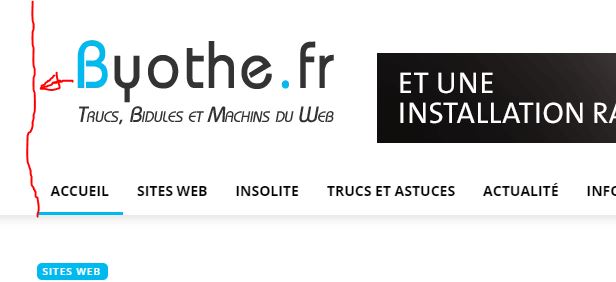
jeffbilbroI’m having an issue on my website (www.frontporchrepublic.com) where the before the logo is loaded, the browser reserves too much room for it, and then when the image loads, all the page below the logo shifts up. I’m using header style 11, and have selected logo images of the size specified in the theme panel page. When I look at the html the browser loads, It has the width of the image in the html, but not the height. Is there a way to have the height in the html, or is there something else I am missing? Thanks.
 chucky20
 Thank you Anamaria thank you for support. but when i did all h1 tags disable; there is no h1 tag on homepage. so i didnt disable only web version’s logo. now i have 1 H1 tag. but when i analyzed site there is:
“blank h1 tag on homepage”
My h1 tag should be my site name right? but it looks empty. My logo has a title and alternative text, but h1 looks blank. how can i solve this? how can i edit h1 tag on homepage like: h1 => eniyibebek (my site’s name)
 PFC
PFCHello,
I’ve been going mad over this one. When I apply a child-theme across the sites, I am getting odd behaviour where the mobile viewport reacted site gets pulled to the left and the logo appears to be shifted off-screen too.

It seems to happen when applying child-themes, if I re-activate the parent theme, it’s back to normal.
Please, god tell me you’ve seen this behaviour before, it’s been plaguing me for some time and I thought I had it resolved, but nope. Currently, I am in maintenance mode as I was performing a massive upgrade. This happening with child-themes is a show stopper.
For instance on the project website, fresh install of Newspaper, if I apply the version 9c child-theme you supply on some sites it will break like the above on others it applies ok.
For the demo image, I posted above. I created a fresh demo multi-site instance, tried version 9c child-theme on all subsites and it was fine. Added and applied my project child theme, and that’s how I took the picture of the bug.
The behavior is so badly intermittent, I’ve been desperately trying to track it down. There is nothing within the project child-theme css that causes this and have seen it working fine on some sites. Even if I remove all the css from the child-theme it still pulls to the left! It’s just because a child-theme is applied that it happens. No settings imported, everything standard.
Please, I am desperate for an answer as I currently on the clock in maintenance mode holding back 100k’s of visitors for the past few days. I’m totally out of options now and pray to God you’ve encountered this behavior before?
Kind regards,
Richard
Anamaria Hello,
You need to edit the page with tagDiv Composer => https://www.screencast.com/t/MIhm17tgIJeX select the logo and disable H1 on the logo => https://www.screencast.com/t/T6pvm7wR9 -> https://www.screencast.com/t/P7DuA9su from header and footer => https://www.screencast.com/t/31zJzmsS
Thank you!
 steve@tvstrategies.com
Hi – Where do I find the settings to make images appear in drop-down menus? I’ve looked “everywhere” in the theme panel and i can’t find it in the documentation either.
Like the News item in the menu on this Demo page: https://www.modernarchitecturaljournal.com
On my site: https://piracymonitor.org, I want the ‘Partners’ drop-down to show images (their logos, which can be the ‘featured images’ for these pages) and the other menu items to show just text/words (like the Contact Us item on that demo page).
Thank you!
chucky20Hi tagdiv. You are the best. i love your theme and suggested my friends for buying.
The Problem:
when i analized my homepage seo there is attention:
“there are 3 h1 tags on homepage. And they havent got name. They are blank! it must have only 1 H1.”
I think one of them is on logo. I found it when i editing my homepage on tagdiv composer. But why is this blank on analyze?
How can i solve it? or how can i find and delete 2 of them?
 Patrick93
 Yes I have. I have also checked it again, it is set correctly everywhere. The logo is still blurred.
Patrick93I have uploaded my logo in the prescribed dimensions. Unfortunately, the logo is very blurry on AMP pages. What can be the reason for this? Is there any way not to upload an extra logo for AMP?
