
- NewsmagLogo & Favicon
- NewsmagWhat’s included in Newsmag theme package
- NewsmagMain menu
- NewsmagHeader styles
- NewsmagFooter templates
- NewsmagTheme colors introduction
 raghavendra,vikram02
Hello team,
I hope you are doing well.
I am using the Newspaper theme for my news website, and I really need some assistance. I am not very technical, so I’m worried about breaking something on my site.
Recently, I found a theme/template inside tagDiv Cloud that I really liked and want to apply. But before I do that, I am scared that I might:
Lose my existing posts, pages, categories, or design settings
Misplace my logo
Mess up the homepage layout
Break the mobile/desktop structure
Or accidentally overwrite something important
I genuinely do not have much experience with WordPress or theme editing, so I kindly request help from someone in the team or any senior member who can guide me step-by-step.
What exactly I need help with:
Safely applying the new theme/template without losing any existing data.
Keeping all my categories intact and mapped correctly.
Adding my logo in the correct place matching the new design.
Making sure my homepage looks clean and matches the template I am selecting.
Any recommended settings to avoid layout issues.
If needed, I can share screenshots or temporary access (after instructions) so the process is done safely.
I will be extremely grateful if someone from the tagDiv team or an experienced community member can help me, as I’ve been struggling with this for a long time and really want to improve my website and please help me as I honestly have no technical knowledge
Thank you so much in advance!
 Calin
Calin HI,
I see that now you have images on the homepage https://i.imgur.com/VIFdMxs.png
For the header use tagDiv Composer and edit the logo text size https://forum.tagdiv.com/header-manager/
 dynamicspotlight
 Good day,
Thank you for getting back with me on this issue. I have done what you suggested and came up with the same results. The conclusion that I have come up with is that there is a bug in the theme. I am going to see if I can find where the theme is referencing “td_header_logo” in the database and see if I can change it there. Thank you for your help and time.
Calin Hi,
Thank you for providing everything via email. My colleague Simion will do his best to resolve it.
To remove/replace the logo “Gourmet Pro” you can do it by removing the text from header on desktop and mobile – https://i.imgur.com/e9fOfjM.png – https://i.imgur.com/JfiKTZ1.png
Thank you!
 miltonrodas_yum
 I have yet to receive help on this topic. Sent everything over.
I also need help showing an image logo on mobile — I cannot seem to get rid of the “Gourmet Pro” text on mobile. There is no intuitive way of doing it within the theme panel options.
Calin Hi,
The Chained News PRO is made using tagDiv Composer and cloud templates and it can be edited using the theme builder.
– https://forum.tagdiv.com/tagdiv-composer-tutorial/
– https://forum.tagdiv.com/header-manager/
– https://forum.tagdiv.com/tagdiv-cloud-library-plugin/
-> https://i.imgur.com/9ioGHfF.png – https://i.imgur.com/4ZZ7tTo.png also the logo from that demo is an SVG, so you need to remove the SVG from the logo tab.
Thank you!
 HeatherKitching
Hi guys, I really want to customize the header in Newsmag so that I can keep the ad bar but ALSO have a full-size logo (ie: I want them one on top of the other instead of side by side). I don’t really code. I use ChatGPT to help me navigate the files. But I can’t figure out what I need to edit. I tried to edit the header.php file, but it didn’t display the image. I commented out the do action php at the top and it displayed the logo but obviously changed everything else for the worse. So is there another file that the theme is actually loading the header from? And if so, how do I edit it to achieve what I’m trying to achieve?
 RENATO
 @Calin Is everything alright? I’m experiencing slow loading times on the site; it’s practically frozen. When I click on any channel links, the first time it’s normal, the second time it’s normal, the third time it freezes completely. I spent days trying to find a solution, I restored it to a point a month ago when it wasn’t like this, but it still freezes insanely. I deactivated all plugins, activated them one by one, and nothing solved it. Before you suggest using Autoptimize, I did use it; it’s a good caching plugin. Link: https://glostv.com/tv-sete-lagoas. This freezing happens during posts and also during static. In Brazil, most of the population uses 4G internet. I tested it on 3 different cell phones, all using 4G, and they all froze as I explained. Watch the video. https://app.screencast.com/Xq9gdosMJFRO9?t=13s In the video, I try to click the link with the red logo next to it, but it doesn’t work. Then I click the GlosTV logo to go to the homepage, and it doesn’t work; it’s stuck. Something very serious is happening. Could you take a look at the console for me and tell me why this is happening? Before you tell me, it’s hosting: https://ibb.co/Q3tf155R. It can handle a lot of traffic, but I haven’t even finished the website yet.
-
This reply was modified 10 months by
RENATO.
 CapturedTravelMediaWWTR
Hi,
I have a website that I want just 1 page to have a different logo and layout to the main homepage. Is this possible?
Calin Hi,
The Doctors Pro needs to be edited using tagDiv Composer https://i.imgur.com/zmyC5nI.png select the logo and select the svg tag, remove the code from there – https://i.imgur.com/vXXlfiI.png then the settings from the general tab will apply if are not set on hide – https://i.imgur.com/jAw8YFf.png (the logo is teh same on header, footer and sticky.
To change the homepage image, select it and click onthe image to replace the current one – https://i.imgur.com/AgRX2jM.png
Thank you!
 ETCOO3
Good day, I have tried several times, including reinstalling the demo content, but I can’t seem to change the logo in the Doctors Pro menu as well as the footer. I have tried all formats permitted, sizes, and resolutions, but I thought I saw them changed in the Theme Panel and in the WordPress (customise) backend (besides the footer).
It just refreshes itself in the preview and reverts to the default image or logo.
I am using the Newspaper default in one license, and in this case, Doctors Pro is the one with the issues; however, I can change the Newspaper default theme for the other site without any issues.
With regards to the body, how do I change the image on the homepage in Doctors Pro and in both Newspaper 12 default and Doctors Pro, how do I change the footer copyrights?
Well done once again, with these great themes.
Many thanks.
 cronicanoticias
Hello,
There’s a section on the website https://cronicanoticias.com that I’d like to modify, but I can’t find where to do it.
It’s near the bottom of the site, where it says LATEST NEWS and the social media logos.
Could you please tell me where to do it?
Thank you very much.
 lastwordonsports
Hi,
I updated to the latest theme (I’ve been using Newspaper for 5 years) on extratimetalk.com, but once I did, the header/menu disappeared. When I go to the menu spot in Theme Panel, it looks right. When I go to WP>Appearance>Menus, it looks right also. But the menu and logo are gone from the header despite both being correct in Theme Panel and Appearance/Menus.
Any ideas?
 Krassimir Radjov
 With the latest update of Newsmag, Version: 5.4.3.1, we are still displaying the Twitter logo instead of the new ‘X’.
 damirvujinovic
Hello,
After last update of newspaper wordpress theme, our website crashed, and some error is displayed on front page, I beleive it is problem with tagdiv composer. There is no response in Theme panel, E.g. when image for new logo is selected, and saved, nothing happense.
 Jazzie
Hello after updating toNewspaper to 12.7.3 my whole Template including header background image and logo an all settings where crasht. My Site came up with a complete new lauyout and I did not find my old settings in my Theme Panel.
Is it the intention that only cloud templates are available? I actually use a child theme to prevent this, but it probably has something to do with the Tagdiv Composer settings.In any case, my homepage became just a news list without all the layouts and texts selected in the TAGDiv Composer and using tagdiv Standard Pack
 mdtonmoyfaraji
I want to use all the WooCommerce and Newspaper 12 tabs on one my-account page. However, it is not working. How can I arrange them in the correct order?
Dashboard
Orders
Downloads
Addresses
Account details
Subscriptions
Orders
Logout
https://prnt.sc/Ctrnqw8a15g7
https://prnt.sc/O1EkwlYYrn_c
https://prnt.sc/06fwlEec0YG-
https://africapublicity.com/pricing
https://africapublicity.com/my-account-2/
https://africapublicity.com/my-account/
I want everything to be connected. When someone subscribes to a plan, they should be able to see their subscription on my account page. Similarly, when someone purchases a product, it should also appear on my account page. Will there be one or two checkout pages for WooCommerce products and subscriptions?
 SteveWA
 Zone: 1
-Row
–Column 1
—Header
—Header Logo
–Column 2
—Single Image
-Row
–Column
—Inner Row
 Michael Wong
I created a homepage using the tagdiv editor, and it displays correctly on both the desktop and mobile versions. However, when I access an article page from the homepage using a mobile device, the logo in the header menu of the mobile article page still displays the default logo, which is different from the homepage logo. The desktop version doesn’t have this issue. How should I set the logo for the mobile article page?
https://drive.google.com/file/d/1x7n1XMaCsqiqu_nEKJvCKQyaY7iYPMfk/view?usp=drive_link
 stanekc
I have a different logo for the mobile version of our site. In the Manager, I’ve selected the “mobile menu” option, selected the “header logo” element, and changed it to the proper mobile logo. It shows correctly in the editor view. It also shows correctly in a desktop web browser when I shrink the window size down to mobile size.
However, when looking at the site on an actual mobile phone, both Android and IOS, it only shows the logo from the “main menu”, not the mobile logo. I can see that it briefly loads the mobile logo but then swaps it with the desktop logo. Is there a setting that I am missing?
The site is EUValorMedia.com
Calin Hi,
What you can do is to set all three elements in a single column in the same row and after that select the column and in the layout tab choose those settings – https://i.imgur.com/931Fu1w.png. Another solution is to set the row in 3 columns and set in each of them the elements you want, menu, logo, search, after that select the row and set it like this https://i.imgur.com/b79UQBY.png
 andros1983
 As you can see, I had to create another row further down so the logo is centered, but it looks ugly.
I’d like all three to be in the same row.
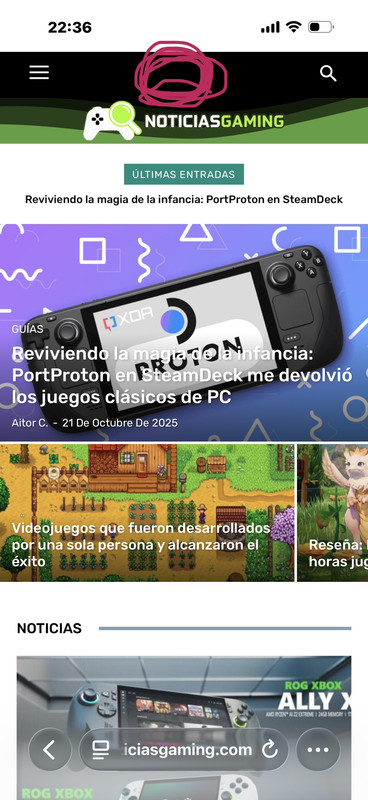
andros1983In the mobile version I need to put the logo between the hamburger menu and the search but every time I move it the logo is off-center and I have no way to place the 3 in the same row. can you help me??
Calin Hi,
Our theme provides for the logo the option to set an image, text, icon, and SVG.
Use tagDiv Composer to change the logo https://i.imgur.com/HgCpJ5P.png select the element and check the text and svg logo – https://i.imgur.com/aC8gVlR.png https://i.imgur.com/8NILLxD.png check it on mobile header too – https://i.imgur.com/2xn9Bba.png
Thank you!
 Fnahoj
lol this is amazing, i deleted everything, hide everything and still all i get is that default thing 😀 In every other theme, this usually is the most easy thing to change 😀



