- NewspaperHow to Add a Logo in Newspaper
- NewspaperShortcodes
- NewspaperHow to Set the Image Avatar
- NewspaperThe Mobile Theme
- NewspaperFavicon & iOS Bookmarklet
- NewspaperHeader styles
- NewspaperWhat’s Included in the Newspaper Theme Package
 Om Baldan
 The problem is, on some pages, the header appears. But the homepage and several other pages don’t, even though they did before. I haven’t made any changes to the header settings other than changing the text and logo.
 Calin
Calin Hi,
You need to remove the logo text and SVG https://i.imgur.com/KS0dhrp.png – https://i.imgur.com/CsZDayE.png
I hope this will help you!
 presse
 Any idea why we can’t change the talk town logo for our own ? I followed all the steps and uploaded my logo and clicked show image and still my custom logo won’t appear. thank you
presse Thanks for your answer. Although several field in the loaded modules does not show in french. Everything seems to have to be changed manually. When i change logo through the theme panel, it does not change either. It seems everything i change within the theme panel is not taking effect. I have no idea why. Thank you for your help
Calin Hi,
On my mobile, the logo is displaying completely – https://i.imgur.com/fw2KGlW.png
What I can suggest is to edit the homepage, select the mobile version and adjust the width for the columns https://i.imgur.com/gXpkyr6.png – https://i.imgur.com/DO4OrQs.png
Calin Hi,
Google may not recognize your NewsMediaOrganization schema because of one or more of these reasons:
1. Using @type as an array:
“@type”: [“NewsMediaOrganization”, “Organization”]
to
“@type”: “NewsMediaOrganization”
2. Missing required fields. Make sure the schema includes:
{
“@type”: “NewsMediaOrganization”,
“name”: “Your Site Name”,
“url”: “https://your-site.com”,
“logo”: {
“@type”: “ImageObject”,
“url”: “https://your-site.com/logo.png”
}
}
Test your schema using:
Google Rich Results TestSchema Markup Validator
I hope this will help you!
 saranoa
Hola. En mi web https://japonpedia.com/ , en versión móvil el logotipo no se ve completo:
https://imgur.com/a/qxxqLwc
Debería leerse Japonpedia, como puedes ver en la versión escritorio:
https://imgur.com/a/0FvoQ3P
¿Cómo puedo solucionarlo?
 miltonrodas_yum
I just installed Newspaper and this is my first experience with the theme.
I want to update Header and I noticed it is using a Cloud template.
When using Cloud templates, I go to Header templates, try to Edit with TD Composer the template “Header Template – Gourmet PRO” and I get page that says:
“Sorry, this page doesn’t exist.
Please check the URL or go back a page.
404 Error. Page Not Found.”
Then I close that and go back to Cloud templates, and click the “+” symbol to see if it will let me add a new template, and it show blank page with “Invalid reply from server endpoint.”
I basically can’t do anything with header. I want to use the Header of the sample website, but add my logo to it. That is all I wanted to do.
What is going on with this theme?
 olivervossmann
 Thank you very much, it works.
But at the mobile is now the black logo not the white, I upload it again but there shows always the black one
and I saw that the favicon doesn’t work anymore.
https://inselleben.es/wp-content/uploads/2025/10/IMG_6812.png
olivervossmann Thank you very much, it works.
But at the mobile is now the black logo not the white, I upload it again but there shows always the black one
https://inselleben.es/wp-content/uploads/2025/10/IMG_6812.png
 Simion C.
 Hi,
Please check this guide https://forum.tagdiv.com/add-logo-newspaper/
So in the composer you can switch to the mobile header https://prnt.sc/1ptXmMAn6dsC then click on the logo and remove the demo logo https://prnt.sc/VjSp1uJqKfbw
Then the same for the mobile sticky headerhttps://prnt.sc/u2q9o4aIefxO
As a note, the Metropolitan demo uses 2 headers, one for the homepage and one for the rest of the website. Both of them must be customized https://prnt.sc/n1xSPoyZYDcI
Please try it.
Thanks.
 martialwarrior
I have asked for TagDiv support for help with an issue with the header logo image on the Front Page of my Newspaper themed website, https://www.thethinkingconservative.com/. TagDiv’s support person, Bettina, did something to make the logo fit in a larger space on my Front Page which I wanted done, but did not explain how she did it although I asked. There is an issue with what she did however, the larger header logo shows up larger in the Brave browser, but not in the Chrome browser.
I have no idea what Bettina did and a different support person did not know either and told me to upload a larger image in the TagDiv editor for the Front Page. When I attempted to upload a larger logo image like your support recommended, it literally broke the Front Page of my website and now it won’t open in TagDiv Composer no matter how long I wait, so I can no longer edit the Front Page in TagDiv Composer and the Front Page is no longer showing correctly on the website. The header area, menu etc. is missing from the entire website.
This code can be seen at the bottom of the broken Front Page
[td_flex_block_1 modules_on_row=”” image_size=”” image_floated=”hidden” image_width=”eyJwaG9uZSI6IjMwIn0=” image_height=”eyJwaG9uZSI6IjExMCJ9″ show_btn=”none” show_excerpt=”eyJwaG9uZSI6Im5vbmU
I have checked and everything is correct with the templates, menus etc. and it is not a plugin issue, but because I can’t open the homepage to edit it there is nothing I can do. I deleted the larger image I had uploaded from the library, but the image didn’t show up in uploads in File Manager in cPanel which I thought was strange.
I do not want to upload a new Front Page template as it took so much work to get the Front Page correct and I can’t just upload the header template because I can’t open the Front Page with the TagDiv editor.
Please look at the Front Page of the website and you will see the issues.
How do I fix this?
Simion C. Hi,
That must be the default mobile logo. It can be customized like so https://forum.tagdiv.com/add-logo-newspaper/
So in the composer you can switch to the mobile header https://prnt.sc/3sVCI3w2ZjBR then click on the logo and remove the text, should be here https://prnt.sc/AaN7JQ0OuhfB Then you can set your own logo.
Please try it.
Thanks.
 duck1970
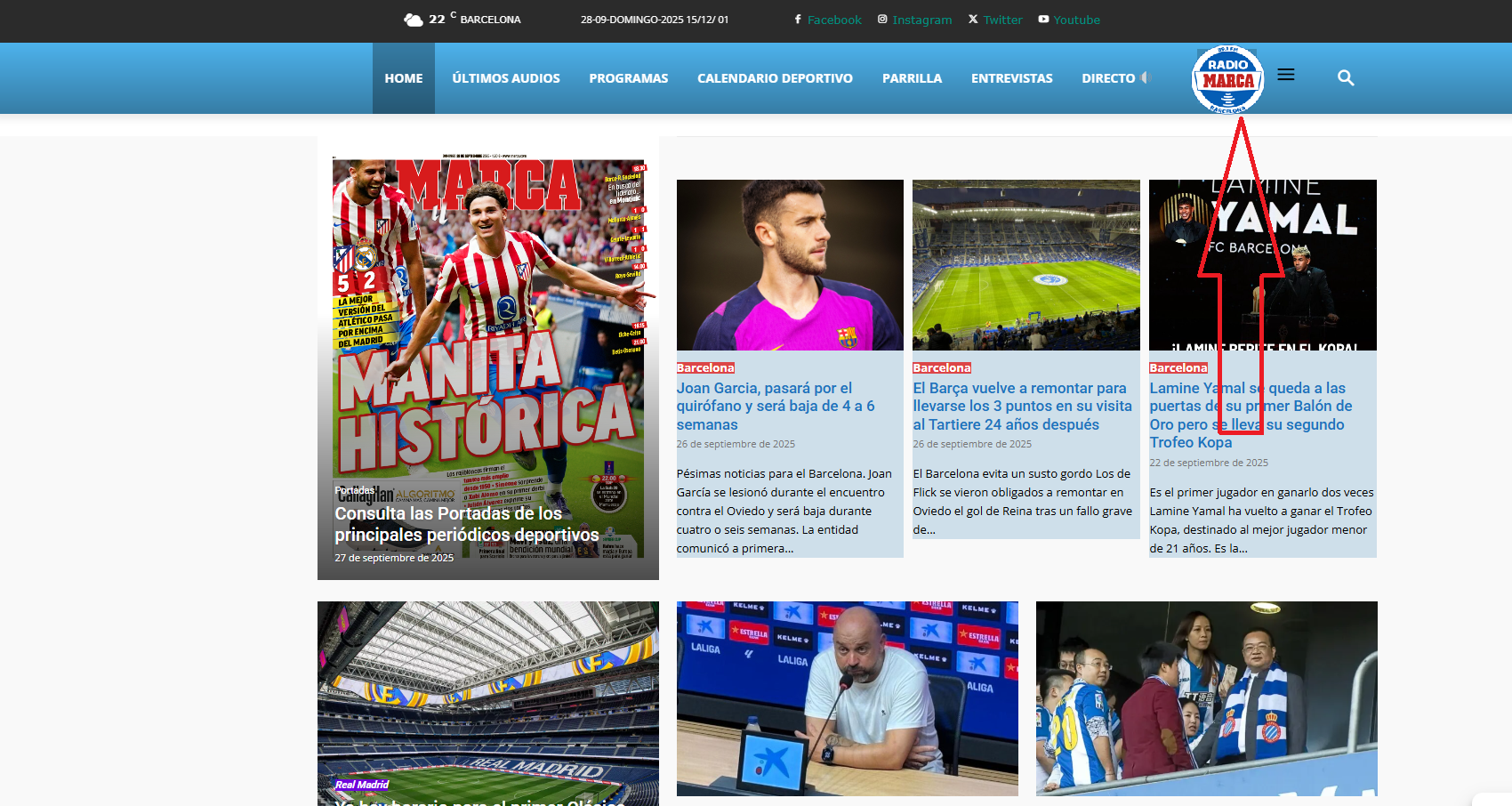
Hello, I’d like to know if it’s possible to insert a logo into my header menu, as shown in the attached example photo?
If possible, I’d like your guidance on how to do this.
Thank you very much.
https://www.radiomarcabarcelona.com/newspaper/LOGO.png
 jhon
jhonAfter I uploaded the demo site to the live site, except for the website logo which could be clicked, nothing else could be clicked, including (URLs, buttons, etc.). How should I solve this problem, and moreover, the demonstration site is also no longer usable.
The license in the picture helped me shut down the demo site and open the online site.
https://www.wiremeshnews.com/enterprise-library/,And the content on this page always returns to the previous revision version. Could you please help me figure out what the problem is?
 thebackbenchers
hi this is my website where i installed newspaper – https://midnightblue-wren-996070.hostingersite.com/
i was able to change the logo on desktop header but didn’t found a way to do same in mobile header, please help me
 mjosephla
Hi Tag Div
In Version 9 of Newspaper, your logo showed the number 9 animated-cycling through colors. Any chance we can get that effect for icons? Would love to have that option!
 Mediv
MedivHello,
I read this in documentation:
VERY IMPORTANT! If you choose to install a pre-built website with content, do not edit the content and use it as your site content! The pre-built website content will get removed when uninstalling the theme or switching pre-built websites. If you want to keep the content as your own, please create a copy of the page and use the copy as your content.
I don’t understand, if i edited everything, renamed the categories, logo, content, posts, articles etc… they would be gone if i switched to another prebuilt website (without content)?
what does this mean “If you want to keep the content as your own, please create a copy of the page and use the copy as your content.”
which page?
 plotwit-team
Hi Team,
I’m using Newspaper theme on my site with Google AdSense Auto Ads enabled. On mobile, the sticky/anchor ads at the top are extremely large — it covers around 60% of the screen and doesn’t collapse. Also covers the logo too
Can you please help me either limit the sticky ad size or adjust the layout so it displays properly? This issue is hurting user experience and site readability.
Thanks!
duck1970 Hi Calin, you’re a genius, you’ve mastered your craft. I’m just a beginner.
I think I was able to restore everything by following your instructions. It’s now displayed correctly, but I still have three problems that I can’t figure out how to fix. That’s why I’m asking for your help again.
1. I’m still having the same problem I mentioned with the menu bar on the website: when you scroll, the NEWSPAPER tab appears in the menu. How can I remove that tab?
2. I still don’t know how to control the mobile header. I’m doing my best. I’m attaching a photo of the home screen to see if it’s possible to make the first module appear a little larger with the photo I display in the header.
3. How can I customize the header of the other sections?
If you click on the dots on the home screen and go to any of the pages, the header only displays a logo.
How can I replace the current logo and display the same photo I have on the home screen?
ONCE AGAIN THANK YOU FOR EVERYTHING Calin.
https://new.radiomarcabarcelona.com/capture/header-mobil.png
 cloverjim
 Hi,
I want the text logo to disappear when scrolling down, so that only the menu and other elements remain.
When scrolling back up and reaching the very top of the page, the text logo should reappear.
Can you help me with this?
Thank you!
Calin Hi,
If you want to change the logo URL, use the tagDiv Composer, edit the page/template where the logo is used, select the logo, and set the link you want to use – https://i.imgur.com/lBvPxL6.png. Ensure you set a complete URL (https://www…..)
 infotec2
How can I change the header logo URL value, is always included in the default URL.
Calin Hi,
This can be done, but it’s not easy, as it requires some custom code.
To achieve a similar effect, the best approach is to make the row sticky and position the logo where you want it to appear. After that, you’ll need to apply custom CSS and JavaScript to replicate the effect shown in the image.
Calin Hi,
By default, the H1 tag is applied to the logo. If you’re using Cloud, you can use the tagDiv Composer to remove the H1 from the logo (you need to do this for both mobile and desktop views).
Here’s an example: https://i.imgur.com/0BjZdOj.png
When you open an article, the H1 will automatically be used for the article title.
For pages, if you want to remove the H1 from the logo, you have two options:
Use the PageBuilder template and enable the page title, this way, the H1 will be set on the page title: https://i.imgur.com/ElmwJQR.png or, keep the default page template and use tagDiv Composer to add the page title manually, then disable the H1 on the logo.
The H1 tag is important for SEO, so it should always be present on the page, just make sure it’s used in the right place.
Thank you!