
- NewspaperHow to Add a Logo in Newspaper
- NewsmagLogo & Favicon
- NewspaperShortcodes
- NewspaperHow to Set the Image Avatar
- NewspaperThe Mobile Theme
- NewsmagWhat’s included in Newsmag theme package
- NewsmagMain menu
- NewsmagHeader styles
- NewsmagFooter templates
- NewsmagTheme colors introduction
- NewspaperFavicon & iOS Bookmarklet
- NewspaperHeader styles
- NewspaperWhat’s Included in the Newspaper Theme Package
 nerdsimple
 @Calin – yes, I’ve tried all of that, but no matter what I do, my logo(s) do not show up in the header even after stripping the gadgetpro SVG etc.
 inin
inin and i want to make the logo bigger i want it to take up more space
https://prnt.sc/KS_Ss8R6pJmi
i have all this space free which i want to fill it with my logo.png
inin Hello it’s again me Still i’m uploading the image full size and the logo still shows gray
 Bettina
 Hello!
Oh, ok. This can be translated from Newspaper -> Theme panel -> Translations -> Translations. Search about that “LATEST ARTICLES” and replace the word from the right side: https://prnt.sc/SFc1OuMrwXpy
Access Newspaper -> Theme panel -> Header -> Logo & Favicon: https://prnt.sc/4XtdH2efwViV
Results: https://prnt.sc/WffNLfJTCAcF
Thank you!
Bettina Hello!
Edit the homepage with the TagDiv Composer. Click on that text, and there you can see the option for the title. Make sure you choose Full size in the Media Library when you add the logo image, as this will load in normal size of the image.
Edit the page with TagDiv Composer. Click on the mobile viewport: https://www.screencast.com/t/XDQJedlggSB. There you can see your mobile version and edit or adjust the elements to look better. Hide the rest of the elements from the mobile viewport. This setting can be seen in the CSS tab of every element: [Display: HIDDEN]. If you hide it on the mobile viewport, then this element will be seen only on the desktop and tablet viewports.
Check in the TagDiv Composer to see which element is that one, or maybe it could be only a row with a background. You could try to delete it like this: select the row, press the button delete on your keyboard, then with your mouse select “YES”.
Also, you have another option too. Check this: https://www.screencast.com/t/pxuOzYIIpcG
Thank you!
 tenacemente
 Al posto di “Latest Articles” voglio la scritta ‘News’ o ‘Altri articoli’ in lingua italiana e nell’Header non voglio aggiungere un logo ma semplicemente la scritta Tenacemente.com. Grazie
-
This reply was modified 4 years by
tenacemente.
ininHello i would like to know how i can change my Website logo to make it bigger than it is in the image,and i would like also to know how i can change it on the mobile when a post is shown to show only the featured image and title and nothing more
https://prnt.sc/7EhIUEoReVlr Website Tittle
https://prnt.sc/6qXNI_JfiCK1 Mobile Section
 hrhq2020
Hi
I have asked this in differing ways but on our homepage http://www.hrheadquarters.ie each individual post can appear in several differing positions – in the carolousel as latest post and then as recent one AND in the category sections in 2 differing sizes – most recent in category and then recent ones in category.
My problem is I need to show the full post image in each slot without it being cropped in anyway so that a sponsor logo at the bottom of the image appears.
Any suggestions appreciated….thanks
Declan
 Anamaria
 Hello,
You can assign a Single Post Template for the posts which have the smart list.
Check this topic: https://forum.tagdiv.com/topic/different-logo-in-categorypage/ ; Here is explained how to duplicate a header template correctly and do some changes for single post template
Thank you!
 erfahrungsguru
Hey, how can i change the position of the header?
The logo is very left and the menu is very right.
I want to get both near the center. how can i change this – only with css or is there a better way?
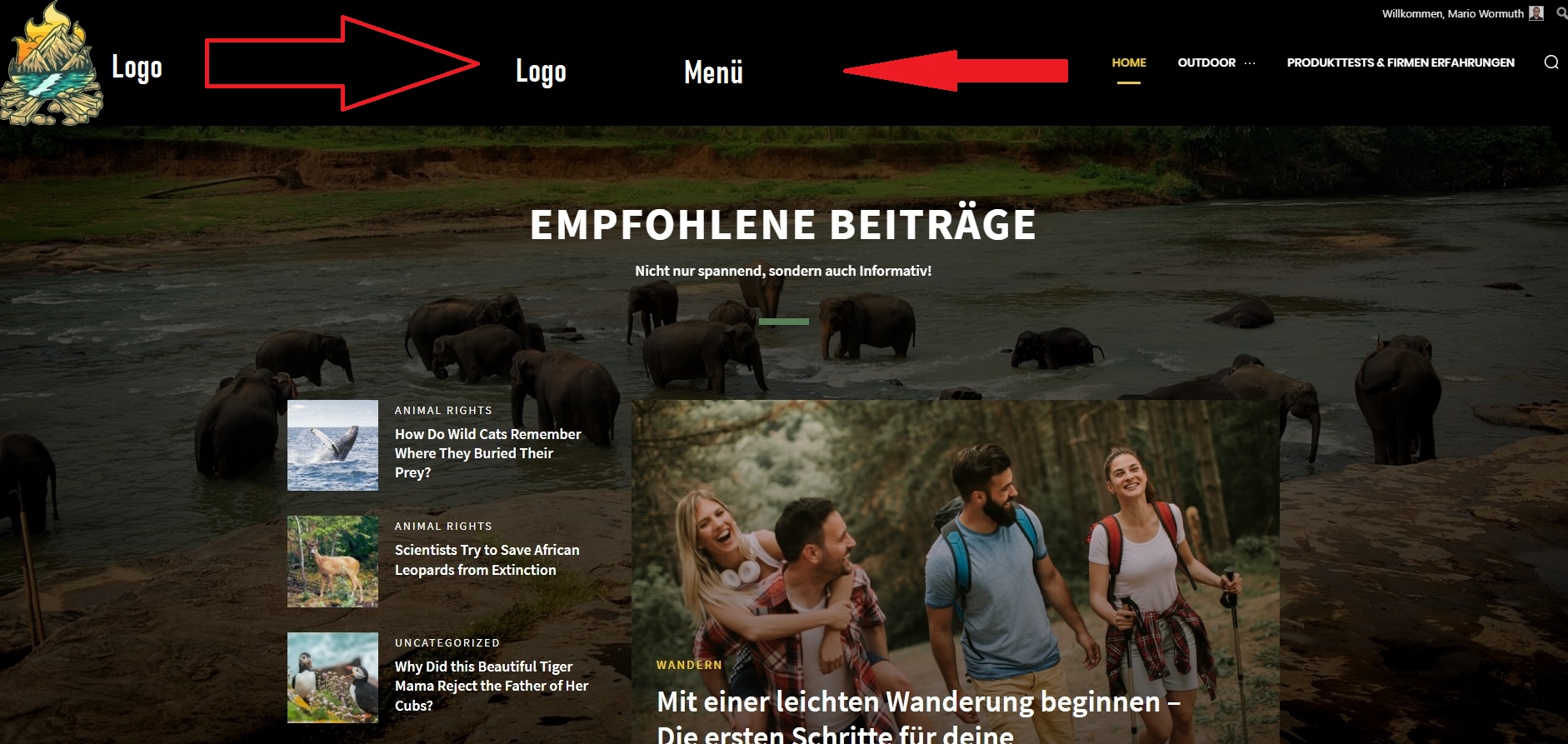
 Calin
Calin Hello,
The header logo can be set using the tagDiv composer on the header section, just like in our guide -> https://forum.tagdiv.com/header-manager/
The Gadgets PRO demo can be edited like this -> https://i.imgur.com/CeiKg3w.png select the logo, then set to show the image -> https://i.imgur.com/ve11Fwt.png also you can remove the icon from SVG tab -> https://i.imgur.com/mLjUuMV.png
I hope this will help you!
Anamaria Hello,
If you have the mobile responsive please edit with tagDiv Composer, select the viewport on phone, select the header logo and change it => https://i.imgur.com/cR7F0v4.png https://www.youtube.com/watch?v=HXQQygkCCJo -> https://forum.tagdiv.com/add-logo-newspaper/
Thank you!
 willysawa
Please how i change the logo of Todays News, New logo only appears on the desktop
nerdsimpleGreetings –
I’ve just installed the theme and am using the GadgetPro theme. I have my logo, retina logo and favicon set – but when customizing the header, only text shows up and the logo values are blank. Even if I set the logos to the same logos linked in the theme panel, the logos still do not show up.
I have screenshots, but I can’t see how to post those here.
 anthonyblfc
Hello Ive only just started designing my website but I want to be able to select for my header and logo to be sticky when scrolling. I dont see the option for this to be selected in the theme panel like on old videos. But I have seen it can be done in the Tagdiv composer plugin. I have the plugin installed and activated but cant see it being an option anywere on my panel.
My second problem is how do i install the revolution slider plugin been trying for a few days now thank you
 Finnedsgang
Hi everyone, I need help ! i’m the owner of https://4news.it
after updating the site to the latest newspaper update, from 11.3.1 to 11.5.1 my site is not showing anymore the correct layout. The home page https://4news.it is unavailable but if I go first on an internal page, and when I click on the logo to return to the home page, it displays correctly. Also, the article is sometimes shown as it should and sometimes not.
https://www.imagebam.com/view/MEBHX6T https://www.imagebam.com/view/MEBHX75 https://www.imagebam.com/view/MEBHX76 https://www.imagebam.com/view/MEBHXB0
hrhq2020 Thanks…please see attached,if you notice the images for “The intervew series” the full image belonging to the post sites not display. The images seem to crop and as a result our sponsors logo is not seen
Bettina Hello!
1. Add a row like this: https://prnt.sc/DBuUmSkoHllV and insert the logo and an inline text element. Try to import a style of flex block from a demo: Music & Life or Chained News PRO demo like in your example, and you can adjust the category like this: https://prnt.sc/b6hhexPu0fhB
2. Change the color of the category from the flex blocks settings.
Thank you!
 grezako
Hello.
We are using “Newspaper HISTORY” Theme (https://demo.tagdiv.com/newspaper_history/).
We want to make a Magazine Page that looks a lot like “Elle Magazine” whose website is: https://www.elle.fr.
So, we are missing three important points to make our page similar to https://www.elle.fr/ to know:
1 – How to put the Logo circled in Orange right next to the Title all circled in green on the following screenshot: https://imgur.com/a/WM6GS0R ??? How to add just a Logo just before the title of a Block ???
2 – How to put a small banner in yellow like the one on which they wrote “EDITION ABONNES” that we circled in blue on the same following screenshot: https://imgur.com/a/WM6GS0R ???
3 – How to decrease (reduce) the height of the black part of the header of the “Newspaper HISTORY” Theme (https://demo.tagdiv.com/newspaper_history/) framed in green color on the following screenshot: https://imgur.com/a/0wP3187 ???
4 – How to decrease (reduce) the height of the images of the different Maga-menus as you can see on the part circled in red color on the following screenshot: https://imgur.com/a/NzseXu3 ???
5 – Finally, how to make Maga-Menus with a list of subtitles or submenus as you can see when you click on the “TIME PERIOD” menu, you can see a list of subtitles appear on the left that we have framed in orange color on the following screenshot: https://imgur.com/a/VW2Vi7g ???
Thank you for answering us on these two very important points for us.
Please once again, answer us through sample demonstrations in screenshots because it will help us best to quickly understand and solve our problem.
Awaiting your reply.
grezako Thank you for your different answers but we are missing three important points to make our page similar to https://www.elle.fr/ to know how:
1 – put the Logo circled in Orange right next to the Title all circled in green on the following screenshot: https://imgur.com/a/WM6GS0R ??? How to add just a Logo just before the title of a Block ???
2 – put a small banner in yellow like the one on which they wrote “EDITION ABONNES” that we circled in blue on the same following screenshot: https://imgur.com/a/WM6GS0R ???
Thank you for answering us on these two very important points for us.
Please once again, answer us through sample demonstrations in screenshots because it will help us best to quickly understand and solve our problem.
Awaiting your reply.
hrhq2020Hi
We have a category sponsored and part of the sponsorship is to display the company’s logo as part of the pos featured image – when this gets displayed on our homepage (www.hrheadquarters.ie) it gets somewhat cropped in each of the positions it could be in.
Is there a way to force the full image to be displayed?
Thanks
Anamaria Hello,
Please select the viewport on phone, select the logo and change it => https://i.imgur.com/Rm75FmU.png -> https://forum.tagdiv.com/add-logo-newspaper/
The slide contains posts and it is filtering it -> https://i.imgur.com/kALpGPR.jpg
Thank you!
 lanxing
我安装了模板REAL NEWS https://www.nbbaobei.com/ 请问怎么更改logo的图片,以及头部的幻灯片图片?
 sanjeev
Hello,
I am unable to use Sticky bar properly on my website http://www.agniveer.com. For example, if you can see here where I have used sticky bar – https://agniveer.com/vedic-deeksha-copy/ , Screenshot – https://ibb.co/tZskN8Y), it works well in Desktop version but once I check in Mobile version, when I scroll up the page after scrolling down, the header area where the logo of Agniveer is placed, disappears. Example – https://ibb.co/VVYLFcz (see the red arrow. It is pointing towards disappeared logo once I scroll up after scrolling down the page).
Please help me to resolve the issue as I am unable to use the sticky feature for this reason.
Waiting eagerly for your active support!
Thanks,
Team Sanjeev
grezakoBonjour.
We are using “Newspaper The Rimont Pro” Theme (https://demo.tagdiv.com/newspaper_the_rimont_pro/).
In fact we try to do like exactly how the news site of “New York Times” (https://www.nytimes.com/) on Desktop and on Responsive Design (Mobile Device). So for this fact, we had already contacted you previously (via this link: ) on the Newspaper Forum:
TO ASK YOU THE FOLLOWING QUESTION: How to create a new Menu Bar located just above the Logo exactly like on the screenshot of the New York Times home page that we have “circled in RED” just above the Logo: https://imgur.com/a/yv7fFHK ???
AND YOU ANSWERED US BY SAYING: A workaround there could be this one: https://www.screencast.com/t/qJZARQex3.
So, it works well, but our problem is that it does not appear on small screens i.e. on mobiles as you can see in the following screenshot of our website on Mobile: https://imgur.com/a/e7QLWod.
How to display this Top Menu Bar on small screens (mobile screen) ???
In other words, how does this Top Menu Bar appear on Mobile phone screens as it already appears on computer screens since it does not currently appear on small screens as you can see in the screenshot? following screen: https://imgur.com/a/e7QLWod ???
Please help us step by step.
We are blocked on the use of “Newspaper The Rimont Pro”.
Please, answer us through sample demonstrations in screenshots because it will help us best to quickly understand and solve our problem.
Awaiting your reply.



