
- ApiUsing the Theme API in plugins
- ApiPractical example – How to add a new Block and Module
- ApiAPI – Smart Lists – Introduction
- ApiAPI – Category top section style – Introduction
- ApiAPI – Category top section template – Introduction
- Apitd_api_module::update
- Apitd_api_module::add
- ApiAPI – Modules – Introduction
 besthomegear
 Updates:
Clarification: We have not made any modifications to the Tagdiv Composer before or after this issue began.
1) My About page currently redirects to a random post, very slowly, but the URL is the “About page”?
2) We are unable to edit any pages or posts in WP editor. When we attempt to we get redirected to a page like this.
3) Essentially our site is shut down for any editing. We have confirmation from your tech support they were to look at my WP admin settings, in regards to AMP + Mobile theme plugins not functioning correctly, so this matter is more urgent. Please ask them to contact me by email Monday am, and i can give them temporary access to my Admin. My developer can find no determination for issues with the theme settings.
Thank You!
Kevin
 PatWire
 I don’t use the TagDiv mobile theme, have never used it – it isn’t installed and therefore doesn’t install when updated
 TheNCBeatNow
 But I want to use the mobile theme because I like the plugin. Do I still need to edit desktop version first after disabling mobile theme and then re activate after the edit is complete?
 Bettina
 Hello!
Please update the theme to the latest update and deactivate, delete, and reinstall the tagDiv mobile theme from Newspaper plugins, clear all cache.
Thank you!
 Anamaria
 Hi,
Using our theme you can choose from 3 mobile versions
-> mobile responsive => https://www.screencast.com/t/oJ2ShOp47
-> mobile theme plugin => https://forum.tagdiv.com/the-mobile-theme/
-> mobile page => https://tagdiv.com/newspaper-10-3-7-update-brings-customizable-and-fast-mobile-pages/
If you created the mobile pages with tagDiv Composer, then when you install the Mobile Theme plugin, your pages will be overwritten by the plugin (the mobile theme comes with its templates for page, post, category, etc so your current templates from the desktop theme will get converted to the mobile theme layout, the page content is made without builders in mobile editor => https://www.screencast.com/t/xbgZG8kH also, the options that are provided to edit the mobile theme version are limited (this keeps the things simple)).
This is a video about Responsive Newspaper Theme, AMP & Mobile Theme, Mobile Pages & Templates -> https://www.youtube.com/watch?v=SpGkOnJeNZY
So, the mobile responsive is what you see when that you select the viewport on phone => https://www.screencast.com/t/matV17hH, so some settings may apply for each viewport(where is the border blue), and others are not(where the border is black).
The mobile page has the mobile templates from Cloud Library => https://www.screencast.com/t/YCcZ8rL8
The Mobile responsive version of the theme and the mobile page editor can be edit with tagDiv Composer, the mobile theme plugin cannot.
For example, you can have the mobile theme plugin activated and use the mobile page/mobile responsive version for the homepage/pages, but for the categories pages/404 page, you can’t use the mobile page/mobile responsive version if you have the mobile theme plugin activated.
So, if you want to design the pages with tagDiv Composer, you can use the mobile page or mobile responsive version.
Thank you!
 terahlynn
I just now learned about being able to update the mobile version separately which I did but when we updated the website, it’s too much to individually update on mobile. is there a way to delete the mobile page then start over so it gives us the option to duplicate the desktop page like it did the first time? Or a way to update so it will pull over from desktop?
Thanks!
 cybernox
 1. I’ll look into creating blocks.
2. I tried https://www.screencast.com/t/CvxrWymeyk but it hasnt turned off the author and post date for Mobile theme homepage.
 vallartamirror
I have the following issues on the design for the header in mobile for the Default PRO theme.
1) Header is prompting reader to sign in or join. However login has been removed from the header in desktop and mobile.
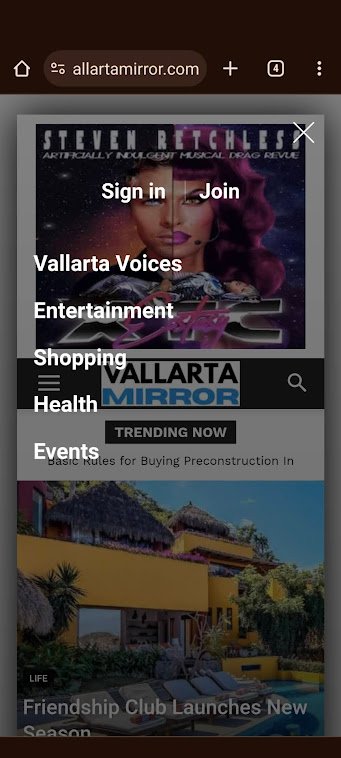
2) No ad is defined in the header on mobile. However an ad is being displayed.
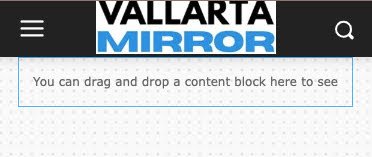
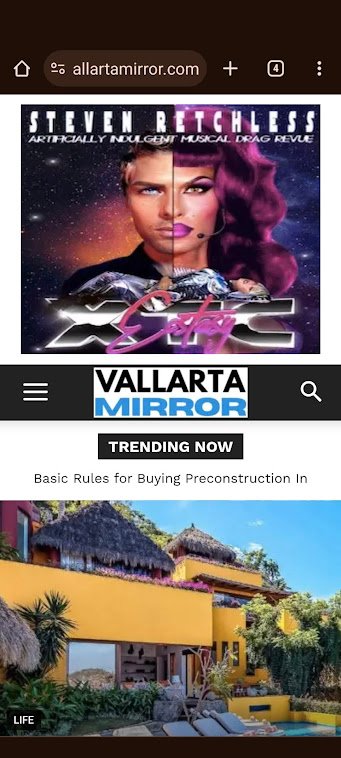
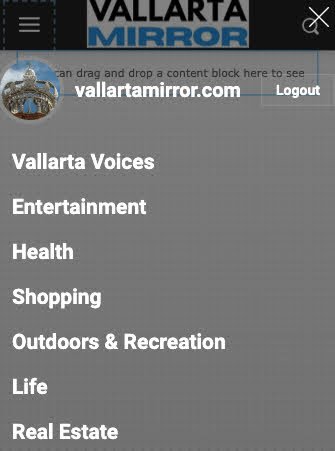
3) Categories are set as “Categories Menu” in admin. This shows correctly in admin (see image below). However, it does not display correctly on mobile (see image in #1)
Anamaria Hello,
You can create modules, with featured images https://forum.tagdiv.com/modules-builder-newspaper-theme/
Do you use the mobile theme?
You can hide the author and date on that grid for the mobile theme plugin, from Theme Panel -> Block Settings -> Meta info on Modules/Blocks => https://www.screencast.com/t/CvxrWymeyk
Thank you!
Anamaria Hello,
Usually, this happens with cache plugins. If the cache plugin does not have mobile support then the mobile theme version can be delivered instead.
The solution would be to use the recommended WP Super Cache plugin instead and activate these settings (especially the mobile device support): https://forum.tagdiv.com/cache-plugin-install-and-configure/
Also, please let me know what plugin for the cache you use now.
I hope this helps.
Thank you!
Anamaria Hello,
Please deactivate, delete, and reinstall the tagDiv mobile theme from Newspaper plugins and clear all cache.
Also, please set the amp like in our guide https://forum.tagdiv.com/tagdiv-amp-plugin-tutorial/
Thank you!
cybernox Another issue. can I remove date/author from Mobile theme homepage? (I was about to remove it from the post using Theme Panel – > Mobile Theme – > Post Settings).
 toppersworld
I am using the Urban Observer theme. When I click the menu icon in “mobile view” I see the text “URBANOBSERVER”. I am not able to find the option to change the text to my website name. Below in the screenshot.
https://prnt.sc/nokFFklXYpt4
When I tried to edit the “Modal Mobile Menu” page the text “URBANOBSERVER” is not present. So how to change the text. Below in the screenshot
https://prnt.sc/iaviLOAg6Atl
cybernox awesome! Its sorted. 🙂
Another question – I wanted to know if there a way I can do something like 9gags like site with newspaper theme? basically post with image/video/gif ex like https://bimber.bringthepixel.com/gags/ see the mobile version of it as well.
Anamaria Hello,
You have the mobile theme plugin activated.
When the mobile theme plugin is used you need to set for pages the page content in mobile editor using only the options from that editor – https://i.imgur.com/p8EqE1b.png also there is an option to disable the mobile theme from a page/post – https://i.imgur.com/d3kTBRf.png this option appears in Gutenberg editor.
Using our theme you can choose from 3 mobile versions
-> mobile responsive => https://www.screencast.com/t/oJ2ShOp47
-> mobile theme plugin => https://forum.tagdiv.com/the-mobile-theme/
-> mobile page => https://tagdiv.com/newspaper-10-3-7-update-brings-customizable-and-fast-mobile-pages/
If you created the mobile pages with tagDiv Composer, then when you install the Mobile Theme plugin, your pages will be overwritten by the plugin (the mobile theme comes with its templates for page, post, category, etc so your current templates from the desktop theme will get converted to the mobile theme layout, the page content is made without builders in mobile editor => https://www.screencast.com/t/xbgZG8kH also, the options that are provided to edit the mobile theme version are limited (this keeps the things simple)).
This is a video about Responsive Newspaper Theme, AMP & Mobile Theme, Mobile Pages & Templates -> https://www.youtube.com/watch?v=SpGkOnJeNZY
So, the mobile responsive is what you see when that you select the viewport on phone => https://www.screencast.com/t/matV17hH, so some settings may apply for each viewport(where is the border blue), and others are not(where the border is black).
The mobile page has the mobile templates from Cloud Library => https://www.screencast.com/t/YCcZ8rL8
The Mobile responsive version of the theme and the mobile page editor can be edit with tagDiv Composer, the mobile theme plugin cannot.
For example, you can have the mobile theme plugin activated and use the mobile page/mobile responsive version for the homepage/pages, but for the categories pages/404 page, you can’t use the mobile page/mobile responsive version if you have the mobile theme plugin activated.
So, if you want to design the pages with tagDiv Composer, you can use the mobile page or mobile responsive version.
Thank you!
 dtechted
Hi Team, I made a page using newspaper theme and now the content is showing on desktop but not on mobile version. And some times the mobile version design shows on desktop without content. https://www.skycofly.com/allegiant-airlines-baggage-policy/ this is 1 link. It shows on all pages.
 HeatherKitching
Hi guys,
OK, I think I’ve figured out most things with the theme. It’s pretty awesome! BUT a couple of things, which I’ll put in different topics: 1. the background image that I uploaded for the footer isn’t displaying properly on mobile. I’m using the fully prebuilt, three-colum version of the footer (I think that’s version 1), and I uploaded a bg image. On mobile, that big image is only displaying behind the third of the three column. How do I fix this? Thanks!
besthomegear Thx Calin
Since I don’t understand the comment “fixed by looking at console” then yes need help fixing it by email – whatever that entails.
Again I can easily provide you a temp password to gain access to the WordPress admin where you can see what I’m up against regarding Mobile theme (AMP) changes not working or updating properly.
Let me know & Thx again!
Kevin
Anamaria Hi,
You can manage the social icons for the mobile menu from the Theme Panel -> Social/APIS -> Social Networks => https://prnt.sc/10112uu
To change the font and color for the mobile menu please go to Theme Panel -> Theme Colors -> Mobile menu/mobile search => https://www.screencast.com/t/0CvSgXp9H to set a background image go in Theme Panel -> Background -> Mobile menu/mobile search => https://www.screencast.com/t/uvDejzbX to change the font from Theme Fonts => https://www.screencast.com/t/ANBQe7hQhJd
Thank you!
 info@simonebarbone.net
 Ok actually I didn’t install any plugin, so mobile pages are build with tagDiv Composer, but I didn’t understand where can I set font-size for them? Because in theme panel there is font-size, but I see the size is fine on desktop but different on mobile.
 Max
MaxHi,
I am writing to you because I would like to solve this problem. I have adsense in my site (Style Pro theme) configured via Tag manager.
I would like to prevent adsense from appearing in the first part of the page (from mobile).
From my adsense account I have disabled the area but it still keeps appearing (the test should be done directly from smartphone not using a simulator).
This goes to affect in my CLS creating many problems in core vitals on search console.
Could the theme be the problem? I have another site with Today News PRO theme and there I do not have this problem.
How will you be able to fix it, has anyone had this problem?
Anamaria Hi,
Please let me know what mobile version you use.
Using our theme you can choose from 3 mobile versions
-> mobile responsive => https://www.screencast.com/t/oJ2ShOp47
-> mobile theme plugin => https://forum.tagdiv.com/the-mobile-theme/
-> mobile page => https://tagdiv.com/newspaper-10-3-7-update-brings-customizable-and-fast-mobile-pages/
If you created the mobile pages with tagDiv Composer, then when you install the Mobile Theme plugin, your pages will be overwritten by the plugin (the mobile theme comes with its templates for page, post, category, etc so your current templates from the desktop theme will get converted to the mobile theme layout, the page content is made without builders in mobile editor => https://www.screencast.com/t/xbgZG8kH also, the options that are provided to edit the mobile theme version are limited (this keeps the things simple)).
This is a video about Responsive Newspaper Theme, AMP & Mobile Theme, Mobile Pages & Templates -> https://www.youtube.com/watch?v=SpGkOnJeNZY
So, the mobile responsive is what you see when that you select the viewport on phone => https://www.screencast.com/t/matV17hH, so some settings may apply for each viewport(where is the border blue), and others are not(where the border is black).
The mobile page has the mobile templates from Cloud Library => https://www.screencast.com/t/YCcZ8rL8
The Mobile responsive version of the theme and the mobile page editor can be edit with tagDiv Composer, the mobile theme plugin cannot.
For example, you can have the mobile theme plugin activated and use the mobile page/mobile responsive version for the homepage/pages, but for the categories pages/404 page, you can’t use the mobile page/mobile responsive version if you have the mobile theme plugin activated.
So, if you want to design the pages with tagDiv Composer, you can use the mobile page or mobile responsive version.
Thank you!
besthomegear Calin
Thanks for the info! Do you have any support techs (for hire) who can correctly implement the mobile theme app, if it fails to work in my attempts?
Kevin
info@simonebarbone.netHi, how can I change font size for body post content for mobile?
And how can I change all font sizes and typography for mobile?
From theme panel > theme fonts I only see parameters for desktop view.
Thanks
Bettina Hello @naimlibien!
We have 3 options for mobile versions that you can use:
1. Responsive version: A responsive version of your website looks similar to the desktop version. TagDiv Composer is used to edit the page.Click on the mobile viewport: https://www.screencast.com/t/XDQJedlggSB. There, you can see your mobile version and edit or adjust the elements to look better.
2. Mobile pages: https://tagdiv.com/newspaper-10-3-7-update-brings-customizable-and-fast-mobile-pages
3. Mobile theme plugin: The Mobile Theme is a performance-optimized theme included in the main Newspaper theme that only loads on mobile devices. It comes with its own templates and designs for pages, posts, categories, etc., so your current templates from the desktop theme will get converted to the mobile theme layout. Please see https://forum.tagdiv.com/the-mobile-theme/ and https://forum.tagdiv.com/mobile-theme-introduction/ for more information.
A full explanation is here: https://www.youtube.com/watch?v=SpGkOnJeNZY
If you need to use mobile version 1 or 2, then you need to uninstall the Mobile Theme plugin and AMP.
Thank you!


