
- NewsmagSmart list ads
- NewsmagIntroduction
- NewsmagMain menu
- NewsmagLogo & Favicon
- NewsmagHeader ads
- NewsmagSmart sidebar
- NewsmagSharing buttons
- NewsmagCategory tag on modules/blocks
- NewsmagBackground introduction
- NewsmagTheme colors introduction
 Ginebiene
Hi,
both in the desktop and in the mobile device view, the images that I have inserted into the posts with Media Grid are not loaded.
Why is that?
2. Question: Why is wpbakery not updated with the newspaper update?
Thank you
https://makanangin.de/waterberg-wilderness-das-andere-namibia/
You can see from the changing gray dots that images should be loaded there.
 Anamaria
 Hello,
The footer is taken from the standard ones, you can’t edit it, but you can import a footer template or convert the footer on the homepage you have on the desktop. All you have to do is edit the mobile page, and in Manager (Website Manager) you need to import or the easy way is to convert the existent footer like this => https://www.screencast.com/t/MbVb9Mkx
Hope this helps you!
Thank you!
Anamaria Hi,
Using our theme you can choose from 3 mobile versions
-> mobile responsive => https://www.screencast.com/t/oJ2ShOp47
-> mobile theme plugin => https://forum.tagdiv.com/the-mobile-theme/
-> mobile page => https://tagdiv.com/newspaper-10-3-7-update-brings-customizable-and-fast-mobile-pages/
Seems you have installed the Mobile theme plugin => https://www.screencast.com/t/KqhPuJV43yf. If you created the mobile pages with tagDiv Composer, then when you install the Mobile Theme plugin, your pages will be overwritten by the plugin (the mobile theme comes with its own templates for page, post, category, etc so your current templates from the desktop theme will get converted to the mobile theme layout, the page content is made without builders in mobile editor => https://www.screencast.com/t/xbgZG8kH also, the options that are provided to edit the mobile theme version are limited (this keeps the things simple)).
Better deactivate the plugin and see the results.
Also, if you create a mobile page, please check if is set correctly => https://tagdiv.com/newspaper-10-3-7-update-brings-customizable-and-fast-mobile-pages/
This is a video about Responsive Newspaper Theme, AMP & Mobile Theme, Mobile Pages & Templates -> https://www.youtube.com/watch?v=SpGkOnJeNZY
So, the mobile responsive is what you see then that you select the viewport on phone => https://www.screencast.com/t/matV17hH, so some settings may apply for each viewport(where is the border blue), and others are not(where the border is black).
The mobile page has the mobile templates from Cloud Library => https://www.screencast.com/t/YCcZ8rL8
Mobile responsive version of the theme and the mobile page editor can be edit with tagDiv Composer, the mobile theme plugin not.
For example, you can have the mobile theme plugin activate and use the mobile page/mobile responsive version for the homepage/pages, but for the categories pages/404 page you can’t use the mobile page/mobile responsive version if you have the mobile theme plugin activate.
Thank you!
 BarbaraZ
I have a problem with the footer – can I customize it with the page builder? Can I customize the mobile footer with the page builder as well? How can I customize and assign the footer, especially to the mobile pages? I am really confused with how to create the mobile version of the page. My page address is: https://bagtotag.com/
Thanks a lot in advance!
BarbaraZHow can I make the mobile page appear on mobile device? I have added A Contact Us page, I have created the mobile version and tried connection the menu I use on the mobile version to one and than another, and it doesn’t appear when I try to open it on my mobile device. The Page address is https://bagtotag.com/. Will be grateful for help!
 vanisticz
 Same problem here – works on mobile, however doesn’t work in desktop version. I think that this is related to update to 10.4 version as it used to work before that. Could you please share the solution if found?
 Vlad S
 Hello !
Are you using the mobile theme plugin ? Please send us a link to your website in order to see how can this be managed.
Thank you !
Vlad S Hello !
Newspaper Theme does not offer in Post editing options. By using the tagDiv Composer plugin you are able to edit only the Templates, not the actual content. On pages you can use tagDiv Composer to create content using different elements from it ( text with image, RAW HTML, etc.. ) but on post content you will be using the standard features.
On the 3rd. Question, unfortunately that cannot be done.
Question 4. Can you send us a link to that demo in order to inspect and see what can be done.
Question 5. It is what we recommend. Mobile Theme plugin offers less customizability but better page speed.
Newspaper theme is fully compatible with Adsense ads.
I hope this was helpful !
Thank you !
 jlkinaz
 Thank you. Disabling the Mobile Plugin appears to have solved the issue. I will read further on the use of the Mobile Plugin. I appreciate your quick reply.
Anamaria Hi,
Using our theme you can choose from 3 mobile versions
-> mobile responsive => https://www.screencast.com/t/oJ2ShOp47
-> mobile theme plugin => https://forum.tagdiv.com/the-mobile-theme/
-> mobile page => https://tagdiv.com/newspaper-10-3-7-update-brings-customizable-and-fast-mobile-pages/
This is a video about Responsive Newspaper Theme, AMP & Mobile Theme, Mobile Pages & Templates -> https://www.youtube.com/watch?v=SpGkOnJeNZY
So, the mobile responsive is what you see then that you select the viewport on phone => https://www.screencast.com/t/matV17hH, so some settings may apply for each viewport(where is the border blue), and others are not(where the border is black).
The mobile page has the mobile templates from Cloud Library => https://www.screencast.com/t/YCcZ8rL8
The mobile theme comes with its own templates for page, post, category, 404 etc so your current templates from the desktop theme will get converted to the mobile theme layout, the page content is made without builders in mobile editor => https://www.screencast.com/t/xbgZG8kH also, the options that are provided to edit the mobile theme version are limited (this keeps the things simple).
Mobile responsive version of the theme and the mobile page editor can be edit with tagDiv Composer, the mobile theme plugin not.
For example, you can have the mobile theme plugin activate and use the mobile page/mobile responsive version for the homepage/pages, but for the categories page/404 page you can’t use the mobile page/mobile responsive version if you have the mobile theme plugin activate.
Thank you!
Anamaria Hello,
Usually, the problem is from a cache plugin, because you are using the mobile theme plugin => https://www.screencast.com/t/mpbsqaVtX2kL, the mobile layout will have a different design and most of the cache plugins do not recognize this and provide the mobile version for desktop (or vice versa). We recommend using WP Super Cache plugin with the settings from our guide -> https://forum.tagdiv.com/cache-plugin-install-and-configure/
If you created the mobile pages with tagDiv Composer, then when you install the Mobile Theme plugin, your pages will be overwritten by the plugin (the mobile theme comes with its own templates for page, post, category, etc so your current templates from the desktop theme will get converted to the mobile theme layout, the page content is made without builders in mobile editor => https://www.screencast.com/t/xbgZG8kH also, the options that are provided to edit the mobile theme version are limited (this keeps the things simple)).
Better deactivate the plugin and see the results.
Also, if you create a mobile page, please check if is set correctly => https://tagdiv.com/newspaper-10-3-7-update-brings-customizable-and-fast-mobile-pages/
You can check this video about the Newspaper theme version on mobile and how to edit them -> https://www.youtube.com/watch?v=SpGkOnJeNZY.
Hope this helps you!
Thank you!
 Rony123456
Hi all,
I want to insert Javascript code that runs only on desktop, not mobile.
However, the theme panel does not have an option to decide where the code is executed.
How to execute the JS code only on desktop?
Anamaria Hello,
If you refer to the featured image on the post, it can only be hidden with a custom CSS code => https://www.screencast.com/t/hr7qj4zJY
This is the code
.td-post-featured-image{

display:none;

}
Set the code in Theme Panel -> Mobile Theme -> Custom Code => https://www.screencast.com/t/St204VtFl3NU
If this is not what you mean, please provide more information as screenshots and a link to your website.
Thank you!
 harish.bhathee
Question 1. Why can’t I use Tagdiv composer to write/edit/design Blog Posts if I choose DEFAULT POST TYPE to “DEFAULT”.
Question 2. However, if I use a template from the cloud library for the post then it shows Edit with Tagdiv Composer.
So now, in this case, I am on my post and click on Edit With tagDiv Composer, then is it going to edit the template of the post itself. If I edit here Is it going to affect the template itself.
In this post link above, I have applied 2 categories and now it seems like they are one, not Two.
1.PHOTOGRAPHY > 2.REVIEWS. There is no difference between them. I want that them to look different.
for example:- Main category with Bold font then secondary with normal font. So that there is a difference in them visually.
Question 4:- Every time I refresh the Page, Then looks like the website first displays few pixels on the right side in the browser and then comes to its actual place means exactly in the center.
I tried this on Your official Demo and seems there is the same issue.
Question 5:- Currently I haven’t enabled the tagDiv Mobile Theme and AMP plugin.
So, What you recommend in 2021. Like is it mandatory to use these plugins.
What will be the difference and benefits if I use these plugins.
If all go well, I will be using Google Adsense in the future. So what would be your recommendations about these plugins.
Thank You in Advance!
 thelastpoet
 Hey Anamaria,
Can you make a recommendation to add it to future updates…
I don’t think disabling mobile themes is an option for us.
Do you think not having it on mobile but desktop makes an impact?
Please add this to your future updates.
thelastpoetHi,
I have done everything I can and followed your articles which you recommend often.
The site is fast and I use the mobile plugin and it is fast too. Scores get to 96 on mobile and 100 on Desktop.
CLS and LCP are good too.
But when I add AdSense script the scores drop to below 70 on desktop and 30 on mobile.
I need a proper discussion on what we can do to improve this because good scores don’t pay the bills and I need Adsense.
Any ideas will help.
Thanks
 katsar0v
 An update on this issue would be really helpful, thank you! I have tried adding the code here:
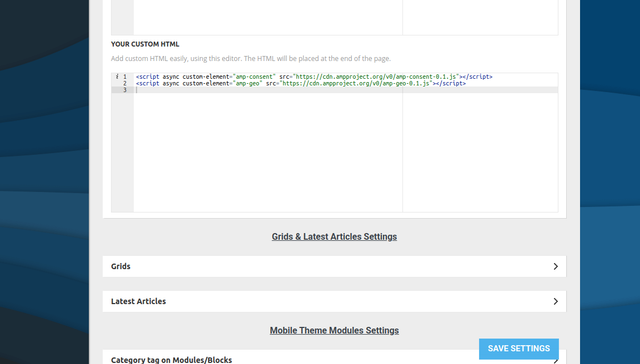
But it does not seem to show. I also tried adding it here (wp-content/plugins/td-composer/mobile/header-amp.php):
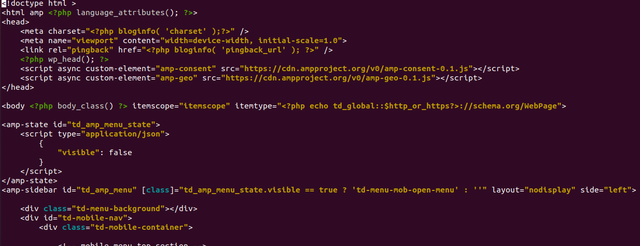
But it also does not work unfortunately. Any help would be appreciated!
katsar0v Hello @Bettina,
can you please recommend a solution for TCF/GDPR Consent on AMP/Mobile theme? This is really crucial and important, if nothing works with your theme you have to find a solution about this.
Greetings,
Kristiyan
Anamaria Hello,
To change the background image for the menu on mobile, please access Newspaper -> Theme panel -> Background -> Mobile menu/search background and change the image from here https://www.screencast.com/t/ATV1Jr7s
Hope that helps you!
Thank you!
 ivanvarela
Hi I got an email from google search console, asking me to fix these settings:
The following issues were found on your site:
Viewport not set
Clickable elements too close together
Text too small to read
I use Newspaper with Mobile Theme and AMP pluging in standart mode.
Where can I adjust those setting for all my posts
 ArchTFL
 Hi,
I’m also having the same problem. In fact, I even manually created mobile pages using the tagdiv composer, and a generic homepage is still displaying
jlkinazURL: https://cullenh1.sg-host.com/
I am having troubles with the site holding its configuration after clearing cache. It appears to be reverting to a mobile theme on a desktop view. Here is an example of a page that is now displaying as a mobile page on a PC:
https://cullenh1.sg-host.com/information-center/.
This is happening randomly and it has impacted all screens. Any suggestions?
Temporary fix has been to open each page in TD Composer, save it, then clear cache. It seems to last an hour or so before it breaks.
The issue is readily visible when using a cellphone as well.
 imdarshanpetkar
My problem is on my website when I active the tagDiv mobile theme plugin, the content of my pages is not showing up! I don’t want to create mobile pages manually. And please clear my doubt that…If I am activating the mobile theme plugin, Do I need to create mobile pages for it separately or not?
 techreen
How can I remove the Mobile theme featured image?
 JJ0000
 I was able to customize the desktop one, but do you know where the mobile “Sign in / Sign Up” section is located also —–> td-menu-login”. Thanks

