
- NewsmagSmart list ads
- NewsmagIntroduction
- NewsmagMain menu
- NewsmagLogo & Favicon
- NewsmagHeader ads
- NewsmagSmart sidebar
- NewsmagSharing buttons
- NewsmagCategory tag on modules/blocks
- NewsmagBackground introduction
- NewsmagTheme colors introduction
 Bettina
 Hello!
If you want to keep desktop design and mobile design same, then you need to deactivate Mobile Theme plugin.
When you install Mobile Theme plugin, your pages will be overwritten by the plugin.
The Mobile Theme is a performance optimized theme included in the Newspaper main theme and it loads only for mobile devices. It comes with it’s own templates for page, post, category, etc so your current templates from the desktop theme will get converted to the mobile theme layout. For more details, please take a look here: https://forum.tagdiv.com/the-mobile-theme/
Better deactivate the plugin and see the results.
Thank you!
 designandtravel3@gmail.com
 Hi,
I’ve solved that problem. Thanks for replying. I would request kindly help me out with my below query.
.
.
1. Mobile view footer is in black color which I don’t want. Desktop version is the final edited design and footer. I’ve also edited the WordPress theme in mobile view. Still, I’m unable to see the desktop version footer in mobile view. Please open femmepod.com on mobile and check.
PS: I’ve also disabled Mobile Plugin which came along with the Newspaper X.
.
2. See this video https://d.pr/free/v/UpiyvQ
When you hover over the mega menu, Lightroom text appears below the SHOP MENU. Please help me to remove that.
.
3. See screenshot https://imgur.com/undefined
 Vlad S
 Hello !
The Mobile theme was specially designed for optimization on mobile devices. Unfortunately on mobile theme you cannot do much changes of design. If you want to have the same design as on desktop mode you can achieve that by simply disabling the mobile theme.
You will have to recreate your pages into the Mobile editor or completely disable the mobile theme. The mobile editor will not render shortcodes !
The mobile theme editor can be found at the bottom of any pages when editing them: https://www.screencast.com/t/wfKibLOjYg
Thank you !
 nitesh9291
Hi,
This is regarding my post editor, When ever i edit my existing post it ask me to recovery my image ” this block contains unexpected or invalid content”. although when i preview it seems normal. And all the post edit in a mobile theme. It happens after updating to new theme.
How do i fixed it.
Vlad S Hello !
At the moment everything seems to be working right. Can you please setup WP Super Cache: https://forum.tagdiv.com/cache-plugin-install-and-configure/
And also activate the mobile theme and we will re-take a look.
Thank you !
 Topfgartenwelt
 @Amit What is the name of the themes main Javascript? The plugin wants concrete name for the exclusion. JQuery I already have excluded from Async.
Here’s a picture of my current settings: https://www.topfgartenwelt.com/svg-logo
The problem with the menu only appears in chrome…
Normally I’m using stop bad bots and my hoster has a protection for the website too, but if the plugin is on all testing tools are blocked, so I have deactivated it for trying to get the LCP down.
I have already tried to reduce the font size on mobile but that leads to a much more higher LCP because the featured image comes into the viewpoint. Than the LCP is really worse.
I have a premium managed wordpress hosting. 🙁 I have already asked them why the server has problems but they only told me that I have worse optimized site…
Greetings Kathrin
-
This reply was modified 5 years by
Topfgartenwelt.
 Calin
Calin Hi,
If you are using only amp plugin without mobile theme then yes, the file that need to be edited is wp-content/plugins/amp/templates/single.php
If you are using the mobile theme plugin with amp, then the file that need to be edited is this one wp-content/plugins/td-composer/mobile/single.php
Thank you!
 Komal
KomalThe images in my posts are not showing properly on mobile. They are not getting resized automatically as they should. I do not use any plugins other than the newspaper’s recommended ones.
Please check what could be the issue here :
Here is the Url :
https://kacyworld.com/eye-kajal/
When you see it in the desktop version and mobile version. You will see all the content is getting resized , just not the images.
The same is happening on all the posts.
 edinhadzic
 Hi Vlad! Thank you for answering me! Of course! The problem with the preview of a post/page happens when I create a new post or page and want to preview it before publishing.
“Views”-field doesnt show at all and i can’t figure out why.
We also cant see the searchbar in our mobile version. https://villalivet.se
However I saw that the theme version is 10.2 and I will update it now.
Calin Hi winipnews, if you have the mobile theme plugin, the menu need to be set from here -> https://i.imgur.com/ECvLv8v.png also if you are using WP Super Cache make sure that this option is enable -> https://i.imgur.com/9YYIQSK.png also make sure that all settings are as in this guide https://forum.tagdiv.com/cache-plugin-install-and-configure/
Let me know the results!
designandtravel3@gmail.com Hi,
I’ve solved that problem. Thanks for replying. I would request kindly help me out with my below query.
.
.
1. Mobile view footer is in black color which I don’t want. Desktop version is the final edited design and footer. I’ve also edited WordPress theme in mobile view. Still, I’m unable to see the desktop version footer in mobile view. Please open femmepod.com on mobile and check.
PS: I’ve also disabled Mobile Plugin which came along with the Newspaper X.
.
2. See this video https://d.pr/free/v/UpiyvQ
When you hover over the mega menu, Lightroom text appears below the SHOP MENU. Please help me to remove that.
Calin Hi ghoangit, something is not right with your mobile version. Please provide me a link to your website to inspect the situation and see what can be done.
Thank you!
 Amit
Amit Kathrin,
I have checked your blog. The LCP issue is coming from the title of your blog post.
This generally happens when your server response time is poor.
Solution:
1. Reduce title font size for the mobile version.
2. Protect your blog from DDoS attacks and bad bots. This will definitely improve server response time. (With DDoS attacks https://prnt.sc/w6xktg Score 90-89 Without DDoS attacks https://prnt.sc/w6xlam Score 96-93) [I attacked your site during this test, sorry!]
3. Upgrade to a better hosting plan.
I hope you will find this helpful.
Greetings
Amit
 insert_JSH
nice to meet you.
For the Article top ad menu,
I would like to use two custom functions. Is it possible?
1. You can adjust the size through the Adsense Size option in the Article Top Ad function.
However, the size is reflected on the desktop,
but on the mobile, “data-full-width-responsive=”true” is forcibly activated and the size cannot be specified.
300 x 250 data-full-width-responsive=”false” on mobile I want to apply.
2. Only one responsive code is allowed for Article Top Ad.
I prefer to display the top 2 ads on PC and 1 ad on mobile rather than this method. Is there any way?
(PC) Top left 300×200, top right 330×250(?)
(Mobile) Top responsive or 300 x 200 fixed
 winipnews
 now everything looks mobile ..
https://winip.news/wp-content/uploads/2020/12/Screenshot_2020-12-20-mobiReady.png
winipnews this is what my mobile site menu looks like:
https://winip.news/wp-content/uploads/2020/12/Screenshot_2020-12-20-News-WINIPNEWS.png
 piko
pikohi i created the page for mobile but when i run the setting to hide header and mobile footer from theme panel section it doesn’t work. In practice, the footer is not hidden on the mobile and the logo in the header is not displayed. I repeat I have performed all the steps from the theme panel. How can I solve? thanks
Topfgartenwelt The problem appears only when I want to open the menu in the post section and in the mobile theme. On the homepage the menu works. I get the following message in the console:
Uncaught ReferenceError: tdbMenu is not defined
at HTMLDocument.<anonymous> (ofenkartoffel-raeucherlachs-dillsauce:4352)
at i (392819be-1604329671.min.js:2)
at Object.fireWith [as resolveWith] (392819be-1604329671.min.js:2)
at Function.ready (392819be-1604329671.min.js:2)
at HTMLDocument.J (392819be-1604329671.min.js:2)
It only appears in the category recipes on desktop and in the mobile menu. So maybe you can help me.
Greetings Kathrin
-
This reply was modified 5 years by
 KUMESH BHARTI
It is only Support Desktop and Laptop. But Mobile Version is Not Support in Whole Theme Design. It’s means that I have Created my website in my own style, BUT NewsPaper Theme is not SHOWING Mobile Version of my Custom Theme Style. I have already Install Mobile Theme Plugin. I am very Tired about this theme. Please Check on your Mobile of my Website. Please
I am Trying Last 5 Days, but I am NOT Success in Mobile Version on Theme.
Please Solve my problem.
My Website is https://lifechangingquotes.org/
I am waiting your Response…
Thanks!
winipnews Our site on mobile menu links to this what should i do?
wp-content/endurance-page-cache/cocaine-worth-1-million-hidden-in-bananas/_index.html
 saragiud
hello! after update i see some issues in our http://www.ilsaronno.it
desktop: not possibile to open old galleries anymore
ex.: https://ilsaronno.it/2018/10/28/calcio-fbc-saronno-muggio-la-fotogallery-del-match/
mobile, android last version: opening any picture in articles (click on it), immagine goes “down” at bottom of the article, same opening galleries.
 garethdavies9209
 Hi Calin,
Thanks for getting back to me. The pages are still not loading on my mobile.
The WP rocket have got back to me and said its nothing to do with the caching and sent me this image –
Do you know if the issue would be with the theme or the amazon code? Amazon seems to think its nothing do with their code.
Can you have a look and see if there is anything I can do?
Thanks!
Gaz
 nathanway
is it possible on the mobile view to have different ads for each category page?
when I open mobile ads in the theme panel, there are only settings for global ads, it can’t be customized based on category pages
And there is one more question, can I edit the category page on the mobile view when the mobile plugin is active?
 dsoldier
When going to the page on mobile I click on the three links in my footer menu Copyright, Privacy Policy and Terms of use and the pages load, but no content shows.. everything else on the page works..
all three load fine on desktop.. Any ideas?
Link to page is http://kayfabereport.com
Thanks.
John
 max-4
max-4Hello,
Impossible to know how to delete connection in the theme, not visible on the theme but visible in the source and google webcache, disaster for SEO and speed
This is what google finds in the webcache when the mobile version is not activated?
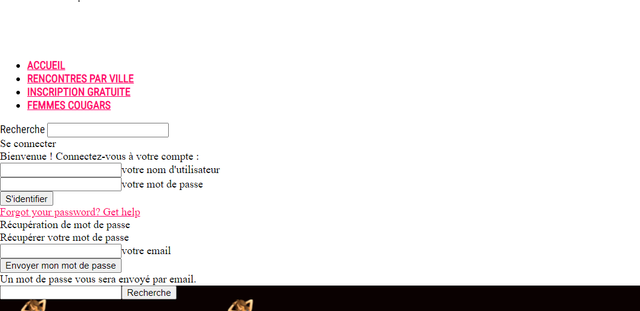
As well as in the source while the mobile plugin is not even activated.
How to correct the problem, and improve the speed, Largest Contentful Paint much too slow



