
- NewsmagSmart list ads
- NewsmagIntroduction
- NewsmagMain menu
- NewsmagLogo & Favicon
- NewsmagHeader ads
- NewsmagSmart sidebar
- NewsmagSharing buttons
- NewsmagCategory tag on modules/blocks
- NewsmagBackground introduction
- NewsmagTheme colors introduction
 dsimms
Menus that appear on desktop may not appear on small devices such as mobile.
It would be great if you added a “mobile” menu under menu settings!
We would be able to set up a custom menu for mobile devices.
Thanks
 alice92
Hi,
I installed plugins TagDiv Mobile Theme and AMP and I follow the brief to install them but on mobile I see just article and not pages. I have enabled articles and pages on theme panel but with page doesn’t work: are visible articles but not pages. What is the problem? thanks!!!
 Calin
Calin Hi,
If you are using the new option for mobile page from cloud -> https://tagdiv.com/newspaper-10-3-7-update-brings-customizable-and-fast-mobile-pages/ then you can import 0> https://i.imgur.com/TtaINYK.png then from manager import the header and footer and set it as you like -> https://i.imgur.com/hLa2P67.png
Hope this will help you!
Let me now the results!
Thank you!
Calin Hi OmurHak,
The pages are black on mobile only if you are using the mobile theme plugin, then need to set for pages a separate content in mobile editor -> https://i.imgur.com/ho41rUl.png
Also you can show the responsive version on mobile theme (to get the same layout as on desktop on mobile) -> https://i.imgur.com/m0bVB5T.png you can check more details about mobile theme in our documentation -> https://forum.tagdiv.com/the-mobile-theme/ or if you want to have the responsive version only, you can use the amp option from mobile theme -> https://i.imgur.com/oofST3D.png (to use the mobile theme template on amp) or you can disable the plugin.
Thank you!
Thank you!
Calin Hi,
Yes, this is the new method that google for pages speed.
To can avoid this problem, you need to remove the mega menu, sticky sidebar, sticky menu, next prev buttons from blocks and other options that use ajax queries.
For removing CLS from website, you can check these similar topic:
-> https://forum.tagdiv.com/topic/wpb-wrapper-causes-cls-in-desktop-version/
-> https://forum.tagdiv.com/topic/remove-cls-cumulative-layout-shift-from-html-element/
-> https://forum.tagdiv.com/topic/to-high-cumulative-layout-shift-in-mobile-theme/
-> https://web.dev/optimize-cls/
Hope this will help you!
 Vlad S
 Hello !
The Mobile theme was specially designed for optimization on mobile devices. Unfortunately on mobile theme you cannot do much changes of design. If you want to have the same design as on desktop mode you can achieve that by simply disabling the mobile theme.
You will have to recreate your pages into the Mobile editor or completely disable the mobile theme. The mobile editor will not render shortcodes !
Also you can disable mobile theme on certain pages or posts by following this setting: 
Please take a look here: https://forum.tagdiv.com/the-mobile-theme/
Mobile theme plugin can be disabled from Newspaper Plugins as you can see here: https://www.screencast.com/t/LnkZCEVC
You are now able to create mobile viewport templates as you can see in our guide here: https://tagdiv.com/newspaper-10-3-7-update-brings-customizable-and-fast-mobile-pages/
! Atention ! If you are using mobile templates you will have to remove the mobile theme plugin and also at the moment AMP is not working with mobile templates.
Please note that at the moment the Support team is not 24/7 available. We answer the topics from Latest to Newest Monday – Friday from 08:00AM to 05:00PM GMT+2
Thank you !
Vlad S Hello !
I too have tested this on multiple mobile devices and your website works great. Can you test on other devices ? It may be that your devices to be cached.
Thank you !
 oldu06
Hello i install plugin for mobile but photo not showing
https://www.fashioncolombia.co
 Alin [tagDiv]
 Hi,
If you use Mobile Theme and WP Super Cache plugins, please check these options in Super Cache settings – https://www.screencast.com/t/McpDHYqFM
Thanks!
 chaitanya
Hi There,
I have been using the Newspaper theme since 5 Years on my blog https://vsbytes.com/
I recently enabled Mobile Theme + AMP for the blog.
The Problem is, the breadcrumbs are showing on Google Search desktop version but there are no breadcrumbs on mobile searches.
 danna
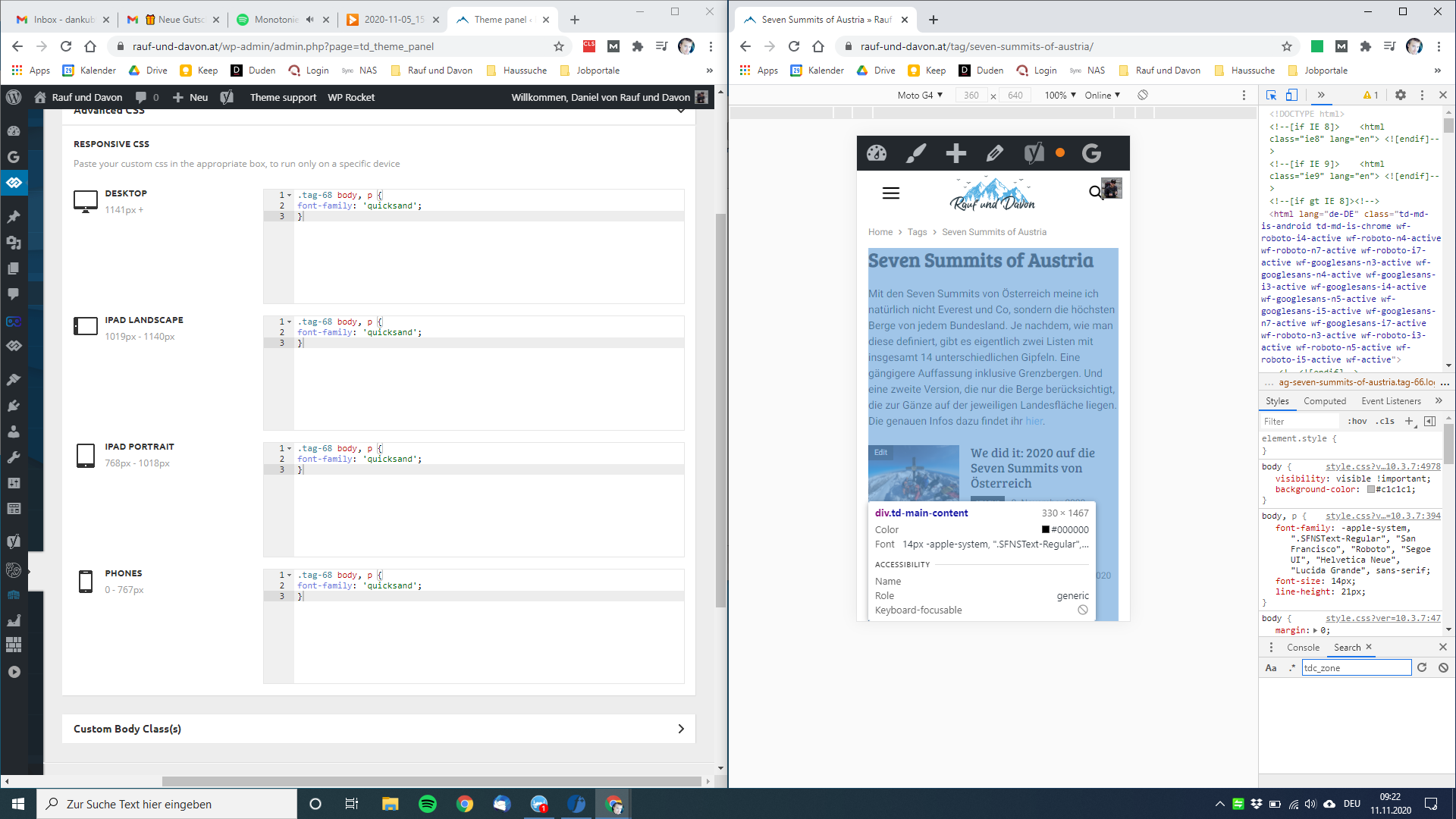
danna Just to be sure: I am talking about the font in the mobile theme.
danna Hey,
thanks for getting back, but it didn’t work as you can see on the screenshot.
Still have the wrong font on the mobile tag page.
Did i do something wrong?
All the best,
Daniel
 singhhimanshu
 thecypher.in link to my website. I want to disable the mobile header navigation bar transition.
Vlad S Hello !
The Mobile theme was specially designed for optimization on mobile devices. Unfortunately on mobile theme you cannot do much changes of design. If you want to have the same design as on desktop mode you can achieve that by simply disabling the mobile theme.
You will have to recreate your pages into the Mobile editor or completely disable the mobile theme. The mobile editor will not render shortcodes !
Also you can disable mobile theme on certain pages or posts by following this setting:
Please take a look here: https://forum.tagdiv.com/the-mobile-theme/
Mobile theme plugin can be disabled from Newspaper Plugins as you can see here: https://www.screencast.com/t/LnkZCEVC
You are now able to create mobile viewport templates as you can see in our guide here: https://tagdiv.com/newspaper-10-3-7-update-brings-customizable-and-fast-mobile-pages/
! Atention ! If you are using mobile templates you will have to remove the mobile theme plugin and also at the moment AMP is not working with mobile templates.
Please note that at the moment the Support team is not 24/7 available. We answer the topics from Latest to Newest Monday – Friday from 08:00AM to 05:00PM GMT+2
Thank you !
 SVPrasad
After Theme updated i have got lots of issues
– Mobile Menu Issue ( Mobile Menu Not Updating Even Selected Menu but it not shows the menu in public view )
Created Menu in Appearance Section –> Edited Menu in Tagdiv Composer –> Selected Menu in Public View –> Menu Not Showing
– Icon Alignment Showing Different in Tagdiv composer But For Public View Show Icons Alignment Like This
– Some Times Row Background colors Not Updating
Please Solve These Major Issues as Early as Possible due to this error My Website Looks not good… These all Problems Occurred in Mobile Theme
 Jeremysiu
Hi,
I created a new element in mobile header so I want to align it to the bottom, please see attachment, how can I get that:
Clic Here
 SMK
SMKHello Team,
I’ve made a mobile page using cloud template – Magazine Pro. I’m not able to adjust header and footer of that page by using TagDiv Composer.
What I would like to do:
I would like to make header (with logo) always visible, even after scrolling down and I would like to adjust content which is displayed by default in footer. How can I do that?
Thanks in advance for help.
 OmurHak
Hello, the pages I created are blank on the mobile side. I don’t want to create individual mobile pages for all of them. I want the pages I add to appear both on mobile and on the web. Is it possible?
Web: https://www.mekancu.com/bize-ulasin/
Mobile: https://www.mekancu.com/bize-ulasin/?amp
 Revive the Netherlands
The comments are not working for the mobile theme.
Domain: revive.nl
Is it possible to turn on the comments?
 WAJAHAT
The mobile header color of my website by default is black, how to change the header color and customize it ?
 Femaro
 I have modified my website greatly but the default Newspaper theme still shows on mobile and sometimes on pc (Chrome and Edge).
I have cleared all cache on WordPress and browsers but still don’t see my site.
Please help.
 raventaz
i has created mobile page on td composer, but why doesn’t appear in my handphone, and appear in my mobile amp version, i had uninstalled plugin amp
https://www.screencast.com/t/Q5LeRkHn
https://www.screencast.com/t/7PvDO2YAc7j
in my mobile https://www.screencast.com/t/pt7Nz60xt
i had cleared my cache
Vlad S Hello !
The best one to be used with Mobile Theme is with transitional version: https://www.screencast.com/t/EgOuyGXa
Thank you !
 alejandroman
 Hi Vlad:
All plug-ins except tagDiv plugins and Akismet deactivated cleared browser and server cache and still am not able to save mobile and AMP settings. Am not using a 
Thanks,
Alejandro
 bribiz
Hi,
We are using the newspaper theme for our site and we have decided to disable the AMP version for most of the pages as we were having issues with some coding. However, when choosing a menu in the composer for the mobile version, this settings only show up in a few pages but not in all the pages that have been saved.
I have attached a few pictures as examples of what is going on.
Picture 1 is how the sticky menu should look on mobile, pictures 2 and 3 are how it actually shows up, not sticky menu and when opening, no menu at all.
This is only happening for a few pages, as for other categories on the site I have set the same settings and it is working. We would appreciate some help with this issue as we need to get the mobile site sorted as soon as possible to live.
Regards,
Ruben
https://thepanafrican.s3.eu-west-2.amazonaws.com/wp-content/uploads/2020/11/10121008/Screenshot-2020-11-10-at-12.03.50-1.png



