
No search results were found in Documentation!
 Anamaria
 Hello,
This plugin JCH Optimize can interfere with the theme settings.
Thank you!
 netclick
 Yes, I use JCH Optimize. is that a good one to use?
 Bettina
 Hello!
Let me explain you which options of mobile versions are:
1. Responsive version: A responsive version of your website is looking similar like on desktop, edit the page with TagDiv Composer, click on the mobile viewport: https://www.screencast.com/t/XDQJedlggSB ; there you can see your mobile version and you can edit the elements there.
2. Mobile pages: https://tagdiv.com/newspaper-10-3-7-update-brings-customizable-and-fast-mobile-pages/
3. Mobile theme plugin: The Mobile Theme is a performance optimized theme included in the Newspaper main theme and it loads only for mobile devices. It comes with its own templates for page, post, category, etc so your current templates from the desktop theme will get converted to the mobile theme layout. For more details, please take a look here: https://forum.tagdiv.com/the-mobile-theme/ https://forum.tagdiv.com/the-mobile-theme/
A full explanation you can find here: https://www.youtube.com/watch?v=SpGkOnJeNZY
Please provide more information about your issue, screenshots or a video with the settings you make in order to help you efficiently.
A solution for sending a screenshot/video is this:
Download, capture, send: https://www.techsmith.com/jing-tool.html
After making the screenshot, you will have a link, paste it here.
Thank you!
 menneskedyr
 Thank you for the quick response, but that’s not quite it. Yes, TD Composer has a lot of queries and we live with it, but this was caused by a single (double, actually) repeating query from TD Standard Pack apparently fetching the site logo, using what seems to be a highly inefficient function:
attachment_url_to_postid()
And it was doing it twice, once for the desktop and once for the mobile logo, on every single page load. This caused mysqld to spike to 200% and above.
I see now that I have posted the wrong screenshot above, sorry. Here’s the correct one:
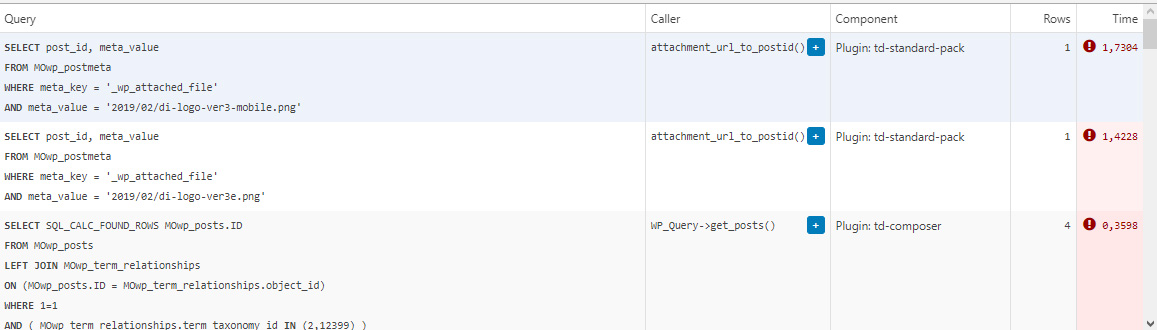
This morning I managed to patch up the problem, it’s a crude solution but may help someone. In header template I found that it was loading the logos from
plugins/td-standard-pack/Newspaper/parts/header/header-menu-h1.php
(yours may be different of course)
There I simply removed the PHP block fetching the logos and hardcoded the HTML for the logos in. As soon as I did that, the SQL spike went away. So I’d say it’s a bug, or inefficient code at least.
To be clear, we’re running the latest versions of WP, PHP, MySQL, the theme & plugins, all on a solid VPS. Yes there is quite a bit of SQL load, we’re working to optimize it with new blocks and Cloud Templates, but this was something else. Could be related to the latest Standard Pack update, don’t know, team didn’t report it before.
-
This reply was modified 4 years by
menneskedyr.
Anamaria Hello,
Did you use any plugins to optimize CSS and js?
Please try to remove the minify and see after the problem persists. https://i.imgur.com/pLe4V9C.png
Also, make sure you don’t have a plugin conflict.
Thank you!
 binwebonlinesolutions
I have a DB of 1.3GB and I need to bring it down to less than 1GB ….
What data is important to delete?
We have already deleted 1000 posts and it is not down….
Is it required to delete images to download?
I already passed wp-optimize and little to do…..
Suggestions and guidance are welcome as Siteground is going to block my access again.
Image for table more 100MB
https://prnt.sc/1y1ifh5
Thank you very much
Sincerely
Leonardo Grabow
Bettina Hello!
Let me explain you which options of mobile versions are:
1. Responsive version: A responsive version of your website is looking similar like on desktop, edit the page with TagDiv Composer, click on the mobile viewport: https://www.screencast.com/t/XDQJedlggSB ; there you can see your mobile version and you can edit the elements there.
2. Mobile pages: https://tagdiv.com/newspaper-10-3-7-update-brings-customizable-and-fast-mobile-pages/
3. Mobile theme plugin: The Mobile Theme is a performance optimized theme included in the Newspaper main theme and it loads only for mobile devices. It comes with its own templates for page, post, category, etc so your current templates from the desktop theme will get converted to the mobile theme layout. For more details, please take a look here: https://forum.tagdiv.com/the-mobile-theme/ https://forum.tagdiv.com/the-mobile-theme/
A full explanation you can find here: https://www.youtube.com/watch?v=SpGkOnJeNZY
If you created the mobile pages with TagDiv Composer, then when you install Mobile Theme plugin, your pages will be overwritten (disappear) by the plugin layout.
If you use Mobile theme plugin, then you can not edit the pages with TagDiv Composer.
You have only some settings for this layout, which you can find in Theme panel -> Mobile Theme. Please note that if a page is made by Composer, than the content won’t be displayed on Mobile theme version. You should create the content with the Mobile Editor.
Unfortunately, AMP is faster and works better only with Mobile Theme, because it is not compatible with cloud templates.
From my point of view, if you don’t use the Mobile Theme plugin, then there is no reason or benefit from AMP.
Check our documentation about this plugin here:
https://forum.tagdiv.com/tagdiv-amp-plugin-tutorial/
Thank you for understanding!
Anamaria Hello,
Did you use any plugins to optimize CSS and js?
Also, please check if you have set the width on the logo => https://i.imgur.com/7xqBSUZ.png -> https://i.imgur.com/jGdrJ2e.png
Thank you!
Bettina Hello!
There is a huge configuration which is tested with our theme: https://forum.tagdiv.com/cache-plugin-install-and-configure/
Let me explain you which options of mobile versions are:
1. Responsive version: A responsive version of your website is looking similar like on desktop, edit the page with TagDiv Composer, click on the mobile viewport: https://www.screencast.com/t/XDQJedlggSB ; there you can see your mobile version and you can edit the elements there.
2. Mobile pages: https://tagdiv.com/newspaper-10-3-7-update-brings-customizable-and-fast-mobile-pages/
3. Mobile theme plugin: The Mobile Theme is a performance optimized theme included in the Newspaper main theme and it loads only for mobile devices. It comes with its own templates for page, post, category, etc so your current templates from the desktop theme will get converted to the mobile theme layout. For more details, please take a look here: https://forum.tagdiv.com/the-mobile-theme/ https://forum.tagdiv.com/the-mobile-theme/
A full explanation you can find here: https://www.youtube.com/watch?v=SpGkOnJeNZY
If you created the mobile pages with TagDiv Composer, then when you install Mobile Theme plugin, your pages will be overwritten (disappear) by the plugin.
This is how that element works there on the mobile version: https://www.screencast.com/t/tt0ZFk3XX5tT
Thank you!
Anamaria Hello,
I saw you use the full image size on the blocks, but you can use thumbs https://forum.tagdiv.com/theme-thumbs/ and after you set the thumbs on the blocks, you need to regenerate them https://forum.tagdiv.com/thumbnails-fix-strange-looking-images-on-blocks/
Also, unfortunately, I can’t help you with a function to optimize the images because I do not have the necessary knowledge to do this, but you can make a request to the custom work team-> https://tagdiv.com/web-development-services/ and they can help you.
Thank you!
Bettina Hello!
Please make a full backup before and please check our documentation about Autoptimize here: https://forum.tagdiv.com/autoptimize-install-configuration/
Every demo has the required plugins (Newspaper -> Plugins) which you can see the notification if you hover over the Install button of the demo.
For the page speed, I can recommend you some solutions in order to increase the score.
Our developers are working a lot to improve the page speed in every update.
Also, to increase the page speed you can check these similar topics for more solutions:
– https://www.infophilic.com/get-almost-100-pagespeed-newspaper-theme/
– https://forum.tagdiv.com/topic/score-100100-pagespeed-with-newspaper-wordpress-theme/
– https://developers.google.com/speed/docs/insights/v5/about
– https://www.youtube.com/watch?v=tnkVapqhIHc
Please note that page speed is not covered by the support team: https://forum.tagdiv.com/newspaper-theme-support/
Thank you!
 melihkotbas
Hello, I am compressing javascript and css codes using “Autoptimize” plugin to optimize the theme. However, after this process, the mobile page I created is canceled and switched to the non-mobile version. I tried many plugins and they all gave the same result. What should I do about this issue?
1. Mobil Homepage;

2. 
3. Broken;

Other question;
What plugins are you using in the theme on this https://demo.tagdiv.com/newspaper_pro/ demo page? Even though I pulled the demo to my site with its contents, I can’t get the same speed scores.
 tsc_site
 Hi Anamaria,
I bought the theme because it promises a good pagespeed score. The main problem in my pagespeed is the images, it is taking 16s of speed.
How can I make the theme work with webp images? Or is there anyway I can optimize those images so I can enhance my pagespeed score?
I already took all the actions suggested from your pagespeed articles.
Thank you
tsc_siteHi, I use ewww image optimizer and I bulk optimized all my images. When I go to my website, I can see all my POST images are webp, but the theme images (thumbs and block images) are still png/jpg
Website: http://tudosob.re/qDoDm3
Can you help me?
Thank you
Anamaria Hello,
The page speed is not related only to the theme that you are using, this is affected by plugins/content/ads/ external resources, etc.
Your website needs an optimal speed that’s why you need to make some settings also to help for the improvement.
Also, to increase the page speed you can check these similar topics for more solutions:
– https://forum.tagdiv.com/topic/optimize-script-to-improve-site-speed/
– https://forum.tagdiv.com/topic/a-few-tips-for-newspaper-x-speed-high-cpu-usage-issues/
– https://tagdiv.com/how-to-increase-page-loading-speed/
– https://developers.google.com/speed/docs/insights/v5/about
– https://forum.tagdiv.com/topic/score-100100-pagespeed-with-newspaper-wordpress-theme/
– https://forum.tagdiv.com/topic/newspaper-theme-speedify-your-website/
However, page loading speed can depend on many factors, and each website is unique from this point of view.
Let me explain some of these factors and maybe they give you some starting points for optimizing your website.
External factors: server speed, if you are using CDN or not, the external resources loaded by your website like ads, fonts, tracking scripts like Facebook Pixel, Google Analytics, Twitter analytics, Hotjar and so on.
Internal factors: the number of elements on the page, image size, image formats, if you are using mobile optimized layouts, console errors, if you are using the Standard Pack plugin on not if you are using PRO demo or a standard one.
To be able to optimize and to remove CLS please check these guide => https://developers.google.com/web/tools/lighthouse/ -> https://www.sqlpac.com/en/documents/google-pagespeeds-lighthouse-6-new-features-lcp-cls.html -> https://web.dev/lighthouse-whats-new-6.0/ -> https://web.dev/lcp/ -> https://web.dev/cls/
Thank you!
Bettina Hello!
I think you are talking about Mobile Theme plugin, which has a separate field in the theme panel for ads.
Let me explain you which options of mobile versions are:
1. Responsive version: A responsive version of your website is looking similar like on desktop, edit the page with TagDiv Composer, click on the mobile viewport: https://www.screencast.com/t/XDQJedlggSB ; there you can see your mobile version and you can edit the elements there.
2. Mobile pages: https://tagdiv.com/newspaper-10-3-7-update-brings-customizable-and-fast-mobile-pages/
3. Mobile theme plugin: The Mobile Theme is a performance optimized theme included in the Newspaper main theme and it loads only for mobile devices. It comes with its own templates for page, post, category, etc so your current templates from the desktop theme will get converted to the mobile theme layout. For more details, please take a look here: https://forum.tagdiv.com/the-mobile-theme/ https://forum.tagdiv.com/the-mobile-theme/
A full explanation you can find here: https://www.youtube.com/watch?v=SpGkOnJeNZY
Thank you!
 Carlos Bello
 Hi Anamaria,
Thanks a lot for your feedback, it was very useful. Im looking to create a desktop/mobile site. Is not entirely a mobile site. But Im pretty much interested in the mobile speed, so I understand the amp technology could work great for that (its a local newspaper’s site, so posted news is everything to show). I was hoping to have full editing tools for both views (mobile/desktop same information to display, optimized view), desktop is already understood and has an incredible performance (96 in google speed test) but the same page is under 70. So what do you think? How is the best way to achieve this?
Bettina Hello!
Let me explain you which options of mobile versions are:
1. Responsive version: A responsive version of your website is looking similar like on desktop, edit the page with TagDiv Composer, click on the mobile viewport: https://www.screencast.com/t/XDQJedlggSB ; there you can see your mobile version and you can edit the elements there.
2. Mobile pages: https://tagdiv.com/newspaper-10-3-7-update-brings-customizable-and-fast-mobile-pages/
3. Mobile theme plugin: The Mobile Theme is a performance optimized theme included in the Newspaper main theme and it loads only for mobile devices. It comes with its own templates for page, post, category, etc so your current templates from the desktop theme will get converted to the mobile theme layout. For more details, please take a look here: https://forum.tagdiv.com/the-mobile-theme/ https://forum.tagdiv.com/the-mobile-theme/
A full explanation you can find here: https://www.youtube.com/watch?v=SpGkOnJeNZY
We recommend to use cloud/PRO templates in order to have the possibility to edit them with the TagDiv Composer which contains a lot of functions and features, please check our tutorial here: https://forum.tagdiv.com/tagdiv-composer-tutorial/
Documentation here:
– https://forum.tagdiv.com/cloud-library-templates/
– https://forum.tagdiv.com/design-post-pages-using-cloud-library-templates/
– https://forum.tagdiv.com/cloud-library-category-templates/
Check also our video tutorials here: https://www.youtube.com/c/tagdivThemes/videos
Thank you!
Bettina Hello!
Yes, you can disable the lazy load from the theme panel and the preloading.
Documentation here:
– https://forum.tagdiv.com/what-is-ajax-preloading/
– https://forum.tagdiv.com/autoptimize-install-configuration/
– https://forum.tagdiv.com/loading-image-effects/
For the page speed, I can recommend you some solutions in order to increase the score.
Our developers are working a lot to improve the page speed in every update.
Also, to increase the page speed you can check these similar topics for more solutions:
– https://www.infophilic.com/get-almost-100-pagespeed-newspaper-theme/
– https://forum.tagdiv.com/topic/score-100100-pagespeed-with-newspaper-wordpress-theme/
– https://developers.google.com/speed/docs/insights/v5/about
– https://www.youtube.com/watch?v=tnkVapqhIHc
Please note that page speed is not covered by the support team: https://forum.tagdiv.com/newspaper-theme-support/
Thank you!
Bettina Hello!
Just to be clear, let me explain you which options of mobile versions are:
1. Responsive version: A responsive version of your website is looking similar like on desktop, edit the page with TagDiv Composer, click on the mobile viewport: https://www.screencast.com/t/XDQJedlggSB ; there you can see your mobile version and you can edit the elements there.
2. Mobile pages: https://tagdiv.com/newspaper-10-3-7-update-brings-customizable-and-fast-mobile-pages/
3. Mobile theme plugin: The Mobile Theme is a performance optimized theme included in the Newspaper main theme and it loads only for mobile devices. It comes with its own templates for page, post, category, etc so your current templates from the desktop theme will get converted to the mobile theme layout. For more details, please take a look here: https://forum.tagdiv.com/the-mobile-theme/ https://forum.tagdiv.com/the-mobile-theme/
A full explanation you can find here: https://www.youtube.com/watch?v=SpGkOnJeNZY
If you need a responsive version or to build mobile pages, then please deactivate the Mobile theme plugin and see the results!
Thank you!
Bettina Hello!
Just to be clear, let me explain you which options of mobile versions are:
1. Responsive version: A responsive version of your website is looking similar like on desktop, edit the page with TagDiv Composer, click on the mobile viewport: https://www.screencast.com/t/XDQJedlggSB ; there you can see your mobile version and you can edit the elements there.
2. Mobile pages: https://tagdiv.com/newspaper-10-3-7-update-brings-customizable-and-fast-mobile-pages/
3. Mobile theme plugin: The Mobile Theme is a performance optimized theme included in the Newspaper main theme and it loads only for mobile devices. It comes with its own templates for page, post, category, etc so your current templates from the desktop theme will get converted to the mobile theme layout. For more details, please take a look here: https://forum.tagdiv.com/the-mobile-theme/ https://forum.tagdiv.com/the-mobile-theme/
If you want the Lead shortcode in your mobile version, then you need to use either the option 1 or 2. But, you need to deactivate Mobile Theme and AMP plugins in order to have that shortcode in your mobile version.
I hope it’s more understandable now!
Thank you!
 brwnfshwebworks
Hello,
I can’t seem to identify what may be the exact cause of this issue but the Theme Customizer returns a critical error when I try to open it.
The only Element that I could relate to the td_subscription php file is the Leads element I placed on the homepage once.
The homepage loads fine when viewed live ( https://paste.pics/EGF4Y ), whether I am logged in as admin, or viewing in incognito mode. It’s only when I try to go to Theme Customizer that the error occurs.
I already tried removing the Leads Element but still gets the critical error message and still unable to access the Theme Customizer.
For reference, these are the active plugins:
Envira Gallery Lite
Siteground Optimizer
tagDiv Cloud Library
tagDiv Composer
tagDiv Opt-in Builder
tagDiv Social Counter
WooCommerce
WPForms Lite
Below is the complete error message ( screenshot uploaded at https://paste.pics/EGF40 )
Fatal error: Uncaught Error: Call to undefined function get_current_screen() in /home/customer/www/brwnfshwebworks.com/public_html/bwmstage/wp-content/plugins/td-subscription/includes/td_subscription.php:196 Stack trace: #0 /home/customer/www/brwnfshwebworks.com/public_html/bwmstage/wp-includes/class-wp-hook.php(303): td_subscription->{closure}(‘https://brwnfsh…’, Object(WP_Term), ‘category’) #1 /home/customer/www/brwnfshwebworks.com/public_html/bwmstage/wp-includes/plugin.php(189): WP_Hook->apply_filters(‘https://brwnfsh…’, Array) #2 /home/customer/www/brwnfshwebworks.com/public_html/bwmstage/wp-includes/taxonomy.php(4559): apply_filters(‘term_link’, ‘https://brwnfsh…’, Object(WP_Term), ‘category’) #3 /home/customer/www/brwnfshwebworks.com/public_html/bwmstage/wp-includes/nav-menu.php(891): get_term_link(Object(WP_Term), ‘category’) #4 [internal function]: wp_setup_nav_menu_item(Object(WP_Post)) #5 /home/customer/www/brwnfshwebworks.com/public_html/bwmstage/wp-includes/nav-menu.php(755): array_map(‘wp_setup_nav_me. in /home/customer/www/brwnfshwebworks.com/public_html/bwmstage/wp-content/plugins/td-subscription/includes/td_subscription.php on line 196
Please inform me how I can find an remove the codes that produce that error.
Thank you in advance.
Bettina Hello!
We’re fine, thanks.
Let me explain you which options of mobile versions are:
1. Responsive version: A responsive version of your website is looking similar like on desktop, edit the page with TagDiv Composer, click on the mobile viewport: https://www.screencast.com/t/XDQJedlggSB ; there you can see your mobile version and you can edit the elements there.
2. Mobile pages: https://tagdiv.com/newspaper-10-3-7-update-brings-customizable-and-fast-mobile-pages/
3. Mobile theme plugin: The Mobile Theme is a performance optimized theme included in the Newspaper main theme and it loads only for mobile devices. It comes with its own templates for page, post, category, etc so your current templates from the desktop theme will get converted to the mobile theme layout. For more details, please take a look here: https://forum.tagdiv.com/the-mobile-theme/ https://forum.tagdiv.com/the-mobile-theme/
A full explanation you can find here: https://www.youtube.com/watch?v=SpGkOnJeNZY
If you need a responsive version or to build mobile pages, then please deactivate the Mobile theme plugin and see the results!
Thank you!
Bettina Hello!
Let me explain you which options of mobile versions are:
1. Responsive version: A responsive version of your website is looking similar like on desktop, edit the page with TagDiv Composer, click on the mobile viewport: https://www.screencast.com/t/XDQJedlggSB ; there you can see your mobile version and you can edit the elements there.
2. Mobile pages: https://tagdiv.com/newspaper-10-3-7-update-brings-customizable-and-fast-mobile-pages/
3. Mobile theme plugin: The Mobile Theme is a performance optimized theme included in the Newspaper main theme and it loads only for mobile devices. It comes with its own templates for page, post, category, etc so your current templates from the desktop theme will get converted to the mobile theme layout. For more details, please take a look here: https://forum.tagdiv.com/the-mobile-theme/ https://forum.tagdiv.com/the-mobile-theme/
A full explanation you can find here: https://www.youtube.com/watch?v=SpGkOnJeNZY
Now, you can use which one is more suitable for your needs. In your case, I recommend the mobile pages(2), so you can have a different page than desktop version editable with the TagDiv Composer. All what you should do is to create a mobile page and assign it to the desktop page.
Thank you!
Bettina Hello!
Let me explain you which options of mobile versions are:
1. Responsive version: A responsive version of your website is looking similar like on desktop, edit the page with TagDiv Composer, click on the mobile viewport: https://www.screencast.com/t/XDQJedlggSB ; there you can see your mobile version and you can edit the elements there.
2. Mobile pages: https://tagdiv.com/newspaper-10-3-7-update-brings-customizable-and-fast-mobile-pages/
3. Mobile theme plugin: The Mobile Theme is a performance optimized theme included in the Newspaper main theme and it loads only for mobile devices. It comes with its own templates for page, post, category, etc so your current templates from the desktop theme will get converted to the mobile theme layout. For more details, please take a look here: https://forum.tagdiv.com/the-mobile-theme/ https://forum.tagdiv.com/the-mobile-theme/
A full explanation you can find here: https://www.youtube.com/watch?v=SpGkOnJeNZY
Now, you can use which one is more suitable for your needs.
If you need a responsive version, then please deactivate the Mobile theme plugin and see the results!
Thank you!



