- TutorialsFrom WPBakery to tagDiv Composer
- TutorialsDefault Block Settings Guide
- TutorialsOffset Feature
- TutorialsSystem status parameters guide
- TutorialsWhat is Ajax preloading?
- TutorialsHow to Update the WPBakery Page Builder plugin
- TutorialsHow to Install bbPress forum
 emmalabbe
Hi,
We’re currently facing serious performance issues on our website, which uses the Newspaper theme and TagDiv modules. Over the past few weeks, we’ve noticed a significant slowdown specifically related to the loading of TagDiv components.
Our server infrastructure is robust (o2switch – 48GB RAM, NVMe disks, high-performance CPUs), and everything runs smoothly with a clean WordPress installation. However, with the Newspaper setup, we’re seeing 5 to 7 seconds of loading time on both the frontend and the WordPress admin, which is not acceptable—especially for SEO.
To give you more context:
• Production: https://devenirbilingue.com
• Staging: https://new.devenirbilingue.com (fresh WP install + duplicated DB from prod)
We’ve already tried the following:
• Installed Query Monitor: SQL queries are fast (< 0.5s), so it’s not a database bottleneck.
• Tested with caching (W3 Total Cache and WP Super Cache): helps when cached, but uncached pages are still very slow.
• Deactivated all plugins: no improvement.
• Switched to the parent theme and even to default themes: the issue seems to lie deeper in the TagDiv components.
This performance degradation started around June 2025. Before that, everything was running smoothly under the same setup.
We’re happy to provide access to both environments if needed.
Would you be able to help us troubleshoot this issue?
Attached is a screenshot with few query monitor screenshots:

<image 1>
Admin dashboard loading time
<image 2>
Homepage loading time
<image 3>
Another random page. The red part is external queries but all errors on them are .04s so not the issue.
Thank you in advance.
Emma
 Calin
Calin Hi,
Usually, the ads in prebuilt websites are set in the element AD BOX, and you can remove it, edit with tagDiv Composer, select the viewport for phone and select the Ad box element and with right-click you can delete it => https://www.screencast.com/t/2GfCVx9BCAw7 or with drag & drop place it into the deleting red zone from the bottom right of the page
The ad box has 3 sections for ads: using theme panel ads -> https://i.imgur.com/KFa9ibl.png, using images/banners -> https://i.imgur.com/MfAPTaE.png and custom code -> https://i.imgur.com/2rh8SuD.png save it and will appear on the post (you can set a shortcode like a shortcode from adrotate plugin or other plugins).
Thank you!
 ioannisch
Hey team, i have a really bad cls score in core web vitals and cant pas it . o,4 in mobile and 0,13 in pc . I dont have auto ads and all my ads is manually with dimension . Only 1 ads in main page and 3 in articles. I dont know what other do . Can you suggest me how to fix it . I have good speed with wp rocket but my problem is only with cls and cant pass core web vitals. Check my site . https://e-agrotis.gr/
 markyj2000
 Gosh, what a reply. First of all, no, your reply is not what the issue is. It is very much a formatting issue. The news pages and home page were not displaying correctly, like they usually do.
So I guess the problem will likely go unsolved.
I’m trying to alert your to a potential issue with one of your products.
(When I buy a car, if there is a technical problem with it years later that isn’t my fault, the car maker fixes it without charge – case in point Stellantis/Citroen’s current global recall over exploding airbags in cars it sold between 2009 and 2019 – https://www.reuters.com/business/autos-transportation/stellantis-asks-thousands-citroen-cars-with-faulty-airbags-be-removed-roads-2025-06-19/)
I didn’t realise when I paid for the theme 5 years ago that there was a limit to getting help – how ‘old world’. I didn’t really use the support in the first 6 months, except perhaps for familiarisation.
I went to the links you kindly added in your reply and wow, how complicated is it to even buy an extension, so I gave up.
I’ve been a big fan of your brand when I talk to others, but what this all tells me is perhaps it’s time for us to look elsewhere for genuine help.
But thanks for bothering to reply.
 ronniecreager
 Unable to create “custom content” (change name in mobile menu).
Custom Content area is “greyed out” & clicking “pade I.D. edit” takes me back to a homepage.
Screen Grab of where I’m at: https://ronniecreager.com/wp-content/uploads/2025/06/Screenshot-2025-06-24-at-7.30.53 AM.png
Please any other help is greatly appreciated
Calin Hi,
Our theme offers the possibility to display any ads and banners using the ad box element, this element can be set using tagDiv Composer on pages and cloud templates.
To create slider ads or other type or ads it will be need to use a dedicate plugin for ads or to have the code that can rotate the banners. All those can be displayed using the ad box element, the shortcode/ code can be set in the theme panel ads section and from the ad box element can be choose that source from the ad should be read or it can be set directly on ad box element in custom ad tab.
Thank you!
Calin Hi,
If you really this it was after the settings made on page, then it can be only if the settings were related to an add (if you set an ad code in the page), then yes, is possible and you can remove the ad or use a page revision.
So I checked again your website and your ad and that is an auto ad – https://i.imgur.com/qgPXiDQ.png
About Auto ads – Automatically place new ads based on different elements such as your page layout, the amount of content on your page, and your existing Google ads. Occasionally, Auto ads might place two ads next to each other (regardless of the ads’ network origin).
If you make a change to your site we’ll detect it and reanalyze your page.
How Auto ads work – https://support.google.com/adsense/answer/9261805?hl=en
Here is a similar case, but the user wants to enable the ads to be as you have now – https://support.google.com/adsense/thread/125714920/sticky-footer-ads?hl=en
Thank you!
 csegarra
Hi, I’m new.
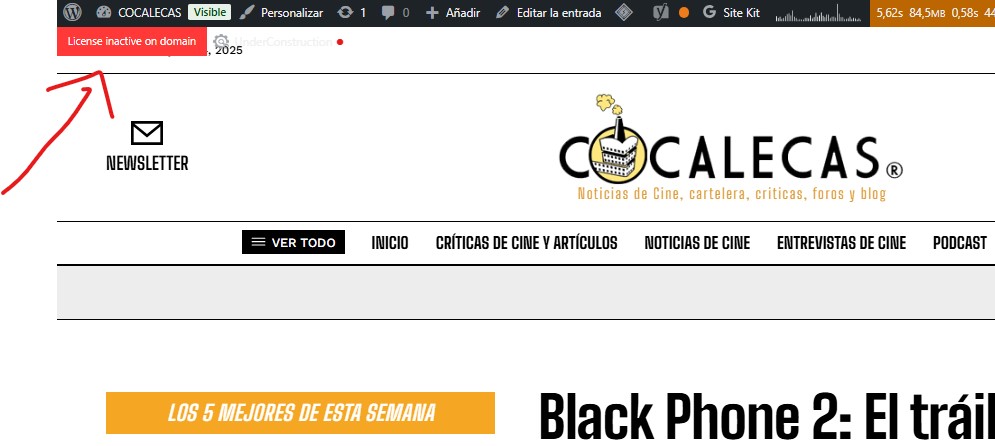
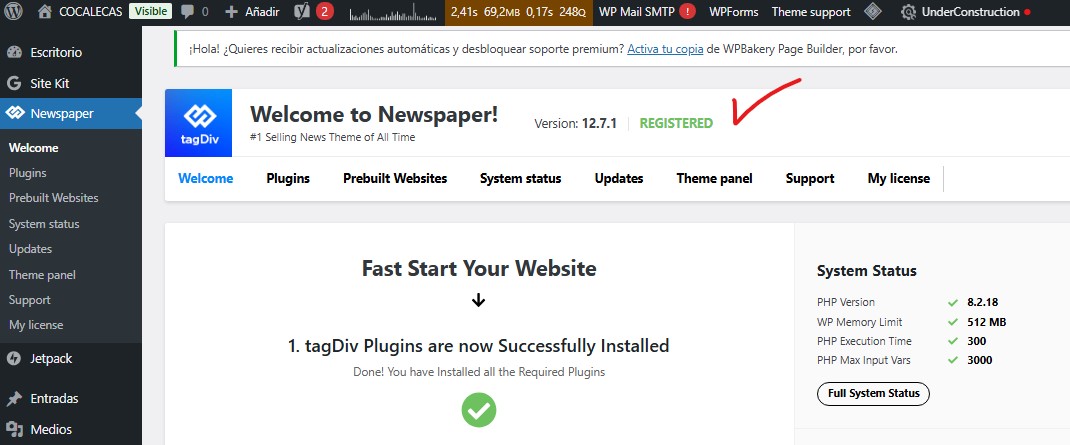
I installed the theme and it says it’s activated, but on the other hand, it says it’s not. Can you help me?
Thanks
https://cocalecas.net/wp-content/uploads/2025/06/Screenshot-2025-06-04-143145.jpg
https://cocalecas.net/wp-content/uploads/2025/06/Screenshot-2025-06-04-143158.jpg
 David
David Hi Calin,
thanks for looking into this. A few additional details from our end:
1. We’ve used about ten different plugins that triggered the same “\_load\_textdomain\_just\_in\_time was called too early” notice, and they’ve all released fixes since WP 6.7 (November 12, 2024). The only one still spamming our logs is td-cloud-library.
2. To prove it’s definitely td-cloud-library, we spun up a fresh install with only the Newspaper theme plus tagDiv Composer and td-cloud-library active. With WP\_DEBUG (and/or WP\_DEBUG\_LOG) enabled, the notice appears—and disabling td-cloud-library alone removes it. Steps to reproduce:
* Install Newspaper theme + tagDiv Composer + tagDiv Cloud Library
* Add to wp-config.php:
`
define(‘WP_DEBUG’, true);
define(‘WP_DEBUG_DISPLAY’, true);
define(‘WP_DEBUG_LOG’, true);
`
* Visit any page and watch the notice flood the debug log.
3. We hunted down why that notice won’t go away under WP 6.7+. Here’s what we tried:
* Searched every PHP file in td-cloud-library for load\_plugin\_textdomain(…) calls—none exist.
* Made a small must-use plugin that removes WP’s JIT filters on “plugins\_loaded” and force-loads the text domain on init. But it still fails because WP 6.7+ attaches _load_textdomain_just_in_time so early that any __(…, 'td-cloud-library') call in the plugin’s global scope immediately triggers the notice—before our MU-plugin runs.
* In other words, as soon as the first translation function fires (e.g. __('…', 'td-cloud-library')), WP already tried and threw the warning.
What needs to happen: All translation function calls (__(), _e(), esc_html__(), etc.) in td-cloud-library must be moved out of the global scope so they don’t run before load_plugin_textdomain('td-cloud-library', …) fires on or after init. Until every translation call is wrapped in a callback (or otherwise deferred until after the domain is registered), that notice will keep spamming logs.
Hope this helps pinpoint the fix. Cheers!
 arti49
Hello,
I have built my website on East Coast Check Pro. You really have a great software.
There is one particular point I would like to draw your attention to:
I believe that you need to implement language and region restrictions on the map.
Imagine a site made specifically for New York State in the US. As you know, city and state information are automatically added to the taxonomy section.
If someone logs in from the UK or from another US state, those countries and states are also added, and we constantly have to filter them out.
Additionally, it should be kept in mind that there are many immigrants and foreign investors in these countries. These users might use their phones or computers in different languages.
Two examples:
California → Kaliforniya (Turkish)
Texas → Teksas (Turkish)
Currently, your Google Map system is set to default. It takes the language from the device being used. If the device is in Turkish, it adds the states and cities in Turkish.
So, consider this: In New York, there are people from all nationalities. As a result, dozens of different language versions of the same state and city names will be added to the taxonomy. This is neither manageable nor editable.
Regarding regional restrictions for Google Maps: It is possible to enter addresses from many countries, states, and cities. If there is a restriction option for country, state, or city in the panel, this would be a huge benefit. The site designer could limit entries to their own city only. Additionally, when someone tries to enter an address from another city, state, or country, the system could refuse it and warn the user. This would be very useful.
Another point is that your directory structure seems to only support countries that have states. In this case, it becomes difficult to use in countries that do not have states, and it requires intervention with software knowledge.
Also, the default region when the map loads is always somewhere in Africa. Instead, it would be better if the center of the selected region is automatically set as the default view.
—- In short, I believe these options would greatly benefit your platform:
Please choose a language for the map.
Please choose a country: Global yes/no Dropdown menu: countries
Please choose a region for your map: state:(if there is any) city: village:
(The selected region will be restricted on the map, and entering addresses from outside the region will be prevented.)
These are my thoughts.
Best regards,
 Sebshot69
 I created my own custom field and I solved my problem… Now your theme bug with an insert of a ReVSlider shortcode on the home page. This permanently blocks the front TagDiv editing again. I can no longer remove the problematic content. I turned off the revslider plugin and all the others but nothing moves anymore!! Look at my screenshot, here is my home page is no longer editable. It is impossible to find the section that is causing the problem in the code mode in traditional editing. In short, I am starting to really regret my choice. I am wasting hours in problems that do not exist with editors like Elementor or Avada, to name just a few. You are the site admin, I will let you solve this problem. copy screen
Calin Hi,
The banner is set using tagDiv Composer in an ad box element and most possible to be linked to the theme panel ads.
The ad box has 3 sections for ads: using theme panel ads -> https://i.imgur.com/KFa9ibl.png, using images/banners -> https://i.imgur.com/MfAPTaE.png and custom code -> https://i.imgur.com/2rh8SuD.png save it and will appear on the post (you can set a shortcode like a shortcode from adrotate plugin or other plugins).
Thank you!
 teknobilimadami
Dear TagDiv Support,
My website is the problem: https://teknobilimadami.com/
I am experiencing a critical issue on my WordPress site that is directly related to the Newspaper Theme. When attempting to upload media files, the system either stalls significantly or fails with a 503 Service Unavailable error, specifically affecting the async-upload.php process.
Sometimes I add an image and when I open and close the page, I see that the image with the error has been loaded.
But these happen in the Newspaper theme. When I switch to the 2025 wordpress theme, images are uploaded instantly from the Media – Add Media – Media Library section without any problems.
After thorough debugging over the past 48 hours, I have tested and ruled out all other possible causes. Below is a complete breakdown of actions I took:
1. Hosting and Configuration
– PHP: 8.1
– Hosting: LiteSpeed / Shared Hosting (GuzelHosting)
– Limits Increased to:
– max_execution_time = 300
– upload_max_filesize = 128M
– post_max_size = 128M
– memory_limit = 512M
– Cloudflare set to “Development Mode”, and later fully paused
– WP Rocket and cache tools disabled during tests
2. Steps Taken & Results
– Switching to Twenty Twenty-Five theme resolves the issue instantly. Image uploads are fast and reliable.
– Activating Newspaper theme causes:
– Slow or failed uploads
– DevTools shows async-upload.php requests returning 503 errors
– Hosting panel shows CPU limit exceeded only when Newspaper is active
– Plugins tested individually (only Rank Math, SMTP, and Converter for Media were active; Converter later disabled)
3. Functions.php and Theme Code Review
– Output buffer using ob_start(“sanitize_output”) was temporarily removed.
– Theme update filters (pre_site_transient_update_themes) commented out.
– Admin-side JS injection via admin_head tested and removed.
These changes made little to no difference — the core issue seems to lie deeper in Newspaper’s admin/AJAX logic.
4. Attached Visual Evidence (8+ screenshots)
Please find attached:
1. DevTools console error (503 on async-upload.php) : https://prnt.sc/qHY-ahJWeCbr
2. CPanel CPU usage exceeded panel : https://prnt.sc/V4Wcb6RWVm8O
3. Functions.php sample (Attachments)
4. Theme switched: Twenty Twenty-Five (success) : https://prnt.sc/XsbBJDqxrBK_
5. Theme active: Newspaper (failure) : https://prnt.sc/3ORZ-qt9OwHj
6. WordPress debug.log output (Attachments)
7. Network panel XHR timing chart : https://prnt.sc/T1_rYdno5uaL
8. Cloudflare paused, issue persists : https://prnt.sc/CKQqSZ2OlLc-
I attach all other detailed screen photos to the e-mail. (20 attach picture screenshot)
Final Note & Request
I believe this issue can only be resolved from the theme side, not via hosting or plugin tweaks. I kindly request:
– Review of internal AJAX handling within the Newspaper theme
– Guidance on patching or disabling blocks that might interfere with admin upload requests
– Confirmation if this is a known issue, and whether an update will address it
I truly want this resolved. I have done my part as much as possible. Now I believe your team can take over and fix this properly.
I sent you contact@tagdiv.com e-mail in more detail. I would like to ask for your help in solving the problem.
Calin Hi,
For this you can use the theme ad box element and the theme panel ads options – https://forum.tagdiv.com/using-other-ads-non-adsense-ads/
Thank you!
 Marian
Hello,
We are using the theme on a news website, with adsense ads, on a Litespeed server, and we think it is reasonable to use Litespeed cache, as a caching plugin.
Is this theme compatible with litespeed cache, are there any settings we can do to lower the LCP, CLS and INP scores?
We also receive from the hosting, automatically the message “Hosting account resources exceeded”
We do not receive this message using any other theme. It seems that there are big problems, can we expect to see better optimization in the future?
Thank you!
 plotwit-team
 1) Another issue how to remove/edit ads images. They are showing up in google search results
2) Also i feel like Tagdiv is not loading properly on my website, wordpress toolbar disappears when i edit with tagadiv composer
Please Help.
Calin Hi,
I checked your site on both Opera and Chrome, and the ads are being displayed https://i.imgur.com/rWCUrdG.jpeg Please try to check the website using other browser without any extension.
Thank you!
 franley_machado
 Thanks for the answer my friend.
The ad is defined in the theme panel, as in the 2 links below:
https://ibb.co/RTGHRCpn
https://ibb.co/vvQ7W03b
For the mobile version I did what you said and it worked, the display returned correctly on the desktop.
However, I’m still having problems viewing ads. No ads appear in my original browser, and when I open them in another browser, the ads appear normally, but others appear that I can’t view in my original browser.
Other browser – https://ibb.co/LDk3n2hh
Origin browser – https://ibb.co/sv0RQkWb
franley_machado Thanks for the answer my friend.
The ad is defined in the theme panel, as in the 2 links below:
https://ibb.co/RTGHRCpn
https://ibb.co/vvQ7W03b
For the mobile version I did what you said and it worked, the display returned correctly on the desktop.
However, I’m still having problems viewing ads. No ads appear in my original browser, and when I open them in another browser, the ads appear normally, but others appear that I can’t view in my original browser.
Other browser – https://ibb.co/LDk3n2hh
Origin browser – https://ibb.co/sv0RQkWb
 Aldis
AldisHi,
I’m using your theme and would really appreciate your help.
I would like to insert a block in the middle of the single post template (similar to how ads are placed) that displays 3–4 of the most read articles — something like (“Others are reading now”) section.
Could you please advise how I can achieve this? Ideally, it should behave similarly to how the ad blocks work within the content — appearing automatically after a certain paragraph.
Thanks in advance!
BR, Aldis
 olebm
olebmDear Support Team,
we are currently experiencing an issue with the Newspaper 12 theme (latest version) in a WordPress Multisite environment. On any post or page where the paywall is active, the burger menu also displays the paywall overlay. This is incorrect behavior — the navigation menu should remain accessible and unaffected by the paywall restriction, allowing users to browse the site structure even if the article content is restricted.
This issue is particularly noticeable on mobile devices and occurs consistently on all pages with active paywall protection. It seems that the paywall overlay wraps the entire page content, including the mobile navigation menu.
We are using the following setup:
• WordPress Multisite with separate instances per blog
• Theme: Newspaper 12
• Page Builder: tagDiv Composer (for all pages)
• Post Editor: Gutenberg (for all articles)
Relevant Plugins in use:
• tagDiv Cloud Library
• tagDiv Composer
• WooCommerce
• WooCommerce Memberships
• WooCommerce Subscriptions
• and others


 sigmadespell@gmail.com
Hello, as title states I am using adsense auto ads but in main pages and other pages as well I can see the ads poping, but when inside articles, sometimes render, sometimes not. Is it known or a newspaper specific issue (with JS block or anything) or it is just Google that not rendering ads?
Things I have already tried:
– When I am testing this, I am not logged in and navigating with a clear browser session.
– I can see the Adsense networks requests in developer tools coming in, they just not rendered.
Sebshot69 Hello, thank you for your message. However, this is a specific issue I’m facing: what I refer to as the contextual menus settings of the builder are the tab options proposed for rows, columns, and elements that make up the building blocks of your TagDive plugin (see attached screenshot). These tabs no longer expand.
Regarding this, I noticed that some users mentioned a potential conflict with other plugins. As a reflex — being familiar with WordPress — I immediately disabled all other plugins to test, but the issue persists.
I also checked the browser console to see if any JavaScript errors were being thrown, but there’s nothing noticeable there either.
I’m truly at a loss and losing a lot of time, as I can’t continue working on our NGO’s website (planet-keeper.org) without access to these contextual menus.
Thank you for your help.
Best regards,
-
This reply was modified 1 year by
Sebshot69.
 duleybr
 Hi Bettina, I disable preatty much all plugins in website.
I leave enabled only AMP, Slider revolution and all tagdiv plugins
tagDiv Cloud Library
tagDiv Composer
tagDiv Mobile Theme
tagDiv Newsletter
tagDiv Opt-In Builder
tagDiv Shop
tagDiv Social Counter
tagDiv Standard Pack
Clean all possible caches and reload the site.
Still displaying ads.
2 thinks I did.
1. I try to search for a possible injection of ads from other account. I didn’t find anything in code, only my adsense code.
2. Remove google site kit plugin
Even removing site kit I am still able to see ALL possible ADS.
I came from another good theme to Newspaper, I really enjoy it but, I was not expecting this one! =]
 dzahdo
Hi,
Adding an AdSense code snippet to the Analytics/JS Code doesn’t complete verification. Could you please advise?
The return message from AdSense is:
Couldn’t verify your site
We couldn’t verify your site. Make sure the changes you made to your site are published and accessible by the Google AdSense crawler. If you’re still having issues try another method.
Thank you.