
- NewsmagUsing other ads
- NewsmagSidebar ads
- NewsmagImport / Export theme settings
- NewsmagRequirements for Newsmag
- NewsmagNewsmag documentation
- NewsmagHow to update the theme
- NewsmagBlock settings tutorial
- NewsmagIntroduction
- NewsmagPage Menu
- NewsmagMega menu
- NewsmagLogo & Favicon
- NewsmagFooter templates
- NewsmagTheme thumbs
- NewsmagBackground introduction
- NewsmagVideo playlist
 Irreverent Gent
Hi All,
I’ve done all the steps recommended for Pinterest Rich Pins (switched to business account, enabled Open Graph data using Yoast, confirmed my site on Pinterest) but when I go to validate a URL, I get a message from Pinterest saying “We were unable to retrieve any data from your URL.”
From reading other threads I know the theme was not set up to be compatible with Rich Pins, but I’m wondering if any other users have had this problem and if there is a solution.
Thanks,
Dave
 sasquatters
Amazon Affiliate has launched a new program where you can get revenue from other countries. There is custom Javascript code which is shown below.
<div id=”amzn-assoc-ad-285a9c11-c070-4361-a812-04a2a0d2f7db”></div><script async src=”//z-na.amazon-adsystem.com/widgets/onejs?MarketPlace=US&adInstanceId=285a9c11-c070-4361-a812-04a2a0d2f7db”></script>
In the theme panel it says not to use <script></script> but this screws up the code.
 ScubaDiverMag
Hi Guys,
This may or may not be a question for you. I’m looking at changing ad servers and we want to us the wallpaper ads still. I have the below code that I need to place into the site but I’m struggling with a place to put it so it loads. I’m switching from Ads Pro which allows me to insert the short code into the bottom leaderboard position and it loads on the site correctly like this https://www.scubadivermag.com/diving/technical-diving/
I’ve tried using the shortcode for Ad Butler but it justs loads the wallpaper in the leaderboard box. I’ve tried placing in various other places in the theme panel.
Do you know of an easy work around before I hire a dev to look at the issue?
<!– Wallpaper [async] –>
<script type=”text/javascript”>if (!window.AdButler){(function(){var s = document.createElement(“script”); s.async = true; s.type = “text/javascript”;s.src = ‘https://servedbyadbutler.com/app.js’;var n = document.getElementsByTagName(“script”)[0]; n.parentNode.insertBefore(s, n);}());}</script>
<script type=”text/javascript”>
var AdButler = AdButler || {}; AdButler.ads = AdButler.ads || [];
var abkw = window.abkw || ”;
var plc300031 = window.plc300031 || 0;
document.write(‘<‘+’div id=”placement_300031_’+plc300031+'”></’+’div>’);
AdButler.ads.push({handler: function(opt){ AdButler.register(172162, 300031, [1600,900], ‘placement_300031_’+opt.place, opt); }, opt: { place: plc300031++, keywords: abkw, domain: ‘servedbyadbutler.com’, click:’CLICK_MACRO_PLACEHOLDER’ }});
</script>
 Simion C.
 On pages you can create smart sidebars (sticky) like this
– https://forum.tagdiv.com/smart-sidebar-2/
Check the bottom part of the tutorial to see how you can create smart sidebars in pages. This would be the only way of doing this. Note that Adsense ads should not be used like this, it is considered a violation of their rules. Other ads could be used.
Simion C. So the sidebar ad code was causing the conflict. It must contain some code that affects the theme in some way. The theme supports other ads then Adsense
– https://forum.tagdiv.com/using-other-ads-non-adsense-ads/
But some ad codes could cause issue like in this situation.
Thanks
 Catalin
 Hello broinfo,
If you want to use other ads than Google AdSense, notice that you should check our useful guide from here -> https://forum.tagdiv.com/using-other-ads-non-adsense-ads/
Thanks for your understanding!
Simion C. Hi,
The WP Super Cache is recommended to be used with the theme, other plugins or configurations can cause issues. To test page speed it is always recommended to first remove ads if possible, and deactivate all non-theme plugins. It also depends on the hosting provider.
The autooptimize plugin could cause issues with the mobile plugin, try disabling it and test again.
There are many guides you can follow here in the forum regarding page speed, provided by theme users who achieved great results. Some of theme here
– https://forum.tagdiv.com/topic/score-100100-pagespeed-with-newspaper-wordpress-theme/
– https://forum.tagdiv.com/topic/tutorial-chriss-custom-optimizations-for-functions-php-etc/
– https://forum.tagdiv.com/topic/newspaper-theme-speedify-your-website/
Thanks
Catalin Hello broinfo,
In order to achieve a responsive Ad if you are using other Ads, please check the following tutorial from here -> https://forum.tagdiv.com/using-other-ads-non-adsense-ads/
Thanks for your understanding!
 sejpost
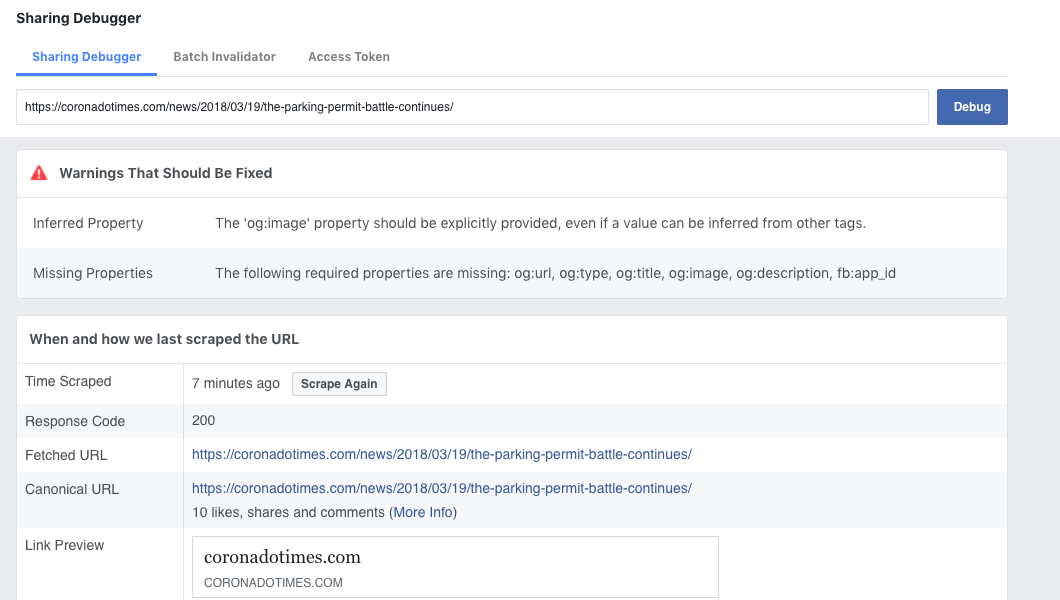
In Facebook debug tool, it says this when I put in a post URL:
The ‘og:image’ property should be explicitly provided, even if a value can be inferred from other tags.
The following required properties are missing: og:url, og:type, og:title, og:image, og:description, fb:app_id
—
I am using Yoast SEO and the OG settings are enabled. What can I do to fix this? My site is http://www.coronadotimes.com
 Bogdan B.
 Hello,
The amp ads work fine on our end. We cannot recreate the issue on our end. Please test this without any other plugins and test from a mobile device, not from desktop emulators. I have tested the amp ads and they work fine on our end.
Thank you!
Simion C. Hi,
Those are the only adspots that you could use in an ad box, on pages (sidebar ad and the custom ads). The others you can only use in their predefined spots.
If the ad codes are valid the theme will display them accordingly. If you could provide a link to a page where you used ad boxes and the ads are not displayed, we will inspect it.
You could in test the ad code in a raw HTML element on a page and check if it is displayed, as a test.
Thanks
 JayVee
Hi!
I’ve got certain categories of posts for which I would like to not display ads. This because the posts were donated without the right to display ads. But as Adsense does not allow ads for all post categories, I can imagine news sites have the same issue.
At the moment, I’m solving this by using post template styles 1, 11, 12 and 13 for those categories of posts where ads are allowed, and other post template styles where they are not. But this means I can’t have posts in header, footer, sidebar, or any of the other interesting places, as those ads would appear across all categories.
Are there better ways to not display ads on certain categories?
Thanks for any response!
 devraj1986
 Very serious Issue!why not saving adsense code header footer or others?
But in mobile section it is working perfectly.
Help me ASAP.
 jbeaul
 Problem does occur when I create new pages and try to edit them with the composer. I deactivated all other plugins and problem remained.
Theme system status looks like this.

-
This reply was modified 8 years by
jbeaul.
 mohammed87
 Hi Simion,
Instagram footer works now.
But social media sidebar widget is not, only twitter:
https://baws.se/utvardera-risk-och-utbetalning-pa-casinospel/
But on our other site instagram and twitter works but not facebook:
https://baws.ae/uae-roads-are-becoming-less-dangerous-uae-road-safety-monitor/
Also weather widget is still not working on http://www.baws.se even though API key was changed, but it works on http://www.baws.ae. Very strange?
 kreativ
Hello,
I installed the template Newspaper but i have a problem (with an other website is working)
When i’m in the Theme panel, buttons are not working. I cannot go in any sections: footer, ads, block setting background. For every click i done, i stay in the header section and i cannot change the style too…
Thank you in advance
Damien
Simion C. Hi,
Thank you very much for your appreciation of the theme. The images you upload are stored by default in the uploads folder on the server.
The issue you are having could be caused by permissions or other factors. Please follow the solutions mentioned in these topics
– http://www.wpbeginner.com/wp-tutorials/how-to-fix-image-upload-issue-in-wordpress/
– https://docs.presscustomizr.com/article/229-fixing-errors-when-uploading-images-in-wordpress
Also you could contact your hosting provider and mention this to them as well. They might be able to fix this for you.
Thank you!
 Gautam
 +1 to this feature.
It’ll help us reduce the number of new plugins that we need to install. The only other option is deleting the post / page which violates Adsense, but that would mean reduction in traffic.
Is there any update on this particular feature ?
Simion C. Hi,
The ads should appear, just enter the codes in the location you want
– https://forum.tagdiv.com/using-other-ads-non-adsense-ads/
So simply enter teh ad code in the theme panel ad sections and they should appear in those locations. If you could provide a link to your website where ads are supposed to display, we could take a look.
Simion C. I don’t understand the problem you are mentioning with a code. If you could provide more details about it it would be helpful.
Note that speed optimization is affected by many factors as I mentioned above. Test only with theme plugins active, test without ads.
There is also a theme tutorial you can follow
– https://forum.tagdiv.com/how-to-make-the-site-faster/
Or follow other online or forum tutorials. Website and speed optimization has to be made by you, or professional services. We do not offer such services unfortunately.
Bogdan B. Hello,
Sorry but we have not tested anchor auto ads. Our theme was built to work with the standard adsense ads. The anchor ads could need other implementation to work properly. Try to check the implementation instructions from google.
Thanks.
Bogdan B. Hello,
This is because the implementation method is different for custom ads. Please use the div’s provided here: https://forum.tagdiv.com/using-other-ads-non-adsense-ads/
Thank you!
 acdmin
Hi,
So I’m using Revive AdServer to display my banners and for some reason, just on the article view they’re not displaying on page load. As it seem that the images load with delay as you scroll down the website I would like to deactivate the effect to see if is affecting. Is that possible as other features or where is that piece of code?
Regards
 hafizrahim
Hi,
I’m not sure what happened. But today I have noticed that my new blog post in hafizrahim.com doesn’t show any adsense ads. While the other post before it have no problem showing adsense ads.
 amd4ever
Hallo, we have a problem with header (and all other places) with ads.
We have adnxs code, with adsense and in house ads but when we want only have them at desktop (DISABLE ON TABLET LANDSCAPE ,DISABLE ON TABLET PORTRAIT, DISABLE ON PHONE is enabled).
But at our stats we have the display code for mobile but its hidden. We cant see the ads but we have the pageview at ads statics.
Its possible to enable and client-side detection and server-side device detection like we have at ad insterter wordpress plugin?
Our website is http://www.topnews(dot)gr
