
- NewspaperWP Rocket and Newspaper Theme: Optimization Guide
- TutorialsDefault Block Settings Guide
- TutorialsOffset Feature
 justrealmoms
 Hey Anamaria, thank you! We will try the copying the code.
Regarding the Taxonomy, what I meant is that each Supplier’s page is currently created with individual Cloud Templates – Single Templates.
But, in the news website, since they are now in CPT/Taxonomies (we created a 2nd Post Type for them), and not under General (where the standard Blog Posts are), the CPT/Taxonomies does not have an option to create separate Single Templates for each Supplier.
So, we have 2 Post Types:
– Posts – where we have blog posts – all functioning well.
– Posts Guia – which we created and is in Taxonomies, which we are not sure where to create Single Cloud Templates for each Supplier page – to create the specific sidebars for each suppler with their unique information. The sidebar is not the same for all. Each one has their own contact details. Here:
https://guia.justrealmoms.com.br/co-study-school-for-life
https://guia.justrealmoms.com.br/mooui
(Each Right sidebar is different, with specific contact infos, which we created by having Single Cloud Templates for each). This is what we need to know how to create now, since they are all under a new Taxonomy and this info is crucial in each page.
Let me know if I was able to explain my self better this time.
Thanks!
 Anamaria
 Hello,
Usually, it should have imported both sidebars; I noticed that on one site, you set the row layout to 3 columns, and on the other, you didn’t. Did you change the row structure?
Can you tell me how you imported it? We recommend copying the code from the page and putting it on a new page on the other site.
Now related to the taxonomy, if you have a taxonomy, you can set the image here https://i.imgur.com/CEKYJLd.png and display it in the template using Taxonomy Background Image -> https://i.imgur.com/N0HzZYu.png after then you can use only one Custom Taxonomy template if only this is change.
I think you use those templates for taxonomy https://i.imgur.com/0Vs2DG1.png, not a Single Post Template.
Also, we provide support only on the forum ad email.
You can contact us via email and provide access to the websites and include the link to that topic to help my colleagues to understand the problem and to try to help you to solve it.
Thank you!
 sco
sco Hi,
Thank you for your reply. I already use a flex loop listing for the search template… but it doesn’t work. Live search and search page results do not match as when we press enter or click the search button from the live search bar, we are redirected to an url with ?post_type=post.
The only way to solve this problem is I think to change the url to ?s=search-entry whenever post_type is left blank.
 Calin
Calin Hi,
To remove the latest news section you’ll need to edit the page in the WordPress editor and change the page template to the default – https://i.imgur.com/xhEUW2x.png
Thank you!
sco Sorry I made a mistake and couldn’t edit the post…
Disregard this “Then, I changed this background color by editing the “Accent hover color” in red.”.
Actually, the default color for the header template “block header 4” is yellow and the default text color is white.
(1) I tested, leaving the configuration like this, without any modification and… the color of the header background of the block header 4,on the modal popup, remains black.
(2) I tested with this configuration :
* Title background color: green
* Title text color: white
* Accent hover color: red
Nothing changes on the modal popup… the header background remains black.
But I can confirm that the header background changes colors on tagdiv composer and also on the modal page when I visit it directly.
Regards,
 sco
sco Hi,
I’ll try to explain…
Go to you modal page… then through tagdiv composer :
add element>list menu > header settings
From third line “header template” I chosed Block header 4… which by default has a black background.
Then, I changed this background color by editing the “Accent hover color” in red.
What I get :
– all is fine from the right part of tagdiv composer the header has the right background color
– and everything is also fine when I visit directly the modal page.
But… once this modal page is called from the icon trigger… then the background color is missed and turns to black.
Thus… I guess… nothing to do with the background of the page.
As you requested… no background set for this page (transparent), nor for the list menu. And the modal has some white translucent background.
Thanks or your help,
Regards.
justrealmomsHi Anamaria, thank you once again for ALL your help. We’re unifying our content website with our subdomain (which is currently Newspaper), and making it all in Newspaper (yay!), so countless issues are appearing.
Our content website is: https://www.justrealmoms.com.br
Our subdomain we use Newspaper is: https://guia.justrealmoms.com.br
So, what is happening now is: We now have TWO types of Post Formats we have to create:
1) Normal Blog Posts (for the content website/blog)
2) Pages of Suppliers part our our Supplier’s Guide with a curation of brands – which is created as a type of Blog Post
Once again, this Supplier’s Guide is what we’ve created using Newspaper (https://guia.justrealmoms.com.br).
The Supplier’s Page have specific fields and functionalities we need. Here is a page for your reference: https://guia.justrealmoms.com.br/mooui.
It has:
1) A right sidebar where each supplier has their contact infos (WhatsApp, Email, Social Channels, embedded Map)
2) The body – where we create as a normal Post (since we need to use Yoast, the filters, categories, etc)
3) A left sidebar with more general infos from the website.
We’ve created a copy of the website and we’re working on it: https://r22.861.myftpupload.com.
The issue is that for the Supplier’s Pages we had to create a new Taxonomy, since we needed it to be featured separately and differently on the website (ex: on the homepage) – here we used Post Loops for the Blog Posts (where there is NO FILTER option), and for the Suppliers Flex Block 1 (where there is filter and we also identified the Post Type as “Guia” (where all Supplier’s Guide pages/posts are set as, separated from the normal Blog posts).
So, the current problem is ONLY when we need to create the Supplier’s Page for each brand. They are all created currently here: https://guia.justrealmoms.com.br, BUT when we copied them to https://r22.861.myftpupload.com where we’re unifying both BLOG SITE + SUPPLIER’S SITE, it LOST the RIGHT SIDEBAR.
Remembering, we had to create a new Taxonomy. For EACH Supplier (on the current website – https://guia.justrealmoms.com.br), we had to create a separate Cloud Template, so each one would have their own set of contact infos on the Right Sidebar – SUPER IMPORTANT FUNCTIONALITY. And also for the SINGLE BACKGROUND IMAGE, if I’m not mistaken since each one has a different header image.
In the Cloud Templates, there are SINGLE TEMPLATES, which is what we used for each Supplier’s page. BUT, since we had to create a new Taxonomy to separate Blog Posts from Supplier Posts/Pages, we can’t now create a SINGLE TEMPLATES in Taxonomy.
So, the RightSide bar which is the most crucial information we need in the page – and in the mobile format it’s supposed to appear first – can’t be created and edited in TagDiv anymore.
Sorry for the MASSIVE text, but this is hard to explain, so I tried to be very detailed.
Also, do you guys offer Zoom assistance – even if it’s paid?
Thank you and keen to hear from you on this, as it’s probably the most importante feature on the website for UX.
 lucakr
Hi!
Im trying to import a block (Pre-designed Templates) from “tagDiv Cloud Library”.
I´m already working on a page, but would like to import a new premade block in to the design -> Hero – NFT PRO by tagDiv.
When I press IMPORT SECTION nothing happens.
What am I doing wrong?
In advance thank you for your help!
Anamaria Hi,
We do not recommend setting two posts loop on the same page/template, please use a flex block or another block, because most of the settings from the first loop element will be set for the second one.
Also, make sure this issue is not from a plugin conflict.
Thank you!
Anamaria Hello,
I just verified your website, and now you have the sidebar in the Single Post Template and on the page -> https://i.imgur.com/G8a7x6s.jpg -> https://i.imgur.com/yyg4iSW.jpg
Maybe the problem was related to the cache plugin.
Thank you!
 Chris Baird
Looking at posting coupons on the site – using CPT and ACF.
I would like to have it to be able to be separated via city and business category type . . .
I would like to have the “pages” with city or business category to show the business logo . . . and how many coupons are available for that business.
When clicked on the business logo – it goes into an information page about that business – with any available coupons shown there. . .
or any other better suggestions as to how to set it up – – i also want my banner ads to be seen on the “pages” . . (Layouts)
Any help and guidance appreciated – – if there is already a template to start from – that would be great.
 northendagents
I’m working on my category template page. I have a Post Loop set to Latest but it’s showing yeas-old posts that seem to be the same as popular posts (in another Post Loop above it). The Flex Grid at the top of the page is also set to Latest and is working properly. I just updated everything – theme, plugins, WP core, etc. The offset is set to 2 so the first post should be the same as the first small block in the Flex Grid.
 ITZackZack
Hi,
I was trying to activate the “unique articles” option (https://forum.tagdiv.com/unique-articles/) on a page of mine, but I don’t have the option available.
According to the documentation, the option should be located in the word press editor beneath the content under the “Page Template Settings” Tab, but I don’t have this Tab at all.
Do I need to activate something else?
Before you ask, no, I cannot use the offset feature on this specific page due to how our categories are structured.
I would greatly appreciate any help with this.
Best Regards
 Bettina
 Hello Tobias!
1. You can change it from here: https://prnt.sc/mSlH6_MIqBHW Do not forget to delete the external image code.
2. Unfortunately, there is no option to achieve this with that functionality. If you need a different design for each profile, then you need to duplicate the template, make the changes, and assign the new template to the specific profile. See https://forum.tagdiv.com/topic/different-logo-in-categorypage/ for more information.Here I show you how to duplicate a template step by step.
3. Yes: https://forum.tagdiv.com/user-reviews/
4. Unfortunately, this has not been implemented yet.
Thank you for your feedback!
 Sergio_T
Hello, I am using the Newspaper Template on our club website (https://bowlingverein-mainz.de/) and am having a challenge with the display of articles and subpages.
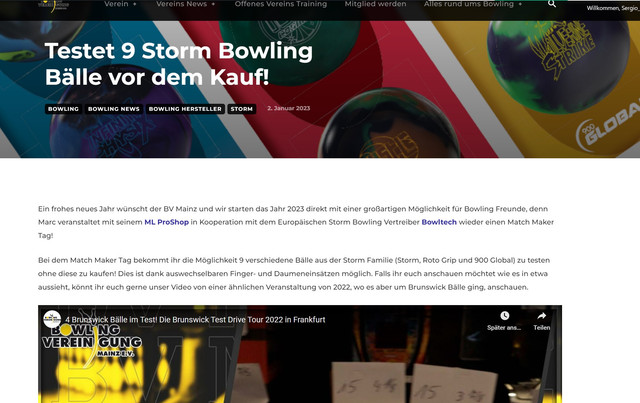
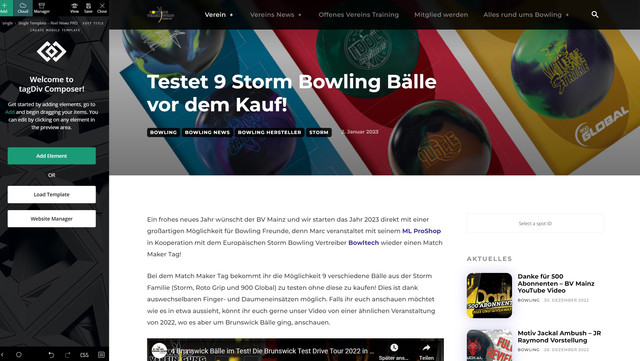
On any article or subpage the sidebar is not displayed as it should next to the main content of the website on the left, it either is beneath the content or behind it, if the content is longer. I am using the Single Template – Reel News PRO and have no idea what is causing the challenges. It is this way in any kind of screen (Laptop, Monitor).
This is how the Website is display currently
This is how it is shown in the backened and how it should be displayed actually
I hope someone can help me out with this topic.
 euphorie-design
Hi there,
thanks for this great wordpress template.
I’ve installed the doctor’s demo theme and have some questions while customizing it.
1) Header picture @doctor profiles: https://demo.tagdiv.com/newspaper_doctors_pro/tdcpt_doctors/herman-rehema/
Where do I change/add the header (cover image) of each doctor profile?
2) Individual ‘Get in touch’: Is it possible to customize the contact form on each profile page? The e-mail should be sent to the e-mail-address of each doctor and not to a general address.
3) Reviews: Is it possible to unlock the review section for everyone without registration? So everybody can submit a review?
4) Search bar on front page (https://demo.tagdiv.com/newspaper_doctors_pro/): Is it possible that the search bar is searching for words in the ‘about’-section of the doctor profile pages, too? Now it only search for the name, location, speciality, but I want to extend this search function.
Thanks a lot in advance!
Tobias
Bettina Hello @ghoangit!
Please let me know which mobile version do you use.
We have 3 options for mobile versions that you can use:
1. Responsive version: A responsive version of your website looks similar to the desktop version. TagDiv Composer is used to edit the page.Click on the mobile viewport: https://www.screencast.com/t/XDQJedlggSB. There, you can see your mobile version and edit or adjust the elements to look better.
2. Mobile pages: https://tagdiv.com/newspaper-10-3-7-update-brings-customizable-and-fast-mobile-pages
3. Mobile theme plugin: The Mobile Theme is a performance-optimized theme included in the main Newspaper theme that only loads on mobile devices. It comes with its own templates and designs for pages, posts, categories, etc., so your current templates from the desktop theme will get converted to the mobile theme layout. Please see https://forum.tagdiv.com/the-mobile-theme/ and https://forum.tagdiv.com/mobile-theme-introduction/ for more information.
A full explanation is here: https://www.youtube.com/watch?v=SpGkOnJeNZY
If you need to use the mobile version 1 or 2, then you need to uninstall the Mobile Theme plugin.
Thank you!
Bettina Hello @sco!
If you leave the field empty, then the search will only show pages and posts.
Unfortunately, we do not have filters in this search functionality. We have some filters on the search page, as well as a template in the element as a posts loop or flex blocks.
Thank you!
Anamaria Hello,
Unfortunately, I do not exactly understand what you mean or your request. Please provide more details about your encountered problem, you can include screenshots.
A solution for sending a screenshot is this:
Download, capture, send: https://www.techsmith.com/jing-tool.html
Using our theme you can choose from 3 mobile versions
-> mobile responsive => https://www.screencast.com/t/oJ2ShOp47
-> mobile theme plugin => https://forum.tagdiv.com/the-mobile-theme/
-> mobile page => https://tagdiv.com/newspaper-10-3-7-update-brings-customizable-and-fast-mobile-pages/
Suppose you created the mobile pages with tagDiv Composer. In that case, when you install the Mobile Theme plugin, your pages will be overwritten by the plugin (the mobile theme comes with its templates for page, post, category, etc so your current templates from the desktop theme will get converted to the mobile theme layout, the page content is made without builders in mobile editor => https://www.screencast.com/t/xbgZG8kH also, the options that are provided to edit the mobile theme version are limited (this keeps the things simple)).
This is a video about Responsive Newspaper Theme, AMP & Mobile Theme, Mobile Pages & Templates -> https://www.youtube.com/watch?v=SpGkOnJeNZY
So, the mobile responsive is what you see then that you select the viewport on phone => https://www.screencast.com/t/matV17hH, so some settings may apply for each viewport(where is the border blue), and others are not(where the border is black).
The mobile page has the mobile templates from Cloud Library => https://www.screencast.com/t/YCcZ8rL8
Mobile responsive version of the theme and the mobile page editor can be edit with tagDiv Composer, the mobile theme plugin not.
For example, you can have the mobile theme plugin activate and use the mobile page/mobile responsive version for the homepage/pages, but for the categories pages/404 page you can’t use the mobile page/mobile responsive version if you have the mobile theme plugin activate.
So, if you want to design the pages with tagDiv Composer, you can use the mobile page or mobile responsive version.
Thank you!
Anamaria Hello,
You can create a page with tagdiv Composer -> https://forum.tagdiv.com/add-contact-form/. You can create one page and edit it with tagdiv Composer.
You can add the text/shortcodes in the column text or text with title.
“Column text” and “text with title” elements have a button called “edit content” and if you click on that button, the WP Editor will open and you can add some text/code/shortcode there. Close the WP Editor from X, save the changes from Composer and view the page to see the changes.
The theme comes with a few predefined page templates; they can be used on any page. When you import a page template, you can find the page imported in the pages section -> https://i.imgur.com/dC9uTep.png and edit the pages with tagdiv Composer.
You can find pages for contact, login -> https://cloud.tagdiv.com/#/load/Pages
Thank you!
Bettina Hello David!
We have 3 options for mobile versions that you can use:
1. Responsive version: A responsive version of your website looks similar to the desktop version. TagDiv Composer is used to edit the page.Click on the mobile viewport: https://www.screencast.com/t/XDQJedlggSB. There, you can see your mobile version and edit or adjust the elements to look better.
2. Mobile pages: https://tagdiv.com/newspaper-10-3-7-update-brings-customizable-and-fast-mobile-pages
3. Mobile theme plugin: The Mobile Theme is a performance-optimized theme included in the main Newspaper theme that only loads on mobile devices. It comes with its own templates and designs for pages, posts, categories, etc., so your current templates from the desktop theme will get converted to the mobile theme layout. Please see https://forum.tagdiv.com/the-mobile-theme/ and https://forum.tagdiv.com/mobile-theme-introduction/ for more information.
A full explanation is here: https://www.youtube.com/watch?v=SpGkOnJeNZY
If you need to use the mobile version 1 or 2, then you need to uninstall the Mobile Theme plugin.
Thank you!
 luca.mosca
I’m finding it really hard to create a page template for the “Medicine Pro”.
For some static sections of the website as the about us, policies, contact, etc. I want it to be pages, but can’t really find an easy guide on how to create them keeping the looks of the main site.
Any quick guide to do it? I’m used to wordpress and builders, but completely new to tag-div.
Anamaria Hello,
The mobile theme comes with its own templates/design for pages, posts, categories, etc so your current templates from the desktop theme will get converted to the mobile theme layout. For more details, please take a look here: https://forum.tagdiv.com/the-mobile-theme/ and https://forum.tagdiv.com/mobile-theme-introduction/3
The mobile theme requires the “265×198” and the “741×486” thumbnail sizes in order to show the featured images properly.
This can be found here: https://www.screencast.com/t/N18dR3qZrh -> https://forum.tagdiv.com/theme-thumbs/
Thank you!
Anamaria Hello @rickyrt,
To have the tagdiv Composer, you must import a Single Post Template for posts from the tagdiv Cloud Library.
Documentation here: https://forum.tagdiv.com/design-post-pages-using-cloud-library-templates/
Thak you!
 prof_zbidi


