
- NewspaperWP Rocket and Newspaper Theme: Optimization Guide
- TutorialsDefault Block Settings Guide
- TutorialsOffset Feature
 Calin
Calin Hi
I see, I believe that in this case the problem was related to the cloud category template that you have set. Didi you use a mobile page template on this one and after that the mobile template was deleted? I remember that in this situations the results were similar with yours.
I’m glad that at least you managed to resolve it even if it was necessary to create a new one.
Have a nice day!
 Anamaria
 Hi,
Using our theme you can choose from 3 mobile versions
-> mobile responsive => https://www.screencast.com/t/oJ2ShOp47
-> mobile theme plugin => https://forum.tagdiv.com/the-mobile-theme/
-> mobile page => https://tagdiv.com/newspaper-10-3-7-update-brings-customizable-and-fast-mobile-pages/
If you created the mobile pages with tagDiv Composer, then when you install the Mobile Theme plugin, your pages will be overwritten by the plugin (the mobile theme comes with its templates for page, post, category, etc so your current templates from the desktop theme will get converted to the mobile theme layout, the page content is made without builders in mobile editor => https://www.screencast.com/t/xbgZG8kH also, the options that are provided to edit the mobile theme version are limited (this keeps the things simple)).
This is a video about Responsive Newspaper Theme, AMP & Mobile Theme, Mobile Pages & Templates -> https://www.youtube.com/watch?v=SpGkOnJeNZY
So, the mobile responsive is what you see then that you select the viewport on phone => https://www.screencast.com/t/matV17hH, so some settings may apply for each viewport(where is the border blue), and others are not(where the border is black).
The mobile page has the mobile templates from Cloud Library => https://www.screencast.com/t/YCcZ8rL8
Mobile responsive version of the theme and the mobile page editor can be edit with tagDiv Composer, the mobile theme plugin not.
For example, you can have the mobile theme plugin activate and use the mobile page/mobile responsive version for the homepage/pages, but for the categories pages/404 page you can’t use the mobile page/mobile responsive version if you have the mobile theme plugin activate.
So, if you want to design the pages with tagDiv Composer, you can use the mobile page or mobile responsive version.
Hope this helps you!
Thank you!
 Stanford Nix
 None of those solutions worked. I already made sure my cloud templates where set and that each category was using the correct theme.
I had to rebuild the category template page so it would work correctly.
 Subin Chandran
The web page at https://ibcmedia.in/wp-admin/post.php?post_id=1634&td_action=tdc&tdbTemplateType=page&prev_url=%2F%2Fibcmedia.in%2F might be temporarily down or it may have moved permanently to a new web address.
ERR_HTTP2_PROTOCOL_ERROR
this is the error message i am getting please help me to rectify this prob
Subin Chandran The web page at https://ibcmedia.in/wp-admin/post.php?post_id=1634&td_action=tdc&tdbTemplateType=page&prev_url=%2F%2Fibcmedia.in%2F might be temporarily down or it may have moved permanently to a new web address.
ERR_HTTP2_PROTOCOL_ERROR
This is the error message i am getting
Anamaria Hello,
Please provide more details about your issues.
Do you have this error -> https://i.imgur.com/WL8qGwV.png ? if yes, then please use a revision of the page/template.
Also, please check this topic: https://forum.tagdiv.com/topic/error-at-zones-6models-1dom-the-model-does-not-match-the-content-currene/.
A solution for sending a screenshot/video is this:
Download, capture, send: https://www.techsmith.com/jing-tool.html
After making the screenshot, you will have a link, paste it here.
Thank you!
Anamaria Hello,
For logo please edit with tagDiv Composer, select the viewport on phone, select the header logo and change it => https://i.imgur.com/cR7F0v4.png https://www.youtube.com/watch?v=HXQQygkCCJo -> https://forum.tagdiv.com/add-logo-newspaper/
Seems you have the Mobile theme plugin activated, and it is disabled for the homepage. When you install and activate the Mobile Theme plugin, your pages will be overwritten by the plugin (the mobile theme comes with its own templates for page, post, category, etc so your current templates from the desktop theme will get converted to the mobile theme layout, the page content is made without builders in mobile editor => https://www.screencast.com/t/xbgZG8kH also, the options that are provided to edit the mobile theme version are limited (this keeps the things simple)).
Better deactivate the plugin and see the results
Also, if you create a mobile page, please make sure you assign it like this https://www.screencast.com/t/lektAhyjd
This is a video about Responsive Newspaper Theme, AMP & Mobile Theme, Mobile Pages & Templates -> https://www.youtube.com/watch?v=SpGkOnJeNZY
Please check this topic where I explained each mobile version -> https://forum.tagdiv.com/topic/mobile-version-not-working-properly-2/ and choose what mobile version you want.
Thank you!
Stanford NixI have edited the cloud template for the category page in cloud templates. When I view the page in TD composer, it looks fine. But when I view ANY category page from my phone it is using a different theme layout!
The theme should look like this
but when I view on my phone it looks like this
PLEASE HELP! I launch my new subscription offers this weekend and I dont want my website to look like this. I just updated to newspaper 12 but I dont think that is the issue. I also have every category using the selected theme in theme panel
 Stexs
StexsHi, I have a site staging environment and I’m making some changes to some pages. Then I would like to bring them back to the original (production) site. I ask you if it is possible to use the template code (in edit page). Copy it from the staging and paste it on the new one. Does it create conflicts instead of directly modifying the production one?
I noticed that only changes to theme settings can be exported and not templates.
Thank you.
 jctruitt
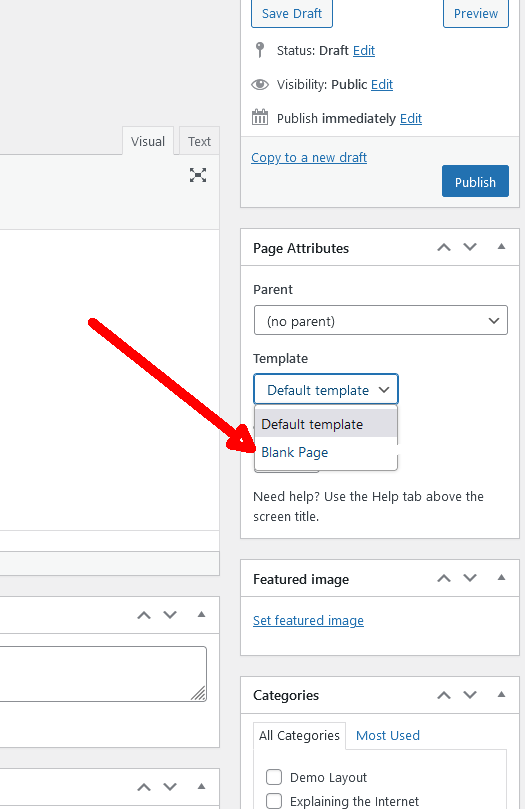
 Hi, I want no header, footer or sidebar, only the page content. The default wordpress themes come with a blank page template. Thank you
 marco.ruffelli
Hi,
I have assigned cloud templates to categories. If I am logged in and click on the load more button, the following category posts in the current language are correctly loaded.
If, on the other hand, I view the site not logged in, the posts of the main language (in my case Italian) are loaded.
I use Newspaper in version 11.5.1 and wpml updated to the latest version.
Below is a link to a page that presents the problem:
https://cucineditalia.com/en/category/design-en/
Here instead the screenshots of the two versions displayed:
logged
no logged
Thanks for support
Anamaria Hello,
There are two blocks one Big Grid Flex and one Posts Loop, the Big Grid Flex can be filtered to display a category, and the posts loop doesn’t have a filters option, and will display all posts from that category, so the pagination is only for Posts Loop, not for all blocks from that template, so the first block will display the same posts for all pages, what I can suggest is to hide the first block for the rest of pages, using this option on the row https://i.imgur.com/QeLwGav.png
Thank you!
 adityafarrad
Hi,
I am using Newspaper theme and have styled my post, categories, etc pages. But the Newsletter Archive page (https://example.com/newsletter/archive/url) is not using any of the templates. How to use style for this custom post?
I am using the Newsletter Glue plugin to publish the newsletter.
Regards,
Aditya
Calin Hi,
Please try the settings from this guide https://www.infophilic.com/get-almost-100-pagespeed-newspaper-theme/
I hope this will help you to improve the speed.
Also for the mobile version, please try to use the mobile theme plugin or the mobile page template -> https://www.youtube.com/watch?v=SpGkOnJeNZY
Thank you!
Anamaria Hello,
You can import NFT Template from tagdiv Cloud Library for your posts https://forum.tagdiv.com/cloud-library-templates/ -> https://forum.tagdiv.com/design-post-pages-using-cloud-library-templates/
Thank you!
Anamaria Hi,
The mobile theme comes with its own templates for page, post, category, etc so your current templates from the desktop theme will get converted to the mobile theme layout, the page content is made without builders in mobile editor => https://www.screencast.com/t/xbgZG8kH also, the options that are provided to edit the mobile theme version are limited (this keeps the things simple)).
So, if you want to use the cloud templates, then you need to disable the mobile theme and AMP plugins, and then use the responsive version.
You can use cloud templates with AMP.
Also, please check this topic where I explained each mobile version -> https://forum.tagdiv.com/topic/mobile-version-not-working-properly-2/ and choose what mobile version you want.
Thank you!
Calin Hi,
If I correctly understand you need an empty page that has only header and footer, for this add a new page an select the default template -> https://i.imgur.com/pf6W0et.png also to remove the sidebar set this option -> https://i.imgur.com/rUKp7Px.png
Thank you!
jctruittHi, I need to pull data using iframes from my website with the Newsmag theme to another website. How do I create a single custom page template that does included the header or footer of a page? I want only the information in the page itself. Thank you
 Bettina
 Hello Laszlo!
The AMP works better only with the Mobile Theme plugin. From my point of view, if you don’t use the Mobile Theme plugin, then there is no reason or benefit to AMP. Please read all about AMP here: https://forum.tagdiv.com/tagdiv-amp-plugin-tutorial/
It comes with its own templates/design for page, post, category, etc so your current templates from the desktop theme will get converted to the mobile theme layout. Documentation here:
– https://forum.tagdiv.com/the-mobile-theme/
– https://forum.tagdiv.com/mobile-theme-introduction/
Thank you!
Bettina Hello @wydawca !
The Standard Pack plugin is useful only if you are using the default templates.
But, we recommend you to use cloud/PRO templates in order to have the possibility to edit them with the TagDiv Composer which contains a lot of functions and features, please check our tutorial here: https://forum.tagdiv.com/tagdiv-composer-tutorial/
Documentation here:
– https://forum.tagdiv.com/cloud-library-templates/
– https://forum.tagdiv.com/design-post-pages-using-cloud-library-templates/
– https://forum.tagdiv.com/cloud-library-category-templates/
If you are using a cache plugin, deactivate it, clear all cache and try again.
Thank you!
Anamaria Hi,
You can duplicate the header template and assign it to the template and set the menu or redesign the header -> https://i.imgur.com/ZQlWeP9.png -> https://forum.tagdiv.com/topic/different-logo-in-categorypage/
Thank you!
Anamaria Hello,
You can use a different template for every article if you use a cloud template. You can duplicate a template, install a new one and assign it to the posts you like, or create one from scratch by importing a blank template and building it as you like.
Check this topic: https://forum.tagdiv.com/topic/different-logo-in-categorypage/; Here is explained how to duplicate a header correctly and do some changes for a single post template or other templates.
Thank you!
 Mir Bhai
I am each
I want to have a separate header and design on the category page.but I have only one category template here..and I want to have a separate design for each post page (category-wise)
Bettina Hello @Sikandar!
We have 3 options for mobile versions that you can use:
1. Responsive version: A responsive version of your website looks similar to the desktop version. Edit the page with TagDiv Composer. Click on the mobile viewport: https://www.screencast.com/t/XDQJedlggSB; there you can see your mobile version and edit or adjust the elements to look better.
2. Mobile pages: https://tagdiv.com/newspaper-10-3-7-update-brings-customizable-and-fast-mobile-pages
3. Mobile theme plugin: The Mobile Theme is a performance-optimized theme included in the main Newspaper theme that only loads on mobile devices. It comes with its own templates and design for pages, posts, categories, etc., so your current templates from the desktop theme will get converted to the mobile theme layout. Please see https://forum.tagdiv.com/the-mobile-theme/ and https://forum.tagdiv.com/mobile-theme-introduction/ for more information.
A full explanation is here: https://www.youtube.com/watch?v=SpGkOnJeNZY
Thank you!
Bettina Hello @diocesipn !
Check in the Newspaper -> Theme panel -> Header -> Logo & Favicon -> Text Logo, text logo tagline.
Are you using the Mobile theme plugin? For Mobile Theme plugin, you can change the logo from Newspaper -> Theme panel -> Mobile theme -> Header and the copyright text in footer -> subfooter.
You can adjust the logo differently in the mobile viewport: https://www.screencast.com/t/XDQJedlggSB, so then it will fit there.
We have 3 options for mobile versions that you can use:
1. Responsive version: A responsive version of your website looks similar to the desktop version. Edit the page with TagDiv Composer. Click on the mobile viewport: https://www.screencast.com/t/XDQJedlggSB; there you can see your mobile version and edit or adjust the elements to look better.
2. Mobile pages: https://tagdiv.com/newspaper-10-3-7-update-brings-customizable-and-fast-mobile-pages
3. Mobile theme plugin: The Mobile Theme is a performance-optimized theme included in the main Newspaper theme that only loads on mobile devices. It comes with its own templates and design for pages, posts, categories, etc., so your current templates from the desktop theme will get converted to the mobile theme layout. Please see https://forum.tagdiv.com/the-mobile-theme/ and https://forum.tagdiv.com/mobile-theme-introduction/ for more information.
A full explanation is here: https://www.youtube.com/watch?v=SpGkOnJeNZY
Thank you!



