- NewspaperWP Rocket and Newspaper Theme: Optimization Guide
- TutorialsDefault Block Settings Guide
- TutorialsOffset Feature
 ucanhindi
 Hello Calin,
thank you for your instructions
I tried to follow your instructions …
But as you can see I have no footer templates to edit. https://ibb.co/W2T2Scc
Although I have prepared 2 footer templates from Cloud Templates…
https://ibb.co/4WsKwHQ
But the front page does not show any footer templates for editing.
So what now? What’s next?
Could you please help me?
 Calin
Calin Hi,
I think that you are referring to this one -> https://i.imgur.com/vRmUDJy.png this is a live search made by our developers and if you want to have the google custom search instead of it, what you can do is to use tagDiv Composer, edit the page/template and replace that live search with widget search, in this way you’ll use the google custom search.
-> https://i.imgur.com/zoQfW2N.png use the right click to remove the element ->https://i.imgur.com/G8KTLtY.png
Thank you!
 Vlad S
 Hello !
Yes, you can create a post template that can be assigned only to a specific category. First create the post template and add your ads in it: https://forum.tagdiv.com/design-post-pages-using-cloud-library-templates/ ; https://www.youtube.com/watch?v=fa7GenCHcBU&t=2s
After you have created the post template you can assign it to only one category as you can see here: https://www.screencast.com/t/Ec38yiJ0HikO
Thank you !
Calin Hi,
Our theme alredy have this option:
“Recently I found an AMAZING plugin, which I wish you would have it build-in within your theme:
https://connekthq.com/plugins/ajax-load-more/add-ons/next-page/” we have a similar option -> https://forum.tagdiv.com/posts-with-pagination/ this option can be use if you are using the classic editor or using the classic element from Gutenberg editor.
Also if you are using a single post template from tagDiv Cloud library, you can edit it with tagDiv Composer and set the infinite loading option on it -> https://tagdiv.com/infinite-loading-for-single-posts/
Let me know if this is what you needed!
Thank you!
 suttyszota
 Basically the whole site was working fine before the update but now it looks like I’m going to have to redo all the pages/templates for mobile? Please tell me this isn’t the case?
Calin Hi,
Thank you for your kind words!
1. This is because you are using a footer template from tagDiv Cloud Library, this can be edited only from frontend with tagDiv Composer.
2. That is a plugin conflict and appear only when you have enable WP Bakery plugin and you are using cloud templates from tagDiv Cloud Library or a pro demo, these can be edited only with tagDiv Composer.
Thank you!
Calin Hi,
The footer can be edited only from frontend, edit a page/post template with tagDiv Composer and go down to footer, or if you want to assign one, use the manager -> https://i.imgur.com/Q5PeHkp.png (the footer templates does not have the button to be edited in backend).
Also now I can see the footer and the page seems to be display correctly -> https://i.imgur.com/qwN88ZB.png but indeed sometimes appears the mobile version, this can be from the cache plugins you are using.
Hope this will help you to understand how footer templates are work!
Thank you!
Vlad S Hello !
Unfortunately option 1 is not possible, we do not offer any ad rotate option. For the option 2, Yes, you can create as many adboxes as you want on a page / post template. And for 3, you are limited by the theme panel at the moment.
You can test out an external plugin for ad rotation that might be more helpful.
Thank you !
Calin Hi Yogesh1,
If you want to remove the date 1,2, 3 date from website you can use the general options from theme panel -> https://i.imgur.com/s7hCDue.png
Also if you are using a pro demo, these are using cloud templates and can be edited using tagDiv Composer, also the elements use are flex blocks and flex grids these can be edited using tagDiv Composer and apply these options individual -> https://i.imgur.com/36B31xz.jpg -> https://i.imgur.com/WFuLZkK.jpg
If there is something that is not clear or you have other questions, please let me know!
Hope this will help you!
Calin Hi,
Using the mobile theme plugin, you’ll gain a better speed then responsive version of theme, but in order to achieve that speed you’ll need to create a new content for pages because in the most of cases those were made with builders or shortcodes ( tagDiv Composer, WPBakery ) and you need to use only the mobile editor ( you need to set the content for pages in mobile editor -> https://i.imgur.com/ho41rUl.png and this content will be display on mobile theme, also the mobile theme will not display any sidebar)
-> https://i.imgur.com/9d0UWLT.png
Also you can show the responsive version on mobile theme (to get the same layout as on desktop on mobile) -> https://i.imgur.com/m0bVB5T.png you can check more details about mobile theme in our documentation -> https://forum.tagdiv.com/the-mobile-theme/ or if you want to have the responsive version only, you can use the amp option from mobile theme -> https://i.imgur.com/oofST3D.png (to use the mobile theme template on amp) or you can disable the plugin.
These options are like this:
Mobile -> the mobile theme will apply only on mobile version.
Mobile + amp -> it will apply on both and it will have the same layout.
Amp -> the mobile theme plugin layout will be use only for amp version.
Thank you!
 ricardoparreira
Hi,
I imported the post racing template and the page does not change.
Theme Panel> Post Setting> Default post template (site wide)> I chose the template
ucanhindi Corrected version
Hello
I have a big problem with “foot templates”.
I cannot edit existing or newly created footer templates.
For example, if I have created completely new footer templates after created come back to “pages area”.
As usually back to always the Templates area. But this error(!) only happens with footer templates. With other templates(For example: Pages, Header, Single… etc) I can edit.
Note: All footer templates do not show “Edit with TagDiv Composer” which only shows “Edit”
ucanhindiHello
I have a big problem with “foot templates”.
I cannot edit existing or newly created footer templates.
For example, if I have created completely new footer templates after created I come back to “pages area” Not usually back to the original area. But that only happens with foot templates.
With other templates, I can edit.
Note: All footer templates do not show “Edit with TagDiv Composer” which only shows “Edit”
<img src=”https://drive.google.com/file/d/1ltK91yXBsklJ2o_TG0EL_Dn2DIse4FWm/view?usp=shari
ng” alt=”null” />
 worldinsport
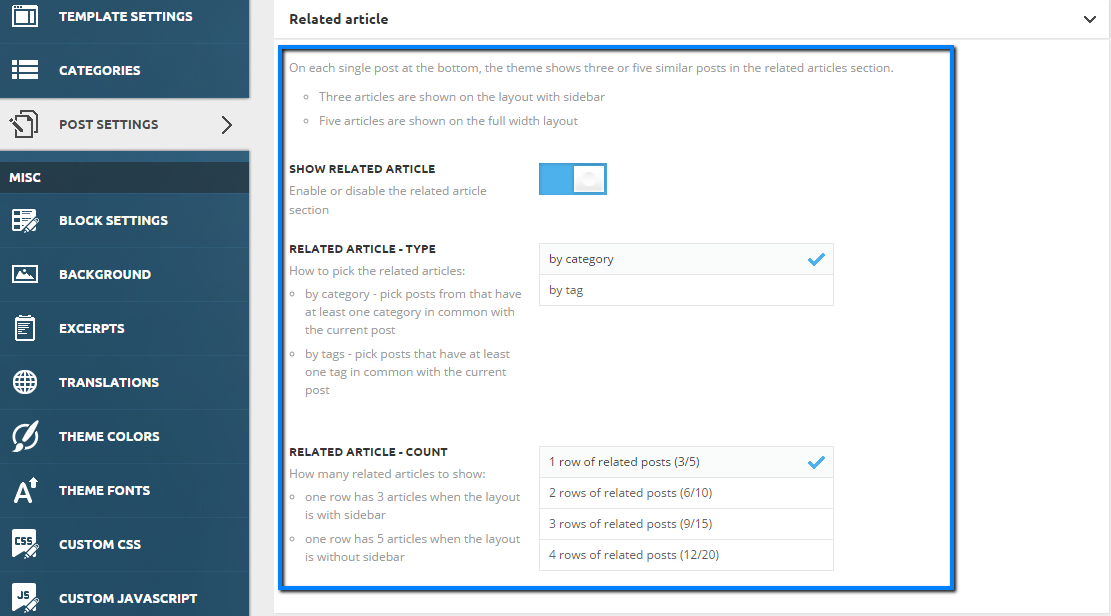
 I have customized my own template for the post pages, how can add an element for related posts – more from the author?
If I use the standard template with newspaper for post pages, then that element is there. When I try to add an element in composer I am unable to find it?
https://forum.tagdiv.com/wp-content/uploads/2015/05/related_articles_settings.png
 Kafraneokese
I edited a single post template for desktop and mobile.
The ad codes are not saving in single post content.
This is my ads code from goolge;
<script data-ad-client="ca-pub-9836362449699621" async src="https://pagead2.googlesyndication.com/pagead/js/adsbygoogle.js"></script>
They keep disappearing on saving and reload of tagDiv Composer and ads never show.
Any help?
Thank you.
 homeworlddesign
Buna ziua,
Am trecut cu Front Page la pagina statica, dar am o necunoscută.
Folosesc un template din library care imi preia ultimele articole, ca si la blog.
Ce setari fac in settings – reading? WordPress imi recomanda sa fac o pagina HOMEPAGE goala si incă o pagină unde se publica articolele POSTS PAGE.
E bine daca setez la HOME PAGE template -ul Newspaper si la POSTS PAGE nu setez nimic?
Am incercat sa fac o pagina goala HOME PAGE si una POSTS cu template, cum recomanda wordpress, dar nu funcționeaza.
Multumesc
 DKF Reisverhalen
Hi there,
I’m using Flex Block 1 on my homepage (Travel pro template). All of a sudden the border around the text does not fit. It’s about a pixel to high. I can’t remember changing anything. I can’t find the settings to fix it. It ‘s on all the different flex blocks I use. Can you help me out?
https://imgur.com/a/deqcUmQ
Vlad S Hello !
You cannot edit the Mobile Theme plugin. You can however now choose to design your mobile viewport templates as you can see here: https://tagdiv.com/newspaper-10-3-7-update-brings-customizable-and-fast-mobile-pages/
Also follow this topic for more information about the new mobile templates: https://forum.tagdiv.com/topic/mobile-themes-cloud-library-v10-3-7-update/
Thank you !
Calin Hi expertek,
I think that you got it a little wrong!
There is no premium theme that can provide for any content over 90 speed, the page speed depends a lot of your content, if you are using small images and more text then the theme will be faster, also if you do not use the mega menu it will be more faster and so on. But if you want to have a nice website and an attractive one, then you’ll use different style and options, a lot of images, videos and most of text will be only inside the posts. When you do this, then you’ll need to use other methods to make the site faster, because the content became bigger. All these optimize can not be achieve using only the theme, therefore you’ll need a cache plugin, maybe a CDN and so on.
Here are some articles about this:
Why Page Speed Matters and How to Improve It
Page Speed
About PageSpeed Insights
Also you can make some tests: for example use only the theme without theme plugins, then you’ll have a simple theme like these free from WordPressn and you’ll not be able to do anything spatial, but the page speed will be quite good, after that activate tagdiv Composer and standard pack, install a standard demo and check again, then the last test disable the standard pack and activate the cloud template and install a pro demo. You’ll see that the more options and effects the theme has the speed will be a little lower and this is happen with all big/premium themes.
Thank you for your understanding!
 DM_Web-Team
In our project I selected “Create Mobile Page” on the start page and created one. It has so many errors that I deleted the Mobile Page, but unfortunately the website still shows me the view created in the Mobile Page template ….
The mobile view on the website is now a disaster 🙁
How can I fix the problem quickly?
 chabotjeff
I’m using Default PRO. There are many templates in use. Where can I edit the templates for Posts, Pages and other main templates if there is no link in top menu to Edit Template? I would like to modify the sidebars and footers.
 Soundqubed
I have three sites DEV, TEST and PROD. I have our logo in SVG format and wanted to use it in the Newspaper theme. On the DEV site I had also added the SVG plugin so I could add SVG’s to the media library. The TD Composer option worked as well by adding its text into the entry area. I then moved it over to TEST, which does not have the SVG plugin, Only the TD Composer and entered the text of the SVG into it and it worked. Finally, I was to add the SVG to the PROD site, which like TEST does not have the SVG plugin , only the TD Composer option. But every time I try to add the text of the SVG into the text entry and click save, it just leaves the save icon spinning forever, every time.
So my questions would be, what would cause only the SVG edit to hang , was doing a big menu modification and everything else worked with TD Composer by using the direct Page or Cloud Template editing. No errors are taking place, it just hangs and never save the SVG in the config text area?
 Ravi tej
I have updated the newspaper theme and my homepage has gone offline.
Vlad S Hello !
After you create your mobile template you can go and edit it by clicking here: https://www.screencast.com/t/y3OKquwZFF
That is because you now have the option to switch between viewports when editing your templates.
Find out more information here: https://tagdiv.com/newspaper-10-3-7-update-brings-customizable-and-fast-mobile-pages/
Thank you !
Calin Hi nawaz1983,
This can be done in two ways:
1. Use two tabs, in one of them you need to have the category cloud template and in the second one the search cloud template, then you should be able to use the right click to copy and paste that element.
2. Save that post loop as an element in tagDiv Composer -> https://tagdiv.com/right-click-menu-tagdiv-composer/ then this element will appear on cloud templates and pages where you can use it.
hope this will help you!