- NewspaperWP Rocket and Newspaper Theme: Optimization Guide
- TutorialsDefault Block Settings Guide
- TutorialsOffset Feature
 Anamaria
 Hi,
You can use singlecloud templates, and in this way, you can add the shortcode to the single post template using the column text element.
A shortcode can be inserted by using the element called “Column text” or “Text with title”. “Column text” and “text with title” elements have a button called “edit content” and if you click on that button, the WP Editor will open, and you can add some text/code/shortcode there. Close the WP Editor from X, save the changes from Composer and view the page to see the changes.
If you want to use template from theme panel, then you need to edit the template that is used for the template and set it in the child theme.
Thank you!
 STARSonTV
 Hello Bettina,
no it should display on the attachment page, like that:

The attachment page was set to global in clud templates, but it does not appear when you call up https://www.starsontv.com/?attachment_id=100756.
Greetings
Sebastian
 Bettina
 Hello @peters1964!
Edit it with the tagdiv composer from here: https://app.screencast.com/QAHStujBIzq5f
Start customizing it as you like. You can import from the Cloud Library sections, blocks, etc. already designed: https://app.screencast.com/XmXeN3Cf760TK
The page templates can’t be global on each page, and it is not working as a single template, for example.
Thank you!
STARSonTVHello everyone,
I have a big problem and the attachment page on my website is not working.
Whenever I enter https://www.starsontv.com/?attachment_id=100756 in the browser line, I am taken directly to the image, but not to the attachment page. It looks like this.
https://www.starsontv.com/wp-content/uploads/2022/04/3_744739.jpg
What can I try now? I really have tried everything.
The attachment page is also set to global in the cloud templates.
I really don’t know what to do.
Can anyone help me with my problem, that would be really great.
Thank you in advance.
By the way, I use RankMath as a seo plugin, if that helps.
Greetings Sebastian
 janamtrup
Hello
I have som pages being page 1 Google, now we are setting up ADS using the TagDiv editor in artickle templates.
But we would like to know, if using TOP BANNER ADS actually effects SEO negative. Meening, dos this in anyway in Google mind, push down the text. ?
If so, and I think you know after many years, then it could be better to not use top banner and only inline ads ?
What are your opinion on this please.
Thanks
 Calin
Calin Hello,
1. This situation is because there are some elements that still have the text set to be center or left align and it will be need to edit each of them in part, but this will take a lot of times, so if you want a quick solution, try this custom css:
body .td-container-wrap .td_block_wrap {

    text-align: right;

}
Just set this code in the theme panel > custom code > custom css and the results should be – https://i.imgur.com/HLn9m59.png
2. A part of fonts indeed can be set from the theme panel, but using cloud templates you’ll need to apply the font on those too, for this you’ll need to edit each cloud template and select the manager then the Global font and replace there all fonts with Persian – https://i.imgur.com/7MqBLe4.png (this can be done on pages and cloud templates).
I hope this will help you!
Thank you!
 peters1964
Hi,
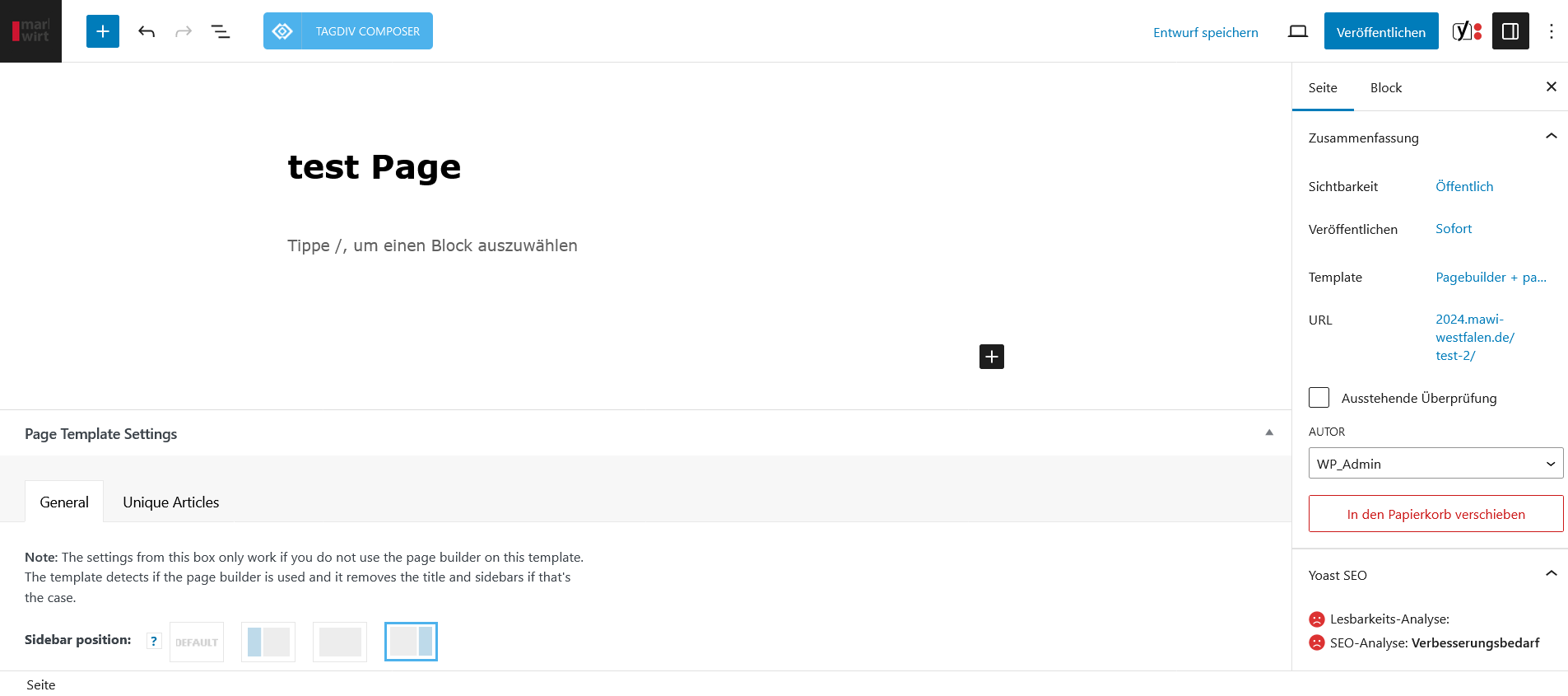
I would like to create a page in WordPress with a news paper template, but the template is not displayed in the WordPress editor after downloading? What can I do?
https://2024.mawi-westfalen.de/wp-content/uploads/2024/02/Screenshot-page-building.png
I am a beginner, are there any tutorials or videos in german language,
Thank you very much!
 GregorS
 I did have an issue with the theme – couldn’t register it for some reason. But this is now fixed. The code still does not work on that page.
This is an example of a shortcode (one of many on the page):
[td_block_big_grid_1 sort=”featured” category_id=”2″ td_grid_style=”td-grid-style-4″ tdc_css=”eyJhbGwiOnsiZGlzcGxheSI6IiJ9fQ==”]
[td_block_11 custom_title=”Title” header_color=”#55a4c1″ category_id=”” sort=”” block_template_id=”td_block_template_1″ header_text_color=”#000000″ ajax_pagination=”next_prev”]
Anamaria Hello,
This is a page https://www.aei.org/policy-areas/education/, not a template for the category.
You can customize the category template. For the category template, please use posts loop; if you have set a posts loop then will display all posts in this category or you can use Flex Block/Big Grid Flex and set the filter to “Category -Current category” => https://i.imgur.com/7P99qx0.png and this is why the block will display posts for each category. So, please check the settings.
Thank you!
Anamaria Hi,
sing our theme, you can choose from 3 mobile versions
-> mobile responsive => https://www.screencast.com/t/oJ2ShOp47
-> mobile theme plugin => https://forum.tagdiv.com/the-mobile-theme/
-> mobile page => https://tagdiv.com/newspaper-10-3-7-update-brings-customizable-and-fast-mobile-pages/ The option that you need to use.
Suppose you created the mobile pages with tagDiv Composer. In that case, when you install the Mobile Theme plugin, your pages will be overwritten by the plugin (the mobile theme comes with its templates for page, post, category, etc, so your current templates from the desktop theme will get converted to the mobile theme layout, the page content is made without builders in mobile editor => https://www.screencast.com/t/xbgZG8kH also, the options that are provided to edit the mobile theme version are limited (this keeps the things simple)).
This is a video about Responsive Newspaper Theme, AMP & Mobile Theme, Mobile Pages & Templates -> https://www.youtube.com/watch?v=SpGkOnJeNZY.
So, the mobile responsive is what you see when that you select the viewport on phone => https://www.screencast.com/t/matV17hH, so some settings may apply for each viewport(where is the border blue), and others are not(where the border is black).
The mobile page has the mobile templates from Cloud Library => https://www.screencast.com/t/YCcZ8rL8
The Mobile responsive version of the theme and the mobile page editor can be edit with tagDiv Composer, the mobile theme plugin cannot.
For example, you can have the mobile theme plugin activated and use the mobile page/mobile responsive version for the homepage/pages, but for the categories pages/404 page, you can’t use the mobile page/mobile responsive version if you have the mobile theme plugin activated.
So, if you want to design the pages with tagDiv Composer, you can use the mobile page or mobile responsive version.
Also, please check this topic https://forum.tagdiv.com/topic/amp-pages-not-working-well-with-this-theme/
If the cache plugin does not have mobile support, then the mobile theme version can be delivered instead on the desktop and vice versa.
The solution would be to use the recommended WP Super Cache plugin instead and activate these settings (especially the mobile device support): https://forum.tagdiv.com/cache-plugin-install-and-configure/
Thank you!
Bettina Hello!
If you install the demo with content, then, of course, it will replace all your content and design as well. If you install the demo with no content, then it will replace the previous design. You can import only some sections or templates of your current-designed pages from those demos. The template’s manager is in Cloud Templates.
Do you have custom CSS code for your homepage?
Thank you!
Anamaria Hello,
So, for the pages, you can add new page like here and create it with tagdiv Composer -> https://i.imgur.com/7DocBaI.png -> https://i.imgur.com/smVRXlX.png
For category, you can assign the template for each category in Theme Panel -> Categories https://i.imgur.com/73rDrdL.png
Thank you!
Thank you!
 newspatron
 My aim was to create a unique home page.
The home page cloud template cannot be used because it may run into speed issues. [As per one of your or your colleague replied]That’s ok .
Therefore what’s the best way to achieve the following using cloud templates?
A unique home page
Unique about Us page
There are about 12 unique pages that need seperate designs.
Unique category pages(s)
For example a unique category page for a tech category and a different for entertainment.
That’s what I was aiming for.
Bettina Hello @jozefradi !
We have 3 options for mobile versions that you can use:
1. Responsive version: A responsive version of your website looks similar to the desktop version. TagDiv Composer is used to edit the page.Click on the mobile viewport: https://www.screencast.com/t/XDQJedlggSB. There, you can see your mobile version and edit or adjust the elements to look better.
2. Mobile pages: https://tagdiv.com/newspaper-10-3-7-update-brings-customizable-and-fast-mobile-pages
3. Mobile theme plugin: The Mobile Theme is a performance-optimized theme included in the main Newspaper theme that only loads on mobile devices. It comes with its own templates and designs for pages, posts, categories, etc., so your current templates from the desktop theme will get converted to the mobile theme layout. Please see https://forum.tagdiv.com/the-mobile-theme/ and https://forum.tagdiv.com/mobile-theme-introduction/ for more information.
A full explanation is here: https://www.youtube.com/watch?v=SpGkOnJeNZY
If you need to use mobile version 1 or 2, then you need to uninstall the Mobile Theme plugin and AMP.
When I try to share an article, I can see that it takes the featured image of your article.
It seems that you have two different single templates for your posts. Assign only one template for both articles. When you access the article, please check which template is assigned, and you can see that on the top bar. For example: https://app.screencast.com/yGnnnMFcWqacY
Thank you!
Anamaria Hi,
I recommend setting the widget in the header; in this way, the widget will be on all pages that have the header template.
Can you please provide more details about what you mean by ” how can separate pages are to be set up via templates?”?
Thank you!
Anamaria Hi,
No, you do not need to have the amp plugin activated for mobile page.
Using our theme, you can choose from 3 mobile versions
-> mobile responsive => https://www.screencast.com/t/oJ2ShOp47
-> mobile theme plugin => https://forum.tagdiv.com/the-mobile-theme/
-> mobile page => https://tagdiv.com/newspaper-10-3-7-update-brings-customizable-and-fast-mobile-pages/ The option that you need to use.
Suppose you created the mobile pages with tagDiv Composer. In that case, when you install the Mobile Theme plugin, your pages will be overwritten by the plugin (the mobile theme comes with its templates for page, post, category, etc, so your current templates from the desktop theme will get converted to the mobile theme layout, the page content is made without builders in mobile editor => https://www.screencast.com/t/xbgZG8kH also, the options that are provided to edit the mobile theme version are limited (this keeps the things simple)).
This is a video about Responsive Newspaper Theme, AMP & Mobile Theme, Mobile Pages & Templates -> https://www.youtube.com/watch?v=SpGkOnJeNZY.
So, the mobile responsive is what you see when that you select the viewport on phone => https://www.screencast.com/t/matV17hH, so some settings may apply for each viewport(where is the border blue), and others are not(where the border is black).
The mobile page has the mobile templates from Cloud Library => https://www.screencast.com/t/YCcZ8rL8
The Mobile responsive version of the theme and the mobile page editor can be edit with tagDiv Composer, the mobile theme plugin cannot.
For example, you can have the mobile theme plugin activated and use the mobile page/mobile responsive version for the homepage/pages, but for the categories pages/404 page, you can’t use the mobile page/mobile responsive version if you have the mobile theme plugin activated.
So, if you want to design the pages with tagDiv Composer, you can use the mobile page or mobile responsive version.
Thank you!
newspatron Thanks for your help. i have managed to get the translations on the posts. so lets consider this partially resolved.
now please guide me how to get it on the pages.
the translation widget is displayed on the home page but not on the other pages.
i am not using a page template or a home page template.
also let me know how i can get the widget on all pages.
also let me know how can seperate pages are to be setup via templates.
Calin Hi skarem100, our theme use dynamic and static text/elements, so some of them will be automatically translated and others will be need to be manually edited (to replace the text). Here are the steps that you need to do:
-> make sure you WordPress language is on Persian (is not a must but it can help you) – https://i.imgur.com/fN1JqqR.png
-> use the theme panel translation option – https://i.imgur.com/K5mbxIX.png – https://i.imgur.com/HIIgUND.png
-> edit the pages and cloud templates with tagdiv Composer select the text/element you want to change – https://i.imgur.com/XMHRrpK.png – https://i.imgur.com/vTaF3OD.png
Thank you!
 leda
ledaI can’t find blank page to add in Page templates from Cloud Library. https://imgur.com/a/Vkc0rGx
 rodgilmour1
Hi
I uploaded a new template without realising it would go live immediately. I had to revert back to newspaper theme but I have since lost the original website homepage and settings. Is there a way of finding and replacing please?
thanks
squashmad.com
Calin Hi,
That section is part from page template “Page builder + latest articles + pagination” and it can be edited from backend at the end of page using the provided options from “Homepage Latest Articles” – https://i.imgur.com/daDBiGZ.png
I hope this will help you!
 happypeoplepickleball
 Thank you I removed the code in the AMP Mobile Device setting. I thought AMP was what I needed to do to create mobile pages for my website. Should I be creating mobile pages through Cloud Templates? Is there a setting? Thank you.
Bettina Hello @lukstan!
We have 3 options for mobile versions that you can use:
1. Responsive version: A responsive version of your website looks similar to the desktop version. TagDiv Composer is used to edit the page.Click on the mobile viewport: https://www.screencast.com/t/XDQJedlggSB. There, you can see your mobile version and edit or adjust the elements to look better.
2. Mobile pages: https://tagdiv.com/newspaper-10-3-7-update-brings-customizable-and-fast-mobile-pages
3. Mobile theme plugin: The Mobile Theme is a performance-optimized theme included in the main Newspaper theme that only loads on mobile devices. It comes with its own templates and designs for pages, posts, categories, etc., so your current templates from the desktop theme will get converted to the mobile theme layout. Please see https://forum.tagdiv.com/the-mobile-theme/ and https://forum.tagdiv.com/mobile-theme-introduction/ for more information.
A full explanation is here: https://www.youtube.com/watch?v=SpGkOnJeNZY
If you need to use mobile version 1 or 2, then you need to uninstall the Mobile Theme plugin and AMP.
Thank you!
happypeoplepickleballhappypeoplepickleball.com
Hi! I am trying to make my website footer and the mobile footer the same. How do I do this?
There is a footer on my mobile site that I don’t know how to access or change. Is this in the cloud template?
Thank you!
Anamaria Hi,
You need to translate the English (original language) header for each language in part – https://i.imgur.com/CDmeHCf.png you should have them for each language cloud template – https://i.imgur.com/4agmUtg.png
A much simpler and faster alternative is to duplicate the cloud template you want to use in another language, edit it and select the desired language – https://i.imgur.com/z1CqgBo.png (edit the name) – https://i.imgur.com/dPX8ROs.png – https://i.imgur.com/Lc81IgP.png This method needs to be used to translate all cloud templates.
The pages are created with tagDiv Composer which is a page builder, when WPML is used it cannot translate everything that was built with the page builder and must be edited for each language separately. Please open the page in the editor and click on translate – https://i.imgur.com/TXH6y1c.png. After, if you duplicate the template, you can edit it to change the logo, menu, and whatever you want.
When you make the corrections, make sure you are on the page with the language you are editing, and if you use the cache, or object cache, please clear it.
Thank you!