- NewspaperWP Rocket and Newspaper Theme: Optimization Guide
- NewspaperBest Of Forums
- NewspaperHow to Make the Site Faster
 Calin
Calin Hi,
tagDiv Composer is the theme builder and in it are all the theme options, if you disable it, all you’ll have will be an default theme from WordPress without extra option (blocks, elements, templates ….).
Therefore the theme can not work without this plugin, sorry! What can be done is to try to improve the website performances.
–> https://tagdiv.com/how-to-increase-page-loading-speed/
-> https://www.infophilic.com/get-almost-100-pagespeed-newspaper-theme/
Thank you!
 Bettina
 Hello!
Please check this topic because it could help you: https://forum.tagdiv.com/topic/low-scores-on-mobile-theme-amp-and-desktop-pagespeed-and-gt-metrics-optimize/
Thank you!
 trebol30
Hello,
I want to completely disable the user registration option. As you can see in the PageSpeed Insights tab in the rendering, this option makes a request that in my case (since I don’t need people to register) I would like to remove. I already had the option disabled as it appears here https://forum.tagdiv.com/login-how-to-enable-user-registration/ both in the theme panel and in the general wordpress settings but it continues to load this option. How can I eliminate that request completely since I don’t need it and it can affect the loading of the web.
I leave you a video so you can see what I indicate https://www.loom.com/share/a4a057d2474a4ff8a42adcd0c495c3ba
Greetings
 xxxLesy
 I think we’re misunderstand each other. I don’t need help speeding up my site. I did all those guides and speed is fine. I’m saying Google PageSpeed mobile tests desktop site instead of mobile, as it should.
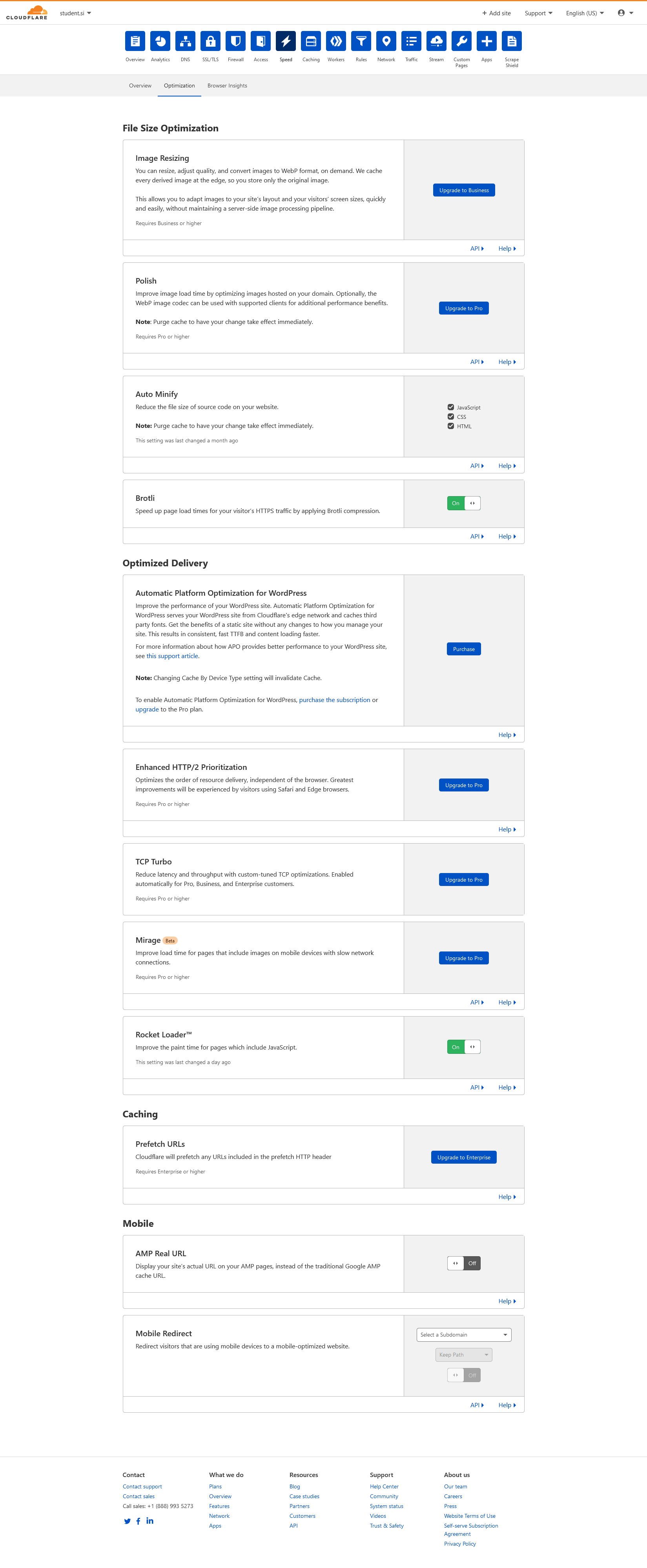
Fortunately I have 2 sites with identical setups and was able to test more. I narrowed the issue down to Cloudflare. As soon as I put my site behind Cloudflare, PageSpeed no longer loads the mobile version of the site. I have Rocket loader off (as well as Brotli), as all the guides suggest. I see Cloudflare has a Mobile Redirect option under speed. Is there any way to use this to redirect PageSpeed to the proper mobile site?
Let me repeat that this only happens for PageSpeed. Actual users see the mobile theme version of the site, as they should.
Calin Hi,
Indeed, there were some changes in google page speed related to some new elements that are specific for page speed, most of them will be fixed in the coming theme update and the website will be faster.
For page speed you need to optimize the theme, for this you can use those guides:
– https://tagdiv.com/how-to-increase-page-loading-speed/
Also if you want you can apply the steps recommended in this article https://www.infophilic.com/get-almost-100-pagespeed-newspaper-theme/ for Newspaper, those should work for Newsmag too.
Thank you for your understanding!
Calin Hi,
For page speed you need to optimize the theme, for this you can use those guides:
– https://tagdiv.com/how-to-increase-page-loading-speed/
Also if you want you can apply the steps recommended in this article https://www.infophilic.com/get-almost-100-pagespeed-newspaper-theme/ for Newspaper, those should work for Newsmag too.
Also there will be soon a theme update that will improve the theme accessibility and this will help to improve the page speed.
Thank you!
Bettina Hello!
If you follow the steps which are presented in this tutorial here: https://tagdiv.com/how-to-increase-page-loading-speed/ you’ll be able to increase the speed of your website.
Also, to increase the page speed you can check these similar topics for more solutions:
– https://forum.tagdiv.com/topic/optimize-script-to-improve-site-speed/
– https://forum.tagdiv.com/topic/a-few-tips-for-newspaper-x-speed-high-cpu-usage-issues/
– https://tagdiv.com/how-to-increase-page-loading-speed/
– https://developers.google.com/speed/docs/insights/v5/about
– https://forum.tagdiv.com/topic/score-100100-pagespeed-with-newspaper-wordpress-theme/
– https://forum.tagdiv.com/topic/newspaper-theme-speedify-your-website/
Please note that page speed is not covered by the support team: https://forum.tagdiv.com/newspaper-theme-support/
Please give it a try and follow the steps which I presented above about page speed.
Also, check our guide from here: https://forum.tagdiv.com/how-to-make-the-site-faster/
Please make sure to use our newest tool called tagDiv CSS Analyzer which comes in handy to resolve some of your issues. Take a look at the video guide here: https://www.youtube.com/watch?v=tnkVapqhIHc
“This custom tool performs an automatic test to find missing CSS rules applied by user interaction. Moreover, you can manually interact with a chosen section/component from the page while the tool records all the involved CSS. It will generate the final CSS file for this page and also will split the rules in Critical CSS to be loaded in the website’s header.” ( https://tagdiv.com/whats-new-in-the-newspaper-theme-10-4-update/ )
We tested our tool on our demos, and we have such great results!
Take a look in this topic because it could help you: https://forum.tagdiv.com/topic/css-analyzer-step-by-step-and-doubts/
Let me know the results!
Thank you!
xxxLesy Thank you Bettina,
Site: https://www.student.si/
PS: https://developers.google.com/speed/pagespeed/insights/?url=https%3A%2F%2Fwww.student.si%2F
Notice on mobile PS it mostly pulls desktop view (big grid: 1 large article + 3 in row bellow) instead of mobile theme (1 banner + grid: 3 articles in a colum) resulting in huge LCP as it renders desktop size images.
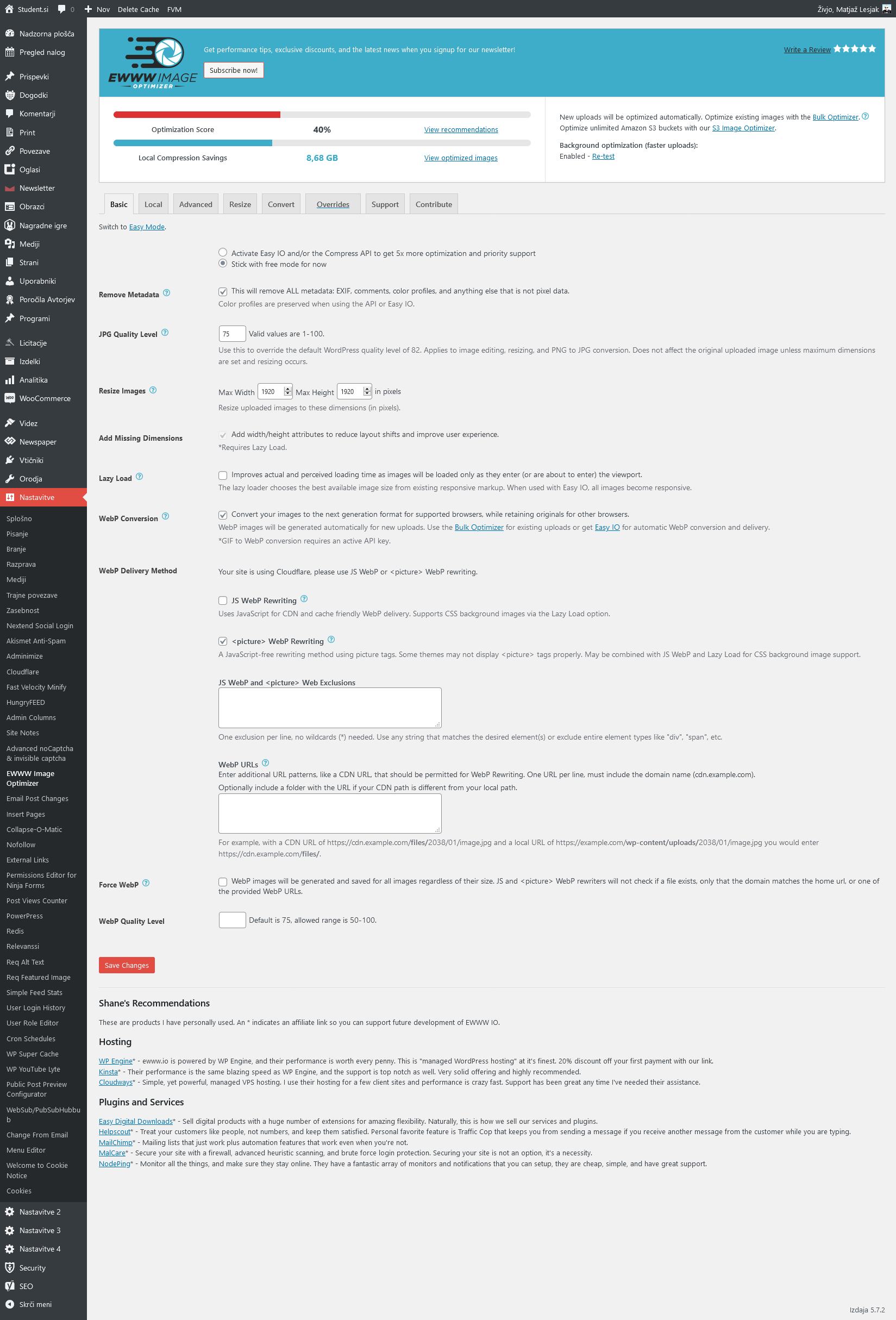
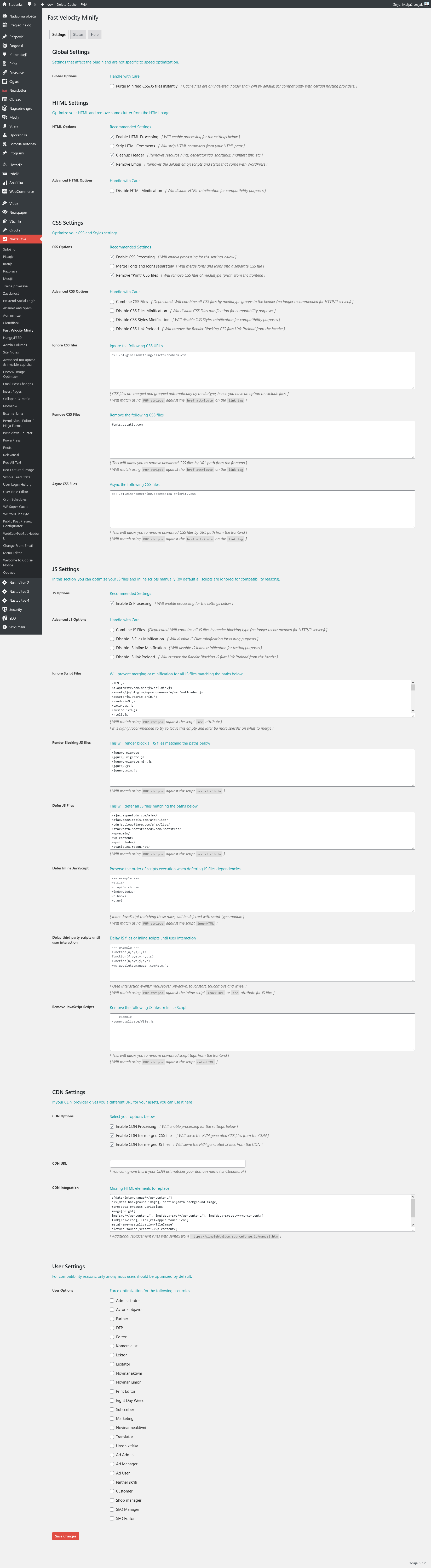
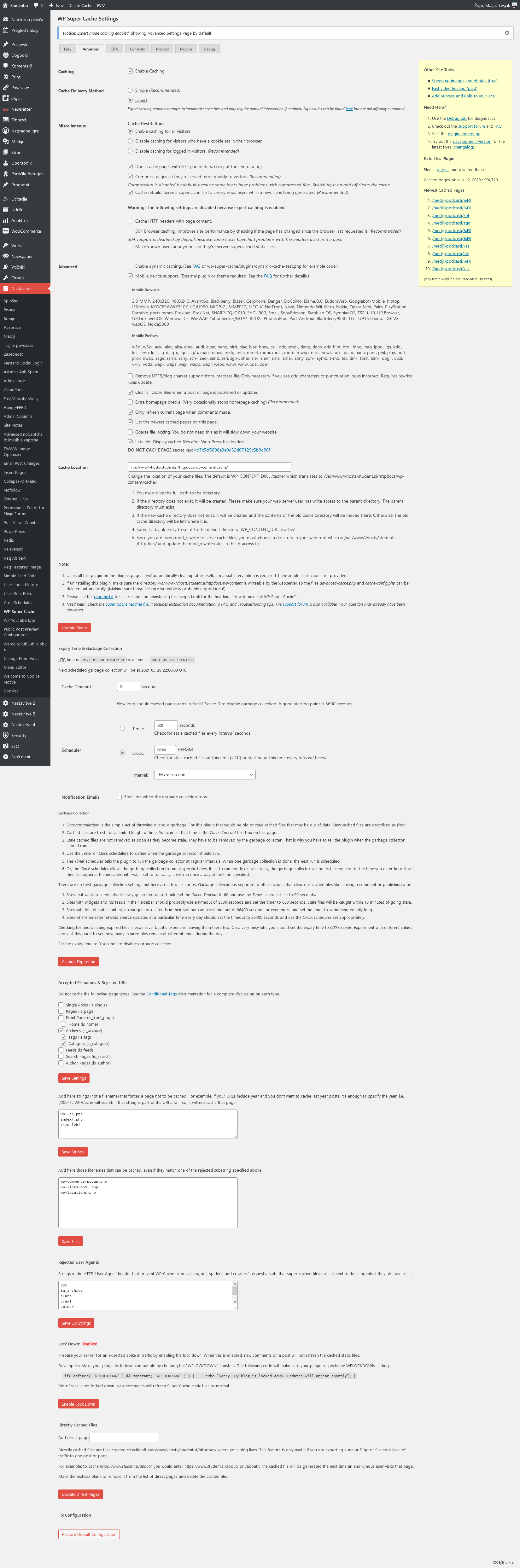
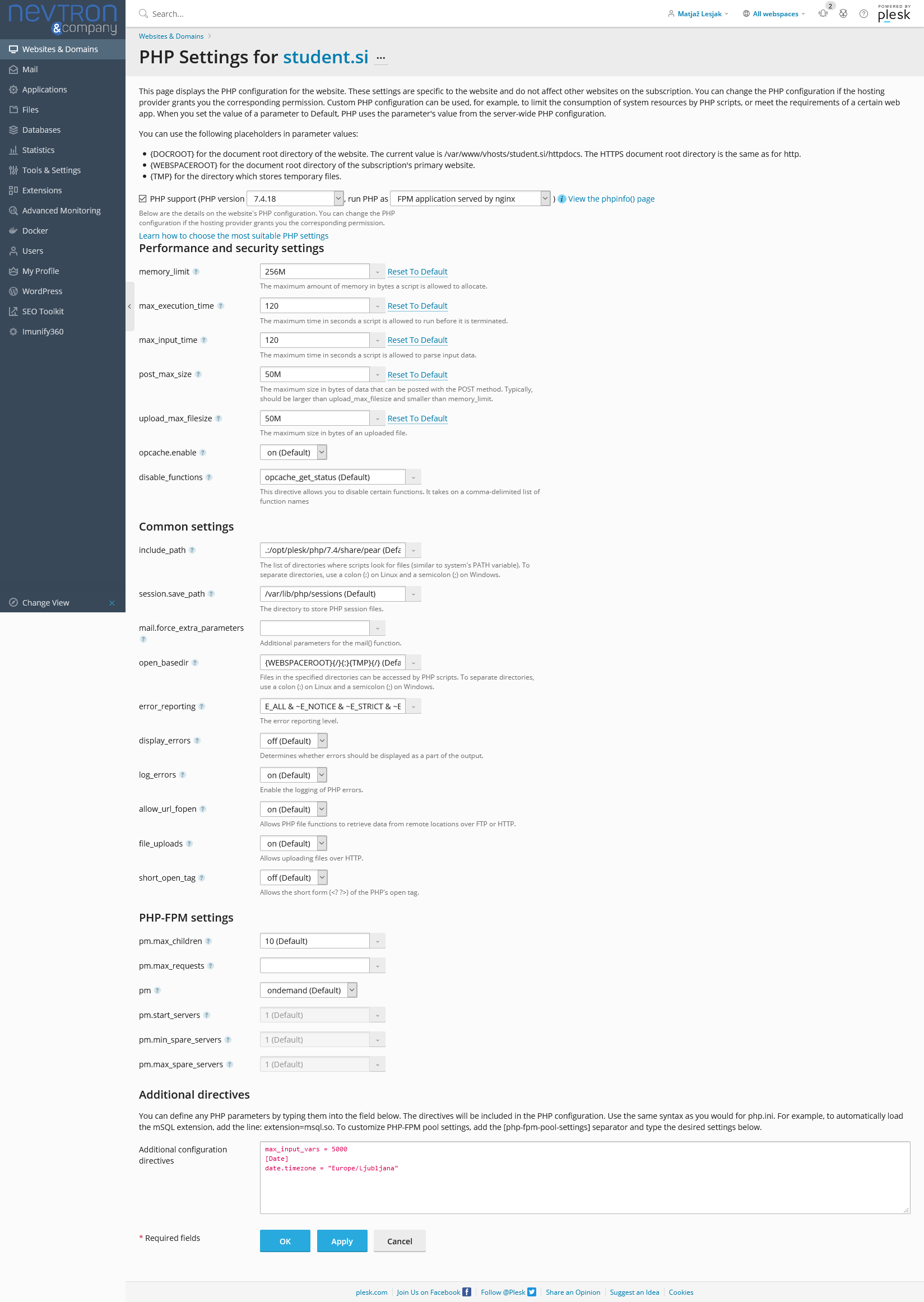
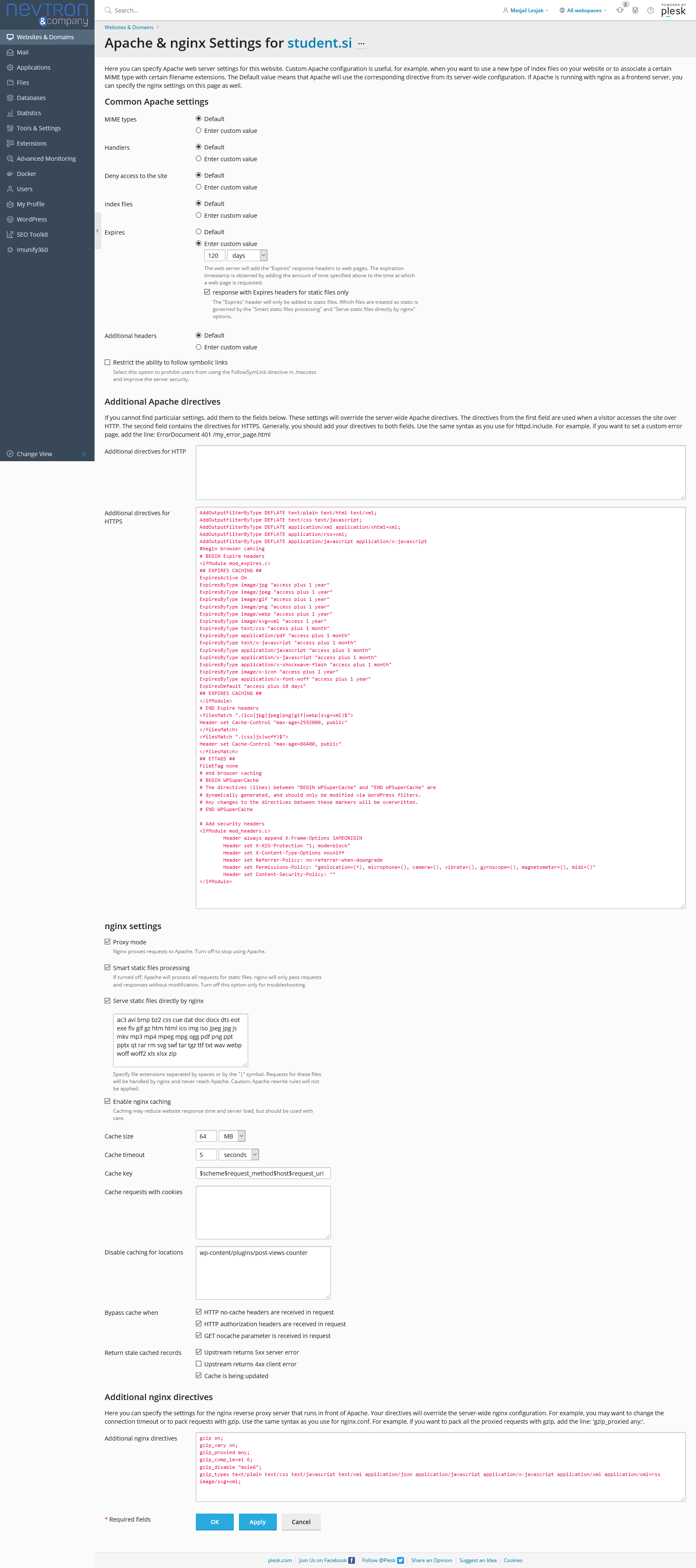
Relevant settings screenshots:
Cloudflare: https://student.si/wp-content/uploads/cloudflare-st.png
Ewww: https://student.si/wp-content/uploads/ewww-st.png
FVM: https://student.si/wp-content/uploads/fvm-st.png
Supercache: https://student.si/wp-content/uploads/supercache-st.png
Php: https://student.si/wp-content/uploads/php-settings.png
Apace & Nginx: https://student.si/wp-content/uploads/apache-nginx.png
-
This reply was modified 5 years by
xxxLesy.
Bettina Hello!
If you follow the steps which are presented in this tutorial here: https://tagdiv.com/how-to-increase-page-loading-speed/ you’ll be able to increase the speed of your website.
Also, to increase the page speed you can check these similar topics for more solutions:
– https://forum.tagdiv.com/topic/optimize-script-to-improve-site-speed/
– https://forum.tagdiv.com/topic/a-few-tips-for-newspaper-x-speed-high-cpu-usage-issues/
– https://tagdiv.com/how-to-increase-page-loading-speed/
– https://developers.google.com/speed/docs/insights/v5/about
– https://forum.tagdiv.com/topic/score-100100-pagespeed-with-newspaper-wordpress-theme/
– https://forum.tagdiv.com/topic/newspaper-theme-speedify-your-website/
Please note that page speed is not covered by the support team: https://forum.tagdiv.com/newspaper-theme-support/
Please give it a try and follow the steps which I presented above about page speed.
Also, check our guide from here: https://forum.tagdiv.com/how-to-make-the-site-faster/
Please make sure to use our newest tool called tagDiv CSS Analyzer which comes in handy to resolve some of your issues. Take a look at the video guide here: https://www.youtube.com/watch?v=tnkVapqhIHc
“This custom tool performs an automatic test to find missing CSS rules applied by user interaction. Moreover, you can manually interact with a chosen section/component from the page while the tool records all the involved CSS. It will generate the final CSS file for this page and also will split the rules in Critical CSS to be loaded in the website’s header.” ( https://tagdiv.com/whats-new-in-the-newspaper-theme-10-4-update/ )
We tested our tool on our demos, and we have such great results!
Take a look in this topic because it could help you: https://forum.tagdiv.com/topic/css-analyzer-step-by-step-and-doubts/
Thank you!
Bettina Hello!
Google PageSpeed load mobile theme version too. Please provide more information about your issue and also your website link in order to help you.
Thank you!
 ukdev
ukdev Yes! there is a tool that helps you pass Google Core Web Vitals!
And your competitors already developed one.
Please Note! I’m not promoting your competition, I want you to beat your competition!
SOLEDAD theme by pencidesign on Envato, have developed a Tool that helps you PASS Google Core Web Vitals.
Have a look at it, and make one as well.
The tool generates CSS for POSTS CATEGORIES PAGES ARCHIVES and HOME.
You download their theme, install the SPEED Plugin + the TOOL on your PC.
And in 5 minutes you PASS Google Core Web Vitals with 96 on MOBILE and 99 on DESKTOP. It’s so simple!
So Instead of writing one million outdated instructions and suggesting 10 year old technology, like the non-responsive Mobile only themes, that I used 10 years ago…
Why can’t you develop a tool like that? Your tagdiv CSS Analyzer is useless!
Again! I’m not promoting their theme, I prefer the Newspaper design over SOLEDAD theme, but sure they know how to optimise for speed.
Don’t believe me ? Go try it yourself.
Why can’t you develop a tool like that?
xxxLesyGoogles PageSpeed used to have a 50-50 chance of either pulling desktop or mobile theme version of the site for both of its tests (desktop and mobile). But it would always use the same version in both tests. If it used the mobile version, both scores would be great, but if desktop, mobile score would suck.
But I’ve noticed lately it always tests only desktop site (meaning it pulls resposnive desktop site in mobile view instead of mobile theme). This is only a Google issue. It works fine for real mobile users.
Is there any way to force Googles PageSpeed to load mobile theme version of the site?
If any of it matters, I’m using vps, cloudflare, fvm, supercache, mobile theme, no standard pack, followed all your optimization guides.
 Anamaria
 Hello,
Related to Google Pagespeed, unfortunately, there is no button to hit and you’re score is high. You need to try to optimize your website and respect all conditions from that list.
If you follow the steps which are presented in this tutorial here: https://tagdiv.com/how-to-increase-page-loading-speed/ you’ll be able to increase the speed of your website.
Also, to increase the page speed you can check these similar topics for more solutions:
– https://forum.tagdiv.com/topic/optimize-script-to-improve-site-speed/
– https://www.infophilic.com/get-almost-100-pagespeed-newspaper-theme/
– https://forum.tagdiv.com/topic/a-few-tips-for-newspaper-x-speed-high-cpu-usage-issues/
– https://tagdiv.com/how-to-increase-page-loading-speed/
Please note that page speed is not covered by the support team: https://forum.tagdiv.com/newspaper-theme-support/
Please give it a try and follow the steps which I presented above about page speed.
Also, check our guide from here: https://forum.tagdiv.com/how-to-make-the-site-faster/
Our tool is running only on normal pages and not for posts or categories for example.
For mobile, you can use a mobile theme plugin or mobile page, you can find more information in these articles
-> https://forum.tagdiv.com/the-mobile-theme/
-> https://tagdiv.com/newspaper-10-3-7-update-brings-customizable-and-fast-mobile-pages/
This is a video about Responsive Newspaper Theme, AMP & Mobile Theme, Mobile Pages & Templates -> https://www.youtube.com/watch?v=SpGkOnJeNZY
Please include the link to your website.
Thank you!
Anamaria Hello,
Unfortunately, you can’t modify the dimension of the image from the grid, this has a thumb created special for him.
Also, if you use WP Rocket, we don’t have a guide for this, but you can try the settings like in this article https://www.infophilic.com/get-almost-100-pagespeed-newspaper-theme/
Our theme doesn’t display the ad after every 5 entries, it is displayed only once after the number set (in this case 5).
Thank you!
ukdevTake any Newspaper Theme and run the Google Page Speed Insights:
https://developers.google.com/speed/pagespeed/insights/
The scores on Mobile and Desktop are still horrible:
Around 33 on Mobile and 80 on Desktop.
To pass we need at least 90 on both Mobile and Desktop!
The newly developed beta tool tagdiv CSS Analyzer, doesn’t do anything to improve my scores.
And the tool doesn’t even work on Post Pages.
When are you guys gonna take Google Core Web Vitals seriously?
Google Core Web Vitals is a ranking factor that affects our ranking and monetisation.
 David
David Hello Anamaria,
Thank you for your answer. I’m scared of using Cloud Templates because of pagespeed. Currently I have 100 pagespeed for desktop and 96 for mobile and if I remember that right Cloud Templates do load much slower than the default version (especially compared to the mobile theme). Or am I wrong and the problem has been fixed in the meantime?
Thanks!
Anamaria Hello,
bI just checked your website and it looks that your images and thumbs are not optimized, for example, you can use EWWW Image Optimizer plugin, also, you can try other plugins like Autoptimize. Your website needs an optimal speed that’s why you need to make some settings also to help for the improvement.
Also, to increase the page speed you can check these similar topics for more solutions:
– https://forum.tagdiv.com/topic/optimize-script-to-improve-site-speed/
– https://www.infophilic.com/get-almost-100-pagespeed-newspaper-theme/
– https://forum.tagdiv.com/topic/a-few-tips-for-newspaper-x-speed-high-cpu-usage-issues/
– https://tagdiv.com/how-to-increase-page-loading-speed/
However, page loading speed can depend on many factors, and each website is unique from this point of view.
Let me explain some of these factors and maybe they give you some starting points for optimizing your website.
External factors: server speed, if you are using CDN or not, the external resources loaded by your website like ads, fonts, tracking scripts like Facebook Pixel, Google Analytics, Twitter analytics, Hotjar and so on.
Internal factors: the number of elements on the page, image size, image formats, if you are using mobile optimized layouts, console errors, if you are using the Standard Pack plugin on not if you are using PRO demo or a standard one.
By the way, we have such a great result with this new update and with our new tool: https://www.youtube.com/watch?v=tnkVapqhIHc
Our tool is running only on normal pages and not for posts or categories for example.
“This custom tool performs an automatic test to find missing CSS rules applied by user interaction. Moreover, you can manually interact with a chosen section/component from the page while the tool records all the involved CSS. It will generate the final CSS file for this page and also will split the rules in Critical CSS to be loaded in the website’s header.” ( https://tagdiv.com/whats-new-in-the-newspaper-theme-10-4-update/ )
Our tool is running only on normal pages and not for posts or categories for example.
Also, if the errors appear on mobile you need to use a version as I said above.
Hope this helps you!
Thank you!
David Hello Anamaria,
Thanks for the explanation and your CSS, now the Logo is displaying properly again.
I get exactly the pagespeed error you described for my footer logo. Do you know how I can add a explicit width and height for the footer logo if its SVG?
Thanks!
Anamaria Hello,
The page speed is not related only to the theme that you are using, this is affected by plugins/content/ads/ external resources, etc.
To increase the page speed you can check these similar topics for more solutions:
– https://forum.tagdiv.com/topic/optimize-script-to-improve-site-speed/
– https://www.infophilic.com/get-almost-100-pagespeed-newspaper-theme/
– https://forum.tagdiv.com/topic/a-few-tips-for-newspaper-x-speed-high-cpu-usage-issues/
– https://tagdiv.com/how-to-increase-page-loading-speed/
However, page loading speed can depend on many factors, and each website is unique from this point of view.
Let me explain some of these factors and maybe they give you some starting points for optimizing your website.
External factors: server speed, if you are using CDN or not, the external resources loaded by your website like ads, fonts, tracking scripts like Facebook Pixel, Google Analytics, Twitter analytics, Hotjar and so on.
Internal factors: the number of elements on the page, image size, image formats, if you are using mobile optimized layouts, console errors, if you are using the Standard Pack plugin on not if you are using PRO demo or a standard one.
Also, in most cases when tagDiv CSS Analyzer has stopped it when is use Cloudflare and the Rocket Loader is active (in our guide it is mentioned the Rocket Loader must be disabled).
The tagDiv CSS Analyzer to be able to do the complete analysis takes longer (8-9 minutes), so I can’t say exactly why it stopped.
Let me know the results!
Thank you!
 bioinformaticsindia
Hi,
I have installed Newspaper on my site https://www.bioinformaticsindia.com/, I have a very bad pagespeed I don’t understand why, and I tried running css analyzer but it does not even run, Help me with this please.
screenshot: https://prnt.sc/135oymv
Kindly help me with a solution.
 jorgemuchacuar
  engrwaseemraja
My Embedded YouTube Video Post size is not showing fit as per the screen in mobile theme. this size is going out of mobile screen I don’t know why please check here: https://youtu.be/p0f32o6sbq4 when i play this video it is showing half screen on mobile device, how can i fix this issue.
Secondly, i am facing the website speed issue that its loading speed is very slow on mobile theme and also not good on desktop theme as well please check here: https://developers.google.com/speed/pagespeed/insights/?url=https%3A%2F%2Fwww.thecivilengineerings.com%2F&tab=mobile
Please note that i already optimized my all images which is less than 100kb but i don’t know why it is taking too much time.
 mgpl
mgplHi,
I am an avid user of the theme Newspaper and I run a large sports magazine. The PageSpeed Insights by Google is showing very strange numbers lately for my website: https://www.talkesport.com.
I follow all the general norms and practice. There are some issues which appear on hand to be problem with the Theme.
Could you please help me fixing the page speed even if that comes at a cost? I’ll be happy to bear the cost.
Please do not link me with random fixes, I have been suffering for a past few weeks and have finally posted it here.
 manideepvtu
When i enabled Lazy load, but in pagespeed its showing Defer offscreen images, which includes Related post images and feature image.
manideepvtu We still have same problem, its showing Defer offscreen image in googlepagespeed, when enable lazy load.