
- NewspaperWP Rocket and Newspaper Theme: Optimization Guide
- NewspaperBest Of Forums
- NewspaperHow to Make the Site Faster
 mislek
 Hello,
Hi,I have a question.
I’ve tested my site on GTmetrix and in PageSpeed section my results are as follows: Minify Js = 99 Minify Css:99 however in Yslow section Minify JavaScript and CSS score = 0.
I’ve send a ticket to the support team of the GTmetrix and this is the e-mail that they send me:
“You have inline JavaScript that is causing the Minify JavaScript/CSS to be triggered

How can I fix it ?
 Simion C.
 Hi,
I believe that is the case. We tried to optimize the demo website for good results. There will be overall performance improvements made in the theme in coming updates, to further optimize speed.
For general theme requirements this would be the guide for a proper functionality
– https://forum.tagdiv.com/requirements-for-newspaper/
There are many optimization guides provided by our users here in the forum, some made by us, you could check some of them
– https://forum.tagdiv.com/cache-plugin-install-and-configure/
– https://forum.tagdiv.com/how-to-make-the-site-faster/
– https://www.infophilic.com/get-almost-100-pagespeed-newspaper-theme/
– https://forum.tagdiv.com/topic/score-100100-pagespeed-with-newspaper-wordpress-theme/
– https://forum.tagdiv.com/topic/newspaper-theme-speedify-your-website/
– https://forum.tagdiv.com/topic/tutorial-chriss-custom-optimizations-for-functions-php-etc/
– https://forum.tagdiv.com/cloudflare-cdn/
Thanks
 designer
 For me it is a big problem because now that they have updated the version of Pagespeed of google my value on mobile is about 10 points then very low. There are huge javascript times and it says everywhere that you can improve by publishing JS payloads, I have no idea what it means though …. look at the values 🙁 Help me to get a decent value.

 Catalin
 Hello,
1)I have checked your screenshots and I saw that you are using the RTL which is not tested with our theme and that’s why you bring some problems with the theme layout, sorry! Please notice that our theme has not been optimized for the RTL version and also, do not support this way, sorry! If you are disappointed about this case, we can provide a full refund, sorry!
3)Regarding page speed loading, please read my response from this topic from here -> https://forum.tagdiv.com/topic/website-loaing-slowly-need-better-pagespeed/
4)I have checked your website on mobile and the main menu button seems to work as expected.
5)Seems to work as expected -> https://www.screencast.com/t/mnMY0h90J
6)Regarding on lazy load, we will improve our theme in the next future updates.
Thanks.
 Calin
Calin Hi,
Our developers theme are working to improve the theme speed, and we hope that this problem will be solved.
Sorry for the inconvenience.
There are some guides here in the forum regarding speed optimization, you could read them and try what is suggested
– https://forum.tagdiv.com/cache-plugin-install-and-configure/
– https://forum.tagdiv.com/how-to-make-the-site-faster/
– https://www.infophilic.com/get-almost-100-pagespeed-newspaper-theme/
– https://forum.tagdiv.com/topic/score-100100-pagespeed-with-newspaper-wordpress-theme/
– https://forum.tagdiv.com/topic/newspaper-theme-speedify-your-website/
– https://forum.tagdiv.com/topic/tutorial-chriss-custom-optimizations-for-functions-php-etc/
– https://forum.tagdiv.com/cloudflare-cdn/
You can try some speed optimization if you want.
Thank you.
Calin Hi,
I’ve inspect your mobile menu and is seems to work just fine https://www.screencast.com/t/fWt4aEddMfe ( you need to wait until the page is full load ), but you need to optimized your website.
There are some guides here in the forum regarding speed optimization, you could read them and try what is suggested
– https://forum.tagdiv.com/cache-plugin-install-and-configure/
– https://forum.tagdiv.com/how-to-make-the-site-faster/
– https://www.infophilic.com/get-almost-100-pagespeed-newspaper-theme/
– https://forum.tagdiv.com/topic/score-100100-pagespeed-with-newspaper-wordpress-theme/
– https://forum.tagdiv.com/topic/newspaper-theme-speedify-your-website/
– https://forum.tagdiv.com/topic/tutorial-chriss-custom-optimizations-for-functions-php-etc/
– https://forum.tagdiv.com/cloudflare-cdn/
Thank you for your understanding.
 aloysiuspattath
I getting an optimization recommendation on pagespeed about Preload key requests.
I am using a3 lazyload & jetpack is enabled also.
How can I solve this issue
site: insanertech.com
screenshot: http://www.screencast.com/t/G42qjiSH
Catalin Hi,
Please notice that the speed of your website depends on how well your site is optimized.
Notice that is not a simple task and if you do not have any experience in this regard you will do not bring good results for the theme. Also, notice that we have a speed optimization tutorial but this is addressed only to advanced users. So, if you follow the steps which are presented in this tutorial here -> https://forum.tagdiv.com/how-to-make-the-site-faster/ you can increase the page speed loading and if you are not aware of the steps in this regard, please consider hiring a freelancer/developer to help you because the speed optimization services are not covered by our support policy, as you can read here -> https://forum.tagdiv.com/support-policy-2/ Check our documentation here -> https://forum.tagdiv.com/requirements-for-newspaper/ regarding on dedicated server to fit our requirements.
Unfortunately, our theme does not have such an option to minify the style.css file and we cannot recommend any plugins with this functionality because is not tested with our theme. For minifying this file, we are using CloudFlare for our demo and works fine. If you want to read other views from our users, please check this topic -> https://forum.tagdiv.com/topic/tip-how-to-easily-minify-your-css-without-breaking-your-site/
Also, check all of your Ad Spots and if you have entered any suspicious code through them, remove all of them and check the results without them.
One of our top members here on the forum wrote his own optimization tutorial here:
https://forum.tagdiv.com/topic/tutorial-chriss-custom-optimizations-for-functions-php-etc/ and here -> https://www.infophilic.com/get-almost-100-pagespeed-newspaper-theme/
Basically, these are the theme requirements
– https://forum.tagdiv.com/requirements-for-newspaper/
Another useful guide for increasing the page speed can be found here -> https://kinsta.com/blog/google-pagespeed-insights/
Thanks for your understanding!
 nagi
nagiHi,
We have recently installed ‘Newsmag’ (Default version) theme to our website.
Our previous theme speed is decent, after we installed Newsmag theme to our website, it is opening slowly. When we open the website first 3 to 4 seconds getting blank page, after that total website is coming, then its working very speed. but instead of waiting 3 to 4 seconds to load the page, is there any way to display website in progressive method like after any one opens the site first load the content, then images some thing like that.
We have also installed ‘Speed Booster’ plugin, but it’s showing v4.9.3 – Disabled – incompatible plugin detected.
Can any one give me the solution to load the website quickly.
Thanks
Nagi
Calin Hi,
If you want to improve the website speed please read this topic:
-> https://forum.tagdiv.com/topic/slow-pagespeed-when-using-newsmag-theme/
Thank you for your understanding.
Calin Hi,
You can use mobile theme, this plugin was made spacial for mobiles and the speed will increase , also you can try to optimize your website
Please read this topic:
-> https://forum.tagdiv.com/topic/low-score-for-mobile-in-google-pagespeed-insights/
Thank you for your understanding.
 maityn
Hi,
After the latest update, I could find that there’s an improvement of Pagespeed score for Desktop: 96% to 99%. Great job done!
But the mobile load speed decreased drastically… 98% to 60% .
Please help
Catalin Hello Bryanlim,
Please notice that the speed of your website depends on how well your site is optimized.
Notice that is not a simple task and if you do not have any experience in this regard you will do not bring good results for the theme. Also, notice that we have a speed optimization tutorial but this is addressed only to advanced users. So, if you follow the steps which are presented in this tutorial here -> https://forum.tagdiv.com/how-to-make-the-site-faster/ you can increase the page speed loading and if you are not aware of the steps in this regard, please consider hiring a freelancer/developer to help you because the speed optimization services are not covered by our support policy, as you can read here -> https://forum.tagdiv.com/support-policy-2/ Check our documentation here -> https://forum.tagdiv.com/requirements-for-newspaper/ regarding on dedicated server to fit our requirements.
Unfortunately, our theme does not have such an option to minify the style.css file and we cannot recommend any plugins with this functionality because is not tested with our theme. For minifying this file, we are using CloudFlare for our demo and works fine. If you want to read other views from our users, please check this topic -> https://forum.tagdiv.com/topic/tip-how-to-easily-minify-your-css-without-breaking-your-site/
Also, check all of your Ad Spots and if you have entered any suspicious code through them, remove all of them and check the results without them.
One of our top members here on the forum wrote his own optimization tutorial here:
https://forum.tagdiv.com/topic/tutorial-chriss-custom-optimizations-for-functions-php-etc/ and here -> https://www.infophilic.com/get-almost-100-pagespeed-newspaper-theme/
Basically, these are the theme requirements
– https://forum.tagdiv.com/requirements-for-newspaper/
Another useful guide for increasing the page speed can be found here -> https://kinsta.com/blog/google-pagespeed-insights/
Thanks for your understanding!
 Bryanlim
Hi, right now I’m using Newsmag theme on my blog, to be exact, the Travel Theme from Newsmag.
When I changed my blog to Newsmag from previous theme, the Pagespeed for my blog went down from previously 87/100 to 17/100.
When I see what is causing this, Google Pagespeed give me a list of things that slowed my website.
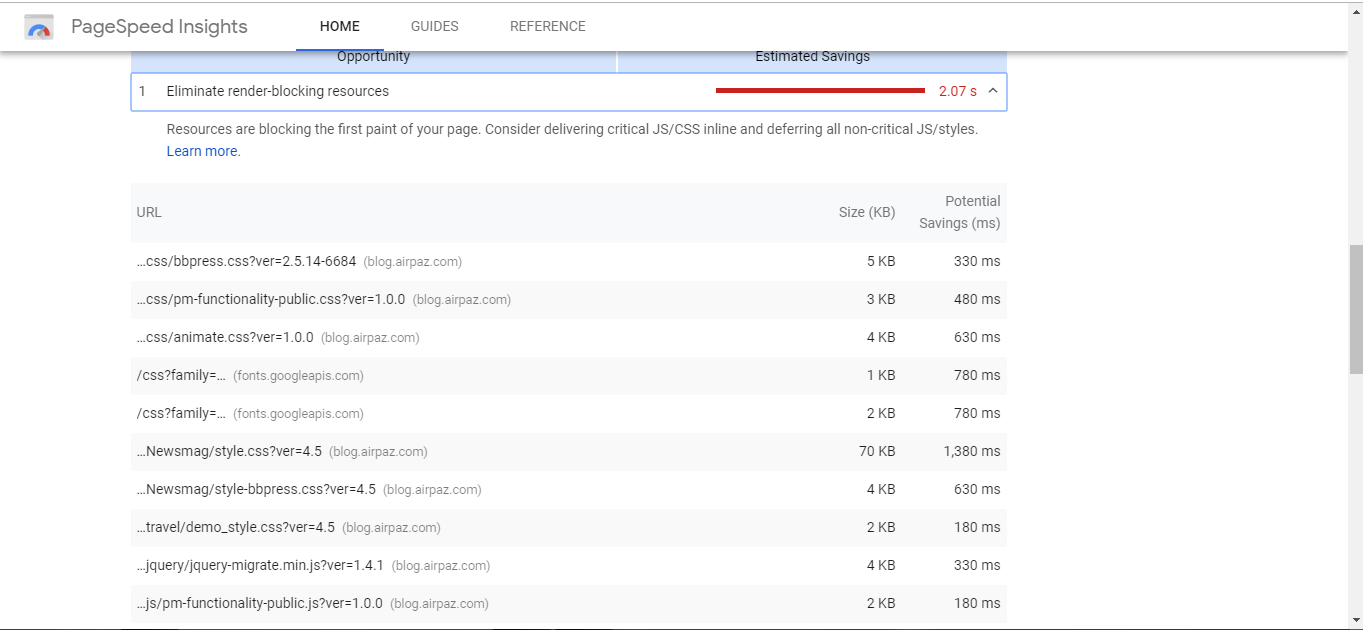
Some of the most time-consuming are from Newsmag, so I was wondering if there are any solution for this issue from you?
Thanks.
 khen888
 thanks for all the help. But what I did were:
1.) change href=”#login-form” into custom URL of top-menu.php
2.) delete class=”td-login-modal-js menu-item” of top-menu.php
It removes the modal login form and change login link into the custom login page I want. Adding more plugins adds more weight to the webpage which slows pagespeed.
Catalin Hello itkhoj,
Please notice that the speed of your website depends on how well your site is optimized.
Notice that is not a simple task and if you do not have any experience in this regard you will do not bring good results for the theme. Also, notice that we have a speed optimization tutorial but this is addressed only to advanced users. So, if you follow the steps which are presented in this tutorial here -> https://forum.tagdiv.com/how-to-make-the-site-faster/ you can increase the page speed loading and if you are not aware of the steps in this regard, please consider hiring a freelancer/developer to help you because the speed optimization services are not covered by our support policy, as you can read here -> https://forum.tagdiv.com/support-policy-2/ Check our documentation here -> https://forum.tagdiv.com/requirements-for-newspaper/ regarding on dedicated server to fit our requirements.
Unfortunately, our theme does not have such an option to minify the style.css file and we cannot recommend any plugins with this functionality because is not tested with our theme. For minifying this file, we are using CloudFlare for our demo and works fine. If you want to read other views from our users, please check this topic -> https://forum.tagdiv.com/topic/tip-how-to-easily-minify-your-css-without-breaking-your-site/
Also, check all of your Ad Spots and if you have entered any suspicious code through them, remove all of them and check the results without them.
One of our top members here on the forum wrote his own optimization tutorial here:
https://forum.tagdiv.com/topic/tutorial-chriss-custom-optimizations-for-functions-php-etc/ and here -> https://www.infophilic.com/get-almost-100-pagespeed-newspaper-theme/
Basically, these are the theme requirements
– https://forum.tagdiv.com/requirements-for-newspaper/
Another useful guide for increasing the page speed can be found here -> https://kinsta.com/blog/google-pagespeed-insights/
Thanks for your understanding!
 Jose
Jose I have added the js and css found to the td-booster plugin:

https://fotos.subefotos.com/afbe355fde64e0551ad28850c482b9f3o.jpg

https://fotos.subefotos.com/6406a5add0cf4ee91a5d15334fe453b3o.jpg
But the problem can’t be solved. The ad is broken (out of box) and the PageSpeed score is very low.
Is it possible to find a solution to this?
JoseHello,
I have detected a serious problem with td-booster on my website.
If I use an ad manager, such as “ad-inserter” or “advanced ads” plugin or “adrotate”, the ads go out of the box (container) and my overall score drops drastically.
If I deactivate the td-booster plugin, the ads look good (inside the box). The problem is, that td-booster helps me get a better score on my page, and I prefer to have it active.
Some examples, here I use the plugin td-booster + advanced ads

https://fotos.subefotos.com/21aac7829dcb815db8dc3cad65aae42ao.jpg

https://fotos.subefotos.com/a40822f8cfe5326840a4a0928688d2f3o.jpg
Now, I use the plugin td-booster and an ad from the ad manager of the newspapper theme (integrated).

https://fotos.subefotos.com/0f8380d07b33abce8194e8f1ca79d299o.jpg

https://fotos.subefotos.com/17ec00f67e08b9d564f307403691b232o.jpg
Conclusions
I’m sure my td-booster plugin is misconfigured.
This is my td-booster.php config: https://pastebin.com/wnvh8bnL
With the plugin “advanced ads” + “td-booster” activated, I performed a test modifying the “functions.php” file of the theme.(Siguiendo las instrucciones de esta guía: https://forum.tagdiv.com/how-to-make-the-site-faster/ )
These are the data provided by the theme: https://pastebin.com/MBED8Rgs
But I don’t know what else to do. I can’t locate the problem, nor do I know how to modify the td-booster file (which data I must add, remove or modify).
My programming knowledge is very limited. I’ve only gotten this far.
Can you please help me? What should I do to make the ad manager plugins as “advanced ads” work well next to “td-booster”?
Cheers, Jose
 itkhoj
After I change my theme to Newspaper, my sites score for mobile drops in Google PageSpeed Insights. It shows only 22-27 speed score.
Pl. suggest
JoseHello team,
You know that Google is becoming more and more demanding, now the new PageSpeed also uses LightHouse metrics.
My sysadmin has been able to simplify the theme to get good scores. But, there is something that cannot be improved in a simple way, accessibility.
Some people may think it’s not very important, but they’re confused. Accessibility is VERY IMPORTANT.
LightHouse and PageSpeed ask for specific things, how to use name, label, alt, etc… Especially in the buttons and useful parts of the web. So that visually impaired people can use voice systems.
Can you give me a solution to this problem?
Do you know any plugin that solves this problem in your theme?
In next NewsPapper updates, are you going to solve this problem?

https://fotos.subefotos.com/850bf1259ccb3d809bec8fce996ff41fo.jpg

https://fotos.subefotos.com/6aaa7d2e0077cbb606d8f27c118a6067o.jpg
My site: https://bit.ly/2RJy1ny
Cheers, Jose
 spu
spuHi,
Just a heads up for the next update.
There are lot of new requirements now from Google for mobile sites at developer.
https://developers.google.com/speed/pagespeed/insights/
Like on mobile
WebP and Jpeg2000 needed.
Speed Index
Time to interactive index
Which can be tackled via lazy loading etc.
Also eliminating render blocking scripts and better way of handling/minimizing javascripts.
Lot of new pre-requisites are there.
Hopefully in the next update we can see some of them tackled 🙂
Regards
SP
 manojkhatri
Hi,
When we test our site on google pagespeed insights (https://developers.google.com/speed/pagespeed/insights/), we get good scores for desktop but poor scores for mobile. Yesterday, we deactivated all social plugins and moved our site to CDN. Now for desktop, we score more than 90 but for mobile we are still getting about 50 or 60 for mobile. We are not using the mobile theme, so the same responsive site is being served to both mobile and desktop devices. We have no extra plugins for mobile either.
Considering that the exact same site is being served to both devices, I am unable to diagnose what the problem is and hence unable to take corrective action on the same. Can someone from tagdiv please help me diagnose the problem?
Site URL: https://completewellbeing.com
 Manuela
My site has a really poor speed,
https://developers.google.com/speed/pagespeed/insights/?url=https%3A%2F%2Fsantavirgenmaria.com%2F
For what I see, in part, is caused because of the theme. Can you help me optimize my Newspaper theme to have a better performance.
Thank you
 Mustafa Varol
Dear,
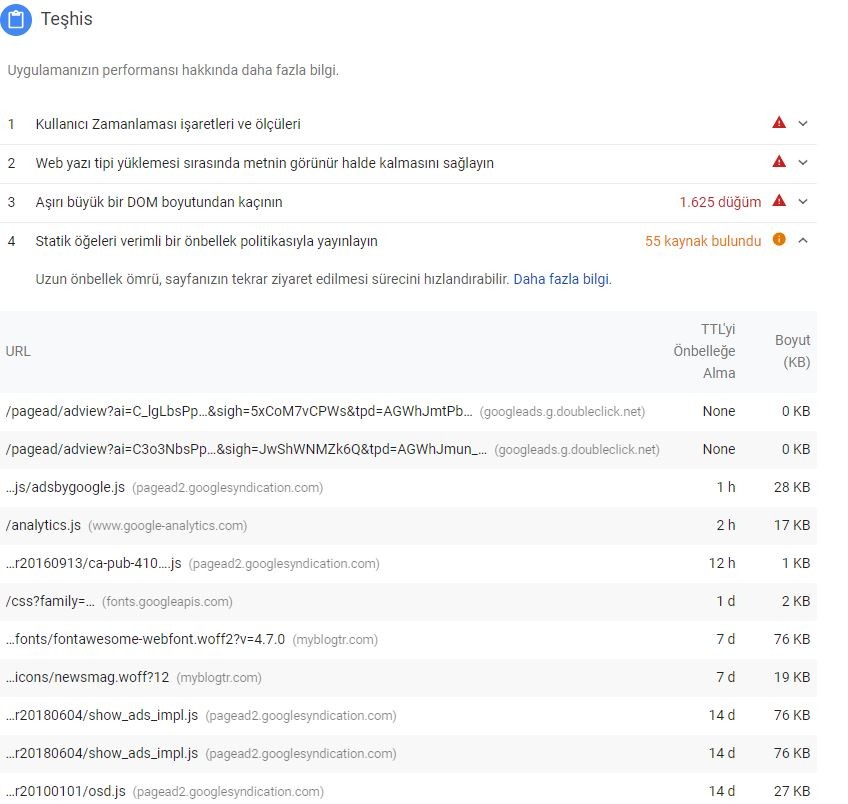
There is a problem about pagespeed and analysis of gmatrix after the updated theme. They are working slowly. What is the problem? Could you help me, please?
Thank you!
Simion C. Hi,
So the website is loading slow? Check in the browser inspector console if there are any errors or resources that are not found (404), also test the website with online tools and see what can be improved.
There are some guides here in the forum regarding speed optimization, you could read them and try what is suggested
– https://forum.tagdiv.com/cache-plugin-install-and-configure/
– https://forum.tagdiv.com/how-to-make-the-site-faster/
– https://www.infophilic.com/get-almost-100-pagespeed-newspaper-theme/
– https://forum.tagdiv.com/topic/score-100100-pagespeed-with-newspaper-wordpress-theme/
– https://forum.tagdiv.com/topic/newspaper-theme-speedify-your-website/
– https://forum.tagdiv.com/topic/tutorial-chriss-custom-optimizations-for-functions-php-etc/
– https://forum.tagdiv.com/cloudflare-cdn/
Thanks
