No search results were found in Documentation!
 ctoweett
  Simion C.
 Hi,
The WP Super Cache is recommended to be used with the theme, other plugins or configurations can cause issues. To test page speed it is always recommended to first remove ads if possible, and deactivate all non-theme plugins. It also depends on the hosting provider.
The autooptimize plugin could cause issues with the mobile plugin, try disabling it and test again.
There are many guides you can follow here in the forum regarding page speed, provided by theme users who achieved great results. Some of theme here
– https://forum.tagdiv.com/topic/score-100100-pagespeed-with-newspaper-wordpress-theme/
– https://forum.tagdiv.com/topic/tutorial-chriss-custom-optimizations-for-functions-php-etc/
– https://forum.tagdiv.com/topic/newspaper-theme-speedify-your-website/
Thanks
Simion C. Hi,
That code would be an example of the implementation used on the live theme demo server. It may be different by server. You should contact your hosting provider, they might have a recommended method or service in the matter, that will work.
Also you can read some tutorials posted by theme users for good results
– https://forum.tagdiv.com/topic/score-100100-pagespeed-with-newspaper-wordpress-theme/
– https://forum.tagdiv.com/topic/tutorial-chriss-custom-optimizations-for-functions-php-etc/
– https://forum.tagdiv.com/topic/newspaper-theme-speedify-your-website/
Thanks
Simion C. @amerikaliturk Test without plugins, leave only theme plugins active. Check the results like that. There are many speed optimization guides here on the forum as well, you can read them and try some of the solutions
– https://forum.tagdiv.com/topic/score-100100-pagespeed-with-newspaper-wordpress-theme/
– https://forum.tagdiv.com/topic/newspaper-theme-speedify-your-website/
– https://forum.tagdiv.com/topic/tutorial-chriss-custom-optimizations-for-functions-php-etc/
 ashubais
How to fix this Leverage Render Blocking issue.
ytechb.com/…/Newspaper/images/icons/newspaper.woff?8 (4 hours)
I am not able to fix it, need help.
ashubaisHelp me, How to optimize my AMP pages, my normal speed is 88 in PageSpeed Insights but the AMP pages are too slow. How to fix it. here is my website please check it out – https://www.ytechb.com/amazing-whatsapp-tricks-2018/amp/
Simion C. There are many speed optimization guides and tutorials here on the forum, you could read them and further optimize the website
– https://forum.tagdiv.com/topic/score-100100-pagespeed-with-newspaper-wordpress-theme/
– https://forum.tagdiv.com/topic/newspaper-theme-speedify-your-website/
– https://forum.tagdiv.com/topic/tutorial-chriss-custom-optimizations-for-functions-php-etc/
A note is that the speed of the website is influenced by plugins and ads as well. Also teh hosting is decisive.
 Catalin
 Hello YTGAW,
Please notice that the speed of your website depends on how well your site is optimized. Notice that is not a simple task and if you do not have any experience in this regard you will do not bring good results for the theme. Also, notice that we have a speed optimization tutorial but this is addressed only to advanced users. So, if you follow the steps which are presented in this tutorial here -> https://forum.tagdiv.com/how-to-make-the-site-faster/ you can increase the page speed loading and if you are not aware of the steps in this regard, please consider hiring a freelancer/developer to help you because the speed optimization services are not covered by our support policy, as you can read here -> https://forum.tagdiv.com/support-policy-2/ Check our documentation here -> https://forum.tagdiv.com/requirements-for-newspaper/ regarding on dedicated server to fit our requirements.
Unfortunately, our theme does not have such an option to minify the style.css file and we cannot recommend any plugins with this functionality because is not tested with our theme. For minifying this file, we are using CloudFlare for our demo and works fine. If you want to read other views from our users, please check this topic -> https://forum.tagdiv.com/topic/tip-how-to-easily-minify-your-css-without-breaking-your-site/
One of our top members here on the forum wrote his own optimization tutorial here:
https://forum.tagdiv.com/topic/tutorial-chriss-custom-optimizations-for-functions-php-etc/ and here -> https://www.infophilic.com/get-almost-100-pagespeed-newspaper-theme/
Basically, these are the theme requirements
– https://forum.tagdiv.com/requirements-for-newspaper/
Thanks for your understanding!
 Bogdan B.
 Hi,
Thank you for your appreciation. The official language is English on our forums so other users can read. If you want Romanian support, you can ask us via email at contact@tagdiv.com
For page speed optimization please use this guide: https://forum.tagdiv.com/how-to-make-the-site-faster/
As a note on speedbooster: https://forum.tagdiv.com/topic/tinymce-advanced-and-other-various-disabling-speed-boster/
Here are the page speed suggestions made by google:
https://developers.google.com/speed/pagespeed/insights/?url=https%3A%2F%2Fwww.lowcarbspark.com%2F&tab=desktop
Thank you!
Catalin Hello Olya,
Please notice that the speed of your website depends on how well your site is optimized. Notice that is not a simple task and if you do not have any experience in this regard you will do not bring good results for the theme. Also, notice that we have a speed optimization tutorial but this is addressed only to advanced users. So, if you follow the steps which are presented in this tutorial here -> https://forum.tagdiv.com/how-to-make-the-site-faster/ you can increase the page speed loading and if you are not aware of the steps in this regard, please consider hiring a freelancer/developer to help you because the speed optimization services are not covered by our support policy, as you can read here -> https://forum.tagdiv.com/support-policy-2/ Check our documentation here -> https://forum.tagdiv.com/requirements-for-newspaper/ regarding on dedicated server to fit our requirements.
Unfortunately, our theme does not have such an option to minify the style.css file and we cannot recommend any plugins with this functionality because is not tested with our theme. For minifying this file, we are using CloudFlare for our demo and works fine. If you want to read other views from our users, please check this topic -> https://forum.tagdiv.com/topic/tip-how-to-easily-minify-your-css-without-breaking-your-site/
One of our top members here on the forum wrote his own optimization tutorial here:
https://forum.tagdiv.com/topic/tutorial-chriss-custom-optimizations-for-functions-php-etc/ and here -> https://www.infophilic.com/get-almost-100-pagespeed-newspaper-theme/
Basically, these are the theme requirements
– https://forum.tagdiv.com/requirements-for-newspaper/
Thanks for your understanding!
Simion C. Hi,
I have browsed your website for a while and for me the website is loading fast
– https://www.screencast.com/t/fh6Zo1CLqOPT
There are no errors on the pages, the website is loading fast. I see you using the latest theme version, which contains many improvements over the previous version. You can try to optimize the website further if you want to, there are many guides in the matter here on the forum, such as these
– https://forum.tagdiv.com/topic/score-100100-pagespeed-with-newspaper-wordpress-theme/
– https://forum.tagdiv.com/topic/newspaper-theme-speedify-your-website/
– https://forum.tagdiv.com/topic/tutorial-chriss-custom-optimizations-for-functions-php-etc/
Thanks
ctoweett  alisamig
Hi Guys,
I moved my site so SSL but Gtmetrix PageSpeed Score is decreased due to the poor “Enable gzip compression” score. How can I fix it ?
Simion C. Hi,
@notageek4u From what I can see at first glance, you could try and optimize the website more. For example the homepage has 10mb in size, that would be high. Regenerate the thumbnails because it seems some of the thumbnails are not created properly and the full image size is served
– https://www.screencast.com/t/DcTg0vMwK
There are many speed guides and tutorials here on the forum that you can follow. Some of them here, but there are many
– https://forum.tagdiv.com/cache-plugin-install-and-configure/
– https://forum.tagdiv.com/cloudflare-cdn/
– https://forum.tagdiv.com/how-to-make-the-site-faster/
– https://forum.tagdiv.com/topic/score-100100-pagespeed-with-newspaper-wordpress-theme/
– https://forum.tagdiv.com/topic/newspaper-theme-speedify-your-website/
– https://forum.tagdiv.com/topic/tutorial-chriss-custom-optimizations-for-functions-php-etc/
Thanks
 rafael-l
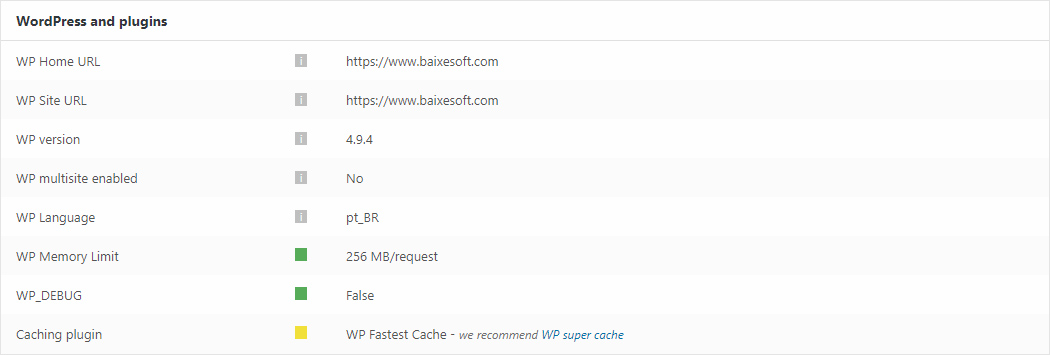
Hi there! Just two quick things about this screenshot form the system status:
https://www.baixesoft.com/wp-content/uploads/2018/02/Sem-Título-1.jpg
1) How much memory in wp memory limit will you recommend for a dedicaded server with a considerable number of access and with 4GB DDR3 RAM Memory at disposal only for this website?
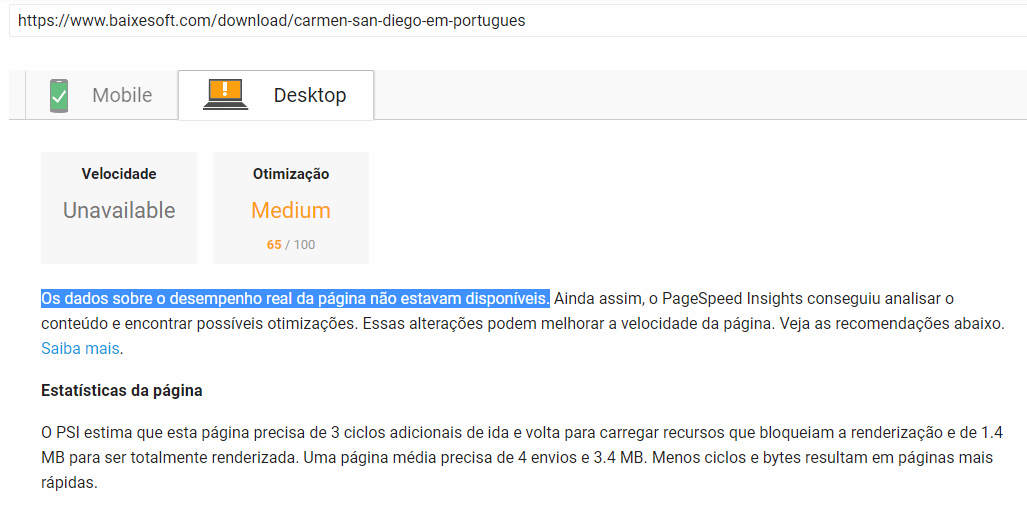
2) I have the premium version of WP Fastest Cache, cause it did way more effect than WP super cache in the previous theme, so there is any problem to use the fastest cache in newspapper? Cause i experienced this in PageSpeed Insights: “Data on actual page performance is not available” like the screenshot above (in portuguese language).
https://www.baixesoft.com/wp-content/uploads/2018/02/Page-speed.jpg
Thank’s for the support!
 irfan.id
 @nina, you should try this https://www.infophilic.com/get-almost-100-pagespeed-newspaper-theme/. work for me
Thanks
 nina
ninahi .. how do i make pagespeed not like this https://www.screencast.com/t/SaxAFzMo ? I’ve done the way as it is on the documentation of this theme. I also have used cloudflare so that the speed increases. but why is it still like this? can you help me to solve this problem? or can you help me to install the tagdiv speed booster plugin?
 Alin [tagDiv]
 Hi,
I have checked your site and from what I see your resources are not loaded in footer, so I guess Speed Booster is not active or it is not configured to move the resources to the bottom.
Also you did not applied please the other pagespeed suggestions – https://forum.tagdiv.com/how-to-make-the-site-faster/ and check the official documentation – https://developers.google.com/speed/docs/insights/rules
Unfortunately the time doesn’t allow us to provide custom or optimization services, sorry! If you don’t have the required knowledge I suggest to get someone to help you.
Thanks!
ctoweett Try these customizations
https://forum.tagdiv.com/cache-plugin-install-and-configure/
– https://forum.tagdiv.com/cloudflare-cdn/
– https://forum.tagdiv.com/how-to-make-the-site-faster/
– https://forum.tagdiv.com/topic/score-100100-pagespeed-with-newspaper-wordpress-theme/
– https://forum.tagdiv.com/topic/newspaper-theme-speedify-your-website/
– https://forum.tagdiv.com/topic/tutorial-chriss-custom-optimizations-for-functions-php-etc/
But if it is still a challenge, try looking for professionals at studio.envato.com because the tagdiv team does not provide custom work. (I don’t work here).
 brian7454
Hi,
I’ve been trying to optimise site speeds (etc) and have been trying wp-rocket. I know you prefer to promote wp super cache, but frankly it just isn’t very good.
Please see the image (can’t see how to upload one, so added it to my own site instead) here: https://www.goodishtimes.com/perf-tests.jpg
I did tests with both pingdom and gtmetrix.
I have a couple of questions:
1) which of the js files shown (in the ‘consider defering parsing js’ section of the screenshot) can I safely defer?
I’m not worried about the pagespeed or yslow scores – 94% and 88% are okay – but anything that reduces loading speed is good.
2) I’ve seen hundreds of people asking about wp-rocket and the standard ‘we don’t test our theme with it’ reply, so do any users who are also USING WP-ROCKET have anything to say about glitches to expect, ways around them, and so on?
I spoke to the guys at wp-rocket and they said there’s no reason why their plugin shouldn’t work properly with any well-written theme. I also see hundreds of posts on newspaper’s envato sales page asking about wp-rocket, so I don’t get why this theme hasn’t been tested with what is probably the best cache plugin out there. It’s not like nobody has ever asked, and it costs what, about $35-$40?
ctoweett Try these customizations
https://forum.tagdiv.com/cache-plugin-install-and-configure/
– https://forum.tagdiv.com/cloudflare-cdn/
– https://forum.tagdiv.com/how-to-make-the-site-faster/
– https://forum.tagdiv.com/topic/score-100100-pagespeed-with-newspaper-wordpress-theme/
– https://forum.tagdiv.com/topic/newspaper-theme-speedify-your-website/
– https://forum.tagdiv.com/topic/tutorial-chriss-custom-optimizations-for-functions-php-etc/
 simchris
 Just fyi —
The envato ‘plugin’ updater will never work 100% of the time and may break site.
Always *best* to do it via FTP, as you can make a safety backup of your site before uploading new folders, in case something breaks or bad plugin causes site to not work at all due to some unexpected compatibility issue.
Also remember when doing major upgrade
– backups should be made of working website
– you will need to update theme, and theme related plugins; disable other plugins for testing
– disable any caching plugins, clear caching
– ideally disable mod_pagespeed during upgrade if using that via htaccess
– after upgrade you may want to use the wp-optimize plugin to help clean up any gremlins in dbase; –and– you should resave your ‘permalinks’ to clear transients
– you will also need to clear your history/cache in web browser to ensure you’re seeing the new CSS for site being loaded properly, or site may look broken/different
Also worth considering
a) copy the text/shortcodes from your home page layout into text file
b) copy/export any custom css
c) copy/export to text file any complicated widget codes you have setup
Chris
simchris Just fyi —
The envato ‘plugin’ updater will never work 100% of the time and may break site.
Always *best* to do it via FTP, as you can make a safety backup of your site before uploading new folders, in case something breaks or bad plugin causes site to not work at all due to some unexpected compatibility issue.
Also remember when doing major upgrade
– backups should be made of working website
– you will need to update theme, and theme related plugins; disable other plugins for testing
– disable any caching plugins, clear caching
– ideally disable mod_pagespeed during upgrade if using that via htaccess
– after upgrade you may want to use the wp-optimize plugin to help clean up any gremlins in dbase; –and– you should resave your ‘permalinks’ to clear transients
– you will also need to clear your history/cache in web browser to ensure you’re seeing the new CSS for site being loaded properly, or site may look broken/different
Also worth considering
a) copy the text/shortcodes from your home page layout into text file
b) copy/export any custom css
c) copy/export to text file any complicated widget codes you have setup
Chris
simchris Just fyi —
The envato ‘plugin’ updater will never work 100% of the time and may break site.
Always *best* to do it via FTP, as you can make a safety backup of your site before uploading new folders, in case something breaks or bad plugin causes site to not work at all due to some unexpected compatibility issue.
Also remember when doing major upgrade
– backups should be made of working website
– you will need to update theme, and theme related plugins; disable other plugins for testing
– disable any caching plugins, clear caching
– ideally disable mod_pagespeed during upgrade if using that via htaccess
– after upgrade you may want to use the wp-optimize plugin to help clean up any gremlins in dbase; –and– you should resave your ‘permalinks’ to clear transients
– you will also need to clear your history/cache in web browser to ensure you’re seeing the new CSS for site being loaded properly, or site may look broken/different
Also worth considering
a) copy the text/shortcodes from your home page layout into text file
b) copy/export any custom css
c) copy/export to text file any complicated widget codes you have setup
Chris
simchris Just fyi —
The envato ‘plugin’ updater will never work 100% of the time and may break site.
Always *best* to do it via FTP, as you can make a safety backup of your site before uploading new folders, in case something breaks or bad plugin causes site to not work at all due to some unexpected compatibility issue.
Also remember when doing major upgrade
– backups should be made of working website
– you will need to update theme, and theme related plugins; disable other plugins for testing
– disable any caching plugins, clear caching
– ideally disable mod_pagespeed during upgrade if using that via htaccess
– after upgrade you may want to use the wp-optimize plugin to help clean up any gremlins in dbase; –and– you should resave your ‘permalinks’ to clear transients
– you will also need to clear your history/cache in web browser to ensure you’re seeing the new CSS for site being loaded properly, or site may look broken/different
Also worth considering
a) copy the text/shortcodes from your home page layout into text file
b) copy/export any custom css
c) copy/export to text file any complicated widget codes you have setup
Chris