
- NewspaperPosts Loop Element
- NewspaperFlex Block Builder and Flex Loop Builder
- Apitd_api_category_top_posts_style::update_key
- Apitd_api_category_top_posts_style::update
- Apitd_api_category_top_posts_style::add
- NewspaperBookmark – Save For Later
- NewspaperModules Builder in Newspaper Theme
- NewspaperFilters and sorting for taxonomies
- NewsmagPage templates
- NewspaperPage templates
- NewspaperSmart Sidebar
- NewspaperChild Theme Support
- ApiAPI – Thumbnail – Introduction
- ApiAPI – Category top section style – Introduction
 Anamaria
 Hello,
You can import a blank template and design it with tagdiv composer as you want with Flex Block and posts loop blocks.
Thank you!
Anamaria Hello!
The default blog page can’t be customized with the TagDiv Composer. You need to create a new page called home, edit it with the TagDiv Composer and there you can add posts loop or flex blocks in order to display your posts.
Thank you!
 SAPO
SAPOGreetings.
Probing one of our websites, running Newspaper 12.2 with WordPress 6.1.1, we have found that there is a security vulnerability on category pages that use infinite loading.
This option:
Theme Panel > Categories > Category global settings > Pagination style > Infinite loading
When this infinite loading is active Newspaper does a POST request to wp-admin/admin-ajax.php with a loopState action to retrieve more posts, and the response is not properly escaped leading to an opening that can allow a reflected cross-site scripting attack.
Here’s an example on your own demo site:
The request:
curl 'https://demo.tagdiv.com/newspaper_pro/wp-admin/admin-ajax.php?td_theme_name=Newspaper&v=12.2' \

  -H 'content-type: application/x-www-form-urlencoded; charset=UTF-8' \

  -H 'x-requested-with: XMLHttpRequest' \

  --data-raw 'action=td_ajax_loop&loopState%5BsidebarPosition%5D=no_sidebar&loopState%5BmoduleId%5D=17&loopState%5BcurrentPage%5D=2&loopState%5Bmax_num_pages%5D=2&loopState%5Batts%5D%5Bcategory_id%5D=1&loopState%5Batts%5D%5Boffset%5D=3&loopState%5Bajax_pagination_infinite_stop%5D=%3Cimg+src%3DBOGUS%3E&loopState%5Bserver_reply_html_data%5D='
The (truncated) response:
HTTP/1.1 200 OK

...

Content-Type: text/html; charset=UTF-8

...

{

  "sidebarPosition":"no_sidebar",

  "moduleId":"17",

  "currentPage":"2",

  "max_num_pages":"2",

  "atts": {

    "category_id":"1",

    "offset":"3"

  },

  "ajax_pagination_infinite_stop":"",

  "server_reply_html_data":""

}
Notice how parameters sent for the loopState action via ajax are reflected back to the client unescaped. In this example, the parameter ajax_pagination_infinite_stop was altered to include a bogus image tag instead of a number. Because HTML tags are not being properly escaped when the response JSON is encoded, and combined with the fact that the Content-Type of the response is text/html, this results in the malformed request being reflected towards the client and rendered as HTML, which can be abused by a malicious actor.
A possible solution:
On your td-composer plugin, the function on_ajax_loop of the class td_ajax deals with loopState requests. Currently it returns with the following statement:
die(json_encode($loopState));
Supplying the flag JSON_HEX_TAG to encode the symbols for opening and closing HTML tags seems to mitigate the issue:
die(json_encode($loopState, JSON_HEX_TAG));
Best regards.
 Ey! Daily
Hi,
On the author pages, author posts are currently not displaying (despite the fact that I’ve selected the ‘post loop’). See here for an example: https://eydaily.nl/author/redactie-criminalitijd/
Kind regards,
Anamaria Hi,
For the category template, if you have set a posts loop then will display all posts in this category or you can use Flex Block/Big Grid Flex and set the filter to “Category -Current category” => https://i.imgur.com/7P99qx0.png ->
Thank you!
Anamaria Hi,
For the category template, if you have set a posts loop then will display all posts in this category or you can use Flex Block/Big Grid Flex and set the filter to “Category -Current category” => https://i.imgur.com/7P99qx0.png ->
Thank you!
Anamaria Hello,
You need to add a row set the layout of the row to 2/3+1/3 https://i.imgur.com/ui33biR.png
and in the first section, set a posts loop and in the sidebar a Flex Block and filter it -> https://i.imgur.com/oIyHKeh.png
Thank you!
 discovermh
 Hello @Bettina,
we change code into file theme>Newspaper>loop-archive.php
$post_count = 1;
$column_count = 1;
$span = ‘span3’;
$column_break = 4;
$is_404 = false;
if( is_404() ) {
$is_404 = true;
$column_break = 4;
$span = ‘span3’;
$args = array(
‘post_type’=> ‘post’,
‘showposts’ => 6,
‘ignore_sticky_posts’ => true
);
query_posts($args);
}
Still, it shows 2 columns in the post archive and category pages.
ideally it should show 4 columns as we mentioned $span = ‘span3’; & $column_break = 4;
-
This reply was modified 3 years by
discovermh.
-
This reply was modified 3 years by
Anamaria Hi,
We do not recommend setting two posts loop on the same page/template, please use a flex block or another block, because most of the settings from the first loop element will be set for the second one.
Thank you!
 matamilenial
Hello
I have a category page using a cloud template and it uses 2 post loops inside and when I use the post offset feature the backend changes https://prnt.sc/MeYzRkycr9h0 and the display on the front end is not the same as the backend view https://prnt.sc/p7Bc0KBJyk3r .
Can you help me?
 Calin
Calin Adding multiple authors to your articles
Content
In this tutorial we will show you how to implement multiple authors to your posts using the Co-Authors Plus plugin.
We will make the implementation in the child theme so it will be easier to manage on theme updates. You will need to install and activate the Co-Authors Plus plugin first.
Adding the multiple authors is a three step process.
- Step 1 – Adding the required functions in your child theme functions.php file.
We created 2 custom functions for the author and for the author box which we can then call on the post styles and not have to use the entire functions each time.
Add these functions in your Child theme functions.php file: https://pastebin.com/ciYrSZvQ These will create the custom implementation to add the co-author and the author box for each co-author in particular.
- Step 2 – Adding the single post templates to your child theme.
In your main child theme folder, you will need to create the following folder structure:
Newspaper-child/parts/single
Then, under the “single” folder add both the single-template and the loop-single files for each of the post styles you use on your articles.
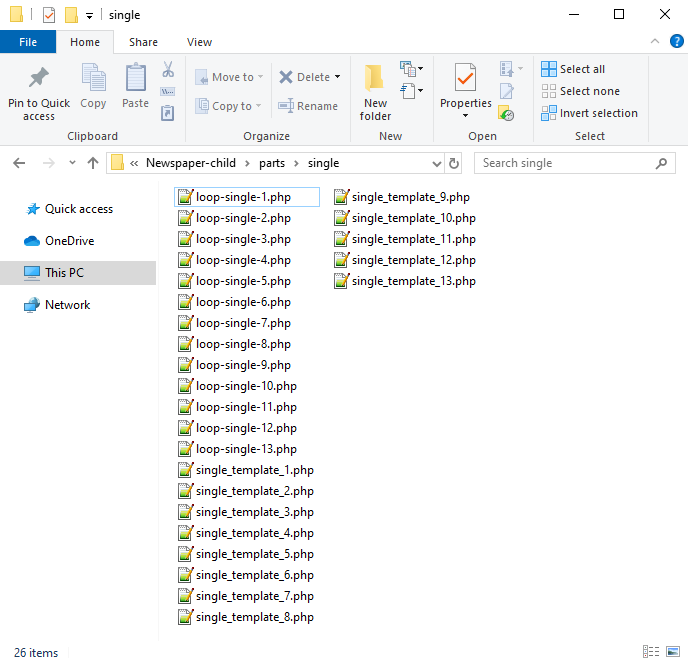
Now you will have to identify where the author is being called in each post style.
For styles 1, 5, 9 and 10 you will find the author code in the loop-single files while for styles 2, 3, 4, 6, 7, 8, 11, 12 and 13 the code is fount under the single_template files.
Edit the files corresponding to the style you want to apply the co-authors to and then call the functions added at step 1. Replace the default author and author box codes:
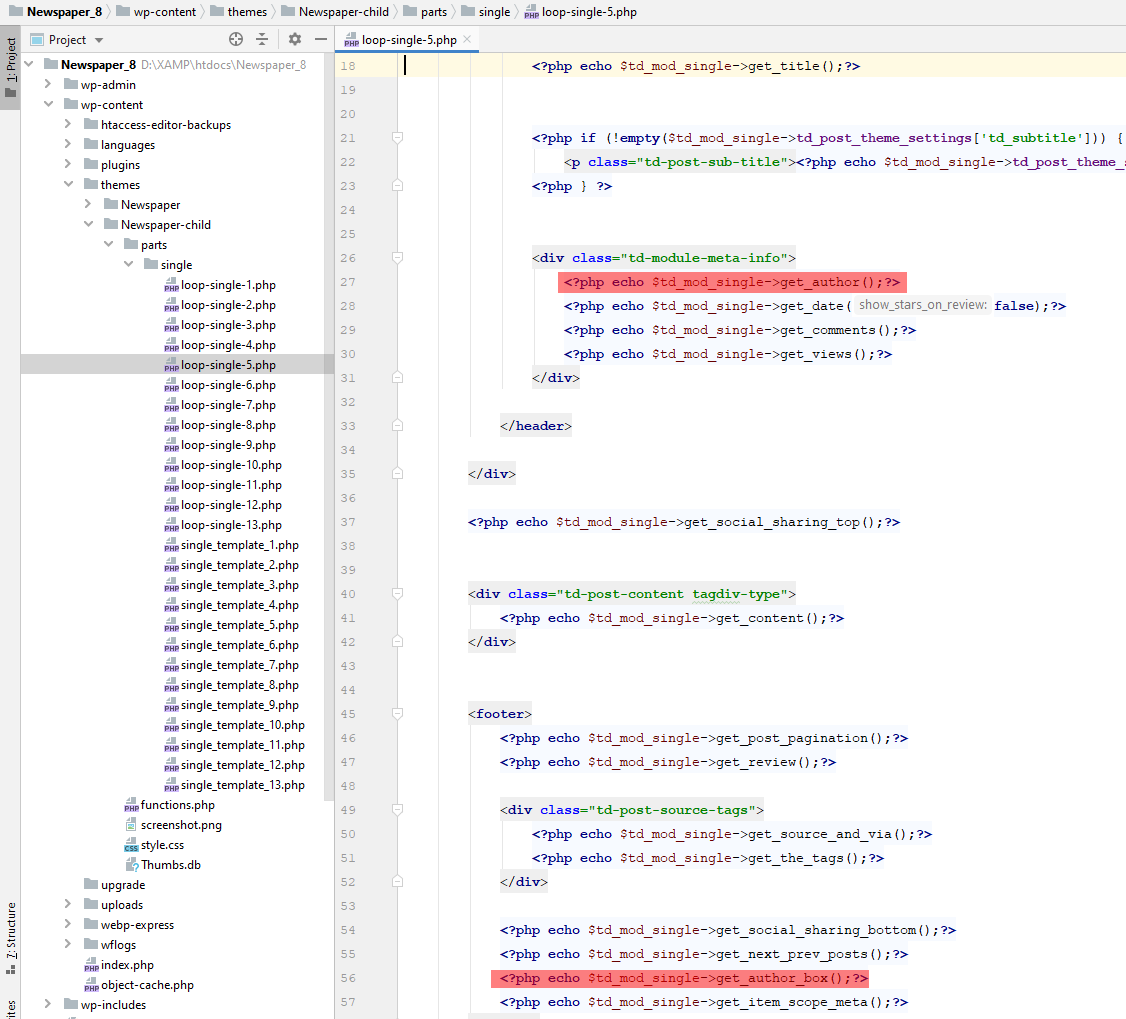
Replace the highlighted code with the following codes:
<?php echo td_get_post_coauthors();?>
and
<?php echo td_get_post_coauthors_box();?>
Maintain the codes position in the .php file though for proper results. \
- Step 3 – CSS styling
In order for the co-authors to position properly we also need a bit of CSS code to ensure proper styling so please add the following CSS code in the the theme panel under custom code-> custom CSS:
https://pastebin.com/dRaStewQ
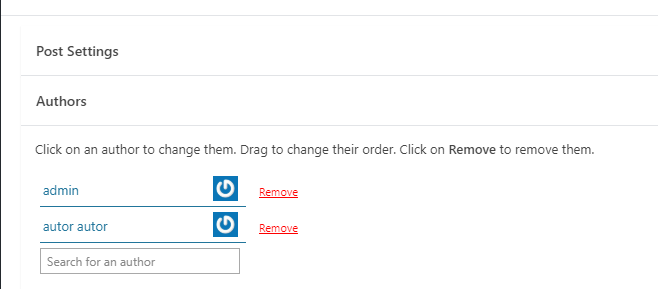
Now you simply need to edit your post and add multiple authors using the plugin author field:
Anamaria Hi,
You can’t filter the block Posts Loop, you can only sort it => https://www.screencast.com/t/geckLSYd5sa, so if you have set the Posts Loop on the homepage, then will display all posts of all categories, if you have set the Posts Loop set on the category template, then will display the posts only from that category.
You can apply the filter only on the Flex Block and Big Grid Flex -> https://imgur.com/Nnt3zGX
Thank you!
discovermh It’s Mobile Theme Plugin.
We did customization in the mobile theme plugin also but it did not reflect.
Even though we did customization for the normal theme but it did not reflect.
we change code into theme>Newspaper>loop-archive.php
$post_count = 1;
$column_count = 1;
$span = ‘span3’;
$column_break = 4;
$is_404 = false;
if( is_404() ) {
$is_404 = true;
$column_break = 4;
$span = ‘span3’;
$args = array(
‘post_type’=> ‘post’,
‘showposts’ => 6,
‘ignore_sticky_posts’ => true
);
query_posts($args);
}
Still, it shows 2 columns in the post archive and category pages.
For Mobile Theme customization we did changes in
plugins>td-composer>mobile>loop.php
Still it did not reflect yet
 aktuellsakerhet
 Hi Bettina!
For example on this page I would like to split the first post listing block in multiple parts so that I can have more than one ad in that block (every other post e.g.):
https://www.aktuellsakerhet.se/category/debatt/?utmpreview=true
That is, have multiple instances of the post loop block where I have set the number of post to display to 1, and for each post loop block I increase the posts offset with 1. Then I can put a custom ad block in between each of the post loop blocks.
Anamaria Hello,
So are you referring to the page or the URL?
For the category template, if you have set a posts loop then will display all posts in this category or you can use Flex Block/Big Grid Flex and set the filter to “Category -Current category” => https://i.imgur.com/7P99qx0.png -> https://wpmarmite.com/en/change-url-categories-wordpress/
Thank you!
Calin Hi Michaelgroth, if you have only posts and pages, then you can use the posts loop elements, there is no need for the flex loop, and this should be displaying both, posts and pages.
Thank you!
 Michaelgroth
 Hi,
I have the same problem with the search results described above. The live search displays search results from pages and posts. The search page only displays search results from posts.
Only in the composer, everything works as expected.
I´m using version 12.2 and the flex loop as described.
Is this bug resolved?
Thank you in advance.
 Bettina
 Hello @jluisqa !
There is an offset and you need to delete it: https://prnt.sc/tTsH-E91aJa1
Access the search page and edit it with the TagDiv Composer, then click here: https://prnt.sc/isubwp2RgORi and you’ll find the settings in that posts loop element.
Thank you!
 grapnell
Hello,
I have searched the forum and the documentation, and I don’t know if I’m just missing it or what, but I can’t figure out what the ADS section in the Posts Loop module does. Does this insert ad code in between posts in the loop? If so, how does it work, because entering a piece of adsense code in the box doesn’t seem to do anything.
Thanks
 sunnymind
Hello,
I like how one can add filters and sorting to Flex Loops. However, other than with Flex Blocks, I can not exclude categories from showing in the Flex Loop.
Is there a way to do that?
Like let’s say I have a category for blog posts (1) and a category for news (2). I only want the Flex Loop to show posts from category 1, but not from 2. How can I do that?
With Flex Blocks it’s easy, simple add – and the category id, however I can’t seem to find a similar option for Flex Loops.
Thank you!
Dominik
 gc_envato
 Hi,
flex block is fine, but I need to get posts related with the current article which ID is in an Advanced custom field. Let me explain:
1. main article is a book author (CPT)
2. flex block lists books (CPT) written by the author
In the book post there is a ACF where I set relation between the book and the author.
Is it possible to set a dynbamic loop in the flex block?
Thanks
gc_envatoHi,
I need to show in a single template the loop of related content. The list is composed by posts related in an ACF field with relation type. Do I need to write php code to create the loop?
Thanks
Anamaria Hello,
So you have a category year and month?
If yes, you can use the posts loop to display the posts from that category and use the flex block to display the posts from other categories.
Thank you!
 Simion C.
 Hi,
So for example in a child category page such as this one https://pluginbliss.com/c/software/synth-presets/
There are 3 posts at the top in the block, which should belong to the respective category, if the block is set to use the special filter for category pages https://prnt.sc/6fqq44d_Cl7L
Assuming this category has those 3 posts, they are the ones displayed in that block. Normally the post loop element below that block should have an offset of 3 posts so it doesn’t display the first 3 posts which are already displayed in the top block https://prnt.sc/7hURUJ15s7Wn So the loop should continue from the 4th post, if the category has more posts.
Please edit the category template with the composer and check first if the top block is set to use the special filter first. Then check if the post loop below it has an offset set, it should be 3. If these elements are set correctly, the posts that are displayed should be correct.
Let me know.
Thank you!
Anamaria Hi,
The Posts Loops settings are divided into 5 tabs: General, Layout, Style, ADS and CSS. The Posts loop is a special block and doesn’t have filtering options.
Also, one of the options for pagination of the Posts Loop has the option for normal numbered and the flex blocks do not have this option.
The Posts Loop is automatically filtering the posts depending on the cloud template you set (for example on the category page there will be posted posts from that category).
Thank you!



