- NewspaperRetina Images
- NewspaperThumbnails – Fix strange looking images on blocks
- TutorialsExisting content
- NewspaperUsing the theme with existing content
 Simion C.
 Hi,
You can try the regenerate thumbnails plugin like in this tutorial, and see if it fixes your issue – https://forum.tagdiv.com/thumbnails-fix-strange-looking-images-on-blocks/ As for the image gradient you can change the style on the big grids in their settings – https://www.screencast.com/t/JOVQJKSEc If you still have issues regarding the thumbs, try deactivating all your plugins except Visual composer, clear your cache and see if the problem is still there and if not, activate them one at a time to identify the one that could be causing this. Also please provide a link to your website so we can take a look if none of these suggestions work.
Thanks
 Catalin
 Hello,
On mobile, for a good quality for your images, you should enable the retina support for your thumb used by you. I noticed that you are using the post template default which uses the 640*0 sizes. Try to enable this option from Theme panel, like this -> https://www.screencast.com/t/fwBQvYrm5K and then, using the Regenerate Thumbnails you should regenerate this image from Media Library like this -> https://www.screencast.com/t/zlNhLa8wJyn Clear all your caches and check the results.
Thanks for the message!
 superchampionkid
Hello!
Thank you for a great theme. It was working splendidly until randomly when I checked the site a few days later, the thumbnail sizes became un-cropped – so the posts appear uneven in the blocks and mega menu. Is the solution to regenerate thumbnails? Not sure.
Also, the front page, the posts have the dark shadow highlight over all of the post blocks, I remember changing this for other pages and I cannot locate it to change the hover/fade effect over the posts as I do not prefer the dark gradient.
Thanks so much in advance for your assistance, looking forward to completing this site shortly.
Catalin Hello ipcs,
Unfortunately, our theme does not have any such an option that allows you to change the thumbs dimensions, sorry! Notice that the Block 21 uses the module 16 which uses the Default Thumbnail from WordPress, like this -> https://www.screencast.com/t/sKHB36Y1 From here, you can set your thumb size and then, using the Thumbnail Regenerate, you should Regenerate them thumbs and then you will bring this result -> https://www.screencast.com/t/kJmiguQRx
Hope this helps!
Thanks for the message!
Simion C. Hi,
These are the thumb dimensions used on the modules – https://forum.tagdiv.com/theme-thumbs/ As you can see there some modules have a 16:9 aspect ratio, while others have one closer to 4:3 you just have to experiment with different aspect ratios and see what works best for you. Also this is the way the featured images are cropped – https://forum.tagdiv.com/featured-image/
If you have tried to regenerate thumbnails and cleared the cache after the process, with no results please provide a link to your website so we can inspect it.
We have not tested any plugin with that functionality so I can not make any recommendations, you will have to search for some plugins and use the one you like.
Thanks
 HeTo25
I`m testing the Newspaper-Theme within a localhost-installation and will go online at the end of the week. I was able to configure most of the things and I am happy with the theme. But there is a question about the thumbsize of Big Grid 1 elements.
I`ve managed to edit the thumbsize (height) of Block 5 elements from 324×235 to 324×324 and it worked.
–> td_config.php:
td_api_thumb::add(‘td_324x235’,
array(
‘name’ => ‘td_324x235’,
‘width’ => 324,
‘height’ => 324,
‘crop’ => array(‘center’, ‘top’),
‘post_format_icon_size’ => ‘normal’,
‘used_on’ => array(
‘Module 3, 4, 5, 11, MX3’, ‘Block 1, 5, 6, 13, 17, 20’
),
‘no_image_path’ => td_global::$get_template_directory_uri,
)
);
Then I restarted Apache/MySQL-Services in XAMPP Control Center –> Regenerated Thumbnails with a Plugin. Block 5 elements now appear as a square on my homepage as they should.
I did the same for Big Grid 1 elements and changed them in td_config.php to 265×265 (4 small items right) and 534×534 (1 big item left).
td_api_thumb::add(‘td_265x198’,
array(
‘name’ => ‘td_265x198’,
‘width’ => 265,
‘height’ => 265,
‘crop’ => array(‘center’, ‘top’),
‘post_format_icon_size’ => ‘normal’,
‘used_on’ => array(
‘Big grid 1, 3, 7’
),
‘no_image_path’ => td_global::$get_template_directory_uri,
)
);
td_api_thumb::add(‘td_534x462’,
array(
‘name’ => ‘td_534x462’,
‘width’ => 534,
‘height’ => 534,
‘crop’ => array(‘center’, ‘top’),
‘post_format_icon_size’ => ‘normal’,
‘used_on’ => array(
‘Module 19, Module MX5, MX17’, ‘Big grid 1, 3, 4, 6, 10, 12’
),
‘no_image_path’ => td_global::$get_template_directory_uri,
)
);
Then I regenerated the thumbnails again but nothing changed in my Big Grid 1 on the homepage. The elements still have the default sizes (534×462 and 265×198).
Do I have to take further steps to change the Big Grid 1 Thumbsizes successfully?
Thanks
 timski82
Hi everybody,
i have two problems (at the moment):
1.)My thumbnails don´t fit into the boxes. I read here a lot and I tried the “Thumbnail Regenerate plugin” in combination with the deactivated plugins (excepted the Visual Composer) – without success.
2.)Can you recommend a plugin (for newspaper) to show the credits + link of the images under or in the images
Simion C. Hi,
After you have activated the retina thumbs in Theme panel->Block settings – https://forum.tagdiv.com/retina-images/ you will have to upload one single image with a bigger size like in your example and the theme will create the required thumbs from that image. Make sure to use the regenerate thumbnails tool after you enable retina images and you could also clear your cache.
Thanks
 juliusuk
 AH, finally found the solution.
The problem was that the thumbs were not generated so the big grids use the full image size with specific aspect ratio. The images were not cropped at all.
SOLUTION: Check if gd library is enabled on the server as wordpress requires it for cropping. You can see it in Cpanel, if not, contact hosting provider.
Then try to regenerate your thumbs and see how it goes.
So, what i did was install php-gd and regenerate thumbnails, and everything worked fine. Might be an issue on some specific hosting providers.
Thanks for the email support!
Julius
 MShayto9
 Hi Bogdan,
This problem is solved now – thanks!
I do however have another problem now, some of the featured images for their respective posts that appear on the homepage don’t appear in full size. They get cut off from all sides and just don’t look “full”.
I tried doing the “regenerate thumbnails” trick you guys suggest in the documentation, but it didn’t work.
 LCale
LCaleHi, my first problem here, using Newsmag theme. 🙂 Please check attached pictures. I think there should be at least 1px space between images in block 14 and block 9(red part).
I regenerated my thumbnails and images are 341x220px as they should be. On another picture it looks good.
Any suggestions?
https://o16i.imgup.net/block_14le69e8.jpg
https://s28i.imgup.net/properspaccdcf.jpg
Regards,
LCale
 Edward
 WordPress doesn’t have an upscale function, if you upload small images on modules which use thumbs that are larger than the uploaded image the original size will be used (the image will not be up-scaled), this is not ideal because blank space may appear around the thumb.
If you don’t have the possibility to upload large images you could use a combination of plugins to upscale the thumbs – Thumbnail Upscale and Force Regenerate.
Theme thumbs: https://forum.tagdiv.com/theme-thumbs/
juliusuk Hi,
thanks Chris, i now tried this plugin as it was suggested in many threads. I installed the plugin and regenerated thumbnails, but did not solve this issue. Probably because the images loaded were large enough, but they scale wrongly inside the boxes.
Example: here this behaviour, which in this example only happens at viewport > 1140px. The pictures scale as they should on widths below this.
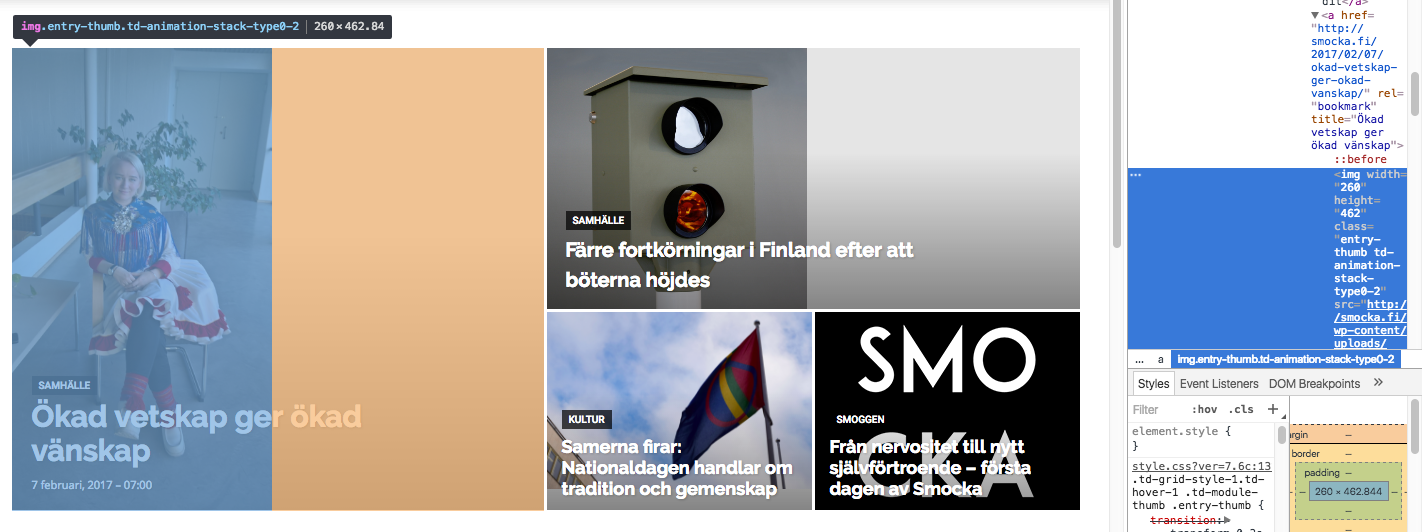
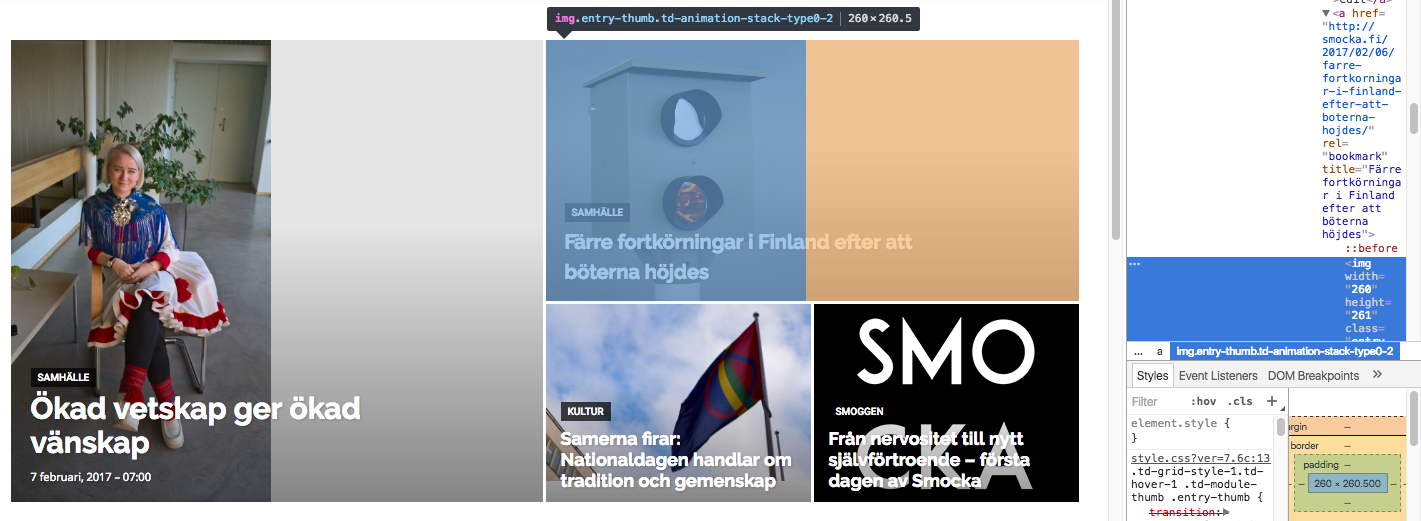
Both images in these boxes get width=”260px” written directly into the img-tag as properties. Don’t know if that is the issue (this also happens at the lower viewports where the layout works). However, the images that actually are loaded into the big grid are of widths 1400px (the one to the left) and 1022 px (the one to top right), i.e. large enough to fill the space if they were cropped to fit.
I’m trying to add “width 100%” or height “100%” at different places in css but this seems only to stretch images rather than crop them so this is not the solution.
I’m really puzzled why the center-top cropping that is described in some earlier threads is not taking place here?
Greetings,
Julius
juliusuk Hello,
I’ve read the discussion and documents on regenerating thumbnails. I’ve used the tool to regenerate thumbnails without success. My uploaded images are large enough (2000px width), but still, depending on which bLock or Big Grid module, the pictures get grey bars in different modules.
example of big grid: http://smocka.fi/wp-content/uploads/2017/02/Screen-Shot-2017-02-06-at-11.14.34.png
These images are uploaded with widths of 2048 (http://smocka.fi/wp-content/uploads/2017/02/29180864370_5656e4cdec_k-1.jpg, http://smocka.fi/wp-content/uploads/2017/02/30704050895_a54f481393_k.jpg) and 1100 (http://smocka.fi/wp-content/uploads/2017/02/Smocka-kesatyo.jpg). WHy do the images not crop correctly in all big grids or blocks?
The site is now live at smocka.fi if you want to have a look.
Since there are so many thumbnail options, cropping a picture correctly for one certain big grid size manually is not an option since the aspect ratios change between modules.
I’m quite sure the theme is not supposed to work like this. Is there some setting for thumbnails that i might have missed?
Catalin Hello newbietamvan,
Please notice that our theme does not enlarge (stretch) the image but only crop these. If you want to bring best results in theme, you should use a picture with high quality (HD for example). As you can see here -> https://www.screencast.com/t/xwiD4mang your size image is too short than the container and that why it is not fit as expected. Try to change the image and load another one which having a larger size. After this, use the Regenerate thumbnail with Force Regenerate, clear all your caches and check the results.
Thanks for the message!
 Bogdan B.
 Hello,
Please make sure the thumbnails are enabled from the theme panel:
https://www.screencast.com/t/ecgGr87m6
And then use this guide to regenerate thumbs: https://forum.tagdiv.com/thumbnails-fix-strange-looking-images-on-blocks/
Thank you!
 newbietamvan
 Thanks Sir
But, not work sir the plugin Force Regenerate and Regenerate Thumbnails
Catalin Hello newbietamvan,
You should regenerate your Thumbnails using the Force Regenerate and Regenerate Thumbnails. For more information consult our guide here -> https://forum.tagdiv.com/thumbnails-fix-strange-looking-images-on-blocks/
Thanks.
Simion C. Hi,
Please make sure that category tags are enabled on all the modules in Theme panel->Block settings – https://www.screencast.com/t/QANsd75mTOWZ
As for the image problems please follow this tutorial and regenerate thumbnails – https://forum.tagdiv.com/thumbnails-fix-strange-looking-images-on-blocks/
Thanks
Simion C. Hi,
Please follow this tutorial – https://forum.tagdiv.com/thumbnails-fix-strange-looking-images-on-blocks/ and regenerate your thumbnails and see if that fixes it. The logo is placed on the left in Header style 1 that you are using, you can find all the header styles here – https://forum.tagdiv.com/header-styles/ and choose a different one if you want in Theme panel.
Thanks
 sadiadds
 hi have use this theme for image site but facing problem with page speed. when i check google page speed test it shows me to optimize all my images. but my images are in medium sizes. check this http://bit.ly/2jKxZuZ .. i have an issue with all image sizes. i want to set all in same size.. on related posts it shows different sizes how can i fix that? you may check my post here http://bit.ly/2kHn4Cq i have regenerate images but can’t work for it.. and i have used in function php this code add_filter( ‘jpeg_quality’, create_function(’’, ‘return 50;’ ) ); but page speed still mess
 hitechtry
 Hello Catalin,
Hello Catalin,
Thank you for the answers, I tried to regenerate the thumbnails with both plugins, but nothing happens. other solutions?
Thanks
Catalin Hello hitechtry,
You should regenerate your Thumbnails using the Force Regenerate and Regenerate Thumbnails. For more information consult our guide here -> https://forum.tagdiv.com/thumbnails-fix-strange-looking-images-on-blocks/
Thanks.
Catalin Hello
I have checked your website and the featured images seem to work as properly, as you can see here -> https://www.screencast.com/t/cmVtO32E Also, is the problem will reappear, you should regenerate your Thumbnails using the Force Regenerate and Regenerate Thumbnails. For more information consult our guide here -> https://forum.tagdiv.com/thumbnails-fix-strange-looking-images-on-blocks/
Thanks.
 Jessie
 I took a look…
My initial thoughts… Damn! That is a big website! and I really don’t want to f it up… It’s a very good looking site and interesting too…
It appears what is slowing down your site the most is the images. About 30% of the page/post sizes is the logo which is 500kb… appearing on all your posts and pages.
After running your website at google pagespeed insights you will see a link for optimized resources for your site at the bottom. I downloaded them and the optimized logo from Google is only 10 kb. And the logo looks to be the same quality and clarity as the large size one on the site.
As you likely know bigger pages equals longer load times.
For the rest of your images, it would be good to optimize them using an image optimizer plugin such as ewww image optimizer. After that you would need to regenerate the thumbnails using regenerate thumbnails plugin for the images to display correctly. I am a bit wary in this advice though as you have many images and it will take very long.
At gtmetrix.com the site scores very low for “remove query strings from static resources”
The code I am using on my site to score 100 for this adding the code below to functions.php
function _remove_script_version( $src ){
$parts = explode( ‘?ver’, $src );
return $parts[0];
}
add_filter( ‘script_loader_src’, ‘_remove_script_version’, 15, 1 );
add_filter( ‘style_loader_src’, ‘_remove_script_version’, 15, 1 );
Your site generates a lot of requests to load… (109)
I think many of those requests are due to your site calling youtube for the thumbnails used on the videos. You should look to have the thumbnails on your website for the videos, then your site won’t have to wait for youtube to send them. I am using ARVE plugin on my site to do this, BJ Lazy Load also does this but ARVE looks better.
I highly reccommend you get a second opinion on my suggestions incase something goes wrong. How long does it take to backup such a big site?
Hope it goes well… That sandbox sounds good… If all else fail give autoptimize plugin a shot. Be advised when it works it does wonders, when it doesn’t it can cause a lot of headaches.
Good luck 🙂