
- NewspaperDesign your post pages using the Default Templates
- NewspaperPost template ads
- NewspaperWP Rocket and Newspaper Theme: Optimization Guide
- NewspaperHow to use the Flex Blocks cache option
- NewspaperFlex Block Settings Guide
- NewspaperThe Newspaper Mobile Theme: Introduction
- NewspaperDefault Category Settings
- NewspaperCloud Library – Category Templates
- NewspaperBig Grid Flex Settings
- NewspaperHeader Builder
- NewspaperMeta Info on Modules and Blocks
- NewspaperTheme modules and blocks
- NewspaperImport / Export Theme Settings
- TutorialsDefault Block Settings Guide
- NewsmagImport / Export theme settings
- TutorialsOffset Feature
- NewspaperUnique Articles
- TutorialsSystem status parameters guide
- NewsmagRequirements for Newsmag
- NewsmagBlock settings tutorial
 rtyom
rtyomHello.
In Instagram block I’m getting some broken image icons with video posts.
http://prntscr.com/sw8kog
How to remove it?
 Calin
Calin Hi,
All pro demos are using cloud templates from tagDiv Cloud Library, these can be edited only with tagDiv Composer, so you are using a single post templates this can be edited with tagDiv Composer and you can adjust it as you want -> https://i.imgur.com/eMV43pi.png use the right click to remove elements -> https://i.imgur.com/MVBO1sm.png after you remove all the elements from sidebar set the set row from 2 in 1 -> https://i.imgur.com/ofpISOQ.png
If you are using a pro demo, the footer is a cloud template, then you’ll need to edit it from a page, for example, you can edit the homepage, click on edit with tagDiv Composer -> https://i.imgur.com/uweNRrc.jpg after that go down to the footer end edit it how you want (now you can customize the the whole web-page from fronted).
The standard templates can be edited only with custom css and using the settings from theme panel.
Thank you!
 Fabrice
Hi. I have a real problem with page templates in the “cloud template” section. When I choose a template with sidebar, the display is correct in the builder : I can add or remove blocks and the sidebar is visible and functional. Unfortunately in production, the sidebar no longer exists and the content of the sidebar is displayed below the main content of the page, sometimes above it. I have this problem on all pages containing a sidebar (single post, categories …).
For example: https://www.421chevaux.com/category/ford-mustang/ (the “MOST READ” part is supposed to be a sidebar on the right, but is below the main content).
To have a sidebar on sigle page, I have to use the native wordpress sidebar and not the tagdiv sidebar which does not work.
It’s not a pluggin problem because I deactivated and reactivated to test. The problem started with the major update 🙁
Thank you very much for helping me.
Calin Hi,
Usually the h1 is set on logo, if you are using a cloud header from tagDiv Cloud Library, you can have a different H1 per page/posts, another way is to using the Page Builder + Page Title on page template, this should set your page title as h1 and remove the h1 from logo.
If you want that your title to have the h1 set instead of logo, then please check if you are using a cloud header, if yes, then you can edit it with tagDiv Composer and disable the h1 -> http://prntscr.com/q1ohji from desktop and make sure that you do the same for mobile logo -> https://www.screencast.com/t/xVUjIMUelXA2 -> https://www.screencast.com/t/ABTw6DUnbMjH and the problem will be solved!
Hope this will help you!
Thank you!
 atmost
 I did some trial and error concerning the featured image not showing, make sure the other images in your post does not have the A-tag embed, like -> <img class=”wp-image-5292 aligncenter” ..
Just remove the … and the featured image will pop up
 ChildhoodBiz
Hi, I use the newspaper theme that shows my latest Instagram posts at the bottom of the homepage. Somehow the connection with Instagram does not work anymore. I had posted a question about that here but nothing helped, Now I want to get rid of this section – but even after I deleted the connection in the theme panel it still shows up.
See here: https://we.tl/t-qufTgXkBUp
How can I get ride of the section: FOLGEN SIE UNS AUF INSTAGRAM @CHILDHOODBUSINESS
Thanks for your advice!
 Topfgartenwelt
Dear tagdiv-Team,
there is a problem with the largest contentful paint in the mobile theme caused by the featured image. When I use a featured image the largest contentful paint is very high and the website doesn’t pass the speed test. Is there a way to improve that?
And is there a way to remove the Social Media Buttons after the Image in the mobile Theme? Where I can deactive them in the source code?
And is there a way to show the featured image in the mobile version on the end of the post or in the middle instead of the beginning? Or is it the only way to delete the featured image at all to get the largest contentful paint down?
Here are the pictures: https://www.topfgartenwelt.com/largest-contentful-paint
 Revive the Netherlands
 Yes. The mobile 2 grid is now fine like this -> https://imgur.com/1DO2B47
But the mobile 1 grid is now like this -> https://imgur.com/yzjzvtm
But I want it to be like this -> https://imgur.com/m1nj4WQ
I used this code for it:
Yes, there is a code that is overwrite the settings from theme panel, please remove this custom css
.td-post-category {
position: absolute;
left: 0;
top: 67px;
display: block;
background: #dd9933;
color: black;
font-weight: 700;
}
but then is Mobile grid 2 messed up -> https://imgur.com/jTIXnaB
You gave me a code to move the date to the right side but is it possible to move the category tag above the title.
Regards Sam
 beautywarrior
We have updated Newsmag theme to latest version.
All went well. We are experiencing a good speed.
Also Tagdiv composer is an excellent composer for adding various elements to page/post.
We are facing only one issue with tagdiv composer. One of our plugin page does not work if tagdiv composer is enabled. Once disabled plugin page functions works fine.
We got support from plugin developer and he gave following code to be added so it strips some sections on the page. We added it to function.php of Newsmag child theme .Still It did not work.
Please let us know how can we make it work.
add_action(‘template_redirect’, ‘remove_td_comment_filter’, 10);
function remove_td_comment_filter(){
if ( is_singular(‘dwqa-question’)){
remove_filter( ‘comments_template’, ‘tdc_template_include’, 99 );
}
}
example link of non working pages
https://www.thebeautymadness.com/question/skin-care-problems/many-light-freckles-face-make-face-looks-like-full-blemishes/
https://www.thebeautymadness.com/question/uncategorized/can-get-gelatin-powder-2/
all pages related to plugin is not working.
Also once we disable tagdiv composer these pages works fine.
Calin Hi,
So you want to adjust the mobile theme to be more like responsive version of theme.
For this please use the option for category tag from theme panel, this will place the category just above the post title -> https://i.imgur.com/0INSeKx.png -> https://i.imgur.com/no7cakd.png also the author can be remove from here -> https://i.imgur.com/SRxz5pT.png (this option appear only if tagDiv Standard pack is enable) -> https://i.imgur.com/7cS4wkG.png
Thank you!
Calin Hi,
Is possible that Leaky Paywall to not be compatible with cloud template, unfortunately this is not a tested plugin and we can not offer support for it.
Also for standard post you can use theme panel to style it, remove/add elements and ads.
Design your post pages using the Default Templates -> https://forum.tagdiv.com/design-post-pages-using-default-templates/
Thank you!
Calin Hi,
Unfortunately there is no setting for the standard post style to change the color of the tag, this can be done only with custom css ->
.td-tags a {

    color: #fff;

}
The code need to be set in theme panel custom code > custom css.
As an alternative, you can use a single post template from tagDiv Cloud Library, this can be edited with tagDiv Composer and you can add/remove elements and style them.
-> https://i.imgur.com/loEfufO.png
Thank you!
 Ruffo
Ruffo Calin,
my website don’t have directory: /blog is the same with @jaspalsingh
I think the theme is breaking the Yoast code and adding a canonical tag.
I already tried almost everything and I can’t solve it!
I reset the theme, delete demo, I installed the demo again. add the filter to function file: remove_action (‘wp_head’, ‘rel_canonical’, 100); and nothing works.
My static page name is: ‘Inicio” (home)
But I don’t have posts page: /Blog
Please look my image:
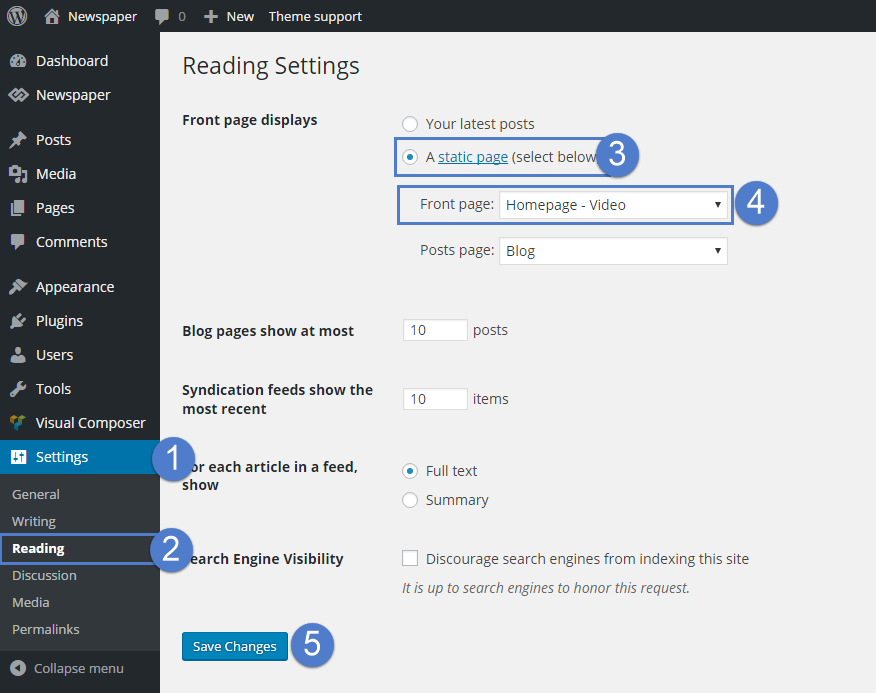
Could it be the issue you should fix? I can see that @jaspalsingh is not fixed the issue yet.
Thank you very much!
Ruffo Hello Calin,
I have the same issue with the theme! I don’t have revolution slider. I deactivate ALL plugins except tagDiv plugins, child theme or cache plugin, and CDN system and clear all cache and not working!!
The only way for remove the canonical tag is set up theme to latest post option, but with this option, I can’t setup excerpt posts and none configuration.
Please I need you help ! my traffic is drop 75% for it !
Thank you very much!
Calin Hi,
All pro demos are using cloud templates from tagDiv Cloud Library, these can be edited only with tagDiv Composer, so you are using a single post templates this can be edited with tagDiv Composer and you can adjust it as you want -> https://i.imgur.com/eMV43pi.png use the right click to remove elements -> https://i.imgur.com/MVBO1sm.png after you remove all the elements from sidebar set the set row from 2 in 1 -> https://i.imgur.com/ofpISOQ.png
Thank you!
 Vlad S
 Hello !
For the white line you will have to edit the post loop with tagDiv Composer and remove the Padding: https://www.screencast.com/t/oZ3Y1kCWwO9x
For the background please change the colors in Theme Panel – Theme colors.
Thank you !
Calin Hi,
Unfortunately using a cloud template this can not be done, but you can try another think, you can set the image in side the post with left align and edit the single post template with tagDiv Composer and use the right click to remove the single featured image. In this way you can set the featured image on post and this will be display on modules and the images set inside the post content will be display as “featured image”.
Thank you!
Calin Hi,
Usually this issue is related to a firewall or security module which blocks admin-ajax.php request. Please verify the console for error while saving the settings on the Theme Panel, usually it displays a 403 or 404 error.
If you don’t use a security plugin, please ask your host about this, maybe you have a security module which blocks this.
If you use a plugin like Wordfence please set it in learning mode.
If you are using a PRO demo or cloud templates, that is why the theme panel settings are not apply. Using cloud template from tagDiv Cloud Library, you’ll need to edit the cloud template using tagDiv Composer and set on the elements the color and style you want
For example in order to change the share style, please edit the single post template wit tagDiv Composer, like this -> https://i.imgur.com/ZpxtjbP.jpg click on the share buttons and choose a style https://i.imgur.com/jyYrNlL.png after that do not forget to save the changes.
If you are using single post template you need to edit it with tagDiv Composer like this -> https://i.imgur.com/6BRfOox.png and use the right click to remove the elements you do not want -> https://i.imgur.com/sKWxCCb.png
Let me know the results!
Thank you!
Calin Hi,
If the sidebar is not apply on your posts, that is because you are using a single post template from tagDiv Cloud library, this can be edited using tagDiv Composer. What you can do to keep the template layout and to have a sidebar selected by you is to edit it like this -> https://i.imgur.com/jK8VGvX.png and use the right click to remove the elements you do not want, also if you have an sidebar made from widgets and you want to display it for posts, you can drag the element from composer and select the sidebar -> https://i.imgur.com/MkCuCRg.png -> https://i.imgur.com/S5hgJ9u.png or if you want to be able to set individual sidebars, then you need to use a standard post style -> https://i.imgur.com/L5q9aUK.png
Thank you!
Calin Hi,
Usually the h1 is set on logo, if you are using a cloud header from tagDiv Cloud Library, you can have a different H1 per page/posts, another way is to using the Page Builder + Page Title on page template, this should set your page title as h1 and remove the h1 from logo.
If you want that your title to have the h1 set instead of logo, then please check if you are using a cloud header, if yes, then you can edit it with tagDiv Composer and disable the h1 -> http://prntscr.com/q1ohji from desktop and make sure that you do the same for mobile logo -> https://www.screencast.com/t/xVUjIMUelXA2 -> https://www.screencast.com/t/ABTw6DUnbMjH and the problem will be solved!
The “Tagline ” can be set in theme panel -> https://i.imgur.com/vMwPIyD.png or if you are using the mobile theme plugin -> https://i.imgur.com/5OgBswQ.png
Hope this will help you!
Thank you!
Calin Hi,
So if I understand correctly, you want to remove the breadcrumbs from posts that have a certain category, this can be done with custom css, or using a single posts template where you remove the breadcrumbs with tagDiv Composer and you assign this cloud templates on these posts that have this category.
Thank you!
Calin Hi,
You are using the mobile theme plugin, this is a separate theme only for mobile devices, therefore the settings made with tagDiv Composer will not affect it. If you want to have the same layout on mobile devices, you can use the responsive version of theme and disable or use only for amp the mobile theme plugin.
Also our theme will set the featured image at the top of your posts, therefore you do not need to set that image in post content, or if you do not want to display the featured image you can remove it with a custom css.
Thank you!
Calin Hi,
If your post have two sidebars, then you are using a single post template from tagDiv Cloud Library, this can be edited with tagDiv Composer -> https://i.imgur.com/sjViaz9.jpg -> https://i.imgur.com/89gCokH.jpg chnage the layout of row, also you can use the right click to remove the elements.
Thank you!
Calin Hi,
As I can see your page speed ton desktop is very good-> https://i.imgur.com/LZ3vxkk.png and if you’ll remove the link for the images that you deleted -> https://i.imgur.com/R0mW4pd.pngt this will be more good -> for this you’ll need to edit the homepage with tagDiv Composer and remove these ads -> https://i.imgur.com/KG8vxea.png also make sure that you removed the background images from here -> https://i.imgur.com/A6uCXUH.png
2. you can try one of these -> https://www.wpbeginner.com/plugins/7-best-wordpress-backup-plugins-compared-pros-and-cons/ also our theme have to a small backup for theme panel options -> https://forum.tagdiv.com/import-export-theme-settings/
3. Yes, you can, but we recommend to test it first on subdomain or test environment, make sure that you test it first and you make a full backup to your website -> https://tagdiv.com/update-newspaper-theme/
4. If you are referring on post title from blocks -> https://i.imgur.com/j3r3jEs.jpg you can adjust it using tagDiv Composer -> https://i.imgur.com/hM0ksjv.jpg
If you are referring on this -> https://i.imgur.com/Qe3SwPx.png then you can do it from theme panel > theme fonts -> https://i.imgur.com/sZV7VVM.png
Thank you!
Calin Hi,
Usually this issue is related to a firewall or security module which blocks admin-ajax.php request. Please verify the console for error while saving the settings on the Theme Panel, usually it displays a 403 or 404 error.
If you don’t use a security plugin, please ask your host about this, maybe you have a security module which blocks this.
If you use a plugin like Wordfence please set it in learning mode.
If you are using a PRO demo or cloud templates, that is why the theme panel settings are not apply. Using cloud template from tagDiv Cloud Library, you’ll need to edit the cloud template using tagDiv Composer and set on the elements the color and style you want
For example in order to change the share style, please edit the single post template wit tagDiv Composer, like this -> https://i.imgur.com/ZpxtjbP.jpg click on the share buttons and choose a style https://i.imgur.com/jyYrNlL.png after that do not forget to save the changes.
If you are using single post template you need to edit it with tagDiv Composer like this -> https://i.imgur.com/6BRfOox.png and use the right click to remove the elements you do not want -> https://i.imgur.com/sKWxCCb.png
Let me know the results!
Thank you!



