
- NewsmagRequirements for Newsmag
- NewspaperRequirements for Newspaper
- NewspaperFlex Block Settings Guide
- NewspaperBig Grid Flex Settings
- NewspaperWhen tagDiv Composer is Not Working
- TutorialsDefault Block Settings Guide
- NewsmagBlock settings tutorial
- NewspaperBlock settings tutorial
- NewspaperInstalling Pre-built Websites
- NewspaperHow to Update the Newspaper Theme
 prose976
 Thanks for the reply. I found a work-around to satisfy my requirements for now.
Have an Awesome Day!
Philip
 michaejk
I’m not sure why but the element Big Slide is not working on my site.
element Slide works fine but the Big Slide does not. Are there additional requirements with the Big Slide that I’m not seeing?
-Mike
 Radu
Radu Hi Chris,
Newsmag is no longer made with bootstrap. The grid system is custom made by us. Newsmag uses a grid system that is very unique and different under the hood compared to a standard bootstrap style grid (due to the borders and other design requirements). We deliver only the fonts that we use on the ui and the icons are made in house (we don’t use one of the free icon font packs). As more and more users rely on visual composer to make pages with buttons and other ‘non news-y’ items we dedicated a lot of time to support visual composer better and to have custom styles and fixes for most of it’s components.
Newspaper 5 is also not based on bootstrap.
A solution based on visual composer will not work? I know they are basically shortcodes and will tie you to visual composer but it’s very easy to built prototypes and to customize them until you reach a nice design.
Radu O.
 newbie
Hi,
it would be kind if you could fix this bug with a high priority as is really annoyoing:
If I install Newspaper and only install the MUST use Plugin (Visual Composer) but not the other suggetesd Plugins (like Jetpack, Contactform, socaial Counter tagdiv)… I will get on newly created Users (with custom Roles (=not having admin rights)) the following Admin Notice:
“Sorry, but you do not have the correct permissions to install the Contact form 7, Jetpack, Revolution slider and tagDiv social counter plugins. Contact the administrator of this site for help on getting the plugins installed.
Dismiss this notice.”
This is major Bug because of two things:
1.) These users do not habe any Install_Plugin Capabiities so will never be able to install a plugin! This does not make any sense at all, showing this message to a user, that only has subscriber rights/role etc…
2.) Secondly I have installed the must use plugins (but not the recommended plubings) and therefore all requirements are fulfilled. So this message should even for administrators not be printed, once the must use plugins (Visual Composer) is installed.
Code is in:
public function notices() {
global $current_screen;
// Remove nag on the install page.
if ( $this->is_tgmpa_page() ) {
return;
}
=>you should at least include a check if the user has the install_plugin capability!
=>I also reported some months ago a bug similar, wthere the Activation Messages is shown also to all users (this is a similar problem)…
thanks
 vj1023
Hey tagdiv ,
Good Evening..hey i m very much happy with the responsive website as it’s doing great!
now i want to move to mobile application for android, apple devices etc..
being a non-techie i would need a good opinion from you that what should i do?
i read about apppress and some plugins which do the job of conversion of wordpress blog to mobile application to be published on application marktets.
Do you have someone who could do it for The Bayside Journal
You guys know it better, as it is your own code and how it can be done the best .
My basic requirements are push notifications , clean interface as newsmag has and one custom requirement which could be done easily.
Please give me a good opinion about it.
 simchris
 I personally would rather not have the SEO stuff tied to the theme, as I’ve changed themes all over the place the past 10 years using WordPress, and there is no guarantee a theme will be updated for new SEO tech/requirements. With YOAST SEO, they now have a business model to sell premium versions and also sell the Google News plugin (which I use with 20 site license). I can swap themes if need be, without losing settings or foobar the sitemap.
Adding additional functions might be nice for the native system, but as long as there is an option to disable it all, I’d be fine with that.
The old Yoast was merely a collection of things we used to do with functions.php frankly, and custom headers. But now, it’s evolved quite well and works well “most of the time.” But it’s kind of like saying “why not build in Visual Composer features and stop using that plugin” … well, a whole separate dev team work on that, and they make money on each license, so it continues to evolve.
I’ve used themes in past that tried to do it all, and they end up being neglected, one month delay to fix something simple, etc.
SO, for me, I’d rather let Radu and folk make sure the theme functions with WordPress properly, supports a wide variety of WP standards, and then leave the “extensions” to others. Just my thought.
I used to build my own themes, and it’s a pain in the arse (hence how I ended up here).
But as many have said, this a forum, so discussion and exchange of ideas is all good. 🙂
(and how about browser and forum designers turning off freakin’ auto correct … changing build to built… it’s not possible for me to mis-type a b next to a t on the keyboard! Argh!)
-
This reply was modified 11 years by
simchris.
simchris Simple Press supposedly will have update very soon for WordPress 4.1, so I’d likely wait for that to stress too much, as a lot of plugins are having problems with the “strict” requirements in WP 4.1.
 itrejomx
I have been working on a clients WebPage.
It is a news portal. They handle a LOT of posts a day. And have some nasty requirements (which force me to run a bit too many plugins like: adrotate, jetpack, redirection, easy responsive tabs, weather plugin, alexa rank widget, and due to security reasons Hide-My-WP from codecanyon).
They’re on a dedicated server, which has a long response time (about 1.4s) Thanks to the guides, here and google pagespeed insights i was able to bring the pagespeed score from 23 up to 64 (enabling gzip among other things). But all the time I have noticed that when I do the check i get an error on the Desktop version.
Screenshot here
Anyone have any idea why I’m getting this error, or how I can fix it?
you can find the site at Aztecasonora.com
 tenocation
Dear TagDiv Team, I start using this theme around 1-2 months ago and did tried all my best to fullfill my needs like custom post type setups and many other things. But, The theme is designed strictly for using built in post types. I therefore, request a refund. I also discontinued using this theme. Hope, you don’t mind. As this theme is awesome but not according to my requirements.
Thanks again.
tenocationNewspaper theme is loading jQuery script in footer instead head. I need the script in header because of one of my plugins requirements. I am using tagdiv speed booster plugin. Please guide me how can i enable to lead jQuery in header.Thanks
 OuweAap
 Thanks Chris,
I already tried it, but not enough options. To limited for my requirements. Like, I would want to have a gradient menu background. And more control of how my menu looks, feels and acts in general.
These third party menu plugins give me that freedom. But I have no idea how they integrate with the theme.
 Gee95
Gee95 @Christopher Thanks, but i don’t think it’s my technical requirements that are denying my application to Google News because that’s perfect (url structures and content etc) but my ‘About Pages’ and listing biographies about each editors.
These requirements i’m struggling with as i don’t want to put too much details about my editors down, but i don’t know how much is enough?
Hope that makes sense 🙂
simchris FYI, Google News requirements have nothing to do with this “theme” but your site contents, editorial focus, original vs “cloned” content, actual editorial staff, number of updates per week, not violating Google policies (e.g., linking to a software product which allows people to download YouTube videos – for example – is a violation of Google policy), paid text links, spammy anchor links to commercial sites which are not “nofollowed,” etc.
Our various sites have been in GN since it was in beta almost a decade ago, and one of our sites running this theme is in GN now.
ref: (RTFM) – GOOGLE OFFICIAL REQUIREMENTS FOR GOOGLE NEWS:
https://support.google.com/news/publisher/answer/40787?hl=en
-
This reply was modified 12 years by
Gee95 @Thakksy Thanks for the tip! Could you email me your website address so i can check it out? I may have got the Google News site requirements incorrect for this theme? 🙂
simchris Hi, Radu,
thanks 🙂
This has been my only outstanding … “c’mon folks” thing since every newspaper ever published puts the author byline on the article, hence the oddity in not having that “on” for the posts for a newspaper theme.
With the folks who “swipe” content to fill pages not really an issue, but for those who make news articles and first publish them, it’s a necessity for copyright, attribution, and google authorship requirements, etc.
Thanks for the reply 🙂
I’d guess and on/off button might be best choice…. but I’m sure you have something in mind already.
simchris Google has been cleaning house on junk news sites (our news network sites have been in GN since it was in beta many years ago) and getting stricter on what kind of sites they will allow; specifically if you’re just copying YouTube videos and cloning stories from major news portals, stealing images without permission, and not creating “first of its kind” original content, they might not take your content. They also don’t want “made up” stuff like a psychic blog, or things which attack other groups, and they do want to see an editorial staff, content which is not “guest posts” or paid content.
You need a Google XML sitemap, Google Webmaster account, unique URL for each story — traditionally they needed a unique ID number for each story which is why you see those strings of numbers on URLs to most real news sites.
Often done as
site/12345/pretty-url-here/
or
site/pretty-url-here_12345
But they do have specific guidelines you can read – both for content and technical requirements (for example they don’t expect to grab content more than 2 days old, so you need to have “current news” every day once you submit your application). Bylines, proper dates/times, etc.
Also remember that the XML sitemap, and Google News sitemap are two totally different things. Your XML sitemap should be working for awhile (not a brand new site), and you should not ping Google News with your news sitemap until approved.
Hope that helped somebody.
I know of many websites which have been kicked out due to “low quality content” this year.
I have not yet submitted one of our sites running this theme, which we’re still messing with as it’s consolidating 3 ooooold sites into one new magazine (ga-ga.com); but one of our sites running this theme *is* in GN right now, although the site is 10 years old and pre-dates GN. We switched over with zero trouble. This theme is properly optimized for Google News as long as your content is newsworthy.
-
This reply was modified 12 years by
 Marius
 Hi,
Leave the license, don’t need to add a license key there, we bought an Extended License that allow us to distribute the visual composer with the theme.
Will take few days for us to manage your requirements.
Thanks for the understanding!
simchris FYI:
it’s against Google policy to “reload” a banner on a page with resize, hence why you can’t do the “drag browser” in to see the ad change. You have to launch a new “visit” at the size you test with to launch a new session cookie and “ad serving” for that “instance.” This is particularly and specifically for image-based ads or fixed-layout text-ads.
The *NEW* text-ads being developed by Google with rolling-slide animations via CSS3/Ajax, etc. may be able to resize with the viewport, but the way Google provides the “responsive adsense code” is to serve different code block PER VIEWPORT or BREAKPOINT.
Anybody really curious about this topic should read Google’s complete AdSense webmaster guidelines/requirements (“LAWS”) since they are really specific about that stuff.
Upshot: things work correctly if you resize your screen from wide to narrow, and the ad stays wide — it’s still the same session/cookie/ad unit. You would have to refresh AFTER you resize to get a new session/cookies/ad unit at the NEW size.
Just my input on this since I had to suffer this last year when we built our own responsive wordpress theme and had to do custom javascript to swap out the 300×200 to 250×250 for vertical ipad so it wouldn’t break the page layout.
Google is working on this stuff … but it’s still a bit newish. They were a bit late to the party on “responsive” stuff.
 adgower
 Did you follow the suggest size requirements/suggestions for the logo? I have no problem on mobile and desktop screens.
Theme Panel -> Header -> Logo

 trandestined
I have just upgraded my hosting plan last night to migrate from a shared Pro plan with BlueHost to a VPS Enhanced Plan. After the migration the site will only pull up a blank white screen. After speaking with the hosting company, we disabled the Newspaper theme, and enabled a default theme just so I could get to the backend of wordpress. I tried deleting the theme altogether so that I could reinstall it. That did not work, right after I installed it I got the same blank white screen.
The site was working fine before migrating it, now it doesn’t. They need me to find out what the exact Server Requirements are needed for this theme to work properly. I am in need of getting this issue resolve ASAP as my site is pretty much crippled right now.
The site works fine with the default theme 2012, but obviously is a jumbled mess because of the code and shortcode used for this theme specifically.
PLEASE Help me so I can get my beautiful site back up and running!
thanks
Kent
RaduHello all,
I will periodically write here a new thread where we can discuss what will be implemented in the next versions. In addition to the small fixes and improvements we have some very big updates that will come in the long run.
Please know that we are working full time and we dedicate all of our attention to this theme and to the support.
We are now working on this:
– fix the sticky posts – on the homepage loop since update 1.7 they are missing.
– the new adsense code
– text color for menu option
We are also investigating and we want to implement if it’s possible this:
– color themes on each category (the theme will change it’s entire color theme when you are on one category or on posts from one category)
– a system that will remove duplicate posts everywhere – in response to this thread
Research:
In the long run we are working on a new panel system. It’s still in the early stages of design but we finished the requirements and a basic framework to work on:
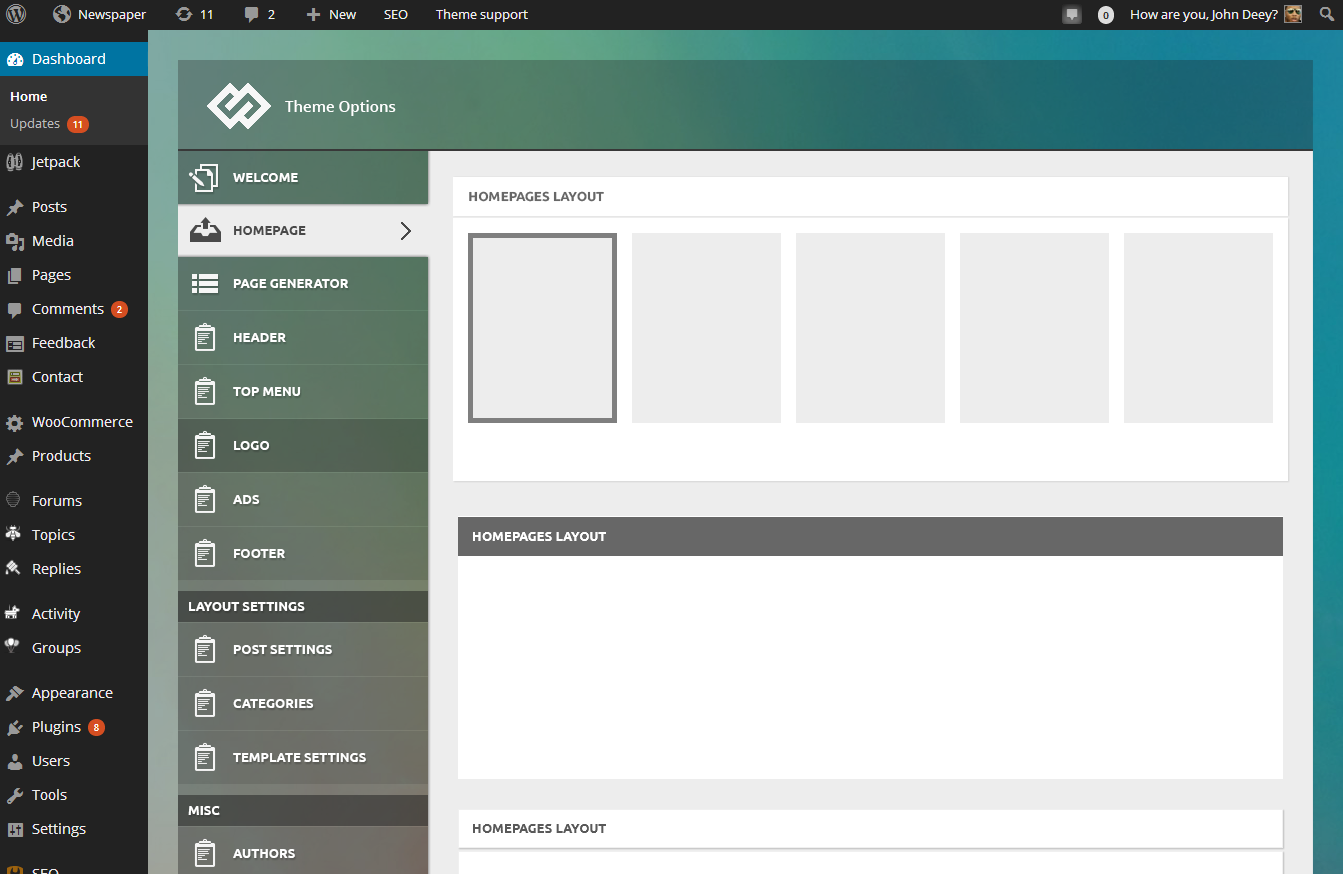
We will use this panel on all of our products from now on and it’s designed to work also with Newspaper. This panel will take us at least a month to be finish and it order to make it compatible with the Newspaper theme I think we have to redo the ads section of the theme and the category settings section but all the other settings should be easily be moved to the new one.
Besides this we also do some interesting stuff to push the limits of wordpress themes 🙂 stay tuned.
