
No search results were found in Documentation!
 tghidotti
Hello I’ve been using the newspaper for about 6 months but now for 2 months I’m having a problem
I use a code for “HEAD Code” from a partner site bar, but on the cell phone it does not appear, only on the computer
Does anyone know how to help me?
Preview egobrazil.com.br
 Anamaria
 Hello,
Did you add the shortcode for review? Those are the shortcodes https://i.imgur.com/08MwGOd.png
Unfortunately, we cannot add these options, because they are not required.
But if it’s a plugin you can use it for whatever you want to do.
Thank you!
 Geoffrey
Hi
When I try to insert the Title block using BeautyBlog prebuilt theme, I have a weird behavior :
The title in the builder looks ok, but in the preview, there is a weird backgound showing :
https://rehost.diberie.com/Picture/Get/f/111682
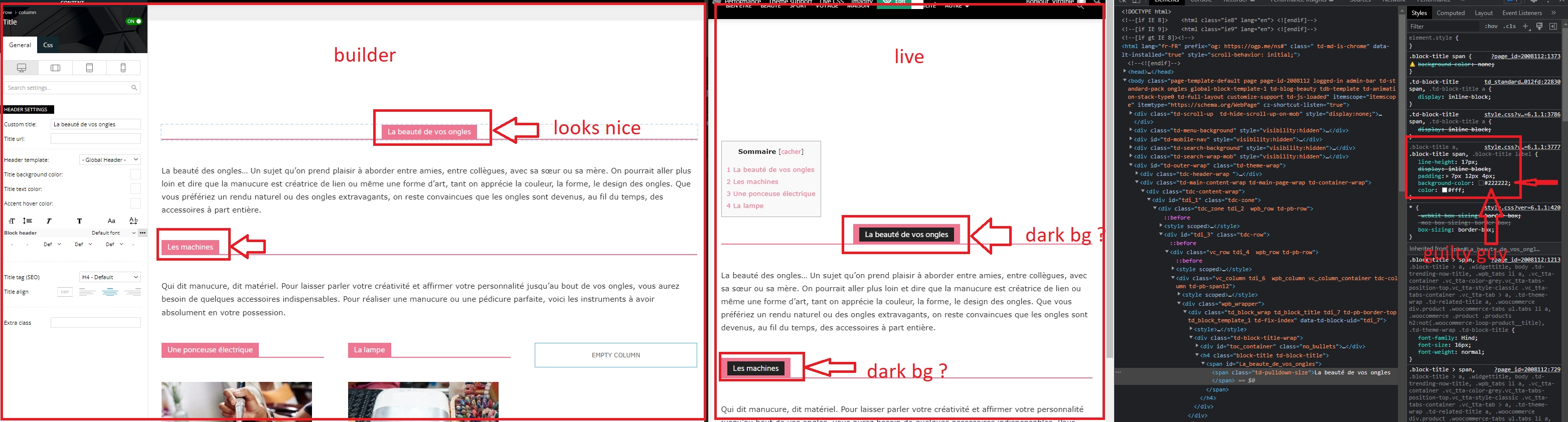
how to clear that bg everywhere ?
thanks
 ezioboy
 I am not asking for user reviews.
What I want is that if I [review something], I wanted to make money by selling the product or connecting with partners.
For example, I reviewed product A. After the evaluation, if the user likes the product, they will want to purchase it. Then, you should be able to purchase the product immediately after clicking. Then, you will need a form to enter the site address, price, and product information.
I would appreciate it if you could refer to the Epic Review plugin.
ezioboy In addition
Reviews don’t work.
Apparently, I wrote and published a review in the post.
But
If you check after publication, the review does not apply.
It seems to be an error, please check.
 Opes
Opes As you will see on the link, post preview are not the same size
https://imgur.com/4F5hNhN
Anamaria Hello,
Those are for review if you allow adding reviews for your articles/CPT.
You can find more details here
-> https://forum.tagdiv.com/user-reviews/
-> https://forum.tagdiv.com/custom-post-type-support/
Thank you!
 Lalit
Lalit Hello
As I said many times before that this issue is from your side not any individual site or theme package.
Many people are posting threats on it so it can not belong to some limited sites.
Why do you need someone’s – admin url and credentials, – cpanel url and credentials and – a link to this topic in order to identify you when it is clearly showing problem on your demo theme?
Discover here: – https://demo.tagdiv.com/newspaper_tech_news_pro/2019/05/13/td-post-hands-on-google-pixel-3a-xl-review/?tdb_action=tdb_ajax
You should fix it from your end, in your original theme package.
You should ask your developers to investigate the bug and fix the theme.
English is not my native language but still, I am trying to describe the issue.
I hope you will understand and fix the issue asap and will not ask anyone to share their site’s login credentials because this issue from your product ?
Thanks
ezioboyhello
I tried to install other review plug-ins because of the features (price, image insertion, site movement) not provided by the review plug-in provided by Newspaper, but the installed review plug-in does not work. Is it possible to use other post review plugins?
(proposal)
I would appreciate it if you would review the application of post review design improvement, price, image insertion, buy button, link site movement, etc. in the next update.
 Rohit Chhabra Rohit Chhabra Opes
 I can’t solve this problem. In preview articles i’d like that all have the same size. Do you have any tips?
Lalit I also brought it to your attention last year but it seems Tagdiv team is unable to fix it.
Though, the same issue is with the official newspaper demo pages. Ex: https://demo.tagdiv.com/newspaper_tech_news_pro/2019/05/13/td-post-hands-on-google-pixel-3a-xl-review/?tdb_action=tdb_ajax
If you can’t believe it, check the above URL.
After loading the page, it will also disable the scroll bar and freeze the page completely.
That’s why I had switched to another theme and removed the newspaper theme entirely from my website.
 oxyman
Hi, I just installed the theme on a new site, and received this error on the category page:
Notice: Undefined index: tdb_templates in /home/XXXXXX/public_html/wp-content/plugins/td-cloud-library/includes/tdb_functions.php on line 516
Example:
https://designreviews.com/cat/tech/accessories/
Support has been renewed.
 muktipolice
 Its writing comes in black. I can’t see the letters because the background is black. So I want to make the writing of this review part white. Please give me the css code instead. Stop wasting your time
muktipolice This is not a page review. This is a review in the Posting Editor. I’m inquiring about the color of the review writing. Please stop wasting time on things that have nothing to do with my question. Please call another person in charge
Opes Thank you Anamaria, is what i’ve done but isn’t working…what about preview article size and font?
-
This reply was modified 3 years by
Opes.
OpesHi i am setting up my web site but i have some problem of visualization. I’d like to set logo in all device(https://www.loom.com/share/bd13fa87456e4e42b8698826ddca072a), preview articles on home page are not the same size, font inside article is barlow but on preview there is another font(https://www.risorse.news/)
Thank you
 Oliagri7
 Hi!
Thanks for the clarification.
I’m unable to activate the theme as it’s a live site. But when i preview the proposed Newspaper theme, it still appears on the backend for the role of the admin.https://imgur.com/a/bInfWt5
Please advise.
 fabienpomies
Hello,
On my home page and on the category pages, I would like the label that is displayed for the categories to be the parent category. By default, the first one in alphabetical order is displayed today. Do you have a piece of code or something to do this please?
Also, how can I get the labels to show on things like Flex blocks as well?
I’m looking to display two pieces of information in my item thumbnails: the parent category and the tag (or post format if that’s not possible).
Here is a preview of my site: https://www.rse-responsables.com/accueil-2/
Best regards
 smilelondon
HI there
I need some help with a CLS issue and failing core web vitals with Google because of this.
It is regarding our page https://www.livetube.tv/news and also the posts pages.
We only receive the CLS alert for desktop evaluations.
Appreciate your help with this.
We especially struggle to fix the zone error. We tried many different things, but the zone error stayed.
1. div.tdc-content-wrap > div#tdi_81 > div.tdc_zone > div.tdi_81_rand_style
<div class=”tdi_81_rand_style td-element-style”>
2. <div class=”tdc_zone tdi_82 wpb_row td-pb-row”>
Many thanks for your help
Best
Sven
Here is the detailed information:
For the homepage (https://www.livetube.tv/news), we get this infos:
Avoid large layout shifts five elements found
These DOM elements contribute most to the CLS of the page.CLS
Elements CLS Contribution:
div.tdc-content-wrap > div#tdi_81 > div.tdc_zone > div.tdi_81_rand_style
<div class=”tdi_81_rand_style td-element-style”>
0.39
Tuesday, November 22, 2022 LiveTube Get paid for your live story Join the For…
<div class=”wpb_wrapper”>
0.007
LiveTube Get paid for your live story Join the Forum Free Media Access Help Abo…
<div id=”tdi_34″ class=”td_block_inner td-fix-index”>
For the posts pages, we receive this alert.
Here is the example post page: https://www.livetube.tv/news/video-mexico-fans-celebrate-before-their-team-playing-against-poland
Google Report CLS Issue Element CLS Contribution
GO LIVE GET PAID Send us your livestream. Our producers are ready to review yo…
<div class=”tdc_zone tdi_82 wpb_row td-pb-row”>
0.302
div.td_block_wrap > div.tdb-block-inner > div#wpfp_958dcf090cf91464f155581dc13aff04 > div.fp-ui
<div class=”fp-ui”>
0.095
Tuesday, November 22, 2022 LiveTube Get paid for your live story Join the For…
<div class=”wpb_wrapper”>
0.006
LiveTube Get paid for your live story Join the Forum Free Media Access Help Abo…
<div id=”tdi_34″ class=”td_block_inner td-fix-index”>
0.004
ENTERTAINMENT
0.003
 Hajar Kitta
Is it okay? In my Rank Math Sitemap option, I disabled all three sitemap that was:
tdb_templates-sitemap.xml
tdc-review-email-sitemap.xml
tdc-review-sitemap.xml
Will it cause any problem? Please help. Google was indexing the template sitemap and so I disabled it. Thank you.
muktipolice Reviews do not have an editor.
muktipolice There is no change in the color of that review’s Please tell me the exact location and method. What you are telling me is the main editor screen. Please answer after looking at my screenshot correctly. I am very tired of the time being delayed continuously.
Anamaria Hello,
You can find more details about new options here
-> https://forum.tagdiv.com/create-form-contact-page/
-> https://forum.tagdiv.com/create-frontend-submission-form/
-> https://forum.tagdiv.com/user-reviews/
-> https://forum.tagdiv.com/filters-sorting-taxonomies/
Also, you can ask specifically what you want and we try to help you.
Also, you can check this topic
-> https://forum.tagdiv.com/topic/how-do-users-update-the-information-from-front-end-submission-form/
-> https://forum.tagdiv.com/topic/listingscptpost-submission-limiting-and-billing/
Thank you!

