- NewsmagReviews
- NewsmagtagDiv Composer Tutorial
- NewsmagCategory templates
- NewsmagHow to add icons in the menu
- NewsmagNewsmag documentation
- NewsmagBlock settings tutorial
- NewsmagInstalling pre-built websites
- NewsmagMain menu
- NewsmagFeatured image or video
 Anamaria
 Hello,
You can use a plugin like
→ https://wordpress.org/plugins/wti-like-post/
→ https://wordpress.org/plugins/posts-like-dislike/
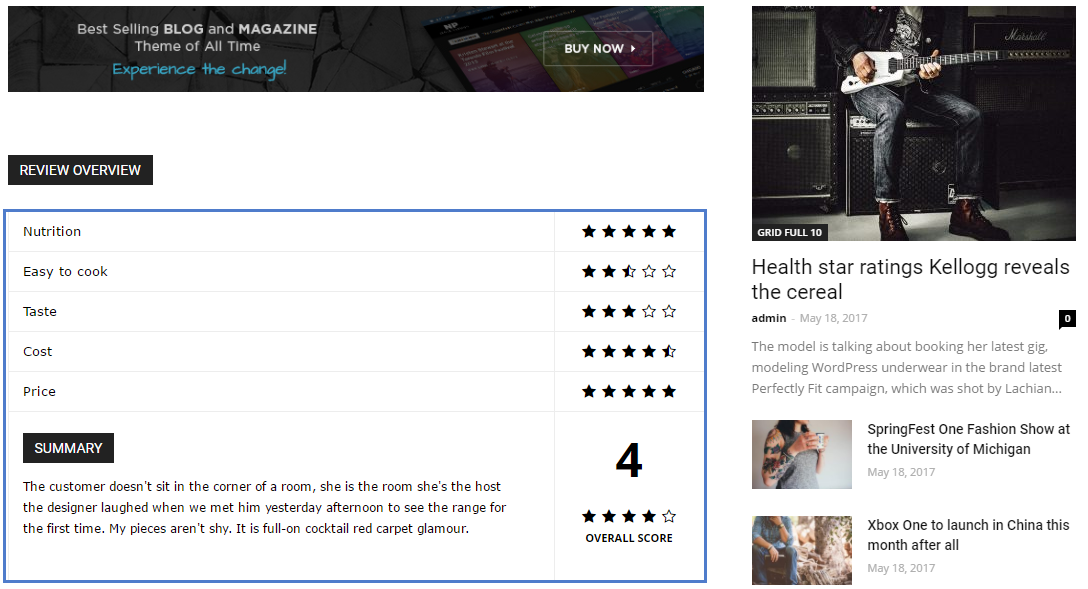
Also, to have a review on the post, you need to set them in the editor of the post https://forum.tagdiv.com/reviews-2/
Thank you!
 AK Rayhan
 How can i add external plugin in my home page. Actually i can not add it in my tamplate. Can you help me please..
And i did not find out the single post review all the option in my cloud tagdiv section.
-
This reply was modified 4 years by
AK Rayhan.
 Gundud
 Thanks Anamaria, it works.
Just one last question, I tried to import cloud template to see the settings and copy it to my custom page.
But all the cloud template didnt have any settings (meaning that all the value is standard), for example for one particular review template, the column gap is blank, but actual template dont have gap, to achieve this on my custom page, i need to set it by -15.
Does this mean that when I import the cloud template all the setting (margin, etc) will not be loaded/shown? If not is there a way to load it so I can learn from the sample instead going trough the forum?
Thanks and happy holiday!
 sun
sunHi, since I used this theme, I noticed that the in-page adsense ads disappear while other ads display as normal. Are they blocked in any way? I can see previews of such ads on the Adsense platform, but they are not actually showing on my site. Why is this happening? It used to show on my previous theme.
 cavalrydesign
 Hi Bettina.
So if I want to add images, quotes, titles i.e not just text to a news post I first need to save the post and then preview it. Only after this do I get access to the tagDiv composer? as with Pages, when you add a new one you get access to the composer straight away via the little blue link button. Also when all my pages are listed there is an ‘Edit with tagDiv Composer’ link next to each page listed.
Is that not something I can have with Posts in the same way as Pages?
-
This reply was modified 4 years by
cavalrydesign. Reason: spelling
 lipcho
 I have the same problem. I will try to fix it with the tutorial from this link (https://www.checkerboard.com/web-development/fix-offers-review-aggregaterating-specified/). The problem is that I have to do it every time after updating the template. It would be nice if the woocommerce feature had an option to turn on and off. I guess this will solve the problem radically.
 jkev2100
 Home
[tdc_zone type=”tdc_content”][vc_row full_width=""][vc_column][td_block_trending_now tdc_css=”eyJhbGwiOnsibWFyZ2luLXRvcCI6IjAiLCJtYXJnaW4tYm90dG9tIjoiMjQiLCJwYWRkaW5nLXRvcCI6IjE0IiwiZGlzcGxheSI6IiJ9LCJwaG9uZSI6eyJtYXJnaW4tYm90dG9tIjoiMjAiLCJwYWRkaW5nLXRvcCI6IjI0IiwiZGlzcGxheSI6IiJ9LCJwaG9uZV9tYXhfd2lkdGgiOjc2NywicG9ydHJhaXQiOnsibWFyZ2luLWJvdHRvbSI6IjIwIiwicGFkZGluZy10b3AiOiIxMCIsImRpc3BsYXkiOiIifSwicG9ydHJhaXRfbWF4X3dpZHRoIjoxMDE4LCJwb3J0cmFpdF9taW5fd2lkdGgiOjc2OH0=” f_title_font_family=”712″ f_article_font_family=”712″ f_title_font_size=”12″ f_title_font_spacing=”0.6″ f_title_font_weight=”400″ f_article_font_size=”13″ f_article_font_weight=”500″ header_color=”#008d7f” mt_title_tag=”p”][/vc_column][/vc_row][vc_row full_width="" tdc_css="eyJhbGwiOnsiZGlzcGxheSI6IiJ9LCJsYW5kc2NhcGUiOnsiZGlzcGxheSI6IiJ9LCJsYW5kc2NhcGVfbWF4X3dpZHRoIjoxMTQwLCJsYW5kc2NhcGVfbWluX3dpZHRoIjoxMDE5LCJwb3J0cmFpdCI6eyJkaXNwbGF5IjoiIn0sInBvcnRyYWl0X21heF93aWR0aCI6MTAxOCwicG9ydHJhaXRfbWluX3dpZHRoIjo3NjgsInBob25lIjp7ImRpc3BsYXkiOiIifSwicGhvbmVfbWF4X3dpZHRoIjo3Njd9"][vc_column][td_block_big_grid_flex_2 meta_info_vert=”content-vert-bottom” show_author2=”eyJsYW5kc2NhcGUiOiJub25lIiwicG9ydHJhaXQiOiJub25lIiwicGhvbmUiOiJub25lIiwiYWxsIjoibm9uZSJ9″ show_date2=”eyJsYW5kc2NhcGUiOiJub25lIiwicG9ydHJhaXQiOiJub25lIiwicGhvbmUiOiJub25lIiwiYWxsIjoibm9uZSJ9″ modules_category=”above” overlay_general=”eyJ0eXBlIjoiZ3JhZGllbnQiLCJjb2xvcjEiOiJyZ2JhKDAsMCwwLDApIiwiY29sb3IyIjoicmdiYSgwLDAsMCwwLjYpIiwibWl4ZWRDb2xvcnMiOlt7ImNvbG9yIjoicmdiYSgwLDAsMCwwLjIpIiwicGVyY2VudGFnZSI6MzV9LHsiY29sb3IiOiJyZ2JhKDAsMCwwLDApIiwicGVyY2VudGFnZSI6NTB9XSwiY3NzIjoiYmFja2dyb3VuZDogLXdlYmtpdC1saW5lYXItZ3JhZGllbnQoMGRlZyxyZ2JhKDAsMCwwLDAuNikscmdiYSgwLDAsMCwwLjIpIDM1JSxyZ2JhKDAsMCwwLDApIDUwJSxyZ2JhKDAsMCwwLDApKTtiYWNrZ3JvdW5kOiBsaW5lYXItZ3JhZGllbnQoMGRlZyxyZ2JhKDAsMCwwLDAuNikscmdiYSgwLDAsMCwwLjIpIDM1JSxyZ2JhKDAsMCwwLDApIDUwJSxyZ2JhKDAsMCwwLDApKTsiLCJjc3NQYXJhbXMiOiIwZGVnLHJnYmEoMCwwLDAsMC42KSxyZ2JhKDAsMCwwLDAuMikgMzUlLHJnYmEoMCwwLDAsMCkgNTAlLHJnYmEoMCwwLDAsMCkifQ==” image_height2=”eyJsYW5kc2NhcGUiOiIxNjhweCIsInBob25lIjoiMTY1cHgiLCJwb3J0cmFpdCI6IjEzMHB4IiwiYWxsIjoiMjIwcHgifQ==” image_height1=”eyJwaG9uZSI6IjI2MHB4IiwicG9ydHJhaXQiOiIyNjNweCIsImFsbCI6IjQ0NXB4IiwibGFuZHNjYXBlIjoiMzQwcHgifQ==” modules_gap=”eyJwaG9uZSI6IjMiLCJhbGwiOiI1IiwicG9ydHJhaXQiOiIzIiwibGFuZHNjYXBlIjoiNCJ9″ meta_padding2=”eyJhbGwiOiIxNXB4IiwibGFuZHNjYXBlIjoiMTJweCIsInBob25lIjoiMTRweCIsInBvcnRyYWl0IjoiMTBweCJ9″ meta_padding1=”eyJwaG9uZSI6IjE4cHggMTRweCIsImFsbCI6IjI0cHgiLCJsYW5kc2NhcGUiOiIyMHB4IiwicG9ydHJhaXQiOiIxOHB4IDE0cHgifQ==” cat_bg_hover=”rgba(255,255,255,0)” review_stars=”#fff” image_size2=”” image_size=”td_1068x0″ image_width1=”eyJwaG9uZSI6IjEwMCJ9″ image_width2=”eyJwaG9uZSI6IjgwIn0=” f_title1_font_family=”712″ f_title2_font_family=”712″ f_title1_font_size=”eyJhbGwiOiIzMCIsImxhbmRzY2FwZSI6IjI4IiwicG9ydHJhaXQiOiI
 Simion C.
 Hi,
That seems to be an issue. The currency position should be the one set in woocommerce
https://i.imgur.com/Qko38Ku.png → https://i.imgur.com/0eNy0xT.png
Inside the cart it is displayed correctly, but in the cart preview it is not. I have added this issue on our list and it will be fixed.
As for the currency icons, those can’t be changed from the theme. You could try something like this -> https://woocommerce.com/document/change-a-currency-symbol/
Thank you!
 fla971
Hello,
in the smartphone version of my site, in the footer I see the “voice report” symbol and not my logo, as I set up the page. I have already checked in the theme panel but unable to edit. What needs to be done?
In the preview of the Elementor editor you can see my logo, while on a smartphone you can see it “voice report”. Vedi allegati.
https://drive.google.com/file/d/14n_KosTUz-slBXVPCbkcdHSDR_sLq2ZV/view?usp=sharing
https://drive.google.com/file/d/1T7EjOyUe2IxXNfrVJtnGQIf_40xgsFfC/view?usp=sharing
 bitcoinworld
 c386
c386Hi,
I want to make better use of the review system built into the Newspaper theme: https://forum.tagdiv.com/reviews-2/
The basic functionality works well – as shown here: https://forum.tagdiv.com/wp-content/uploads/2017/05/review.png – but is there a way to edit what is automatically added to the foot of the review?
I would like to add lists of pros and cons, some imagery, and basically want to use the review system in a more personalised way. The above guide suggests using tagDiv Cloud Library Post Templates in order to open up further customisation options. I don’t really need a whole new template in this instance, and just want to edit the review element.
What would be the best way to achieve this?
Thank you in advance.
 Lalit
Lalit Hello,
I am using tech news demo and activated autoload feature.
While looking at the analytic data I found a real-time visitor comes to one of my post ending with ?tdb_action=tdb_ajax
I wonder how he/she reach this URL?
Tried to access the URL with ?tdb_action=tdb_ajax and found, it has no header,footer and page was also not scrolling, and in the source of the page, it has two meta robots tags.
I don’t know what is it and how to fix it.
It is similar like – https://demo.tagdiv.com/newspaper_tech_news_pro/2019/05/13/td-post-hands-on-google-pixel-3a-xl-review/?tdb_action=tdb_ajax
Please investigate it.
 alvecrisservices
Hello recently I have an plugin called Rafflepress and f?is the first time when I use on my website and I saw something .
When I see my contest on AMP is not showing but if I use normally is showing ok .
Could you help me to understand why ?
Here is the link
Non-AMP https://techstart.ro/review/review-router-tenda-4g07-ce-ofera-internet-si-prin-cartera-sim-concurs/
AMP. https://techstart.ro/review/review-router-tenda-4g07-ce-ofera-internet-si-prin-cartera-sim-concurs/?amp=1
 candersonnm
I’m getting a double post issue where the content of my jobs plugin posts like a standard blank post and then another unformatted post content area.
You can see the issue here: https://discovermuscatine.com/job/linde-muscatine-full-time-co2-delivery-driver/?preview_id=73288&preview_nonce=be298a7504&preview=true&_thumbnail_id=73289
 yonish3
The image height is going out of design: https://prnt.sc/23o8r9f
This is my website: https://happybarefoot.com/category/reviews
 IFP News
Helo
We are migrating from Default Newspaper to newspaper_pulses_pro, On the editing tagdiv composer we see everything Ok about the single posts, but in the preview and published posts we have issues, some blocks are displayed in a full row not as a sidebar as you see in its default. ( Author and Must Read )
 baijubenance
  Chris Baird
 I cant see the post settings > General/SMart List / Reviews / Locker on my post.
Where do i enable to have those settings show?
Thanks
 Charter Party Disputes
Hello, I’ve noticed that when I’m sharing a link to the site I’m working on (https://staging.charterpartydisputes.com/) the preview shows a default image of the MAGAZINE PRO prebuilt website I’m using https://imgur.com/a/HLLAHGb
How can I change that? Ideally, I’d like to use our website’s logo.
 dennisjpitocco
When creating a new Post & we click on PREVIEW DRAFT, we are taken to an Error Page: “WE ARE VERY SORRY FOR THE INCONVENIENCE. IT LOOKS LIKE YOU ARE TRYING TO ACCESS A PAGE THAT DOES NOT EXIST.”
May be related to our other issue reported here: https://forum.tagdiv.com/topic/home-page-page-edit-issues/
 timitt
 Hi @Bettina,
Thanks for the info. I have changed/added the details according to the above-mentioned details.
My site URL is:https://designpress.com/dev/
But it still does not work. I have inspected it from console then it shows 403 error like screenshot.
Please HELP
Thanks
-
This reply was modified 4 years by
timitt.
 Calin
Calin Hi,
We are glad you love our theme and that it suits your needs!
Thank you very much for taking the time to review our theme and share this inspiring feedback with us!
Thank you!
 criacaoanicer
According to this documentation I can specify fonts for elements.
The tagDiv Composer lists dozens of available fonts but they’re all displayed as Times New Roman in my browser, which I presume is a fallback font. This happens both during preview and while viewing the saved page.
So the CSS to load said fonts isn’t present or isn’t loading correctly.
No, the font I’m trying to use is not configured on the Themes Panel.
Is this behavior expected?
 Ngatia
Hello,
I created a Single Post from existing cloud template but display shows more than one article in a page. How can we restrict. Template used https://cloud.tagdiv.com/hands-on-beats-powerbeats-pro-review/ output http://www.eblue.co.ke/waryahe/architecture/mobile-marketing-is-said-to-be-the-future-of-e-commerce/
 sagarmahajan
Fatal error: Uncaught Error: Cannot unset string offsets in /home/foreignpolicywat/public_html/wp-includes/class-wp-customize-widgets.php:1216 Stack trace: #0 /home/foreignpolicywat/public_html/wp-includes/class-wp-hook.php(303): WP_Customize_Widgets->preview_sidebars_widgets(”) #1 /home/foreignpolicywat/public_html/wp-includes/plugin.php(189): WP_Hook->apply_filters(”, Array) #2 /home/foreignpolicywat/public_html/wp-includes/widgets.php(1035): apply_filters(‘sidebars_widget…’, ”) #3 /home/foreignpolicywat/public_html/wp-includes/class-wp-customize-widgets.php(379): wp_get_sidebars_widgets() #4 /home/foreignpolicywat/public_html/wp-includes/class-wp-customize-widgets.php(354): WP_Customize_Widgets->customize_register() #5 /home/foreignpolicywat/public_html/wp-includes/class-wp-hook.php(303): WP_Customize_Widgets->schedule_customize_register(Object(WP_Customize_Manager)) #6 /home/foreignpolicywat/public_html/wp-includes/class-wp-hook.php(327): WP_Hook->apply_filters(”, Array) #7 /home/foreignpolicywat/public_html/wp- in /home/foreignpolicywat/public_html/wp-includes/class-wp-customize-widgets.php on line 1216
There has been a critical error on this website. Please check your site admin email inbox for instructions.
Learn more about troubleshooting WordPress.