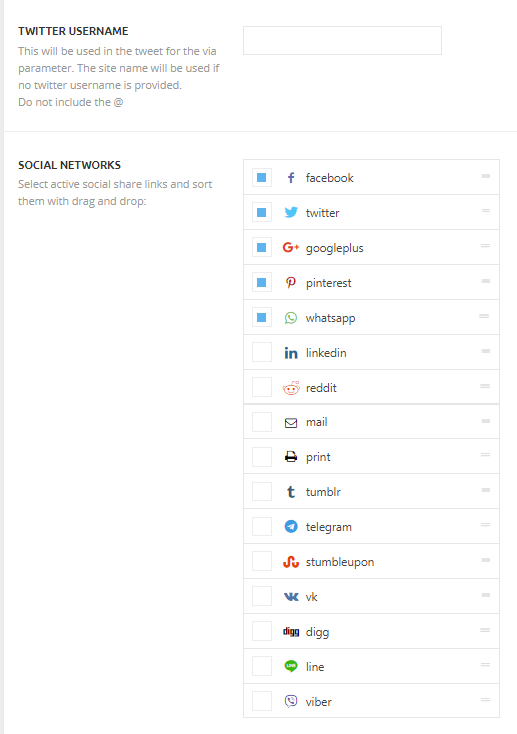
- NewspaperSocial Sharing
- NewsmagSharing buttons
- NewspaperSharing
- NewspaperDesign your post pages using the Default Templates
- NewspaperFacebook Share
 showman626
 Hello Vlad!
Thanks for your reply!
I deactivated all the plugins except tagDiv’s but nothing changed. I tried to view the pages on a different browser, different PC but nothing changed. I did not installed a cache plugin yet. What I also noticed that on a post page all the sharing buttons (before and after post) are disappeared.
 Nave8
Nave8 Hello,
My website with newspapper doesnt work with social buttom. i´ve tried to fix changing the code php. But nothing… i need the social buttoms: https://forum.tagdiv.com/wp-content/uploads/2015/05/sharing2.png
 nouvart
We can’t find the file from the screenshot. How can we set up Whatsapp and other Social Sharing buttons? We don’t have ‘modules’ in the includes folder.
 danistone
Hi,
When sharing the entries on Facebook the featured image disappears and the web logo appears in the publication, please I need to solve that urgently.
In the social options the whatapp option appears but although you configure it later it does not appear on the web.
I need to configure the cover with only 1 news that occupies everything without having the title above the photo and that option is not in any of the template options, telling me how to do it is important for the web.
I have installed a plugin to register with social networks but it does not appear in the option to comment how I can fix it?
At the bottom of the web I do not find the possibility of eliminating the categories menu, I want it to be one created by me.
WEB CAPTURES HERE = https://wetransfer.com/downloads/f2b095fb52c684f78d8d6458d9b722c020200128192119/58f9db54e3a84ec39ec53fe75f4713df20200128192119/e923e1
 minervasocials
Hi there,
I recently bought the theme. But when I want to set up the social sharing buttons, they do not appear in post settings.
Do you know a fix for this ? Thanks
 youlovedance
Hello, i don’t know why i can’t share the posts.
in the theme panel > post settings > sharing > social networks I just have one option “Naver” i don’t have facebook, twitter etc…
Someone can help me?
Thanks

 alessiopel
Hello,
I would like to show the arrow pointing up (see image below, the arrow inside the red circle) also in the mobile version of the site.
https://drive.google.com/file/d/1dS6kcAC2CyvJivM9LBlFV_CaHCPW3-kO/view?usp=sharing
It is currently only visible on the desktop, what can I do?
I use Newspaper (Nomad), my website is https://terraincognita.earth/
Thank you
 Calin
Calin Hi HeliR,
Thank you for sharing with us your solutions.
Thank you!
 tjaplink
Hi, is there a tutorial to add <link rel = preload> to the newspaper theme?
If there is, where should I look for it.
thanks.
https://drive.google.com/file/d/1UR1jTHz5ifY00YxnQb5MvIAKUo8F1P1M/view?usp=sharing
 Sumit
Sumit Hi Vlad S
I don’t think you pay attention or you don’t understand what I’m talking about. I’m not asking for page speed. as i said many times above and also send image it is an AMP issue(Reference AMP URL is self-canonical AMP).
As you said, i already changed my seo plugin (All in one SEO), but this problem is still present in google webmaster. I wait a few days after changing my plugin, but this problem has not been solved. I’m uploading image again to help you better understand the problem.
https://drive.google.com/file/d/1AjceU4NUkbRem6mOjI0-pIo-m1m_u83H/view?usp=sharing
It is not in the chat conversation that you respond what comes to your mind like you said in above message. I am looking for the solution.
thank you.
 aysasi
 Here is the image from my developer.
https://drive.google.com/file/d/17GM3WEcVAgnhEYahCvAqm9p59JJSY2iA/view?usp=sharing
 boss4all
Website: https://sportsblogit.com
Issue: Mobile version of website is fugly
I first set up my website by importing the setting and all demo content for the “world new” child theme. I then changed some posts and added the revolution slider. However, on my website sportsblogit.com the mobile theme does not match the desktop theme. When I view the theme on mobile I only see “latest” articles, the header, and footer. There is no other content on the page. I imported all your demo content/settings and it was like this.
But when I view the child theme “world news” on your website the mobile template looks great. You have a slider, “must-read”, “latest” and social sharing. I would like this same design on my website and I don’t know what settings I must change.
 ralvira
Hi! TD Composer is not loading. It prompts this on the screen.
This page isn’t working
http://www.boletera.com didn’t send any data.
ERR_EMPTY_RESPONSE
Also getting that message when I go to edit footer page.
Newspaper>Theme Panel>Footer
https://drive.google.com/file/d/1KcmIQLjFY6Kv0tT6ngO_T1lMgEC1coXH/view?usp=sharing
Thanks
Roberto
Sumit Hi @Viad S
Thanks for your response.
As I saw, this issue is not related to the valid amp error, but is to “Referenced AMP URL is self-canonical AMP”
https://drive.google.com/file/d/1C_AMJ2Ndich0UrM2hgQxZnQka_Rs2cFV/view?usp=sharing
i guess this links will help you to understand the problem.
https://support.google.com/webmasters/answer/7478053
https://amp.dev/documentation/guides-and-tutorials/optimize-and-measure/discovery/?referrer=ampproject.org#what-if-i-only-have-one-page?
https://amp.dev/documentation/guides-and-tutorials/optimize-and-measure/discovery/?referrer=ampproject.org
waiting for your response.
Thanks you.
-
This reply was modified 6 years by
Sumit.
 gyantimes
Hello,
I bought the theme today but it seems it doesn’t meet the requirements. The following are the details –
1)Speed
To build a faster site, I have installed LAMP from the Digitalocean.com marketplace and installed your theme with a fresh WordPress installation.
I didn’t import any demo but create a simple homepage using the tagDiv Composer and also installed only these plugins – tagDiv Composer, Akismet, WP rocket and Yoast SEO.
I am only using 4 plugins but there is still getting some speed errors in different speed test tools.
FOR PAGESPEED INSIGHT
a. remove unused CSS
b. serve images in next-gen formats
c. Reduce server response times (TTFB) which is 0.29 sec
check this screenshot: https://prnt.sc/qoxt3l
FOR GTmertix
a.Leverage browser caching – 52 grade which is taking care by wp rocket.
b. optimize images
However, waterfall just loading 1 css, 2 js internal, 1 font file and 7 images.
Check the report here: https://gtmetrix.com/reports/gyantimes.in/TH71VBlG
I have also followed your guide available at https://tagdiv.com/how-to-increase-page-loading-speed/. Unfortunately, i found no improvements.
2) There is no options in the theme panel to change the footer copyright after disabling tagdiv standard pack plugin. screenshot: https://prnt.sc/qoy62e
3) Post sharing plugins only showing nevada green button.
However, I am using the simple feature that a default wordpress theme can provide but still i paid $62
This is not a small amount for me to invest in a starting website.
 LAKESMedia
hello,
I’m having a lot of trouble trying to remove the social media share buttons on posts. I’ve deactivated them in the share menu and they still pop up. They block the audio file so that it can’t be played.
https://drive.google.com/file/d/14wlkFpq-F_xc5boiKiBToz5vUrJ3VrUQ/view?usp=sharing
Calin Hi,
The social media can be set from theme panel> social networks -> https://i.imgur.com/K6FcPXX.png also the shearing social can be selected from here -> https://i.imgur.com/35Jvj8t.png -> https://forum.tagdiv.com/newsmag-sharing/
Thank you!
 mayank4872
Hi,
I am getting below issues while adding content to my website.
1. When I am trying to add a post I am getting below error every time.
https://drive.google.com/file/d/1uBqbga-OYktikMZ6qhAuq1ZsIFiCa0Ur/view?usp=sharing
2. When I am trying to add pages I am getting error and also the loader is infinite. Please refer the below screenshot.
https://drive.google.com/file/d/1fB7aVlAtKPKMTv2ryoo1juWcteCq8h3Y/view?usp=sharing
Please help me with the above-mentioned issues and do the needful. Thanks
 mariiowski
Hi,
I have a problem with adding Facebook, Twitter and Pinterest share buttons on both top and bottom of my posts.
The thing is everything works fine but the only share button that’s on the list is Naver.
Any ways to fix this?
Here’s the screenshot: https://imgur.com/a/tf5yMNq
Thanks.
*Edit: Yes I tried switching between the styles. It happens to all.
 markyj2000
Hi, in Newspaper panel I clicked on Post Settings/Sharing/Social Networks – there was only one option there NAVER – which I’ve never heard of. I no other options appeared. I stupidly clicked on Naver just to see if it worked. Now I cannot turn it off.
Grateful for any support on this issue.
Sumit Hi,
I have already contacted All in one SEO team and fixed the data structure problem.
Referenced AMP URL is self-canonical AMP:
https://drive.google.com/file/d/1eTPfR-xfrKu3JTqIALvPLgrFYA1FPD0o/view?usp=sharing
https://drive.google.com/file/d/1o3wi3gTpjsrm0okE0UyMw3pu-P8Lu8Xe/view?usp=sharing
https://drive.google.com/file/d/1MhsBMwOkbbsqri6-78rstBDqk0Rs7tcq/view?usp=sharing
Can you tell me why I am getting this error in the AMP section???
Thank you.
 BlakeDouglas
Hi Team,
I’m having trouble displaying Linkedin & Mail under social shares on an article.
Once I select Linkedin & mail under Theme Panel>Post settings>Sharing and then save settings nothing happens.
Note: icons in this section for all social media networks are missing,.
When i refresh the page the saved settings disappear and WhatsApp seems to be selected…
 Vlad S
 Hello !
In order to deactivate sharing on posts you will have to go into Theme Panel – Post Settings – Sharing and disable all the options available there: https://www.screencast.com/t/Yju5ZhDY8
Thank you !
Sumit Hi,
Thanks for your response.
I want to know how can I solve this all in one plugin error.(https://prnt.sc/qn2tv2)
These links that I mentioned in the January 13th image appear in the google webmaster bug list. Even though i’m testing this /?amp format i’m getting error(https://drive.google.com/file/d/1-TRSrIqJwBpECyI4UMVp3uySLY52O_EO/view?usp=sharing)
I am not adding image separately to amp. I am using normally 800×530 image site for all my posts.
waiting for your response.
Thank you.
 SimplyCom
 Hi,
Thanks for the 2 solutions abouve but unfortunatly niether are working for me, I have tried with the greater sign and with the greater sign and exclamation mark and neither options are working, the only option I am getting in the post settings section are “Naver” here is the code: –
“function td_add_new_social_network() {
$social_drag_and_drop = td_options::get_array(‘td_social_drag_and_drop’);
if ($social_drag_and_drop != ” && array_key_exists(‘naver’, $social_drag_and_drop) != true) {
$social_drag_and_drop += array(‘naver’ => ”);
}
td_options::update_array(‘td_social_drag_and_drop’, $social_drag_and_drop);
}
td_add_new_social_network();
function td_theme_migration() {
$td_db_version = td_util::get_option(‘td_version’);
// update TO version 8.6 – add social networks
// @since 14.12.2017
if (version_compare($td_db_version, ‘8.6’, ‘>’) || TD_DEPLOY_MODE == ‘dev’) {
$social_drag_and_drop = td_options::get(‘td_social_drag_and_drop’);
if ($social_drag_and_drop == ”) {
td_options::update_array(‘td_social_drag_and_drop’, array (
‘facebook’ => true,
‘twitter’ => true,
‘pinterest’ => true,
‘whatsapp’ => true,
‘linkedin’ => ”,
‘reddit’ => ”,
‘mail’ => ”,
‘print’ => ”,
‘tumblr’ => ”,
‘telegram’ => ”,
‘stumbleupon’ => ”,
‘vk’ => ”,
‘digg’ => ”,
‘line’ => ”,
‘viber’ => ”,
‘naver’ => ”
));
}
}”
Any help would be appreciated, the client needs to have the other sharing options! Many thanks