
No search results were found in Documentation!
 Bettina
 Hello @youngman!
That’s strange! We would like to investigate this issue.
Please contact us via email at contact@tagdiv.com and provide the following:
– admin url and credentials
– cpanel url and credentials
– a link to this topic in order to identify you
Thank you!
 Mar
Mar Hi Bettina, thanks for your reply.
Is strange I should need a plugin because whe I’ve tried the demo version of the EasyCoast Check, the search engine was finding any of the words (location, attribute etc). Also on the demo version od Doctor Pro there’s this function. But on Cali Sight is not?
Thanks for your help
waiting for yours
Mar
 mortgageman
 Hi I use wp optimise and the mobile option is active. I’ve used this for years and never had this issue. What’s also strange is the homepage is the only page that does this. All other posts/pages appear correct (mobile theme), but the homepage is pulling the td composer homepage (I’ve checked page settings as well).
mortgageman Hi I use wp optimise and the mobile option is active. I’ve used this for years and never has this issue. What’s also strange is the homepage is the only page that does this. All other posts/pages appear correct (mobile theme), but the homepage is pulling the td composer homepage (I’ve checked page settings as well).
 Anamaria
 Hi,
Yes, this is strange. If you try to add other elements, then work?
We can take a look. Please get in touch with us via email at contact@tagdiv.com and provide the following wp-admin URL and credentials.
Thank you!
 libertylens
 Hi Bettina,
We have tried what you suggested, but still can’t get the results we’re looking for. Also, here is a recording of a couple things we tried to do to do so you can see what we might be doing wrong (For some reason there’s an echo in the audio): https://app.screencast.com/mTcoTByKsJYyr?conversation=VCRnGt2RxmET4ou1yXzLBO .
Hi Bettina,
We are trying to do that, but it is not working for us as you describe. Here is a recording of how we’re trying to make it work (there is a strange echo in the recording). Maybe it will help to figure out why
Also, here is a screenshot of the blank space that shows up on the mobile. https://app.screencast.com/tIGKlaXVh9YPB . For some reason this blank space does not appear at the top of the mobile home page, but it does appear on others.
Thanks,
Ken
 f110tech
 Strange, try redownloading form themeforest and clicking download installable wordpress file only. I looked inside that zip and it does have the stylesheet
 ersandrino
Good morning,
Good morning,
a very strange thing is happening to me without having modified any components or added plugins. When I try to modify the div compose tag, an element on any page (or even when I create a new page and use the “Column text” module for example), after clicking on “Edit Content”, the editor that opens above it runs idle as shown in the two screenshots you see:
How is this anomaly resolved?
Thank you
 samnash68
hi
I am using bdpress and youzify for the login and members users
I am trying to change or redirect the login button and not use the default login modal you have.
I want to use the user icon without the login/logout button next to it.
it is strange the user icon directs users to bdpress page however the login/logout directs to your default modal login!!!
I also want to delete the “log in to leave to comment” in the single post comment element. because it keeps directing users to the default login modal whereas I want it to direct to the bdpress and youzify login page
is this possible?
thanks
Sam
 Hubert
 Strange, I disabled all plugins and enabled them again one by one. Now it works.
 egm_ar
Hi good evening,
I’ve imported the Urban Observer header, but when I try to edite it on TD Composer, I get the following code:
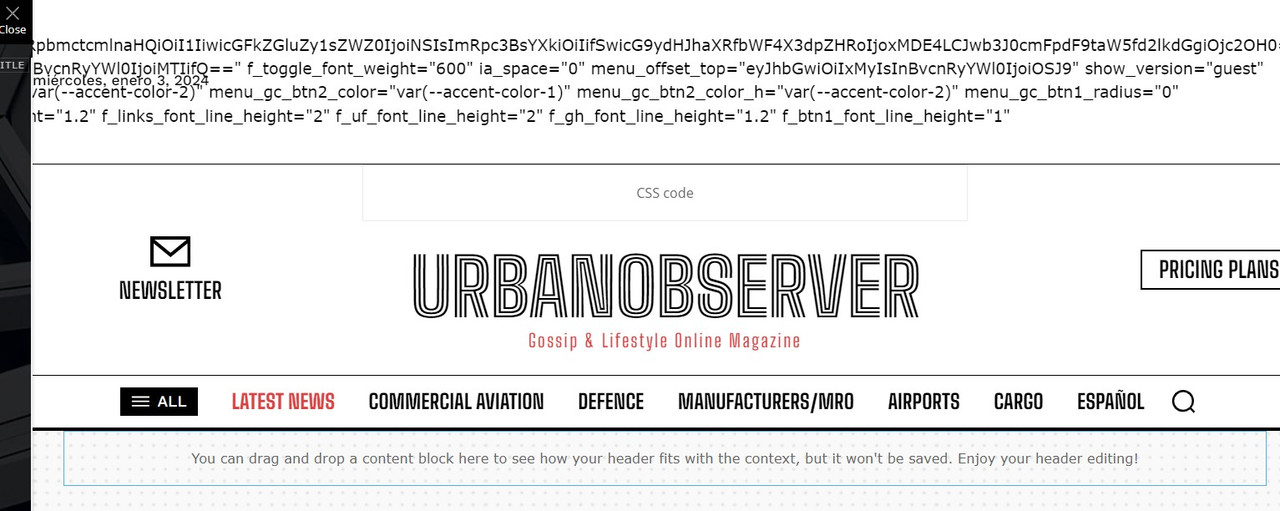
What could be happening?
Thanks in advance!
Bettina Hello!
Strange! Can you please provide another screenshot link? Because this one doesn’t work.
Thank you!
 soberano.pt
I have a specific problem with the my account page, as it loads in a strange and different way, for example from the my subscriptions page, and it still shows a 500 error on the page, could anyone help me? Have you ever seen anything like this?
The error happens only the tab Dashboard. The tab Account Details is working.
Account Details working: https://www.printfriendly.com/pdf-viewer/default-4e26271a6d00cd8d0c374cc078800b0c.png?ids%5B%5D=default-4e26271a6d00cd8d0c374cc078800b0c.png
 JonasFrey
 Hi,
like most websites, we also use google adsense. We attach great importance to the fact that advertising is only displayed where we install it using adbox.
For some reason, however, a huge advertising block appears within the Weather Block every time Google advertising is loaded in another adbox.
I can absolutely assure you that the automatic placement of Google Adsense is deactivated. So there will NOT be any ads placed by Google.
I can also rule out the possibility of Google advertising being loaded from a third party.
It looks like a pretty strange bug to me. Unfortunately I couldn’t find anything about it in the forum. Can you take a look at this, or do you have a fix for it?
JonasFreyHello,
like most websites, we also use google adsense. We attach great importance to the fact that advertising is only displayed where we install it using adbox.
For some reason, however, a huge advertising block appears within the Weather Block every time Google advertising is loaded in another adbox.
I can absolutely assure you that the automatic placement of Google Adsense is deactivated. So there will NOT be any ads placed by Google.
I can also rule out the possibility of Google advertising being loaded from a third party.
It looks like a pretty strange bug to me. Unfortunately I couldn’t find anything about it in the forum. Can you take a look at this, or do you have a fix for it?
 depatech
Hi!
Strange case
Till yesterday the option to clear blocks cache was at the end of system status of newspaper
exactly as described here:
https://forum.tagdiv.com/use-flex-blocks-cache-option/
Suddenly today , with no update sor something options disappeared.
Any ideas?
 DJ Promotion
 does anyone know why such a strange situation has now appeared:
empty fields in images in the incognito browser.
However, in my one (in my desktop computer) it shows normally, but with an error in the image:
“FORCED TO WRONG SIZE 196X126, NATURAL SIZE IS: 300X194”
https://prnt.sc/Jn3_dic_OYyX
This is the BLOCK 16
and inthe incognito browser there is:
https://cdn.djpromotion.com.pl/wp-media-folder-dj-raport/wp-content/uploads/2023/12/newsmag_1812.jpg
Here is not the same BLOCK 16 , but something different.
On the mobile devices looks fine.
Thanks
 Ericky
I decided to change the design of my news site and I liked your Town Talk demo so I adapted this design but I encountered a strange problem that I never expected.
As you can see in the image I added above (Ops I can’t add photos but you can see yourself from links at above), it is necessary to enter a page id for the block covering the “LATEST” and “RECOMMENDED” content on the main page of the Town Talk demo. Otherwise it doesn’t work.
Our site -> https://www.atarita.com/
Demo -> https://demo.tagdiv.com/newspaper_towntalk_pro/
I couldn’t design a page where I can capture the exact same design here. I didn’t see this added to the demo. Can you forward a page with the same design? I am adding it but it looks very bad. Please help me.
Bettina Hello @Beldar!
Did you regenerate the thumbs? https://forum.tagdiv.com/thumbnails-fix-strange-looking-images-on-blocks/
Thank you!
ErickyI decided to change the design of my news site and I liked your Town Talk demo so I adapted this design but I encountered a strange problem that I never expected.
As you can see in the image I added above (Ops I can’t add photos but you can see yourself from links at above), it is necessary to enter a page id for the block covering the “LATEST” and “RECOMMENDED” content on the main page of the Town Talk demo. Otherwise it doesn’t work.
Our site -> https://www.atarita.com/
Demo -> https://demo.tagdiv.com/newspaper_towntalk_pro/
I couldn’t design a page where I can capture the exact same design here. I didn’t see this added to the demo. Can you forward a page with the same design? I am adding it but it looks very bad. Please help me.
 Bikul
Bikul Hi,
thank you, but when I looked at the site after updating Newspaper to 12.6.3, it was working!
Although there is still the message Social/APIs: Personal Account Token has expired.
Very strange…
Bettina Hello @kevrose!
Strange! It should work. It could be an issue with the ad code; please check. You can try to use the raw HTML element from Composer and add the code there.
I hope that helps you!
Thank you!
 pratul11
 Hi
The Homepage also not showing me latest posts. Why?
Strange thing is the pages (homepage & Shop) are loading correct from your end (even without tagdiv cloud shop template) but not in my end!! And is installing cloud template for shop mandatory? What I do for homepage?
And earlier…like couple of weeks back, everything was fine and loading everything updated…even without your cloud templates!
It doesn’t make any sense! Can you also check again from your end if latest pages are loading without problems?
And what should I do?
 Southview92
for some reason on all my images a strange symbol has appeared. I do not know what it is or how to get rid of it. can anyone please look at in2town.co.uk and let me know what the strange symbol on my images are and what i do to remove it
 Calin
Calin Hello Valdivz, simchris is right, this can be a permission option set in htaccess file or host/server.
If the problem is file permissions, you can follow the steps in the below article to learn how to modify your file permissions: How to change file permissions within cPanel https://codex.wordpress.org/Changing_File_Permissions
Another possible cause could be a corrupt .htaccess file. Also check your .htaccess files for anything strange.
Thank you!



