
- NewsmagCustom Post Type Support
 Anamaria
 Hi,
This is strange, please check these topics with the same error
-> https://wordpress.org/support/topic/err_http2_protocol_error-6/
-> https://forum.tagdiv.com/topic/err_http2_protocol_error-on-go-daddy-hosting/
-> https://theme-fusion.com/forums/reply/850045/
Also, make sure that all the settings are like in our requirements, please follow the guide carefully: https://forum.tagdiv.com/requirements-for-newspaper/
and please increase all requirements that are lower, and follow all steps.
It can be because a plugin conflict, for this, please make a test using only the tagDiv plugins and check to see if the problem persist
Hope this helps you!
Thank you!
 cityrumors
 Hello!
this thing is strange, I have not requested any refund ….
The only thing I can think of has happened, is the payment failed?
I try to verify this.
I noticed that in my admin area of envato this appears to me:
– Download not available – Item removed by either staff or the author
(see screenshot attached)
Could this be the reason?

 Calin
Calin Hi gwk,
This is a rather strange situation, normal with the settings in this guide -> https://forum.tagdiv.com/cache-plugin-install-and-configure/ you should get some better results.
Also, if you want you can check our guide for How to Make the Site Faster -> https://forum.tagdiv.com/how-to-make-the-site-faster/
I hope this will help you!
 Bettina
 Hello!
This is strange! We can take a look at this and investigate why it is not working for you. Contact us via email at contact@tagdiv.com and provide the following:
– admin url and credentials
– a link to this topic in order to identify you
Thank you!
 Wyohost
This is an odd one.
Something is wrapping strangely and I’m ending up with a couple of odd characters appearing above a flex box.
If I use 020 for padding(instead of 20) it will seem to go away, for the moment.
Check out this video
https://screencast-o-matic.com/watch/c31QbVV3tej
 ersandrino
Hello everybody,
i have a very strange problem happening to me on a site. When I use the “tag div composer” and for example I happen to use the “column text” component by subsequently clicking on “edit content” as shown in this screenshot (https://prnt.sc/nDrWhlvDJ0wN), the system opens a screen that keeps spinning blank as shown by this other screenshot (https://prnt.sc/qE84GRvgoaxL). This happens even after clearing the cache from any browser. The site uses as php version this: 7.2.24-0ubuntu0.18.04.11 and as version of your template: 11.4.
It has always worked correctly with the exact same plugins.
I hope for your help.
 mgiannelis
Hello
I keep getting reports of noindex and failed submissions for URLS that should not even be trying to get crawled
Example – https://www.techbusinessnews.com.au/tdb_templates/single-post-template-67-speed-test-2/
This got INDEXED in in Google. And many more like this. Why are these being and getting strangely indexed?
I have gone ahead now and added this to my robots.txt file
Noindex: /tdb_templates
This is killing my crawl budgets for instant indexing in bing and Google is indexing absolutely everything to do with my site including all my WordPress Directories
What can I do about this?
 Lamb
Lamb I have checked with a dev and apparently all permissions were correct and the problem came from php version. I had 7.4 and the activation of the tagdiv standard pack was only possible with php 7. He found a way to go back to version 7 activate and then go on version 7.4 … Are the files updated?
There are still very strange things … in the back office theme part, I see tagdiv as if non installed whereas it is installed as in the pluggins i see it installed… then, strangely my website disappered again.
Do you know if the problem comes from php version 7.4 and its compatibility with the theme pluggins?
 jasaj
jasajDear Sir,
We have a problem with letters on mobile devices.
Please check screen shot on link:
https://mina.news/wp-content/uploads/2022/06/velikaslova.jpeg
This problem is not always present. There is no rule on when it would happen. We tested with IOS and Android but it could happen on both platforms without a rule.
Please advise us on how to find solutions for this issue.
Regards,
Jasa Jovicevic
 PuckWuck
 Unfortunately, that’s not the case at all.
As mentioned, it’s just so strange that I see the edit CPT template button at top and I see the changes I made to that template. But they’re just not reflected in the actual page. 🙁
Frustrating since it’s such an important feature for me to have and yet I can’t get it done.
Anamaria Hi,
Strange! Please contact us via email at contact@tagdiv.com and provide the following:
– wp-admin url and credentials
– cPanel url and credentials
– a link to this topic in order to identify you
Thank you!
 kevingrech
 Hi,
I do all that. Something is strange as when I post the image appears in Facebook, but in preview it does not.
I refreshed all cache and checked all settings.
 RECORD EUROPA
 Just one more information, after the update, in the Appearance > Menu options, the option ‘Make this category mega menu’ already appears. However, if we save the menu and check the font end, the first time the mega menu appears with the correct subcategories. But but with a simple refresh, everything goes wrong again! very strange. You can check on our staging if you want.
Thanks.
-
This reply was modified 4 years by
RECORD EUROPA.
Anamaria Hi,
Strange! Please contact us via email at contact@tagdiv.com and provide the following:
– wp-admin url and credentials
– cPanel url and credentials
– a link to this topic in order to identify you
Thank you!
Bettina Hello!
Strange! Please deactivate ALL plugins except tagDiv ones, also if you are using a cache plugin, deactivate it, clear all cache and try again.
If the issue is not solved after that, then we need to take a look and see what happened there.
Please contact us via email at contact@tagdiv.com and provide the following:
– admin url and credentials
– a link to this topic in order to identify you
Our team will take a look!
Thank you!
 Archerix
 I have the same problem every time i update Newspaper. After upgrading i have to reinstall the Newspaper plugins and then i must go to the plugins page to activate them.
I thought it was the normal behavior of the upgrade, but apparently it should all be automatic, strange
Bettina Hello!
Strange! Please deactivate ALL plugins except tagDiv ones, also if you are using a cache plugin, deactivate it, clear all cache and try again.
If the issue is not solved after that, then we need to take a look and see what happened there.
Please contact us via email at contact@tagdiv.com and provide the following:
– admin url and credentials
– cpanel url and credentials
– a link to this topic in order to identify you
Our team will take a look!
Thank you!
Bettina Hello @mediamiu!
Strange!
Are you sure you do not use any extra plugins which have some settings about updates?
Please try to update the theme with all the extra plugins or cache plugins disabled and let me know the results!
Thank you!
LambHello,
Two questions :
1/In my home page I have the header as usual but if I go on home page 2, 3 (when there are several articles) there is no header (the second header with about page is there but not the top header with logo and menus)… what is strange is that when i’m on home page 2 if I click on tagdiv I see the header as if i was in home page.
https://www.captainforest.com/
https://www.captainforest.com/page/2/
2/ When users click on next in bottom of home page to read the next articles, when the users arrive in home page 2, 3, is it possible to configure to arrive directly in all articles section without having to scroll down to see the next articles please?
Thank you.
 knthdgd
Hi TagDiv.
This is really strange!
Take a look at: https://farsoeavis.dk/
This is my website, and it works as it should now, and has worked fine like this for weeks.
But when I woke up this morning, it suddenly looked like this:
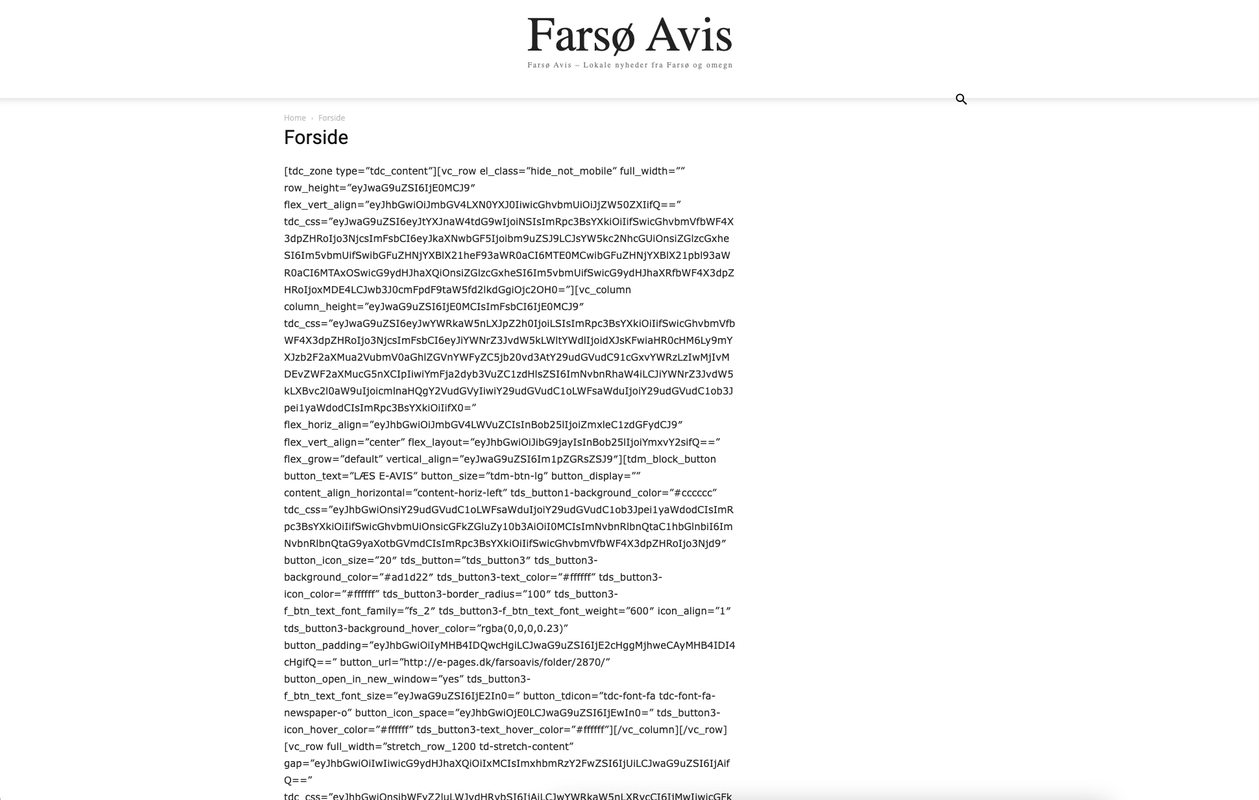
I have no idea what went wrong.
I now restored it a few days back, but how do I make sure that it does not happen again?
mgiannelisHello
My site has an issue. The front main images on the front page look perfect on laptop. But on desktop they are too small and look strange. They are smaller in height making everything look wrong.
The problem is. If I try to make the correct size for desktop. They come out “Too Big” on laptop. They don’t seem to be responsive.
I am talking about the front page headline images (The ones in the middle between the two sidebars)
Anamaria Hi,
It’s a very strange situation, that the same element works well on one template, and not on the others.
Please make a full backup to all files and database send an email at contact@tagdiv.com and provide wp-admin and Cpanel/FTP access so we can take a closer look. Also, paste a link to this topic so we can easily identify you.
Thank you!
Anamaria Hello,
This strange. Please do a test with tagDiv plugins and WPML plugin.
Thank you!
Anamaria Hello Thomas,
Please check if you don’t have any custom code CSS on the element ->
td-post-category in theme panel -> custom code.
This is strange, you can reset the style on the block and see if the problem persists, please duplicate the block before.
Thank you!
 dmxsta
 I’m glad you managed to fix PART of the review schema, the numbers are displaying properly, however, why are we stuck with “1 vote” and not the author’s name like every single other review site has?
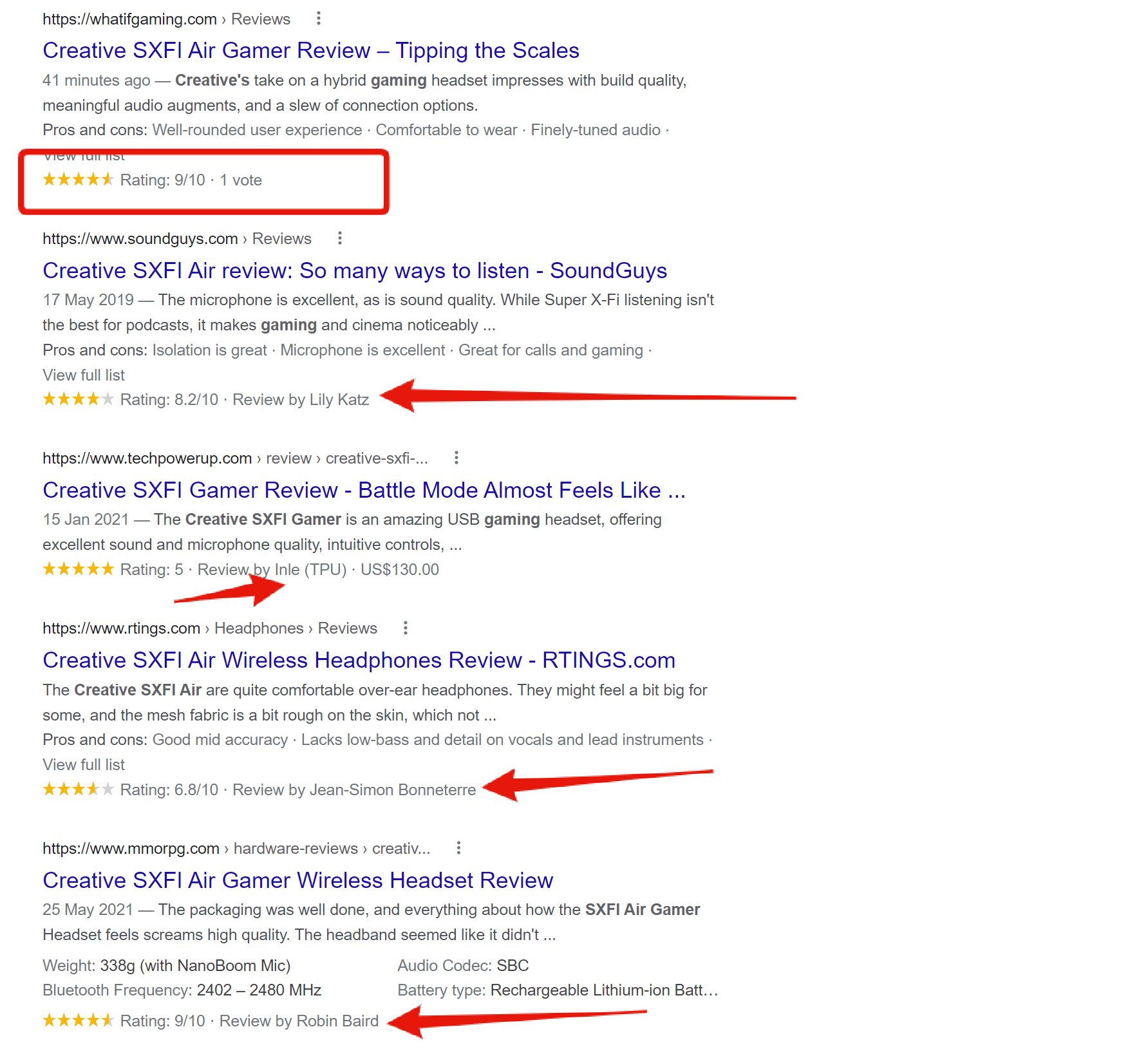
It seems strange to do something so half-heartedly when it’s so so simple, maybe you are not relaying the information properly to the dev team? It just doesn’t make sense to me.
PLEASE can we revise the review schema and make it right!
I’d love to be able to speak with the dev team myself or even pay someone on your team to fix it for me. It’s making our review site seem super unprofessional and just needs fixing ASAP.
Thank you!
-
This reply was modified 4 years by
dmxsta.

