
- NewspaperUser review system
- NewspaperHow to use the Flex Blocks cache option
- NewspaperRequirements for Newspaper
 Anamaria
 Hello,
If you get a message like this“Sorry, you are not allowed to access this page.” ,then you can solved this problem in this way:
go in Newspaper> System status and replace the url from: -> https://i.imgur.com/WlRnszw.png
admin.php?page=td_system_status
in
admin.php?page=td_system_status&reset_registration=1
And try after that to activate the theme.
If there is still a problem, you can send us an email at contact@tagdiv.com and provide wp-admin login (to can login in WordPress admin zone) and the license. We will take a look at the problem and we’ll fix it. Include a link to this topic in the email.
Let me know the results!
Thank you!
Anamaria Hello,
What key? If you referring to the activation code, you can reset from System Status -> https://www.screencast.com/t/Zt12bpyX
If you want to display a particular category, you can filter the blocks -> https://i.imgur.com/JSxTplN.png-> https://forum.tagdiv.com/flex-block-settings-guide/
Thank you!
 Stanford Nix
I made a post and no one responded. I need to make sure the update for Newspaper theme will not mess anything up.
The theme already is pretty buggy and I had to change a lot of things to make it work how I wanted. When I update, is it going to change the block settings, and how the articles filter? Or will it change anything with the settings on the theme ‘system status’?
I don’t know what the update does.
 Gabriel29
Hello,
We are not able to do any changes because when we click on Save Settings on the Theme Panel the spinning icon doesnt stop and the panel gets stuck loading. All settings are OK in the system status as per the guide in the Documentation, and disabling all plugins doesnt change it. How can we fix this?
Thank you for your time
 hanna2390
 Can you review those files that the Mangboard team has changed for the User system?
/wp-content/plugins/td-composer/legacy/Newspaper/parts/login.php
/wp-content/plugins/td-composer/legacy/Newspaper/parts/logged.php
/wp-content/plugins/td-subscription/includes/td_subscription.php
/wp-content/plugins/td-subscription/includes/shortcodes/tds_menu_login.php
Because we wanted to use a social login feature on their user system and we were using Mangboard, we tried to use Mangboard user system. They provide a menu we can simply add our social login ID and secret on their user system. However, their login status was not worked properly on our site, so they worked on those files to let us use their login system.
Do you think those file made any problem?
we had a backup file so we just overwrite with backup and it return to normal now.
Can you guide how to add some sources to those files safely? I have added the link to their sources here.
Please review and give us some solution.
Thank you.
https://drive.google.com/drive/folders/1lMWvcq3z0NJuZ4oQxfhxaaFVsyYD591g?usp=sharing
 Eighthats
Currently, when using the tagdiv editor, changes made to the mobile menu, such as selecting which menu it should use,
do not save when the page is updated.
The mobile menu always pulls up the menu from the main header, even if the menu itself is set to a different menu.
This page is using a different overall header:
https://www.rcrwireless.com/qualcomm-analyst-day-2022
The mobile menu will not retain the settings so we’ve had to leave the horizontal menu layout in place.
I have also been unable to change the CSS on the page. Any changes made are erased when the page is updated.
Theme status page:
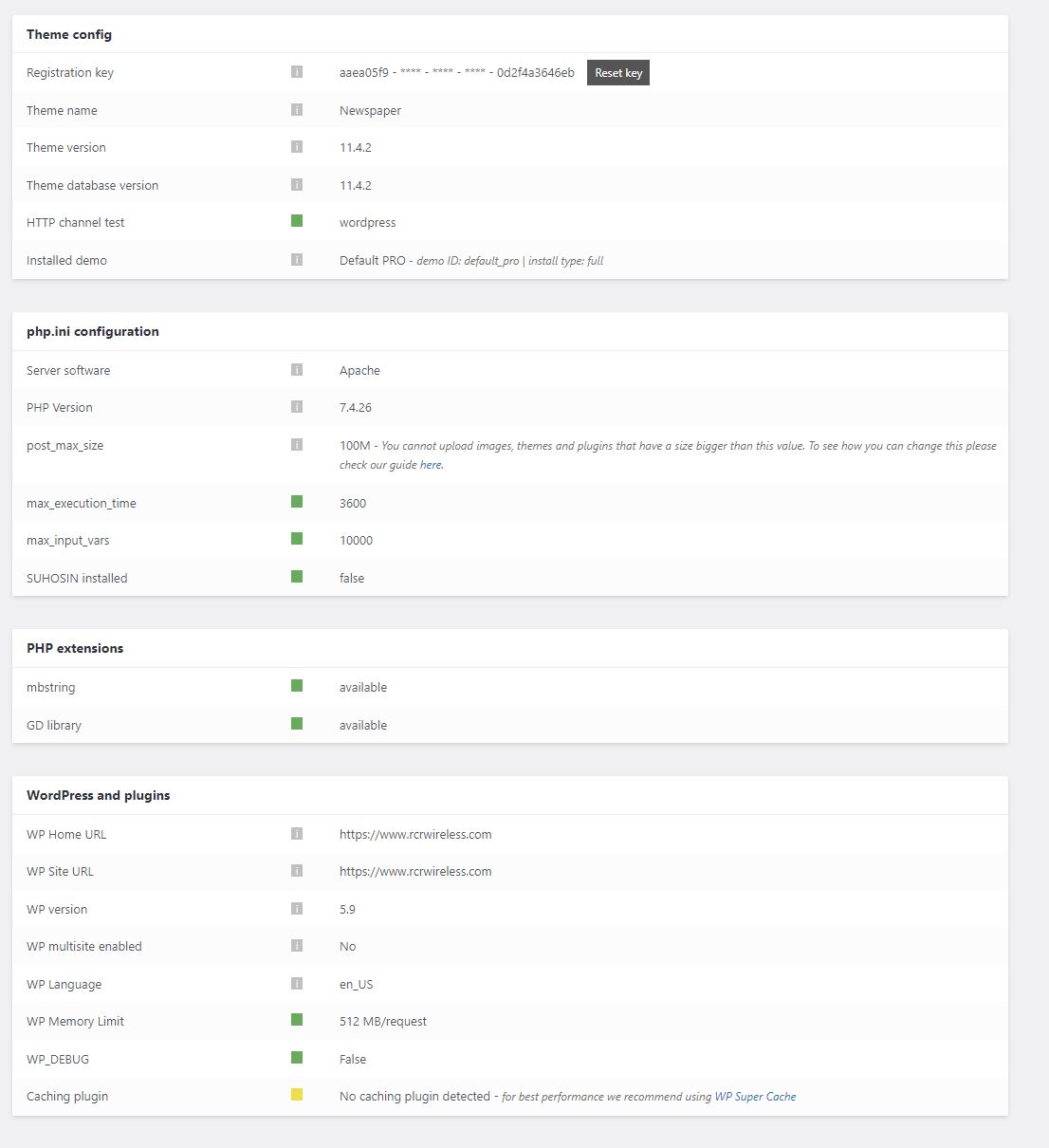
Anamaria Hello,
Please delete flex block 4 and add it again and see if the Warnings are still displayed. Also, please check the fields, and see if had an invalid value, please remove it https://i.imgur.com/gTplnJN.jpg
Please make sure the system status parameters are correctly increased according to our documentation from here -> https://forum.tagdiv.com/requirements-for-newspaper/ in config is WP_MEMORY_LIMIT not PHP Memory Limit (there is a typo, sorry) => https://www.screencast.com/t/88pK5QXpC
Also, you can ask your host to help you to set the wp memory.
Thank you!
 Viturico
I changed the value of max_input_vars in php.ini, I have checked it with an info.php but in System Status of the Newspaper Theme a different value still appears. I’ve tried making changes to php.ini, .htaccess and wp-config.php, but I can’t change that value.
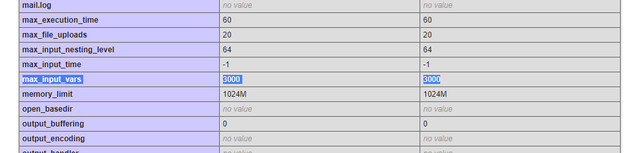
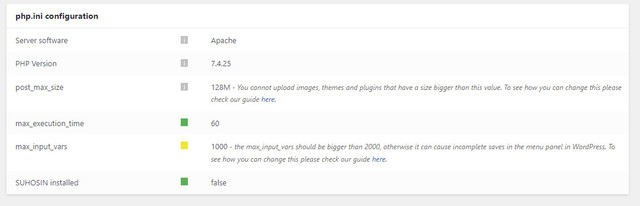
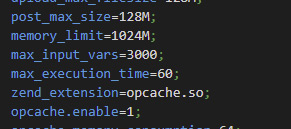
Stanford NixI updated my servers to dedicated servers. Now, when i make edits to my site, the WP Super Cache doesn’t flush. I didn’t change anything in the settings of the plugin. This is within TagDiv in WordPress. You can see I have added a stock ticker to my main page, and changed the line to red.
Once I save, and view within WordPress it looks fine. But when I go to an incognito window, it doesn’t adapt the changes. Also on my phone, it doesnt adapt the changes
When I go to test the cache this is what it shows.. I have not changed any of the WP Super Cache settings and the TagDiv System Status shows Green.
PLEASE help. I don’t know why it isn’t caching.
Stanford Nix I think I got it. Here are some questions:
1) I have added the mod_substitue code on the file. I did it both before the “# end WordPress” and I also added it after the ‘# end wordpress’. Both of these still show yellow in the system status
2) have set the WP memory. It now shows green in the system status here. Is this correct? And also, how much traffic can I hold? On Tuesday, I will probably have over 100,000 people visiting my site and I need to make sure it wont crash.
-
This reply was modified 4 years by
Stanford Nix.
Anamaria Hello,
Normally these two links in System status must match -> https://i.imgur.com/51PQQLU.png
Is this problem only for some pages or all of them?
Also, for error please check this topic https://forum.tagdiv.com/topic/error-at-zones-6models-1dom-the-model-does-not-match-the-content-currene/
Thank you!
 honlim
The following images are issue i consulted with my hosting company.
These are the maximum allowable value permitted for my shared host WordPress.
Are there know known issues if I disregard the system status and continue using Newspaper theme?
system status
maximum allowable value
 trademodo
I have a few issues I need help with:
1. TagDiv composer is stuck on loading, and I cannot edit any pages as a result – image
Note: I have already checked mod_substitute and followed the guide to set it to 10M
2. The main navigation menu is glitched, and I cannot access the submenu – image
3. In the theme panel > template settings > image loading – animations (LazyLoad), if I enable ‘use loading animation image’ then my site will not display the images. This is the issue that lead to all of the above issues that I am now left with, and here’s the backstory about what’s going on:
The site was working perfectly fine on Feb 18th. No additional changes were made, and when I came to look at the site again after the long weekend on Feb 22nd, I discovered the issue where the images on the site were not displaying. After a whole day of trouble shooting, and restore backups to Feb 19th and before Feb 18th, I discovered that the way to get the images to show up was to disable the loading animation in ‘3.’ (from above). Now the images, work and I am starting to discover all sorts of issues with the website (point ‘1.’ and ‘2.’ from above). I’ve checked the system status, and the only one that is not green is the mod_substitute, which I have already followed your guide and updated correctly. I’ve reinstalled the newspaper theme and am running 11.4.1. I updated wordpress and am using 5.9.1, I even tried with the previous older version and it still was not working. I am using supercache and cloudflare to the exact recommended specifications. My hosting provider is Siteground, and I have already gone into there to reset permissions. I am completely stumped with what’s going on and have accepted that the theme is not behaving normally, but at least I need to be able to go into TagDiv composer to be able to make up for the issues.
Stanford NixI have no idea how to change these system status settings
I need to update my memory and the system. On Tuesday I will have around 100,000 people visiting my site and I CANT let it crash.
The help documents are pretty useless. I have no idea what they mean or how to make the changes.
1) Do i need to update my PHP version? if so, how?
2) I don’t know how to change my memory
3) what is PHP max time and input vars?
Please someone help, I HAVE to update these so I can launch my website on Tuesday
 lopetoms
 The new version of the screen is broken, it blocks me even the IP of my server with my local internet. if i install another template it works great just with you guys
System Status
PHP Version
8.0.15
WP Memory Limit
256 MB
PHP Execution Time
1000
PHP Max Input Vars
2000
lopetomsInternal Server Error
The server encountered an internal error or misconfiguration and was unable to complete your request.
Please contact the server administrator at root@localhost to inform them of the time this error occurred, and the actions you performed just before this error.
More information about this error may be available in the server error log.
System Status
PHP Version
8.0.15
WP Memory Limit
256 MB
PHP Execution Time
1000
PHP Max Input Vars
2000
 RichBrun
My PHP Memory Limit was increased to 2GB, which is much higher than the recommended 256MB. However, the System Status for WP Memory Limit is still displaying as a yellow status.
 sotiris
 Hello, I enabled mod_subsitute on apache and added the lines you showed in my .htaccess, but the theme’s system status does not show anything about module substitute. Everything worked well, until I updated tagdiv composer, is there a way to revert to the previous version?
Anamaria Hi,
Please check if this code is missing from your .htaccess: https://www.screencast.com/t/iN0R93dD3p from our requirements https://forum.tagdiv.com/requirements-for-newspaper/ this requirement is not displayed in System Status.
Usually, after you set the code in .htaccess the WP editor works well.
Please do a test using only tagDiv plugins and try to open the WP Editor.
Please check the console if you have any errors when you try to open the wp editor, maybe is possible to be from the firewall or security module which blocks the admin-ajax.php request, which usually displays a 403 or 404 error.
If you don’t use a security plugin, please ask your host about this, maybe you have a security module that blocks this.
Thank you!
Anamaria Hi,
Please check if this code is missing from your .htaccess: https://www.screencast.com/t/iN0R93dD3p from our requirements https://forum.tagdiv.com/requirements-for-newspaper/ this requirement is not displayed in System Status.
Usually, after you set the code in .htaccess the WP editor works well.
Please do a test using only tagDiv plugins and try to open the WP Editor.
Please check the console if you have any errors when you try to open the wp editor, maybe is possible to be from the firewall or security module which blocks the admin-ajax.php request, which usually displays a 403 or 404 error.
If you don’t use a security plugin, please ask your host about this, maybe you have a security module that blocks this.
If you use a plugin like Wordfence please set it in learning mode.
Also, if you are using Cloudflare, please make sure that is set as in our guide https://forum.tagdiv.com/cloudflare-cdn/, you need to disable the Rocket Loader.
Thank you!
 tennistalker
 Unfortunately, as you can see from this image, I still do not have the Page Template Settings section:

This is my system status:

 Calin
Calin Hi,
Indeed, the font size was changed for the title in the Gutenberg editor, but the rest of the options for me are the same, unique article -> https://i.imgur.com/KlcABcW.png and on posts -> https://i.imgur.com/es0XUl2.jpg -> https://i.imgur.com/XKA3Z09.png
Also this is my system status -> https://i.imgur.com/spZTOfk.png
Thank you!
 Madalin
 1. https://imgur.com/a/m8Sa9RR i done this but in Newspaper System Status mod_substitute is still yellow
2. It’s not the answer I was looking for, I didn’t mean to click on an image and the modal to appear, I meant that inside the modal I could add a button to redirect you to something and an image
3. I want to mention the Social Count is not work only for Instagram. I already connect on theme panel, but still stuck to 0
4. Everything is ok, the video from your YouTube channel were made a long time ago, I installed Classic Editor and it looks the same as in your video. All good 🙂
MadalinHi, I also have 3 problems if you can help me:
1. In Newspaper-System Status I have everything there in green except mod_substitute, I wrote that code from the documentation in .htaccess But nothing changes
2. I checked the speed on pagespeed insights and shows me on the phone very low speed 25 score and 85 on the desktop.
3. 2. How do I create pop-ups?
 underwooddesign
 Calin,
Thanks for your prompt reply! We indeed did receive a pop-up message as the demo content installation status showed complete – see below:
rtbuild.underwood-design.com says
tagDiv Importer detexts that your server is not properly configured.
Don’t worry, the importer will continue to install the demo after you click the OK button.
Steps to verify:
– Please go to the SYSTEM STATUS tab and check if all parameters are gree – Verify the permissions on your upload folder
– Contact our support via email contact@tagdiv.com (please provide your product license key)
We have checked the System Status portion of the theme, but are showing no yellow (all green unless grayed out with “i”).
Other than WordFence and some malware protection plugins (in addition to those loaded by the them), this is a fresh build.



