
No search results were found in Documentation!
 rexcom
 Unregister in ThemePanel System Status en register. This works for me.
rexcom Unregister in ThemePanel System Status en register. This works for me.
rexcom Unregister in ThemePanel System Status en register. This works for me.
 yvrmark
 Newspaper > System Status
The Registration Key is the first entry under “Theme config”. Click on the “Reset key” button.
Once you’ve done that you need to re-enter your purchase code. Can’t remember where that actually shows up but you should be able to find it by going to the Newspaper menu.
yvrmark Happened to me. Appears to be associated with the WordPress update today. I had to reset the registration key (under system status) and then re-enter my purchase code. Everything is now back to normal. I understand though this has not worked for everyone.
yvrmarkHappened to me. Appears to be associated to the WordPress update today. I had to reset the registration key (under system status) and then re-enter my purchase code. Everything is now back to normal.
 bob@mrrogersweborhood.com
Hi.
Our site, https://okobserver.org, is running extremely slow. We have worked with WPMU and their Hummingbird plugin to address these response time issues. WPMU indicates that on the Theme system status page, it does not recognize WPMU’s Hummingbird cache plugin is in use.
—–
Message is: Caching plugin No caching plugin detected – for best performance we recommend using WP Super Cache
—–
There is no mention of Hummingbird cache. WPMU suggests that TagDiv be notified of this.
We’re losing customers over the slow response time. What can be done here?
Thanks so much for your help.
 Calin
Calin Hi Sendada, if the website use the Newsmag theme and this was not activated, then please activate it. In case that this is activated, then please reset the license key from Newspaper > system status and activate the theme again, then clear all cache and the problem will be fixed.
Let me know the results!
 gorton20
Hi,
The theme working with is Newspaper version 11.3.1 It checks the system status and says System Status
WP Memory Limit 40 MB
⤏ We recommend memory to at least 256 MB.
I ran the MultiPHP INI Editor and changed other settings successfully.
Not sure what to do?
 Anamaria
 Hi,
Please check if this code is missing from your .htaccess: https://www.screencast.com/t/iN0R93dD3p from our requirements https://forum.tagdiv.com/requirements-for-newspaper/ this requirement is not displayed in System Status.
Usually, after you set the code in .htaccess the WP editor works well.
Please do a test using only tagDiv plugins and try to open the WP Editor.
Please check the console if you have any errors when you try to open the wp editor, maybe is possible to be from the firewall or security module which blocks the admin-ajax.php request, which usually displays a 403 or 404 error.
If you don’t use a security plugin, please ask your host about this, maybe you have a security module that blocks this.
If you use a plugin like Wordfence please set it in learning mode.
Also, if you are using Cloudflare, please make sure that is set as in our guide https://forum.tagdiv.com/cloudflare-cdn/, you need to disable the Rocket Loader.
Thank you!
 bilgin53
After upgrading the newspaper theme version, when I try to edit the header and footer section, I get the following error
header section link 
footer section link 
this type of header is not editable with tagdiv composer. Please use a cloud header template when I try to load no screen results
screen results section link1 
screen results section link2 
system status link 
Note: there is no problem when editing other parts
 Avispa Midia
 Thanks for the reply! We’ve already checked the topic you refer to. We’ve made the changes you suggest, including WP_MEMORY_LIMIT to 256, and also we’ve corroborated that the requirements for the Newspaper Theme are all correct. We leave you here the captures of the current system status on our site, so you can check them out. We also have a Valid SSL Certificate, issued by R3 / Let’s Encrypt.
– System status 1 : https://postimg.cc/NKsYkSnC
– System status 2: https://postimg.cc/yDLKQn41
Nevertheless, the Cloud Templates are still not working. Any idea of what could be happening? Thanks for the attention and your help!
Avispa Midia Thanks for the reply! We’ve already checked the topic you refer to. We’ve made the changes you suggest, including WP_MEMORY_LIMIT to 256, and also we’ve corroborated that the requirements for the Newspaper Theme are all correct. We leave you here the captures of the current system status on our site, so you can check them out. We also have a Valid SSL Certificate, issued by R3 / Let’s Encrypt.
– System status 1 : https://postimg.cc/NKsYkSnC
– System status 2: https://postimg.cc/yDLKQn41
Nevertheless, the Cloud Templates are still not working. Any idea of what could be happening? Thanks for the attention and your help!
Anamaria Hello,
If you get a message like this“Sorry, you are not allowed to access this page.” ,then you can solved this problem in this way:
go in Newspaper> System status and replace the url from: -> https://i.imgur.com/WlRnszw.png
admin.php?page=td_system_status
in
admin.php?page=td_system_status&reset_registration=1
And try after that to activate the theme.
If there is still a problem, you can send us an email at contact@tagdiv.com and provide wp-admin login (to can login in WordPress admin zone) and the license. We will take a look at the problem and we’ll fix it. Include a link to this topic in the email.
Let me know the results!
Thank you!
Anamaria Hello,
Please make sure you have the latest theme version, v11.2 and resetting the activation and reactivating the theme with the key, in the theme system status panel
-> https://i.imgur.com/5SU7ldm.png
We are very sorry for the inconvenience!
Thank you!
Anamaria Hi,
First, ensure that you are using the latest version of the theme,v11.2 the system status parameters are correctly increased according to our documentation from here -> https://forum.tagdiv.com/requirements-for-newspaper/, clear all the caches and check the results. Try to resave your permalinks and check after the results.
If you need to make the update I recommend that you update the theme on a staging website and please make a full backup to all files and the database, in case something goes wrong. => https://forum.tagdiv.com/how-to-update-the-theme-2/ -> https://www.youtube.com/watch?v=LAJXrSI-dDA, clear all cache and see the results.
Thank you!
 ivan.ibarra
Been reading the forums and i seem to have everything set up correctly but its still not working
i have my setting in wp-config.php like this:
define( ‘WP_DEBUG’, false );
define( ‘WP_MEMORY_LIMIT’, ‘256M’ );
and this is how my system status are:

Anamaria Hello,
Please check if this code is missing from your .htaccess: https://www.screencast.com/t/iN0R93dD3p from our requirements https://forum.tagdiv.com/requirements-for-newspaper/ this requirement is not displayed in System Status.
Usually, after you set the code in .htaccess the WP editor works well.
Also, if the problem persists please check if you do not have a plugin conflict, please deactivate ALL plugins except tagDiv plugins, also if you are using a child theme or cache plugin, deactivate them, clear all cache (also from your browser) and try again.
Thank you!
Anamaria Hello,
Please check if this code is missing from your .htaccess: https://www.screencast.com/t/iN0R93dD3p from our requirements https://forum.tagdiv.com/requirements-for-newspaper/ this requirement is not displayed in System Status.
Usually, after you set the code in .htaccess the WP editor works well.
Also, if the problem persists please check if you do not have a plugin conflict, please deactivate ALL plugins except tagDiv plugins, also if you are using a child theme or cache plugin, deactivate them, clear all cache (also from your browser) and try again.
Thank you!
 SpaghettiBolt
When trying to edit text for column text the wp editor pops up but just continues to load with spinning circle.
all of my system statuses are green except mod_substitute which is yellow.
not sure what to do.
Anamaria Hello,
We apologize for this unfortunate situation.
That notice that is displayed on the website, happens in a specific case.
Due to an issue, the notice may appear when using an older theme version. The issue was solved a long time ago actually, but if an old theme version is used, then it may happen.
So if it did happen on your website, assuming the theme was activated with the key, please consider updating the theme as soon as possible, or resetting the activation and reactivating the theme with the key, in the theme system status panel
-> https://i.imgur.com/5SU7ldm.png
The notice will then go away permanently from then on, as long as the theme is activated.
We are very sorry for the inconvenience, please let us know if there is something we can help with, by sending us an email at contact@tagdiv.com We will help.
Sorry again for this inconvenience.
Thank you!
Anamaria Hello,
We apologize for this unfortunate situation.
That notice that is displayed on the website, happens in a specific case.
Due to an issue, the notice may appear when using an older theme version. The issue was solved a long time ago actually, but if an old theme version is used, then it may happen.
So if it did happen on your website, assuming the theme was activated with the key, please consider updating the theme as soon as possible, or resetting the activation and reactivating the theme with the key, in the theme system status panel
-> https://i.imgur.com/5SU7ldm.png
The notice will then go away permanently from then on, as long as the theme is activated.
We are very sorry for the inconvenience, please let us know if there is something we can help with, by sending us an email at contact@tagdiv.com We will help.
Sorry again for this inconvenience.
Thank you!
Anamaria Hello,
If you get a message like this“Sorry, you are not allowed to access this page.” ,then you can solved this problem in this way:
go in Newspaper> System status and replace the url from: -> https://i.imgur.com/WlRnszw.png
admin.php?page=td_system_status
in
admin.php?page=td_system_status&reset_registration=1
And try after that to activate the theme.
If there is still a problem, you can send us an email at contact@tagdiv.com and provide admin login (to can login in WordPress admin zone) and the license. We will take a look at the problem and we’ll fix it. Include a link to this topic in the email.
Let me know the results!
Thank you!
 caker15
 Hi! thanks for your answer, followed your steps and of course the reqs for newspaper and still getting the error :/
Here’s a screenshot of the system status
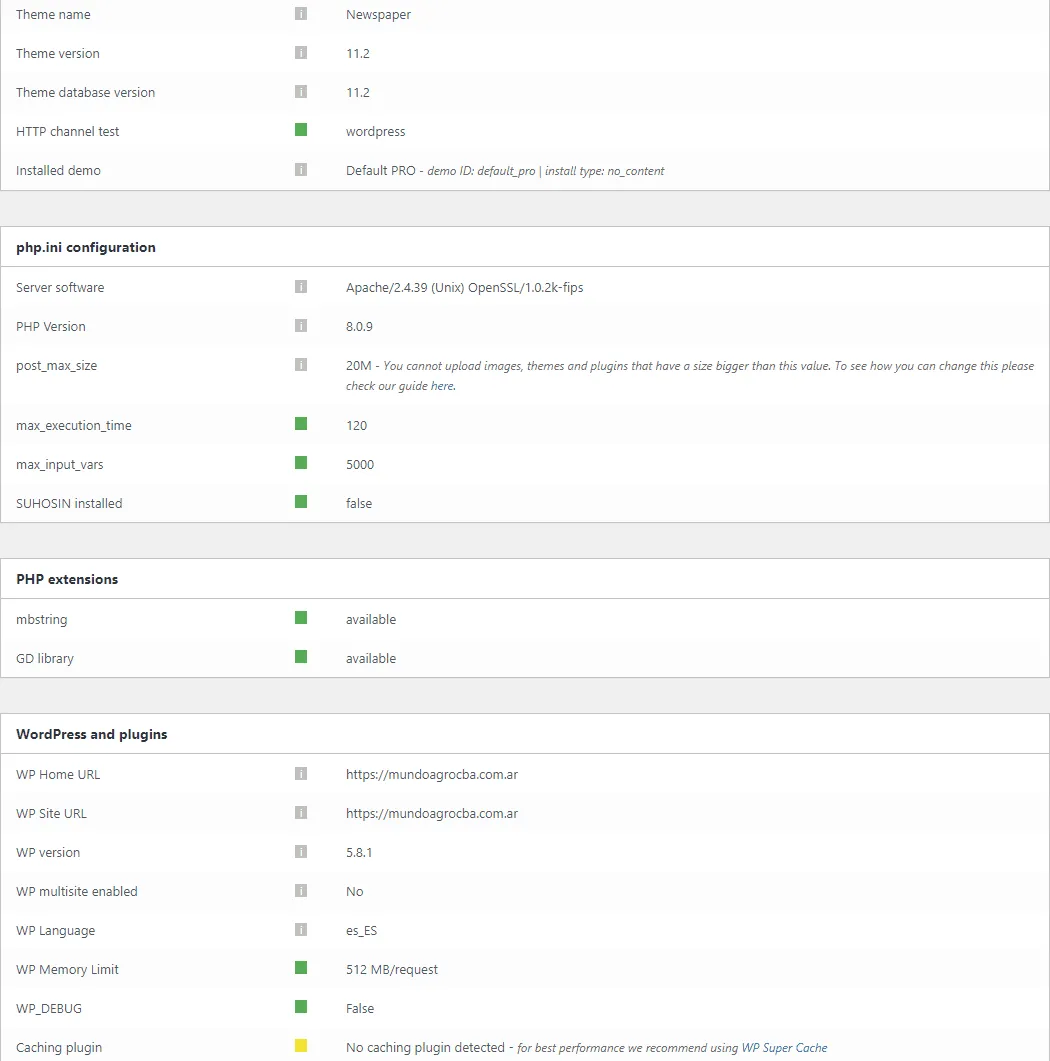
Thank you!
Calin Hi,
Right now the website looks normal -> https://i.imgur.com/OdhnLfT.jpg
That situation can avoid if you activate the theme, but in case that the theme is already activated and the problem persist, what you can do is to reset the license key from Newsmag> system status and set it again, after that clear all cache, this should fix the problem.
Thank you!



