
- NewsmagRequirements for Newsmag
 Oktay
Oktay Since the update to 12.6.9 my website has slowed down, and sometimes I get a 503 error. This never used to happens, the traffic is still around the same as before. This is the system status. I’m using Litespeed Cache for the optimisation and the settings have not changes also. What could be the issue?
 Anamaria
 Hi,
Please check if this code is missing from your .htaccess: https://www.screencast.com/t/iN0R93dD3p from our requirements https://forum.tagdiv.com/requirements-for-newspaper/ this requirement is not displayed in System Status. Also, add this code https://i.imgur.com/k44HWD5.png you can ask your host to help you https://forum.tagdiv.com/tagdiv-composer-not-working/
Thank you!
 DavidCC24
Hi, can you please help me?
I’m using my license on the domain https://movitok.online: I paste the license code to activate the theme along with my email and it validates showing “Version: 12.6.9 REGISTERED” in step #1:
Fast Start Your Website
tagDiv Plugins are now Successfully Installed; Done! You have Installed all the Required Plugins!
But when I click on the blue button “2. Choose to Install a Prebuilt Website” the error appears: “An issue has been encountered while trying to validate your license key” Please reset the key from the System status tab and try to activate it again, or contact our customer support team at contact@tagdiv.com.
This means that the license is not active even though it reports that it is.
Actions I’ve taken:
It doesn’t allow me to install the necessary plugins automatically online. To solve the problem, I manually installed the necessary plugins from the zip files downloaded from ThemeForest.
I reset the key from the System Status > Theme config > Registration key menu, but the problem persists and the license still doesn’t work. When I enter the license; it shows this notification “Theme activation
Theme successfully activated. Thanks for buying our product.” But it doesn’t work 🙁
I had version 12.6.8 and updated to version 12.6.9, but the problem persists.
I reset the hosting, deleted the entire site and reinstalled WordPress from scratch, installed the theme, but the problem is not solved and the error persists.
The theme is not functional, I have not been able to install any “Prebuilt Site”.
Please help!
Image View: https://postimg.cc/gallery/HY9G5fh
Anamaria Hello,
You can reset your license from Newspaper -> System status and activate them with the new license. Also, after, you need to contact us via email at contact@tagdiv.com and provide the license certificate there to delete the domains from that license.
Thank you!
Anamaria Hi,
Please check if this code is missing from your .htaccess: https://www.screencast.com/t/iN0R93dD3p from our requirements https://forum.tagdiv.com/requirements-for-newspaper/ this requirement is not displayed in System Status. Also, add this code https://i.imgur.com/k44HWD5.png you can ask your host to help you https://forum.tagdiv.com/tagdiv-composer-not-working/
Thank you!
Anamaria Hello,
There is an option in the theme that will remove the ads from the backend; please go to Newsmag > System status and click on “tagDiv advertisement” – https://i.imgur.com/ysGaxrZ.png
Thank you!
 Ervin108
 Hello Anamaria,
thank you for your answer. I realized that I included memory_limit line only in wp-config that was located in public_html folder, but not in wp-config of my actual website database folder. Now it works and system status says I have 256M.
There is however one more thing in system status that I am trying to figure it out. That is “max_execution_time” which is 30 but it should be at least 60.
To fix this I am looking at my “.htaccess” file, according to your guidelines. (It seems I dont have php.ini ).
My .htaccess looks like this:
# BEGIN WordPress
# The directives (lines) between “BEGIN WordPress” and “END WordPress” are
# dynamically generated, and should only be modified via WordPress filters.
# Any changes to the directives between these markers will be overwritten.
<IfModule mod_rewrite.c>
RewriteEngine On
RewriteRule .* – [E=HTTP_AUTHORIZATION:%{HTTP:Authorization}]
RewriteBase /
RewriteRule ^index\.php$ – [L]
RewriteCond %{REQUEST_FILENAME} !-f
RewriteCond %{REQUEST_FILENAME} !-d
RewriteRule . /index.php [L]
</IfModule>
# END WordPress
Please advise me where should I include “php_value max_execution_time 300” line that should be done according to your guidelines for fixing this.
thank you
Ervin108Hello,
1. I recently bought Newspaper Theme. First I was thinking to use prebuilt Black Version PRO demo – but then I saw this: https://demo.tagdiv.com/newspaper_black/
Problem is that I can not find this “Newspaper black” prebuilt website…only “Newspaper black – version Pro” is available in demos directory. Was “Newspaper black” removed from directory ?
2. My WP Memory Limit system status shows problem – 40 MB/request. I tried to follow your guideline for changing this value in wp-config.php file. However in my wp-config.php file there is no any such line “define( ‘WP_MEMORY_LIMIT’, ’40M’ );. So I tried solve this by just adding the line “define( ‘WP_MEMORY_LIMIT’, ‘256M’ )” into my wp-config.php file but Newspaper system status still shows there is problem because of “40 MB/request”.
I did however tried to instal Newspaper black – Pro and edited it a little and so far there seems to be no problem.
Anamaria Hello,
You can reset your license from Newspaper -> System status. Also, if you want to check on what domains the license is used, you need to contact us via email at contact@tagdiv.com and provide the license certificate there.
Thank you!
Anamaria Hi,
Please ensure that there are no conflicts with untested plugins by deactivating all non-tested plugins, including any child themes you are using. Additionally, clear all cache and try again.
Make sure to resave your permalinks.
Check if the following code is missing from your .htaccess file: https://www.screencast.com/t/iN0R93dD3p. This requirement is not displayed in the System status , and add this code: https://i.imgur.com/k44HWD5.png. You may want to ask your hosting provider for assistance with this. For more details, refer to https://forum.tagdiv.com/requirements-for-newspaper/ and https://forum.tagdiv.com/tagdiv-composer-not-working/.
Thank you!
 remodelschool
My tagdiv composer stopped working randomly about 24 hours ago. I tried to update the theme to the most recent version and I keep receiving this error:
“An issue has been encountered while trying to validate your license key
Please reset the key from the System status tab and try to activate it again, or contact our customer support team at contact@tagdiv.com.”
I reset the key and then I even purchased another key just to see if that would resolve the issue. Neither solution worked. I need help to resolve this issue ASAP as I use my site to sell products and I can’t update it.
What are my options?
 Pazan
PazanHello,
I’m experiencing an issue with the Newspaper theme and the tagDiv Composer. When I click on “Edit Content” in the frontend editor, the screen keeps loading indefinitely, and I’m unable to make any changes to the content.
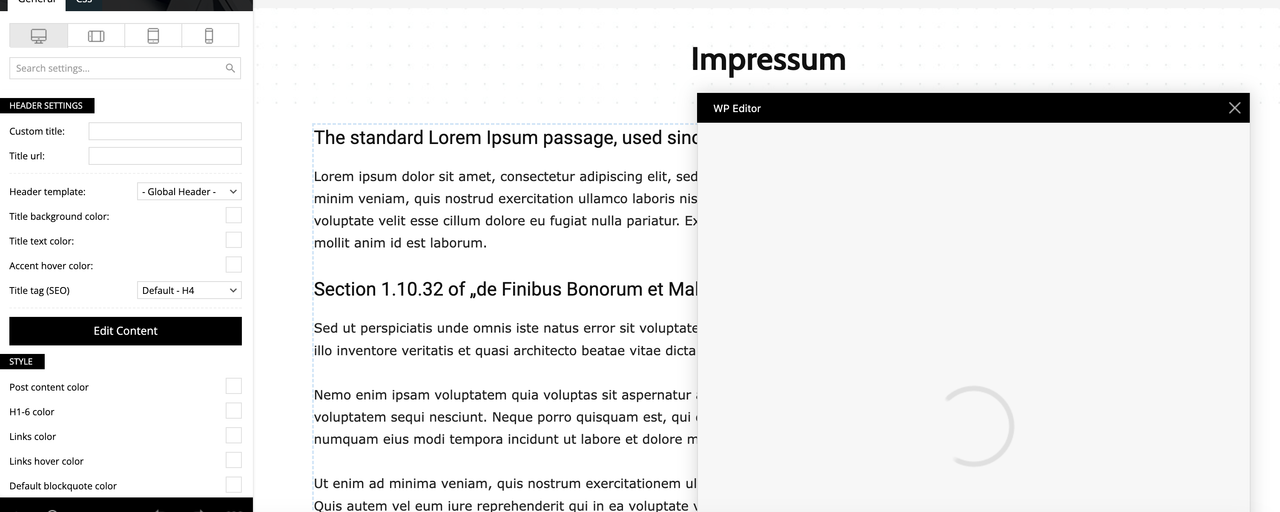
Here is some information about my setup:
Theme: Newspaper (Version 12.6.8)
Page Builder: tagDiv Composer
PHP Version: 8.0.30.4
WordPress Version: (6.7.1)
Memory Limit: 256M (recently increased, confirmed in the system status)
Server: GoDaddy hosting
Steps I’ve Already Taken:
Increased PHP memory limit to 256M in wp-config.php.
Cleared browser and WordPress cache.
Despite these actions, the problem persists. Could you please advise me on how to resolve this issue? I’m unsure if it’s a conflict or a server-related problem.
Thank you in advance for your help!
Best regards,
(Philipp)
 gabor
gabor Hello Annamaria,
Thanks for the very fast answer.
I tried with both PHP version 8.0 and 8.1 the very same error persists.
Meanwhile I also tried with other prebuild websites, for example with “DEFAULT PRO”, the very same error occurs. , so this is a more general issue. I also carefully read the other thread you linked https://forum.tagdiv.com/topic/error-at-zones-6models-1dom-the-model-does-not-match-the-content-currene/, but unfortunately there are no steps to follow there and also there is no solution described there 🙁
I am using official WordPress docker images, so any developer on your side can spin up exactly that image and reproduce the error:
– wordpress:6.7.1-php8.3-apache
or as you recommended:
– wordpress:6.7.1-php8.1-apache
– wordpress:php8.0-apache
For detailed diagnostics, all my experiences are on freshly installed images, with no other themes and plugins.
Theme name i Newspaper
Theme version i 12.6.8
Theme database version i 12.6.8
HTTP channel test wordpress
Installed demo i Default PRO – demo ID: default_pro | install type: full
System Status
————–
PHP Version 8.0.30
WP Memory Limit 384 MB
PHP Execution Time 600
PHP Max Input Vars 3000
WordPress Health Info from Tools -> Site Health
———————————————–
### wp-core ###
version: 6.7.1
site_language: en_US
user_language: en_US
timezone: +00:00
permalink: /%postname%/
https_status: true
multisite: false
user_registration: 0
blog_public: 1
default_comment_status: open
environment_type: production
user_count: 1
dotorg_communication: true
### wp-paths-sizes ###
wordpress_path: /var/www/html
wordpress_size: 56.95 MB (59713887 bytes)
uploads_path: /var/www/html/wp-content/uploads
uploads_size: 0.00 B (0 bytes)
themes_path: /var/www/html/wp-content/themes
themes_size: 20.08 MB (21059932 bytes)
plugins_path: /var/www/html/wp-content/plugins
plugins_size: 315.73 KB (323305 bytes)
fonts_path: /var/www/html/wp-content/uploads/fonts
fonts_size: directory not found
database_size: 4.70 MB (4931584 bytes)
total_size: 82.04 MB (86028708 bytes)
### wp-active-theme ###
name: Newspaper (Newspaper)
version: 12.6.8
author: tagDiv
author_website: https://themeforest.net/user/tagDiv/portfolio
parent_theme: none
theme_features: core-block-patterns, post-formats, post-thumbnails, automatic-feed-links, html5, woocommerce, bbpress, align-wide, align-full, editor-font-sizes, widgets-block-editor, editor-style, menus, widgets
theme_path: /var/www/html/wp-content/themes/Newspaper
auto_update: Disabled
### wp-themes-inactive (4) ###
Twenty Twenty-Five: version: 1.0, author: the WordPress team, Auto-updates disabled
Twenty Twenty-Four: version: 1.0, author: the WordPress team (latest version: 1.3), Auto-updates disabled
Twenty Twenty-Three: version: 1.3, author: the WordPress team (latest version: 1.6), Auto-updates disabled
Twenty Twenty-Two: version: 1.6, author: the WordPress team (latest version: 1.9), Auto-updates disabled
### wp-plugins-active (3) ###
tagDiv Cloud Library: version: 3.7 | built on 26.09.2024 10:39, author: tagDiv, Auto-updates disabled
tagDiv Composer: version: 5.2 | built on 26.09.2024 10:39, author: tagDiv, Auto-updates disabled
tagDiv Social Counter: version: 5.6 | built on 14.11.2024 7:59, author: tagDiv, Auto-updates disabled
### wp-plugins-inactive (2) ###
Akismet Anti-spam: Spam Protection: version: 5.3, author: Automattic – Anti-spam Team (latest version: 5.3.5), Auto-updates disabled
Hello Dolly: version: 1.7.2, author: Matt Mullenweg, Auto-updates disabled
### wp-media ###
image_editor: WP_Image_Editor_Imagick
imagick_module_version: 1691
imagemagick_version: ImageMagick 6.9.11-60 Q16 x86_64 2021-01-25 https://imagemagick.org
imagick_version: 3.6.0
file_uploads: 1
post_max_size: 30M
upload_max_filesize: 30M
max_effective_size: 30 MB
max_file_uploads: 20
imagick_limits:
imagick::RESOURCETYPE_AREA: 122 MB
imagick::RESOURCETYPE_DISK: 1073741824
imagick::RESOURCETYPE_FILE: 786432
imagick::RESOURCETYPE_MAP: 512 MB
imagick::RESOURCETYPE_MEMORY: 256 MB
imagick::RESOURCETYPE_THREAD: 1
imagick::RESOURCETYPE_TIME: 9.2233720368548E+18
imagemagick_file_formats: 3FR, 3G2, 3GP, AAI, AI, APNG, ART, ARW, AVI, AVIF, AVS, BGR, BGRA, BGRO, BIE, BMP, BMP2, BMP3, BRF, CAL, CALS, CANVAS, CAPTION, CIN, CIP, CLIP, CMYK, CMYKA, CR2, CR3, CRW, CUR, CUT, DATA, DCM, DCR, DCX, DDS, DFONT, DNG, DPX, DXT1, DXT5, EPDF, EPI, EPS, EPS2, EPS3, EPSF, EPSI, EPT, EPT2, EPT3, ERF, FAX, FILE, FITS, FRACTAL, FTP, FTS, G3, G4, GIF, GIF87, GRADIENT, GRAY, GRAYA, GROUP4, H, HALD, HDR, HEIC, HISTOGRAM, HRZ, HTM, HTML, HTTP, HTTPS, ICB, ICO, ICON, IIQ, INFO, INLINE, IPL, ISOBRL, ISOBRL6, J2C, J2K, JBG, JBIG, JNG, JNX, JP2, JPC, JPE, JPEG, JPG, JPM, JPS, JPT, JSON, K25, KDC, LABEL, M2V, M4V, MAC, MAGICK, MAP, MASK, MAT, MATTE, MEF, MIFF, MKV, MNG, MONO, MOV, MP4, MPC, MPG, MRW, MSL, MTV, MVG, NEF, NRW, NULL, ORF, OTB, OTF, PAL, PALM, PAM, PATTERN, PBM, PCD, PCDS, PCL, PCT, PCX, PDB, PDF, PDFA, PEF, PES, PFA, PFB, PFM, PGM, PGX, PICON, PICT, PIX, PJPEG, PLASMA, PNG, PNG00, PNG24, PNG32, PNG48, PNG64, PNG8, PNM, POCKETMOD, PPM, PREVIEW, PS, PS2, PS3, PSB, PSD, PTIF, PWP, RADIAL-GRADIENT, RAF, RAS, RAW, RGB, RGBA, RGBO, RGF, RLA, RLE, RMF, RW2, SCR, SCT, SFW, SGI, SHTML, SIX, SIXEL, SPARSE-COLOR, SR2, SRF, STEGANO, SUN, TEXT, TGA, THUMBNAIL, TIFF, TIFF64, TILE, TIM, TTC, TTF, TXT, UBRL, UBRL6, UIL, UYVY, VDA, VICAR, VID, VIDEO, VIFF, VIPS, VST, WBMP, WEBM, WEBP, WMV, WPG, X, X3F, XBM, XC, XCF, XPM, XPS, XV, XWD, YCbCr, YCbCrA, YUV
gd_version: bundled (2.1.0 compatible)
gd_formats: GIF, JPEG, PNG, WebP, BMP
ghostscript_version: 9.53.3
### wp-server ###
server_architecture: Linux 6.8.0-1018-azure x86_64
httpd_software: Apache/2.4.56 (Debian)
php_version: 8.0.30 64bit
php_sapi: apache2handler
max_input_variables: 3000
time_limit: 600
memory_limit: 500M
admin_memory_limit: 512M
max_input_time: -1
upload_max_filesize: 30M
php_post_max_size: 30M
curl_version: 7.74.0 OpenSSL/1.1.1w
suhosin: false
imagick_availability: true
pretty_permalinks: true
htaccess_extra_rules: false
current: 2024-12-17T08:17:27+00:00
utc-time: Tuesday, 17-Dec-24 08:17:27 UTC
server-time: 2024-12-17T08:17:26+00:00
### wp-database ###
extension: mysqli
server_version: 11.4.4-MariaDB-ubu2404
client_version: mysqlnd 8.0.30
max_allowed_packet: 16777216
max_connections: 151
### wp-constants ###
WP_HOME: undefined
WP_SITEURL: undefined
WP_CONTENT_DIR: /var/www/html/wp-content
WP_PLUGIN_DIR: /var/www/html/wp-content/plugins
WP_MEMORY_LIMIT: 384M
WP_MAX_MEMORY_LIMIT: 512M
WP_DEBUG: false
WP_DEBUG_DISPLAY: true
WP_DEBUG_LOG: false
SCRIPT_DEBUG: false
WP_CACHE: false
CONCATENATE_SCRIPTS: undefined
COMPRESS_SCRIPTS: undefined
COMPRESS_CSS: undefined
WP_ENVIRONMENT_TYPE: undefined
WP_DEVELOPMENT_MODE: undefined
DB_CHARSET: utf8
DB_COLLATE: undefined
### wp-filesystem ###
wordpress: writable
wp-content: writable
uploads: writable
plugins: writable
themes: writable
fonts: not writable
`
 Humaira
  robinrush
Dear tagdiv
i am trying to install Cloud templates and Prebuilt Websites theme since 2 days but it is not working, when i try to install cloud templet the black loading appears and its hang. and when i install pre builder themes this massage comes up….
digitnews.in says
tagDiv Importer detects that your server is not properly configured. Don’t worry, the importer will continue to install the demo after you click the OK button.
Steps to verify:
* Please go to the SYSTEM STATUS tab and check if all parameters are green- Verify the permissions on your upload folder
* Contact our support via email contact@tagdiv.com (please provide your product license key)
pleae help me.
Anamaria Hello,
Did you reset the license from system status -> https://prnt.sc/rPcHwIdR7J7a? You need to remove and activate the new license.
Thank you!
 isabell.noelle
Hello!
Maybe some of you have tested this case already: If I change the registration key in the system status, will the appearance of my website also be reset?
I have cloned my website and bought another newspaper-licence. Therefore I need to change the registration key but the appearance should remain the same.
Greetings, Isa
Anamaria Hello,
Please be patient! We reply from oldest to newest.
Support Hours (GMT+3)
Monday – Friday:
8:00 AM – 16:30 PM
Please check if this code is missing from your .htaccess: https://www.screencast.com/t/iN0R93dD3p from our requirements https://forum.tagdiv.com/requirements-for-newspaper/ this requirement is not displayed in System Status. Also, add this code https://i.imgur.com/k44HWD5.png you can ask your host to help you https://forum.tagdiv.com/tagdiv-composer-not-working/
Thank you!
 AsianStyle
Hi I have 2 sites under the Newspaper theme for http://www.asianstandard.co.uk and http://www.asiansunday.co.uk But the system status shows that my PHP is Version 7.4.33 In order for all my plugins to work I need PHP 8.0. Can you send me the update please.
Thanks
Anamaria Hi,
Please check if this code is missing from your .htaccess: https://www.screencast.com/t/iN0R93dD3p from our requirements https://forum.tagdiv.com/requirements-for-newspaper/ this requirement is not displayed in System Status.
Also, resave the permalinks.
Thank you!
Anamaria Hi,
Please check if this code is missing from your .htaccess: https://www.screencast.com/t/iN0R93dD3p from our requirements https://forum.tagdiv.com/requirements-for-newspaper/ this requirement is not displayed in System Status.
Also, resave the permalinks.
Thank you!
 tiffany976431
Hello! My WordPress site was running Newspaper 9, and this morning, I downloaded version 12.6.8. It says I’m registered, and I’ve updated the license key in System status using the original purchase code I got when I first bought the theme. When I “reset key,” it says “your theme is not registered.” I then go to “Activate Now” and enter the code again and hit “Activate.” The message I get is “Theme successfully activated. Thank you for buying our product.” I click “OK”. When I go to “Prebuilt Websites,” I get this message “An issue has been encountered while trying to validate your license key.”
Also, when I try to choose a prebuilt website, it takes me to the demo page. I can’t figure out how to actually install the prebuilt website. Help?
Anamaria Hi,
Please check if this code is missing from your .htaccess: https://www.screencast.com/t/iN0R93dD3p from our requirements https://forum.tagdiv.com/requirements-for-newspaper/ this requirement is not displayed in System Status. Also, add this code https://i.imgur.com/k44HWD5.png you can ask your host to help you https://forum.tagdiv.com/tagdiv-composer-not-working/
Thank you!
Anamaria Hello,
If you get a message like this“Sorry, you are not allowed to access this page.” ,then you can solved this problem in this way:
go in Newspaper> System status and replace the url from: -> https://i.imgur.com/WlRnszw.png
admin.php?page=td_system_status
in
admin.php?page=td_system_status&reset_registration=1
And try after that to activate the theme.
If there is still a problem, you can send us an email at contact@tagdiv.com and provide wp-admin login (to can login in WordPress admin zone) and the license. We will take a look at the problem and we’ll fix it. Include a link to this topic in the email.
Let me know the results!
Thank you!
Anamaria Hi,
Please check if this code is missing from your .htaccess: https://www.screencast.com/t/iN0R93dD3p from our requirements https://forum.tagdiv.com/requirements-for-newspaper/ this requirement is not displayed in System Status. Also, add this code https://i.imgur.com/k44HWD5.png you can ask your host to help you https://forum.tagdiv.com/tagdiv-composer-not-working/
Thank you!



