
 Suliman Razvan
I have announced countless times that there is an issue between AIOSEO and tagDiv Mobile Theme main menu, which is not working. I had promises that it will be solved in a future update but…it seems that tagdiv team are not really interested in AIOSEO users, they favor those from Yoast more. I still have hope that it will be resolved. Thank u.
 mhndm
mhndmi lost my one week work after update
how i can have my design ?
 Anamaria
 Hello,
You have malware on the website. Please update the theme to the latest version 12.6.5.
This malware infects not only theme files but also WordPress files or other plugin files. This malware was not detected only in our theme but also in many other themes and plugins https://www.bleepingcomputer.com/news/security/massive-balada-injector-campaign-attacking-wordpress-sites-since-2017 / -> https://cybernews.com/security/wordpress-malware-epidemic-balada-injector/ -> https://www.geoedge.com/balda-injectors-2-0-evading-detection-gaining-persistence /
You could consider reinstalling the WordPress version, reinstalling the theme, and checking for this plugin wp-zexit.php. It might be wise to inspect via FTP if it doesn’t appear in the WordPress -> Plugins. Additionally, using Wordfence to scan the website and remove unknown users would be prudent.
Thank you!
 Calin
Calin Hi,
Unfortunately I do not know a query that can do this without needed to be set in that theme, or WordPress. That sql should run from somewhere.
Normally the sql code should be like this https://pastebin.com/PZSUYVpw (if you have a prefix for wp_ please set it in the provided code). Also, make sure to backup your database before running any SQL update queries. Additionally, it’s always a good practice to test queries on a staging or development environment first before applying them to your live site.
Thank you for your understanding!
Anamaria Hi,
You are probably uploading the whole theme package. You have to upload only the theme zip file, not the whole package which contains other items
– https://help.market.envato.com/hc/en-us/articles/202821510-Theme-is-missing-the-style-css-stylesheet-error
How to update the theme https://forum.tagdiv.com/how-to-update-the-theme-2/
Requirements for Newspaper => https://forum.tagdiv.com/requirements-for-newspaper/
Thank you!
 agouni1502
 Hi,
Thanks for your reply.
I am looking for an sql query to cut subtitle and past it just before the title like :
“subtitle : title” in the database.
This way I will not touch theme’s code for future updates.
Best regards
 saidsin
I actvated the plugin withe de new version but the website https://rubenguajardo.mx/ crashes. Only with this plugin. All of the wordpress has been updated.
I shared via URL the screencapture: https://rubenguajardo.mx/wp-content/uploads/2024/03/rubenguajardo-tagDivcomposer-1.jpg
I remain attentive to a prompt solution.
 Alminacorp2023
Hello, how please turn off the new top bar, I don’t understand its purpose and it appeared after the update.
Screenshot: https://imgur.com/a/2J1hF8m
On websites: https://trader-magazine.com , https://www.forex-mag.com , https://forex.sk , …
Thank you!
 fm
fmHello,
after the theme update we have another problem of our Site https://autogazette.de
The background colour of the menu/Icon headers of the articles are now black on the mobile site and no longer blue as on the desktop site, Exception is the Resort elektroautos (see Side Bar like “Anzeige”, “Transoformation” etc.)
On the Home-Page is ist correct in Blue:
https://autogazette.de/Homepage Header in Side bar in blue, this ist correct
When I try to make changes under Theme Colors, it does not work because Save Settings does not work (the save icon rotates and rotates without saving)
Furthermore: What are the names of the this items the are now black in the panel? So i can change it?
Thanks in advance, Frank
Calin Hi,
Indeed, there re some changes ta Facebook and Instagram api and now is requested to use different implementations and the business Instagram.
We’ll try do make a new theme update soon an resolve this problem.
Thank you!
Anamaria Hello,
You have the mobile theme plugin activated; please disable it.
Using our theme, you can choose from 3 mobile versions
-> mobile responsive => https://www.screencast.com/t/oJ2ShOp47
-> mobile theme plugin => https://forum.tagdiv.com/the-mobile-theme/
-> mobile page => https://tagdiv.com/newspaper-10-3-7-update-brings-customizable-and-fast-mobile-pages/ The option that you need to use.
Suppose you created the mobile pages with tagDiv Composer. In that case, when you install the Mobile Theme plugin, your pages will be overwritten by the plugin (the mobile theme comes with its templates for page, post, category, etc, so your current templates from the desktop theme will get converted to the mobile theme layout, the page content is made without builders in mobile editor => https://www.screencast.com/t/xbgZG8kH also, the options that are provided to edit the mobile theme version are limited (this keeps the things simple)).
This is a video about Responsive Newspaper Theme, AMP & Mobile Theme, Mobile Pages & Templates -> https://www.youtube.com/watch?v=SpGkOnJeNZY.
So, the mobile responsive is what you see when that you select the viewport on phone => https://www.screencast.com/t/matV17hH, so some settings may apply for each viewport(where is the border blue), and others are not(where the border is black).
The mobile page has the mobile templates from Cloud Library => https://www.screencast.com/t/YCcZ8rL8
The Mobile responsive version of the theme and the mobile page editor can be edit with tagDiv Composer, the mobile theme plugin cannot.
For example, you can have the mobile theme plugin activated and use the mobile page/mobile responsive version for the homepage/pages, but for the categories pages/404 page, you can’t use the mobile page/mobile responsive version if you have the mobile theme plugin activated.
So, if you want to design the pages with tagDiv Composer, you can use the mobile page or mobile responsive version.
Also, please check this topic https://forum.tagdiv.com/topic/amp-pages-not-working-well-with-this-theme/
Thank you!
 siciliamare
Dear Theme Developers,
I hope this message finds you well. I am currently using Newspaper Theme version 12.6.5 with the Town Talk demo installed. I’ve encountered an issue that I hope you can assist me with.
Recently, I noticed a bug related to the Ads section, specifically under Ads > Article Bottom Ads. The content displayed to visitors does not match the code I have inserted in the theme settings. This discrepancy only occurs in the desktop version; the Mobile Theme > Mobile Ads > ARTICLE BOTTOM AD section updates and displays correctly in real time without any issues.
This issue seems to suggest a bug in the theme or a conflict that prevents the Article Bottom Ads section from updating as intended on desktop views. It’s critical for our advertising strategy that the ads display correctly and can be updated promptly.
Could you please investigate this issue? Any guidance on resolving it would be greatly appreciated, as it directly impacts our site’s functionality and user experience.
Thank you in advance for your time and support. I look forward to your prompt response and a possible solution.
Best regards,
Barbara
 Bettina
 Hello!
Check this thread: https://forum.tagdiv.com/topic/after-latest-update-an-arrow-is-showing-on-the-top-left-corner-how-to-remove/
Thank you!
Bettina Hello!
Please make sure you use the latest update of the theme and plugins. If you use default templates, please activate the Standard Pack plugin.
Please execute these steps:
1. disable TagDiv Composer
2. uninstall(delete) TagDiv Composer
3. install TagDiv Composer
4. activate TagDiv Composer
Hope that helps you!
Thank you!
Bettina Hello!
Check this thread: https://forum.tagdiv.com/topic/after-latest-update-an-arrow-is-showing-on-the-top-left-corner-how-to-remove/
Thank you!
 peppecastelli
 But this is a cloud template, the strange thing is that I have installed this template on 3 other sites and I haven’t had any kind of problem after the update. http://www.infomessina.it is a site on which I installed this theme and this identical template. What may have happened?
 pablo ™
 I also found the theme to be slower after the update.
 College Info Nepal
Recently, I updated the newspaper theme on my website. After updating a line with an arrow appearing above the header. My website is http://www.collegeinfonepal.com.
 mohamadazliaidi
I guess this is bug..
here the screen shot : https://prnt.sc/0AQE1Jspg5zE
 mrg
mrg Thank you c386 – I feel this update made site worse. Feels slower for admin user
pablo ™After the last template update, an icon (td-icon-menu-up) appeared above my website header, on the left side. Can you help me remove this? If it doesn’t appear the first time, reload the site. site: https://empreenderonline.com
 c386
c386 We had an even larger space at the top of our site on desktop. Had to pull the update.
 Stefan
 Did not help 🙁
All postings before I made the last Newspaper Update is fine to share and the image is shown… but not those done AFTER the update…
 jayflyer
I just started noticing this after the theme update yesterday.
below is what it says under inspect element. you can inspect yourself as well on my site jayflyer.com
<div class=”td-scroll-up td-hide-scroll-up-on-mob” data-style=”style1″><i class=”td-icon-menu-up”></i></div>
peppecastelliGood morning, after updating to version 12.6.5 I get this error.
The site is 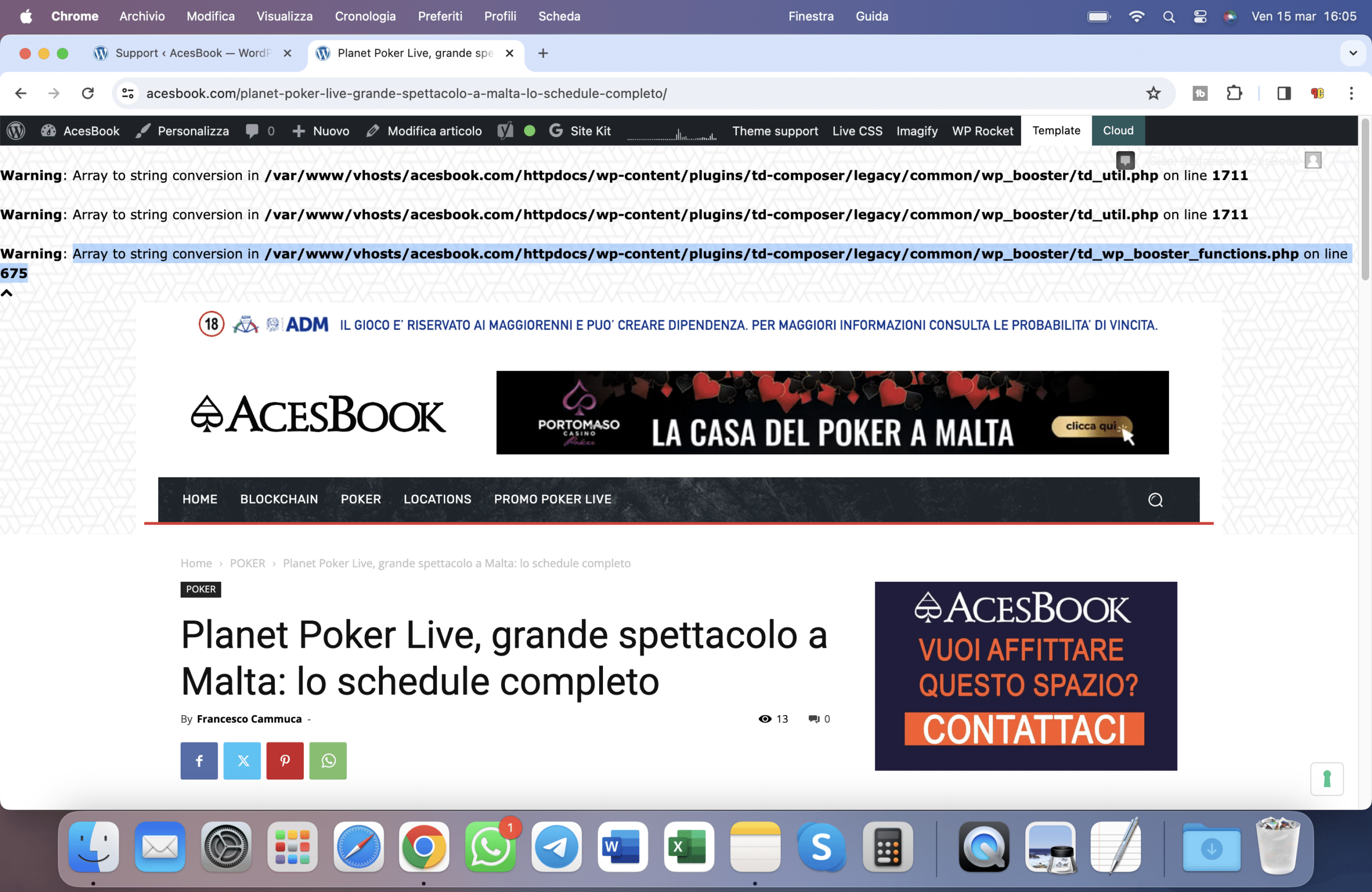 on any post there is this error.Why isn’t support responding? Who should I contact? I bought the theme and I need assistance too

