
 jlgraber
Hi,
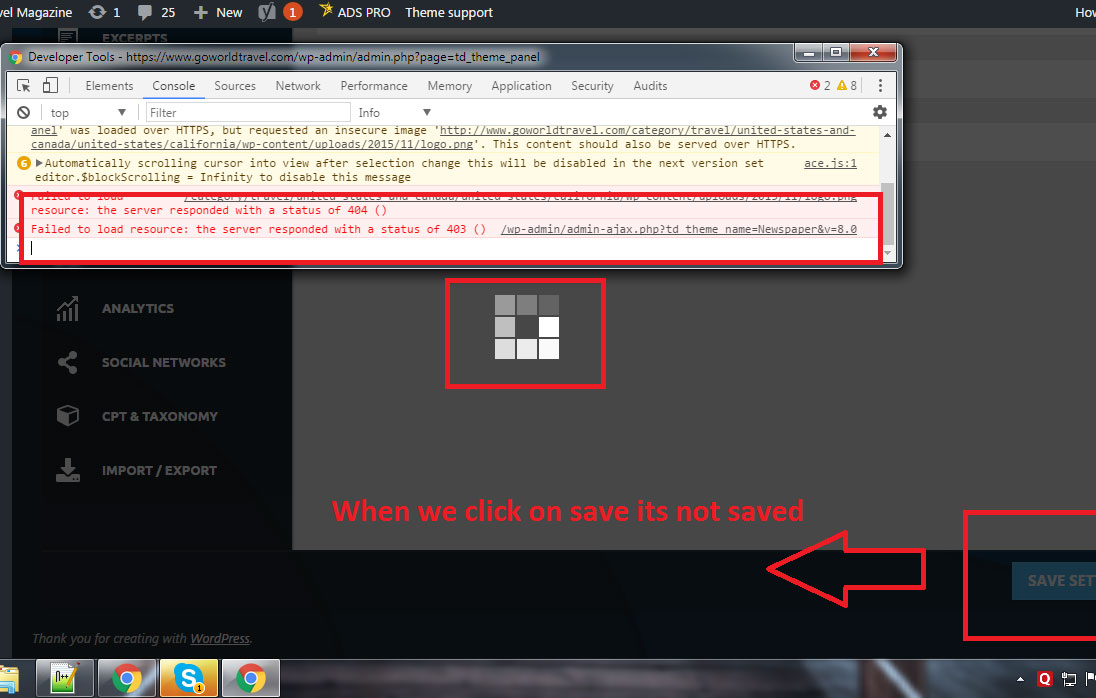
I have recently updated my wordpress, plugins and Theme to the latest and now we are unable to save the theme panel of Newspaper 8.0. Please see the image for error that I’m getting. Thanks in advance for your assistance.
 Bogdan B.
 Hello,
No, the theme does not require visual composer starting with version 8. Please udate your theme to the latest version by using this guide: https://forum.tagdiv.com/how-to-update-the-theme-2/
If you already have version 8, please check the plugins section of the theme: https://www.screencast.com/t/Z6jkR3WFmTxk
Thanks.
 Catalin
 Hello nani2408,
In a future update, it is possible but we cannot say for sure if it will get done in the next update because we have a big list of fixes, improvements, and suggestions to implement. It’s hard to filter them and select which one gets implemented now and which one gets postponed. The developers decide if it gets done or not though.
Thanks for your understanding!
 lethow
We updated to newspaper and now we want to change Title Font, Content font, H1, H2, H3 & H4 font while mobile theme is active…
There is option to change fonts in desktop theme and its working fine but same change sin not being done in mobile theme so how to do that?
 Simion C.
 Hi,
The tagDiv composer is not available for posts, only for the creation of pages. Also the elements you mention are not present at the moment in this editor. More options and items will be added in future updates
– https://forum.tagdiv.com/tagdiv-composer-tutorial/
You can choose from the available post templates and create unique post formats
– https://forum.tagdiv.com/post-templates-2/
– https://forum.tagdiv.com/post-formats-for-tinymce/
You could use a do_shortcode to insert a page building element in the post template file that you are using. Multiple related topics are available here on the forum. Like these topics for example
– https://forum.tagdiv.com/topic/add-content-after-post-items-after-related-articles/
– https://forum.tagdiv.com/topic/wanted-to-add-widget-belowabove-related-article/
Thanks
 planetcappe
 Thanks for the response. I did it many times and never had errors, at the moment I’m using the latest version of the theme, 8.0, and the child theme that comes bundled. As you know, the child theme doesn’t seem to be updated to the 8.0 version, it also has a presentation image of version 7. I’m using it locally to develop my project.
The strange thing is that it’s searching an editor-style.css file that is not present in the child folder, so I’m wondering: should it be there?
Catalin Hello breakingtech,
We will make some investigations in this case and we will consider fixing it in new future updates if the problem exists.
Thanks for your message!
Bogdan B. Hello
Yes, there is a way. Please download the theme package again from your envato account and copy the file you rewritten from the theme package replacing the one in your install. Or simply replace all files as you would do in an update: https://forum.tagdiv.com/how-to-update-the-theme-2/ (not the automatic process)
Thanks
Simion C. Hi,
Please note that the tagDiv composer will be much improved over future updates, and more options and elements will be added to it.
If settings are not saving properly, please check the theme system status, and make modifications if needed to the parameters mentioned in this guide
– https://forum.tagdiv.com/system-status-parameters-guide/
Thanks
 pulto
pulto yes you can do this. i am also doing the same. after update inactive tagdiv composer plugin. theme works fine without tagdiv and with visual composer. but if you activate tagdiv plugin then its override visual composer and create a mess with your custom block setting
 breakingtech
 Hi, I think you misunderstood, the problem isn’t that I get a 404 error, the problem is in the 404 page template itself, it has an issue with the style of the title block, it comes with a strange background.
Anyway, I solved with a custom CSS rule, but I hope you can fix it in the upcoming updates because it is also present in your demo.
Thanks for your help
 chadsrl
 Thanks Simon.
I gound that and it works perceftly! I hope it comes as a feature to template on future updates..
Bogdan B. Hello,
I’m not sure what html you replaced, but if you want to reinstall the theme files, simply replace them as you would update the theme. Use this guide and choose any other method besides the automatic one: https://forum.tagdiv.com/how-to-update-the-theme-2/
Thanks.
 Nano
NanoSo, My theme was already activated but with this new update, it again asked to activate it.
I tried adding my purchase code like before but nothing happened ( no response from page, kind of non-responsive)
Then I took a bigger step, like :
Used manual activation page: http://tagdiv.com/td_cake/manual.php
Posted my Server ID there and the Envato purchase code
Generated the activation key successfully and paste it the form but still nothing happened. the’activation button’ behaved as if nothing is being clicked. What’s the issue? Why is it happening.
Kindly help me resolve it.
If you need extra data like login access etc. , let me know.
Thanks.
Bogdan B. Hello,
This seems like a plugin conflict. Please disable all plugins except visual composer, clear cache and reset cnd files if you use it.
Then try to update your articles and see if the error is still there.
Thanks
Simion C. Hi,
Depending on how you look at it, there could be many things missing. You cannot have it all in a theme. Please understand that the tagDiv composer is yet to be be complete. More elements and options will be added in future updates. Also each theme update is meant to implement more features. The list of suggestions is carefully analyzed, but it is hard for the developers to decide what gets priority.
So we will just have to wait and see what each update will bring in terms of new options and features.
Thanks
Bogdan B. Hello,
It means you are not updating the theme properly. You absolutely must not have both versions in your install. The files should be replaced, not copied next to the previous version. Simply replace the files in your old theme version with the new ones.
Please use this guide to properly update your theme: https://forum.tagdiv.com/how-to-update-the-theme-2/
Thanks.
 Cavemantraining
 ok, this seems to be an issue with all widgets now, not sure if it’s the theme, wordpress update or something else. But no widgets are sticking.
 designrh
Hello,
I have an issue on my website, quite urgent.
The view counter doesnt work on my webite : it seems like the number is updated only when the user is login. When its logout it doesn’t update when refreshing the page.
In this post for example, we have 168 shares but only 60 views => https://www.myrhline.com/actualite-rh/veulent-travailler-chez-facebook.html
Thank you for your help.
 hwlee8
When I update a article in Health and fitness category, I noticed that I couldn’t make access with the message shown as below. Please let me know how to solve this problem. Thanks
Forbidden
You don’t have permission to access /2017/06/17/simple-form-creation-and-storage-built-for-developers/ on this server.
Apache/2.2.15 (CentOS) Server at thetravelnews.co.kr Port 80
 AfricanQuarters
I updated my website from Newspaper 7 to 8, ever since the update I have been unable to change my homepage because as I worked on it, each time I try to add a sidebar it distorts the whole page. Even after discovering the widget sidebar, I tried it but no success.
Bogdan B. Hello,
We are aware of this issue and we will remove the link to the background image in the next theme update.
Sorry for the inconvenience.
 kpkurankar
 You probably did NOT read my request carefully. I clearly said that I did NOT updated visual composer still getting the error. Plz help in solving the issue.
Bogdan B. Hello,
Please do not use the composer for the Newsmag theme yet. We will update newsmag and provide the version of the tagdiv composer compatible with Newsmag in the near future.
Thank you!
Bogdan B. Hello,
Yes indeed there was a major change to the theme implementation of the theme elements in the page builder as we have converted them to make them compatible with both our own page builder and VC. I will add this to our list for future updates and we will fix the link color issue in future versions of the theme.
Thanks.
