
- NewsmagHow to update a plugin
- NewspaperHow to update a plugin
- NewsmagHow to update the theme
- NewsmagHow to update the WPBakery plugin
- NewspaperHow to update the WPBakery Page Builder plugin
- NewspaperHow to Update the Newspaper Theme
- Apitd_api_top_bar_template::update_key
- Apitd_api_top_bar_template::update
- Apitd_api_single_template::update_key
- Apitd_api_single_template::update
- Apitd_api_footer_template::update_key
- Apitd_api_footer_template::update
- Apitd_api_smart_list::update_key
- Apitd_api_smart_list::update
- Apitd_api_thumb::update_key
- Apitd_api_thumb::update
- Apitd_api_category_top_posts_style::update_key
- Apitd_api_category_top_posts_style::update
- Apitd_api_category_template::update_key
- Apitd_api_category_template::update
 renovaweb
 Thank you !
So it worked ..
I love the updates ?
 volkandalyan
 No unfortunately, we updated to 6.4 with PHP 8.1, and all we get is 503 Error. We rollback; and everything is fine. There seems to be an issue; not sure exactly what; but once again the hosting company warned us that they are having this issue with some themes after updating to 6.4. PHP version is not the problem here, as I said we tried it with 8.0, 8.1 as well…
-
This reply was modified 2 years by
volkandalyan.
 Sergey
 FYI, I also contacted WPML support. We did the below exercise with them. But the issue persisted with minimum set of plugins. So they advised to contact TagDiv support.
I kindly ask you to follow these steps in order to isolate the cause of the issue:
– Create a full backup of the site
– Update any outdated plugins or themes
– Flush any cache memory that might exist
– Deactivate all plugins, including the WPML ones
– Activate a default WordPress theme, like Twenty Twenty
– Activate the WPML plugins
– Create a test page in Russian and check if there is any error
– If there is no error, then activate tagDiv Composer
– Create a new test page in Russian
– If the issue disappeared, start by activating the theme and then the rest of the plugins, one by one, until the issue appears again and you find the culprit
volkandalyan Hello Anamaria,
I am currently using PHP 7.4 which seems to be the most stable. Is many support forums it is suggested that 6.4 is fully compatible with PHP 7.4. I did try however PHP 8.0 as well; which did not solve the problem. As a matter of fact; it became even slower. I can’t try PHP 8.2 anyway because it gives a critical error on the website.
I contacted the hosting company; they downgraded the wordpress version and warned us about the exptremely high CPU usage. They did a few things to improve speed, restarted our server (dedicated). They informed us that with the update to WP 6.4 they observe high CPU usage problems with certain themes and we should wait for an update from the theme before trying to update to 6.4.
With the downgrades everything went back to normal. Clearly there seems to be a compatibility issue but we are not sure from where it arises.
Your support is much appreciated!
Thank you…
-
This reply was modified 2 years by
 shasankagogoi
 My plugins are on auto update so i’m not sure. How to check for plugin conflict ? Can you check the site once please ? this is urgent
volkandalyanHi,
After updating to WordPress 6.4 we faced extremely high CPU usage and started getting 503 errors. Our hosting provider told us that some themes have this problem after updationg to 6.4. After switching back to the older version of WP; our problem is fuly solved. Any ideas? Suggestions? Should we expect an update for the theme before updating to 6.4?
 idove
idoveHello community,
We recently underwent a server change and updated our theme to the latest version. However, we are encountering a problem with the Featured Image display on Single page post preview. When clicking on the Featured Image on the top of post page, it doesn’t show the image; instead, it displays a blank screen.
Has anyone else faced a similar issue after a theme update? We’d appreciate any guidance on where to look for a solution or if there are specific steps to troubleshoot this problem. Unfortunately, we couldn’t find relevant information in the forum archive.
Thank you for your help!
 Anamaria
 Hi,
Did you update or install a new plugin recently? Have checked for plugin conflict?
Thank you!
Anamaria Hello,
Please update the theme version to 12.6.2 and check afterward.
Thank you!
 syned
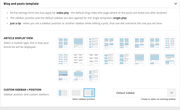
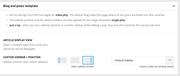
synedToday I updated the Newspaper theme and all the different modules/templates disappeared from Template Settings.
Is there any way to bring them back and make my site look as it did before the update?
For example it now shows full post content on the homepage instead of showing only excerpt.
Template settings before and after update:
Anamaria Hi,
The description wasn’t updated.
Thank you!
Anamaria Hi,
You can update the plugin manually -> https://forum.tagdiv.com/newspaper-how-to-update-a-plugin/
Thank you!
 banyaninfomedia
after theme update the tagDiv cloud library plugin is automatically deactivated and on activation it shows an error that this version of plugin is not compatible with current version of theme.
The current version of tagDiv cloud library plugin is 3.1 and Newspaper theme version is 12.6.2.
How can i get the updated version of tagDiv cloud library plugin?
 abhayrick
Hi,
after recent update, theme is not working with all in one plugin.
Anamaria Hi,
After you make the update, please activate the tagdiv Standard pack plugin.
Thank you!
 Laura
Laura Hello!
I got no response yet. Is it a bigger problem?
Btw I wrote that I updated from 6.3 but that was wrong. I updated from 12.3 to the latest version. I apologize!
Best,
Laura
 vickyjacko
 We have updated the theme a few times and the issues seem to be with the cloud library and losing the templates. I could just do with a few old versions to try updating in a few steps rather than a big jump.
If that doesn’t work I will have to rebuild the pages.
Anamaria Hello,
Please try to update the plugin manually: https://forum.tagdiv.com/newspaper-how-to-update-a-plugin/
Thank you!
 aerosurfer
When I try to up date my Newspaper theme 12.2 to 12.6.2 it deletes all the activated tag div plugins and says:-
Updating all tagDiv plugins…
tagDiv Composer – Not installed
tagDiv Cloud Library – Not installed
tagDiv Standard Pack – Not installed
When I look at my plugins page there are tag div plugins.
I have 3 other identical (theme and plugins) sites and they have all updated ok.
Plugins are identical to my other websites.
 c386
c386 Has there been an update on how review schema has progressed?
We were seeing Google pick up review ratings correctly for a while, but it seems to have stopped working again following recent updates. We do have ‘Reviews System’ disabled in the theme admin panel as we don’t have a need for user reviews, but I presume this wouldn’t affect schema.
 jtoney
 You are completely wrong. It happens because your plugins are causing it. Ask me how I know? Look at what I posted instead of just giving me a generic response. Your plugins crashed the website whenever they are removed the website works flawlessly. Your plugins are also causing random 404 errors. You updated something within the last month that caused this.
-
This reply was modified 2 years by
jtoney.
 zakonnik
 Hi,
Only on the main domain from Newspaper > My license there is field for activation and the theme is REGISTERED with Status: ACTIVE.
But for none of the subdomains there are option for activation.
On the subdomains there are only Welcome, Plugins and Support, but in these panels there are not field for activation.
From Themes on the subdomains the Newspaper Theme is visible and the status is “Active: Newspaper”.
However the options Prebuilt Websites, System Status, Updates, Theme Panel and My License are not visible on subdomains and is unimpossible to modify these settings for each subdomain.
Screenshot of a subdomain Newspaper panel:
https://drive.google.com/file/d/1OQRbgmMy9eHo47OITvDuMHOBP-pSnVe9/view?usp=sharing
Screenshot of a subdomain Theme panel:
https://drive.google.com/file/d/1v76N4iN7KvvP0an8N77q8s_5EHMOXnpk/view?usp=sharing
-
This reply was modified 2 years by
zakonnik.
 trebol30
Since the 12.6.2 update, the titles (H) lose their correct reading for the Flex Block Builder modules in particular.
You can see the video https://www.loom.com/share/08425d238be1491cae7096d20908f778?sid=2e9c6911-f7a1-4829-89d5-ef1ab9744672
zakonnikHi,
I am currently using the Newspaper Theme on my WordPress multisite network, and while it functions seamlessly on the main domain, I’ve encountered some issues on the subdomains.
Here is the structure of my multisite network:
domain.com
domain.com/subdomain-1
domain.com/subdomain-2
domain.com/subdomain-3
The Newspaper theme is installed on the main domain and is working perfectly. However, on the subdomains, the theme doesn’t seem to function as expected.
In the “Themes” panel, the Newspaper Theme is visible, and it is activated for the subdomains. However, when navigating to the “Newspaper” panel on the subdomains, only the options “Welcome,” “Plugins,” and “Support” are available. Unfortunately, the options “Prebuilt Websites,” “System Status,” “Updates,” “Theme Panel,” and “My License” are not visible. Consequently, I am unable to modify the settings within these panels for the subdomains.
I am inquiring whether the Newspaper theme is designed to work with multisite networks. Additionally, I am would like to know if it’s possible to install different pre-built designs for each distinct subdomain.
I would be very grateful if you would help me in this matter.
 Iqtidar
 The issue is not solved even in the last update. We did not get a reply from the Newspaper team if they are even working on a solution.
