- NewsmagHow to update a plugin
- NewsmagHow to update the theme
- NewsmagHow to update the WPBakery plugin
- NewsmagCategory templates
- NewsmagWhat’s included in Newsmag theme package
- NewsmagAjax view count
- NewsmagSmart Lists
- NewsmagFeatured images
- NewsmagFeatured image or video
- NewsmagModal window
- NewsmagtagDiv slider gallery
- NewsmagVideo playlist
 willskz
I’ve translated almost the entire theme, but when I update to 11.4.3, all my translation, my huge work was erased to the previous one, I even share my complete translation for free WTF!!!
There’s another problem, my language is Portuguese, but from Brasil (pt-BR), not Portuguese from Portugal (pt), there’s no differentiation on the language choices.
This need to be fixed or at least provide a way to download the translation file and upload it again to keep my changes and make sure my work isn’t going to sinkhole?
 Peter_86
Hello,
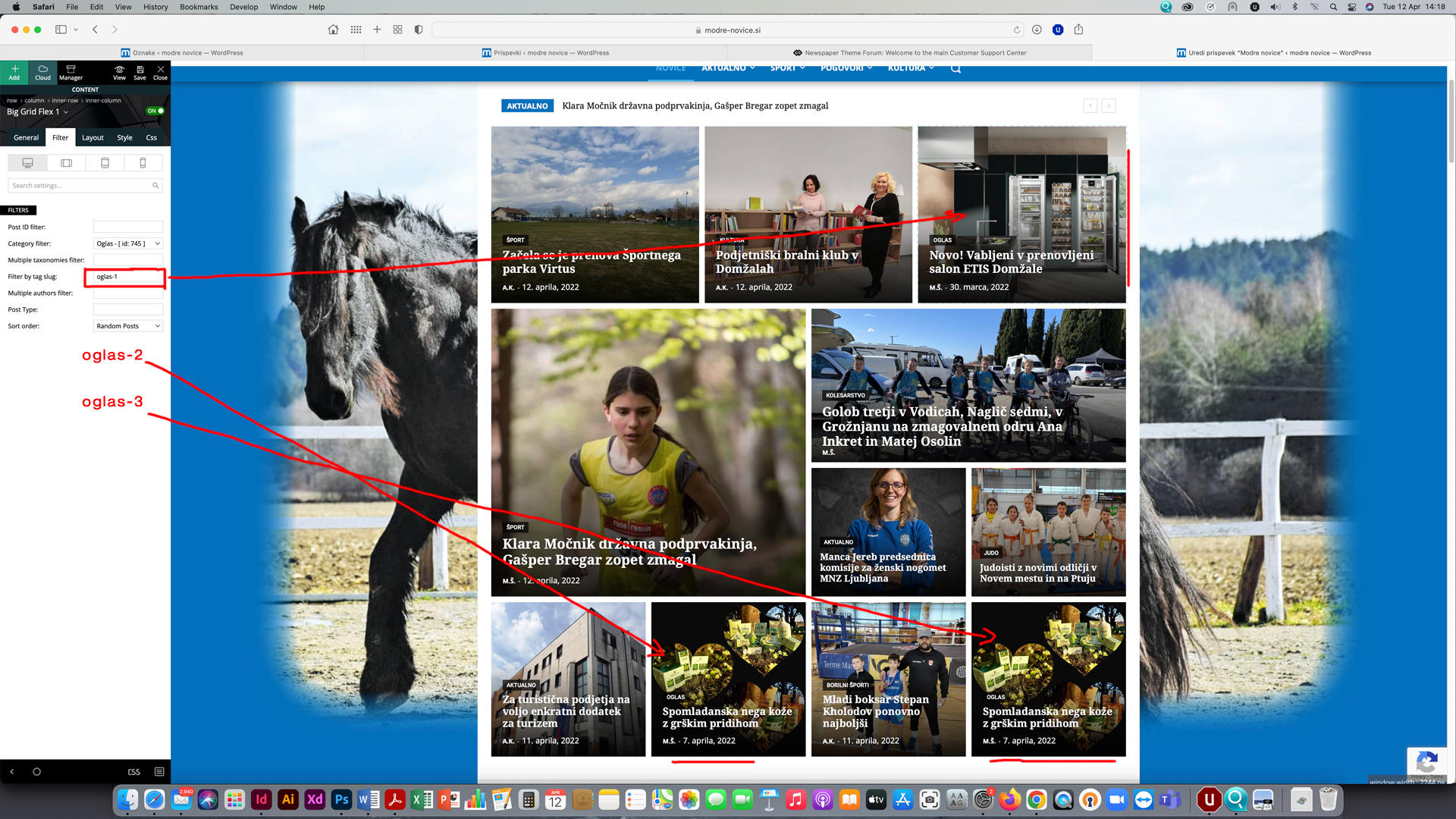
on homepage I have 3 modules set to show advertorial content (payed articles). In top right sections only articles with category ‘Oglasi’ AND TAG ‘Oglas 1’ (tag slug: oglas-1) should randomly appear, on bottom left module there should only be randomly visible articles with category ‘Oglasi’ AND TAG ‘Oglas 2’ (tag slug: oglas-2) and on bottom right module articles with category ‘Oglasi’ AND TAG ‘Oglas 3’ (tag slug: oglas-3).
Afer update articles are not filtered by tag-slug anymore.
Now article with tag ‘Oglas 3’ appears also on top right position and in position 2 instead only in position 3. Main problem now is that one article appears on two positions at once. With tags I have filtered advertorials to appear on predetermined positions only and now I can’t filter them anymore.
See image here: https://www.modre-novice.si/wp-content/uploads/2022/04/modre-novice.jpg
Help here would be very much appreciated.
 ludyma
 Hello, every time there is no update there is no information about where it is done and how it is done, person bother you with these issues but it would be advisable to make small tutorials of improvements and new functionalizades or tualize the ones that are already, so that users Let’s know how maximum the subject.
You could inform me about these.
- new: Added Facebook Login functionality;
- new: Option to set margin for Single Content Ads;
- new: Option to disable the sticky menu on the Mobile Theme;
- new: Added the option to show only the form on the Header Live Search shortcode;
- new: Added the option to show the “Exclusive” label on posts from Flex Big Grids and live search shortcodes;
- new: Manage License System – Easily assign your key to a specific domain to access all the theme features. The new system allows you to manage multiple license keys on multiple domains;
- new: Option to import Homepage and Pages from Cloud templates interface;
 Bettina
 Hello!
We have 3 options of mobile versions that you can use:
1. Responsive version: A responsive version of your website is looking similar like on desktop, edit the page with TagDiv Composer, click on the mobile viewport: https://www.screencast.com/t/XDQJedlggSB ; there you can see your mobile version and you can edit the elements there.
2. Mobile pages: https://tagdiv.com/newspaper-10-3-7-update-brings-customizable-and-fast-mobile-pages/
3. Mobile theme plugin: The Mobile Theme is a performance optimized theme included in the Newspaper main theme and it loads only for mobile devices. It comes with its own templates/design for page, post, category, etc so your current templates from the desktop theme will get converted to the mobile theme layout. For more details, please take a look here: https://forum.tagdiv.com/the-mobile-theme/ and https://forum.tagdiv.com/mobile-theme-introduction/
A full explanation you can find here: https://www.youtube.com/watch?v=SpGkOnJeNZY
You can choose to use which one is more affordable and useful for you.
If you want to use the mobile pages or the responsive version, please deactivate the Mobile Theme plugin.
Thank you!
Bettina Hello!
If you use responsive version, then edit the homepage with TagDiv Composer, click on the mobile viewport: https://www.screencast.com/t/XDQJedlggSB ; there you can see your mobile version and you can change/remove the logo there.
If you use mobile pages, then you should edit the mobile page and change the logo: https://prnt.sc/agGRcsVxFMRA -> https://tagdiv.com/newspaper-10-3-7-update-brings-customizable-and-fast-mobile-pages/
If you use the Mobile Theme plugin, then you have some settings in the theme panel: https://prnt.sc/x09C3DVPyFAM
Thank you!
Bettina Hello!
You should increase the text font-size for a better user experience for your mobile version.
We have 3 options of mobile versions that you can use:
1. Responsive version: A responsive version of your website is looking similar like on desktop, edit the page with TagDiv Composer, click on the mobile viewport: https://www.screencast.com/t/XDQJedlggSB ; there you can see your mobile version and you can edit the elements there.
2. Mobile pages: https://tagdiv.com/newspaper-10-3-7-update-brings-customizable-and-fast-mobile-pages/
3. Mobile theme plugin: The Mobile Theme is a performance optimized theme included in the Newspaper main theme and it loads only for mobile devices. It comes with its own templates/design for page, post, category, etc so your current templates from the desktop theme will get converted to the mobile theme layout. For more details, please take a look here: https://forum.tagdiv.com/the-mobile-theme/ and https://forum.tagdiv.com/mobile-theme-introduction/
A full explanation you can find here: https://www.youtube.com/watch?v=SpGkOnJeNZY
You can choose to use which one is more affordable and useful for you.
If you want to use the mobile pages or the responsive version, please deactivate the Mobile Theme plugin.
Thank you!
Bettina Hello!
Enable/disable it from here: https://www.screencast.com/t/JaSHpq10Y
We have 3 options of mobile versions that you can use:
1. Responsive version: A responsive version of your website is looking similar like on desktop, edit the page with TagDiv Composer, click on the mobile viewport: https://www.screencast.com/t/XDQJedlggSB ; there you can see your mobile version and you can edit the elements there.
2. Mobile pages: https://tagdiv.com/newspaper-10-3-7-update-brings-customizable-and-fast-mobile-pages/
3. Mobile theme plugin: The Mobile Theme is a performance optimized theme included in the Newspaper main theme and it loads only for mobile devices. It comes with its own templates/design for page, post, category, etc so your current templates from the desktop theme will get converted to the mobile theme layout. For more details, please take a look here: https://forum.tagdiv.com/the-mobile-theme/ and https://forum.tagdiv.com/mobile-theme-introduction/
A full explanation you can find here: https://www.youtube.com/watch?v=SpGkOnJeNZY
You can choose to use which one is more affordable and useful for you.
If you want to use the mobile pages or the responsive version, please deactivate the Mobile Theme plugin.
Thank you!
Bettina Hello!
In the next updates, we will try to implement also this functionality in our theme.
Stay tuned!
 Calin
Calin Hi,
The theme can be updated from Newspaper > updates tab -> https://i.imgur.com/eozzO2i.png -> https://forum.tagdiv.com/how-to-update-the-theme-2/ but before the theme update, please make sure that you have a full backup for your webiste.
Thank you!
Calin Hi,
This should not happen. Did you try to update the theme only with the active theme plugins?
Also, after all plugins are activated, you can use a backup for the theme panel -> https://i.imgur.com/Ki988c5.png -> https://forum.tagdiv.com/import-export-theme-settings/
Thank you!
Bettina Hello!
You can check it here: https://tagdiv.com/update-version-11-4-3-newspaper-theme-is-rtl-ready/
The changelog can be seen here: https://tagdiv.com/newspaper/
Thank you!
Calin Hi,
If everything works properly, then just run the update and the theme and the theme plugins will be automatically updated. At update all theme and plugin files will be replaced, so any change in them will be lost, but not the settings in the theme panel or those made with the composer, they are saved in the database.
Unfortunately, there are also situations where the update does not work properly (due to certain extra plugins that are active, or certain restrictions, server settings), in these cases it is possible that the plugins in the theme will not be updated automatically and this will have to be done manually.
In the worst cases, the settings in the theme panel may be lost (there have been isolated cases), in these cases, after the theme plugins that were previously used are activated, you will have to use a backup for the theme panel -> https://forum.tagdiv.com/import-export-theme-settings/
Thank you!
 sagarmahajan
Hi Team,
I had installed prebuild website “COV-19 Italy Report PRO” on my website foreignpolicywatchdog.com but it missing lots of feature after update.
Feature like infinite scrolling on blog page.
also I want to disable feature images for listing blog on other page but no option also saw limited option tto customize mobile website.
Can you please help?
 raulfloresp
 Hi Calin,
I solved the issue on my side by disabling one line in the htaccess file inside the wp-content directory. The line updated is for the SiteGround Security Plugin – Hardening. I am unsure about the drawbacks of disabling this “Require all denied” command, and I am concerned about exposing my site to reducing security to make TagDiv Composer WP-Editor. What is your recommendation here?
BTW: These are the related lines in my htaccess file in wp-content.
# SGS Directory Hardening
<FilesMatch “\.(?i:php)$”>
<IfModule !mod_authz_core.c>
Order allow,deny
Deny from all
</IfModule>
<IfModule mod_authz_core.c>
# Require all denied
</IfModule>
</FilesMatch>
# SGS Directory Hardening END
 Renu Bakshi
Hi,
I am trying to update the Newspaper theme 11.4.2 to 11.4.3. When I switch to Newspaper welcome tab it prompts me to this:
1st step – “Start your website”
2nd step: “Install or update the required plugins”
I am not getting any option to update the theme from 11.4.2 to 11.4.3
Please help…….. Thanks & Regards
 mhariush
 socarrasv1
When I updated the theme to the lates version the website is broken, the header dispaear and it is a real dosaster.
The AMP plugin is installed but is not in the left side bar and is not working at all.
I need you to fix this problem, do not send me how to, you just do it.
I have paid support for these moments.
Let me know hoiw can I send the WordPress credentials as a secure way.
Thanks!
 webdog
Why is it that every time I update the newspaper theme I have to manually re-install the plugins and re-activate the theme with my purchase code and then have to go back to the theme panel and re-enter pertinent settings like logos, header backgrounds, etc.?
Seems updating the theme should hold all the previous settings, plugins, etc.
Updating the theme is a major time consumer as my site won’t display or function properly until I reinstate the plugins, settings, logos, purchase code, etc., so I have to set aside enough time to redo all of these.
 mathclash
HelloTeam!
There is somewhere that i can find the the update 11.4.3 details?
Bettina Hello!
Some texts can be translated from Newspaper -> Theme panel -> Translations -> Translations.
We recommend WPML plugin for translations: https://forum.tagdiv.com/using-theme-translations-together-wpml/
We have 3 options of mobile versions that you can use:
1. Responsive version: A responsive version of your website is looking similar like on desktop, edit the page with TagDiv Composer, click on the mobile viewport: https://www.screencast.com/t/XDQJedlggSB ; there you can see your mobile version and you can edit the elements there.
2. Mobile pages: https://tagdiv.com/newspaper-10-3-7-update-brings-customizable-and-fast-mobile-pages/
3. Mobile theme plugin: The Mobile Theme is a performance optimized theme included in the Newspaper main theme and it loads only for mobile devices. It comes with its own templates/design for page, post, category, etc so your current templates from the desktop theme will get converted to the mobile theme layout. For more details, please take a look here: https://forum.tagdiv.com/the-mobile-theme/ and https://forum.tagdiv.com/mobile-theme-introduction/
A full explanation you can find here: https://www.youtube.com/watch?v=SpGkOnJeNZY
You can choose to use which one is more affordable and useful for you.
If you want to use the mobile pages or the responsive version, please deactivate the Mobile Theme plugin.
Thank you!
 JKLFab
 Hi, I just updated my Newspaper theme, and my Instagram footer is still busted. I hope with every update it will be fixed. Does anyone on the dev team know the exact cause of the issue? And maybe an estimate for when it will be fixed. For Newspaper theme customers, are you using a workaround plugin for now?
Calin I understand. So if the problem was still not resolved by the theme update then, please make a full backup for your website and please contact us via email at contact@tagdiv.om, we’ll check this problem and see what happens with your website. Please include wp-admin and cPanel in email.
Thank you!
Bettina Hello!
You can check it here: https://tagdiv.com/update-version-11-4-3-newspaper-theme-is-rtl-ready/
The changelog can be seen here: https://tagdiv.com/newspaper/
Thank you!
Calin 1. I understand. The problem is the same when you are logged in? Can you please make a backup and update the theme to Newspaper v11.4.3 to see if the problem persists.
2. I see some errors in console, so the problem can be from there -> https://i.imgur.com/Nu1aZr8.png can you please make a test using only tagDiv plugins?
3. I mean the new update from today, I see that the current version is 11.4.2 https://i.imgur.com/IX3u0Ye.png but today was made an update to 11.4.3
If not, then please contact us via email at contact@tagdiv.com, make sure that you have a full backup for your website and also provide wp-admin and cPanel access. also include the link of this topic in email.
Maybe this can help.
Thank you!
 mgiannelis
Hello
Can you please explain to me what happens in the process of applying a newspaper11 theme version update.
If I run the update will this
Reset anything?
Will I need to reapply CSS?
Will it force me to install the plugins?
Will there be anything else I need to do after the update completes?
Or
Will running the update just bee seamless and no other intervention will be required after I hit the button
Thanks