
 Calin
Calin Hi,
Indeed, a bundled revolution slider is provided with the theme
– https://forum.tagdiv.com/how-to-install-revolution-slider-v5/ and the plugin should be updated using the provided version from the theme package.
Also, the plugin will be better to be manually updated. The theme plugins are automatically updated when the theme is updated, but this is a bundled plugin.
Thank you!
 Anamaria
 Hello,
We recommend for multi-authors use the Molongui plugin -> https://forum.tagdiv.com/adding-multiple-authors-articles/
You need to do the changes in more files if you want to use that plugin.
Please note that any change you make in the theme files after the update will be overwritten and you have to make the changes again.
Thank you!
Calin Hi,
1. If you had a pre-build website and now you installed a different one, then yes, the code and settings from the theme panel will change, so it is one possibility that happened and the code was lost.
If the theme plugins that were activated are no longer activated or are deleted after the theme update, then it can be from a plugin that was interfering during the theme update and the plugin need to be installed one by one from Newspaper > plugins.
2. If you changed the demo, then all settings pages/posts that were installed with that demo will be removed, also the theme panel settings. When you install a new demo, the old settings are removed and are apply the settings from the new one.
Thank you!
Anamaria Hello,
In most cases, this problem occurs because you have the latest version of WordPress with an older version of the theme.
Please check if you use the last version of WordPress 5.9.2 with the last theme version Newspaper 11.4.2 (if you have a theme version older, then tagDiv Composer does not work) and check to see if the problem persists.
If you need to make an update, before please make a full backup to all files and the database, in case something goes wrong. => https://forum.tagdiv.com/how-to-update-the-theme-2/
Also, make sure that all the settings are like in our requirements, please follow the guide carefully: https://forum.tagdiv.com/requirements-for-newspaper/
and please increase all requirements that are lower, and follow all steps.
Also, if the problem persists please check if you do not have a plugin conflict, please deactivate ALL plugins except tagDiv plugins, also if you are using a child theme or cache plugin, deactivate them, clear all cache (also from your browser) and try again.
Let me know the results!
Thank you!
 pmontesrincon
Hi, I have a problem with the menu and search box in the mobile version of my website.
As you can see, when you click on the menu it doesn’t appear. And the search box does not appear either. I have installed the latest update of the template and I see that in other websites with this same template this problem does not happen. Can you help me? Thanks
 sudipto
Hi,
After the 11.4.2, the View All page of Cloud Library seems to have gone missing.
Now we can do the following:
1. See the specific sections of the cloud library and import them (eg. we can see header or single etc.)
2. Import specific sections from the cloud library section
3. Import a full site design template from the Theme section
But, we can’t do the following:
1. View sections in cloud library
2. Import a specific page without assigning to any section
3. Don’t know how to view and import homepages
Can you guide please?
 great1212
 TagDiv team, another theme update and another failure.
We are waiting for your fake assurances, as usual.
 mxfarsa
 Hi again,
Been off site for awhile. But now im back.
Problem persist and from what I can see this is a issue that for some reason comes and goes?
When internet cache is cleared – the featured image appear both on sidebar in editor, and it also appears under prefs – panels. But after a day roughly. The featured image dissappears again for no reason (no updates done or any coding in theme) then we clear internet cache in browser again – and it comes back?
No cache plugins are present on site – no plugin conflicts as the issues occurs also when all plugins are inactive….
I am stunned as to why this is happening and why it occurs in a random fashion..
Regards, Henrik
 debra@propertyfrontline.com.au
Hi,
I’m often sent the slider updates via email . . but can you confirm I don’t need to update these as the updates are done automatically with updates to the newspaper theme? thxx
 Matt Tews
 I don’t know why the image is broken above:
https://publishpress.com/wp-content/uploads/2019/09/bylines-updates-1024×975.png
-
This reply was modified 4 years by
Matt Tews.
Matt TewsI am successfully using PublishPress Authors to create multi-author posts. Each of the authors appear at the bottom of the articles as designed.
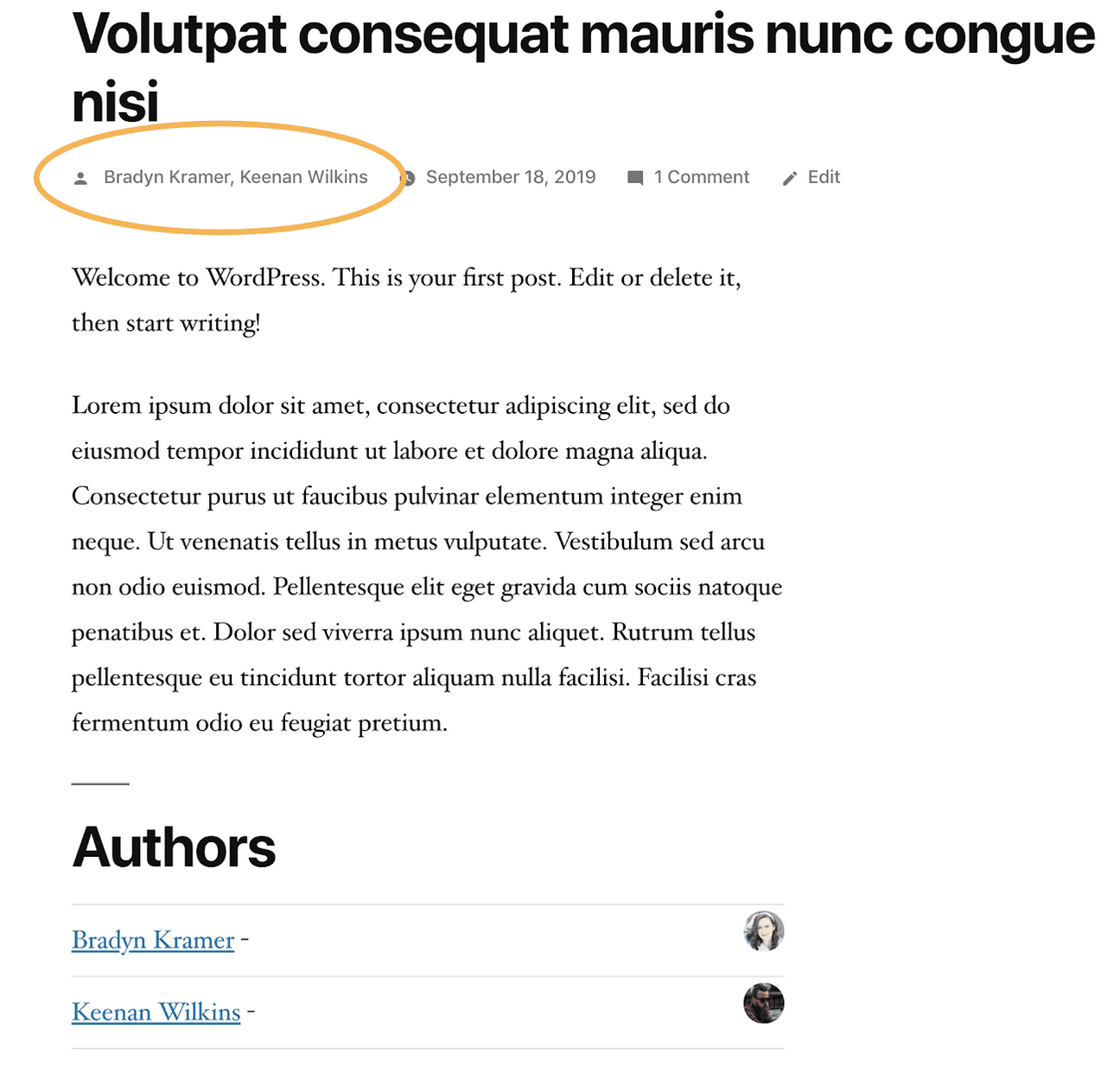
I am trying to get the default WordPress byline to show each author. Following this tutorial, I am trying to locate the file which contains “td_author_post” or “td-author-by” so I can add the appropriate override to functions.php:
https://publishpress.com/knowledge-base/customize-authors-byline-themes/
Anybody done this? Advice?
Thanks!
 romario_ferreira
Hi,
I updated and changed the template of my site and the template duplicated all H1 as Page Title. The result is that for all my blogposts the page title and H1 are the same. How do I change that, please?
 rashedsubaihi
Hi there,
After I have updated the theme to the latest version you have released, I observed 2 Important things happened
1. I had a short code in the custom CSS in the Theme Panel and after updating the theme it disappeared alongside that all plugins (newsletter plugins) have been deactivated. Note: the custom CSS code disappearance issue may be happened because of I have used another prebuilt demo.
I need to know exactly when the custom code disappears, When I update the theme? or when I change the demo? and why is that happening??? I need my website to work well for the future. I don’t like sudden issues like this.
Please help me.
Best Regards.
 larryb19
 Ok, so I deleted the image I embedded in classic and updated. Then uploaded again in bloc and this worked. THANK YOU!!! 🙂 But the training video I saw had these tools pop up around the image. Is that feature not active any more?
 westropMEF
 I figured it out. If anyone else is wondering, in theme panel, under block settings, there’s a section titled Meta Info on Modules/Blocks. The ‘Show Modified Date’ there had been turned on when I updated the theme.
larryb19 Hi,
Here is a video of my problem. I cannot see or activate the tools to edit the image the I embed in the text in bloc editor mode. I can resize, but the left right centre alignment tools and wrap text tool buttons do not show up…I just installed the theme update.
 Alex Cioalai
 Hello,
Is there any update regarding using NEWSPAPER together with the Varnish cache from Cloudways? I would really like to use their caching solution together with the mobile theme, but the issue described above by the others is still there.
Is there anything technical we can do to solve it?
 srpskiposlovniimenik
 I try everything,, disable cash, clean cash,turn off all plugins, roll back to older versions wordpress, roll back to older versions of Newspaper, delete plugins wich maybe cause a problems. I have other website under my control novinarionline.rs that website working great but still work with wordpress 5.9 and Newspaper 11.4 and now wait for update maybe jump out same problem as serbiannews.ca when update theme. What I notice, Newspaper theme work great with 7.x php but with 8.x php versions make some troubles. I cant access to Dic composer when is stream Hero player plugin is active P.S Now I can’t access even when all plugins are turned off. I any case I think this is GREAT WORDPRESS THEME AND I CAN RECOMMEND IT.
 Bettina
 Hello @netsrik2006!
Make sure you have the latest update of the theme(11.4.2) and plugins too.
Sometimes, the issue can be from a plugin conflict or a cache issue, that’s why, we recommend first to deactivate ALL plugins except tagDiv ones, also if you are using a cache plugin, deactivate it, clear all cache (also from your browser) and see the results.
Thank you!
 questit
Hey there,
After the latest update of the Newspaper theme, we had an issue with the post page template we are using on our site. Now, it is uneditable and we are getting the error message in the photo.
This is a huge issue for us since we cannot edit the posting page of our site anymore.
Can you please have a look?
Image is here: https://prnt.sc/yM_Cf0UT8SPW
 tihanak
Hi,
is anyone experiencing problems with “Related articles”?
I cannot enable them or disable them, or better, I can, but nothing changes on the website. Also, images and text appear wrong on some of the boxes in related articles.
I did the latest update. Still the same.
Please help.
Calin Hi Beldar, if you agree, we’ll like to take at look at this and try to make the update for you. For this please contact us via email at contact@tagiv.com provide wp-admin and cPanel and make sure that you have a full backup for your website and database.
Hi srpskiposlovniimenik, please make sure that all theme plugin that you had before the update are now enabled. Also, you can try to set a theme panel backup or if the cloud header is empty, you can try to use a revision on the cloud header template -> https://www.wpbeginner.com/beginners-guide/complete-guide-to-wordpress-post-revisions/
Thank you!
Calin Hi,
Indeed that is an old theme version and the update need to be done via FTP/cPanel.
What I can suggest is first to make a full backup for your website and database and after that to update the theme (also, you can try first on staging or subdomain).
The theme should be updated via FTP, by replacing the old theme with the new one (replace not overwrite), in case that there are custom changes in the theme files, those will be lost. After that install the theme plugin tagDiv Composer, tagDiv Standard Pack and the rest of the theme plugins if you using (social counter, newsletter).
I hope this will help you!
 simo-2
 Hi Calin,
That will help, thank you!
By that logic, Isn’t it better to disable 1068 and 485 in block settings? And what about category page 150*0? How should I allow them to use the full image.
Also, for featured image post settings that you showed, I don’t have that option of “edit with tagdiv composer,” but https://prnt.sc/kIL6teFLFcrI
For the last post, it worked; I never touched anything; it automatically picked .gif full size, not created thumbs. Even though I used WordPress media/featured image settings.
Don’t you think its better for a newspaper to not resize .gifs? or something changed in the update?
Choosing Full Image will affect static png thumbs.. png’s and jpegs will also show full size instead of thumbs.
Hence effecting page performance.
Other than direct upload, is there a way to tell newspaper;
Use Original when Gif, Not thumb, when gif.
-
This reply was modified 4 years by
simo-2.
Bettina Hello @BLAY!
Please deactivate the Mobile theme plugin. Make sure you assigned correctly the mobile pages to your desktop pages: https://tagdiv.com/newspaper-10-3-7-update-brings-customizable-and-fast-mobile-pages/
Delete the cache and try again.
Thank you!

