
 Vlad S
 Hello !
I am sorry for missunderstanding your issue !
Unfortunately there is no posibility in adding more in-line ads. The only option is the one you find in Theme Panel – Ads – Article Inline Ad wich will display after the paragraph you set: https://www.screencast.com/t/SBHpP2J2
Other option MAY be available from future updates but untill then there is no way. We are sorry for the inconvenience !
Thank you !
 Simion C.
 Hi,
In the theme package there are 2 page builders, the tagDiv composer and the WPBakery builder. Quite a while back the theme provided only WPBakery, but we developed the tagDiv composer as our own builder. Now the composer is considered the main builder of the theme, and it has to be active at all times. It is also the only composer that can be used with the cloud library plugin
– https://forum.tagdiv.com/tagdiv-cloud-library-plugin/
We recommend to use the tagDiv composer, but you can activate and use WPBakery as well if needed. Just remember to not edit pages built with the composer, with WPBakery, or the other way around.
Here are some simple guides if you want to check them out
– https://forum.tagdiv.com/how-to-use-visual-composer/
– https://forum.tagdiv.com/how-to-update-visual-composer-plugin/
Let me know if you have more questions.
Thanks
Simion C. Hi,
I will try to help you with these questions.
1. That is not actually an error, the mobile theme will display it’s own version of the website on phones – https://tagdiv.com/mobile-theme-automatic-optimization-for-mobile-newspaper-theme/
You can check how it looks here (check with a phone or browser mobile emulator)
– https://demo.tagdiv.com/newspaper_local_news/
If the top grid is missing for you, please make sure there are posts in the featured category created by the theme – https://forum.tagdiv.com/featured-posts-2/
The mobile theme is optional, if you want the same content from desktop on mobile, deactivate it.
I should note that in coming updates the mobile theme will receive many more settings, including an option to disable it for specific pages.
2. Those could be removed with some CSS if needed. Do you want them removed for all categories or specific category pages?
Let me know.
Thanks
Simion C. Hi,
Please read the guide carefully. The mobile version of pages will not be the same as the desktop version. So while the desktop page can be built with the composer, and contain blocks, grids etc. the mobile version is limited to the mobile editor
– http://prntscr.com/o8vbaq
If a page contains no content in the mobile editor, on phones it will be empty when the mobile theme is active. Please edit the pages and enter content in the mobile editor, this will appear on phones.
I should note that in coming updates there will be more options added for the mobile theme, like for example the option to disable it for specific pages and many others.
Let us know if you have more questions.
Thanks
 VZ
VZHi,
I have already mentioned this in a discussion on Envato – and have purchased further support to deal with these issues – 1 x issue and 1 x request as follows:
ISSUE-1:
On the site: https://searchgo.co mobile version – there is a problem with white space at the top of mobile pages – it doesn’t look good and ruins the experience. At first, Brogdan suspected it was an issue with ads – however, I removed ads and the issue still remains. I have now replaced ads and on the discussion mentioned again. Brogdan believes it is a CSS issue. Can I get this fixed?
REQUEST-2:
I had previously requested adding a modified date to posts and that it appears in the meta description as well so that in turns appears in search engines when I update an old post. There was one response before about changing the templates, but I don’t want to do that as I have already got sized images etc in each post, plus I didn’t understand the response. So, here is what I would like to do and a solution I found which if I use breaks Newspaper but supposedly the correct solution:
‘Last updated on July 11th 2019’. (or whatever date you edited it on).
<br>
I did some research and came across this workaround (However, the problem is when I add the code to my child functions.php it works okay, but, it throws the date and words outside of the body to the left of the template body).
Here is the code:
function wpb_last_updated_date( $content ) { $u_time = get_the_time('U'); $u_modified_time = get_the_modified_time('U'); if ($u_modified_time >= $u_time + 86400) { $updated_date = get_the_modified_time('F jS, Y'); $updated_time = get_the_modified_time('h:i a'); $custom_content .= '<p class="last-updated">Last updated on '. $updated_date . ' at '. $updated_time .'</p>'; } $custom_content .= $content; return $custom_content; } add_filter( 'the_content', 'wpb_last_updated_date' );
Here is where I found the original article that references this code:
How to Display the Last Updated Date of Your Posts in WordPress
Thanks
Vincent
Simion C. Hi,
We provide updates for WPBakery when the theme is updated
– https://help.market.envato.com/hc/en-us/articles/213762463-Bundled-Plugins
So the next theme version will contain the latest version of the plugin at the time.
Currently there are some issues with WPBakery 6.0.3 if used with the 9.7.3 theme version, we are investigating these as we speak so we can fix them for the next theme update.
For the time being please keep using WPBakery 6.0.2 which works fine with the current theme. Let me know if you have more questions.
Thanks
 cellinis
Hi,
I recently purchased the theme. But the welcome screen keeps showing that the plugins are outdated. I’ve tried installing them manually as well as shown in the doc, but to no avail.
Regards,
Cellinis
Simion C. Hi,
There is a quick fix in this topic if you want to try it before the theme update is released – https://forum.tagdiv.com/topic/sign-in-join-not-showing-up-on-mobile-view-not-using-mobile-theme/
You won’t have to do it again after the update is available, as it will be fixed permanently. Sorry again for the inconvenience. Let us know if you have more questions.
Thanks
 martialwarrior
I am really confused about what is going on with the WPBAKERY Visual Composer Plugin update. I have to keep the plugins on my websites up to date for security purposes and I see that people are having issues with the WPBAKERY Visual Composer Plugin update to 6.0.3. Have you provided an update that works as we are not switching to TAGDIV on our very large, 3000 to 6000 page websites? Please advise.
 eriklarsen
 Here is the link to our testing website: https://webtest.healthscient.com/. Notice the gap between the trending now title and the Big Grid 8 on the homepage? When I update the margin, it shows a change inside the TagDiv composer, but it goes away when I save the changes and view the site.
-
This reply was modified 7 years by
eriklarsen.
 cemillekorea
 Hi there,
This is a big issue for our users. We trusted your theme for our project and now my users cant even login from their phones which is BIG deal. How long do you think would it take you to fix this issue? I dont want to downgrade to previous version. I’m not even sure how this updated was issued to my theme.
In the worst case scenario, How can I downgrade to the previous version of the theme to get the login button back?
PLEASE FIX THIS!!!
 isagachie
 It works fine! Thanks! Will I have to delete the CSS after a future theme update?
I hope this visibility priority setting will be adressed, to appear in the common UI soon.
 jamonkey
 I’ll try another template for now. Thank you for the update.
Vlad S Hello !
Please note that there have been major updates since version 6 to 9.7.3, due to update of the core: https://tagdiv.com/updating-the-core-of-tagdiv-themes/ The child theme has some bugs that will be fixed coming with the next update.
Also take a look on our documentation regarding updating the plugisn and the theme: https://forum.tagdiv.com/how-to-update-the-theme-2/ ; https://forum.tagdiv.com/newspaper-how-to-update-a-plugin/
Please send us a link to your website also.
Thank you !
 Asgher Ali
Hello,
I have updated my theme from version 6 to version 9,but after updating theme, some pages are not updating content.
I am not able to update 2 pages so far: Global Realignment and US Pakistan relations. The message I get is that this page does not exist.
Please check this issue
Vlad S Hello !
Unfortunately we cannot say an exact date of when the update will be released but I can ensure you that it will be soon.
We are sorry for the inconvenience !
Thank you !
 chiuaua
 Hi,
I am currently not using any other plugin other than WPML plugins, tagdiv plugins and Yoast SEO and AMP. Those should be compatible with the theme. They are all updated to the latest version…
I currently do not have a cache plugin
 deborasilvestri
 I updated everything but still not working at all!
I need to use visual composer to build a shop pag es tagdiv composer does not let me add any woocommerce widget!
How can I attach you a screenshoot of how poor is my visual composer interface? thanks
Simion C. Hi,
This issue will be fixed in the coming theme update. The temporary fix is to enter this code in the theme panel custom CSS section
.td-mobile-content .td-icon-menu-right {

display: inline-block;

}
Then the drop-down arrow will appear – http://prntscr.com/oczz2z
Sorry for the inconvenience, please let us know if you have more questions.
Thanks
 badal
badalhi, I am facing an issue when I am trying to submit my website URL on google webmaster.
error – an amp component script tag is present but unused – google webmaster error
website name – https://puregadgetreview.com/lg-w30-pro-price-features-and-update/
Simion C. Hi,
I have inspected the website, I see the problem as follows. All posts that have this “|” character in the post title have the sharing problem – http://prntscr.com/oczcle
Others that don’t contain the character can be shared correctly
– http://prntscr.com/oczd01
Having that character there will affect the URL.
A while back we identified this issue and made modifications in the theme to solve it. But in the theme version you are using it is not fixed.
If you do not want or can’t update the theme you could add the fix. Edit this file in the theme – http://prntscr.com/oczfk4 and locate the linkedin case in it.
Replace the line of code highlighted there with this one – https://pastebin.com/gUuK5Kdm
So after the modification it should look like this – http://prntscr.com/oczgvc
Clear all caching after doing this, then check to see if the issue is solved. Let me know.
Thanks
Simion C. Hi,
How exactly are you adding categories to custom post types? From what I know that is no possible by default. Maybe with a plugin or through code it is possible to do. But even if the custom post types have categories, they wouldn’t appear in the category pages and theme modules. They will appear in the taxonomy pages.
We are currently working on providing the same child theme functionality as before the 9.7 update when there were major changes. Now the child theme is limited to just the required files, stylesheet and functions.
Thanks
 ML
ML Any idea when will be the next update ?
 nakrajsveta
Awesome theme, love to play with, but have one issue which I can’t get rid of even after several days.
1. I delete some element in tagdiv composer by clicking on the cross button
2. The element is deleted, but EMPTY COLUMN rectangle stays there.
3. The EMPTY COLUMN rectangle can’t be deleted. I’ve tried all possible methods.
No X cross on the EMPTY COLUMN.
The EMPTY COLUMN can’t be drag and droped anywhere on the side, also red delete button which usually appear is NOT appearing.
4. Only possible way how to actually HIDE the EMPTY COLUMN is trought css. However this is not the solution as HTML code is still there.
Please help me. Thank you
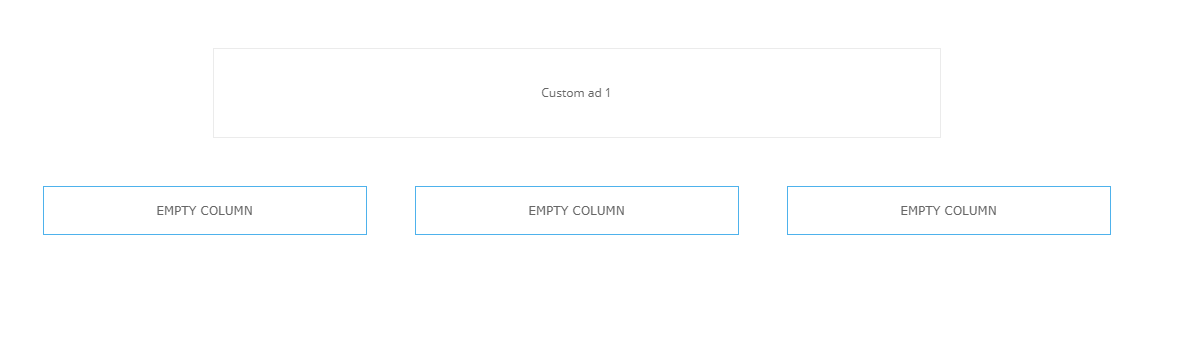

UPDATE 20min after
Recently did several other deletions of elemets and end up with having these EMPTY COLUMNS already 5…

Interesting is that some of the elements can be deleted without leaving EMPTY COLUMN after them, and some not
 Mick Pacholli
 I understand tagDiv Composer is now the theme editor, but I have 26 very complex pages using WPBakery that came with the theme, that’s cool, I like the live interface much cooler, you have now widgetised sidebar though whicch you may want to add.
FYI…I have another site http://www.stkildawritersweek.com that was still unupdated versions of many plugins, I tested them all with the WPB editor as I updated them and all was cool until I also updated the WordPress to 5.2.2
Then I lost WPB composer functions, so I downloaded and activated TagDiv Composer to see what was happening, I can no longer develop my site
