
No search results were found in Documentation!
 simchris
 @mboydnv
I do agree on being a bit against the “bloated one plugin for all” concept. I used to hate YOAST. We used to build our own themes, or hack things like Canvas to add custom if/then and queries for meta data in our headers. Yoast simply made it easier for us to deploy and add some things more quickly. But it has gotten a bit big and bloated and every major version it crashes and burns. I certainly don’t think it’s the only game in town, but it does work for a lot of folks. Of course, we’re using some other things on some sites, just because they’re smaller and work as well.
As for canonical tags — the reason they are useful for many sites, is for things like the pending /amp/ protocol from Google rolling out in 2016 to speed up mobile pages separate from things like mod_pagespeed or http/2 (previously inclusive of mod_SPDY). So, for example mobile accelerated pages will soon be loaded as so:
yoursite.ooo/name-of-my-article/amp/ — in this context, the canonical tag is useful to identify the /amp/ version is not another page, but an alternate “version” of the same page.
In our case — I should have stated — we syndicate our news from some sites, and the canonical tag helps identify we did it first, and when we link back to the parent page from the child syndicator.
Also be aware that article on MOZ is from 2013, and going into 2016, the canonical tag is more mature now.
However, you are correct — if you have no duplicate versions of content, if you’re not dealing with malformed inbound links to your site like /site/name-of-article/?12hy6 — where Google is saying you have duplicate content for too many 404 errors — then you may not need it !!
In our case, it helps control inbound malformed links from external sites, and also because with modern social media you have a dozen sites inventing their own links to your website page; meaning FB, Twitter, LinkedIn, etc. all use a shortcode in some case to link to you, and the canonical can help identify that the URL on your site is the de-facto CORRECT one, even though it should be self evident being on your site.
I’m not arguing you need to have them, just saying they are useful and do NOT hurt inbound traffic in any way. Just like adding a default img tag, or an author tag, or other meta data; it’s read by those systems that have use for it, and other things ignore it.
Anyway — just some food for thought 🙂
 Speedster
Hi!
I have updated theme, wp and plug ins, but WP Antivirus Site Protection still send warning for this files:
“””””””””””””””””””
WP Antivirus Scan Results
Latest Scan Result
No files for review.
Review is required
/wp-content/plugins/js_composer/config/templates.php
/wp-content/plugins/maintenance/js/select2/select2.min.js
/wp-content/plugins/w3-total-cache/lib/CSSTidy/data.inc.php
/wp-content/plugins/google-pagespeed-insights/google-api/src/contrib/Google_AnalyticsService.php
/wp-content/plugins/js_composer/include/classes/editors/class-vc-frontend-editor.php
/wp-content/themes/Newspaper/includes/wp_booster/wp-admin/panel/td_view_import.php
/wp-content/themes/Newspaper/includes/wp_booster/wp-admin/panel/td_view_import_export_settings.php
* Please note: Hackers can inject malware codes inside of the normal files. If you delete these files, website can stop to work or will be not stable. We advice to send request to SiteGuarding.com for file review and analyze.
“””””””””””””””””””
Notice, I have update all this files and plug ins and theme tonight, and still this morning the WP Antivirus Site Protection marked this as potential malware.
Please help.
 manilashaker
 Hi catalin,
I tried disabling plugs in on the main plugins tab of WordPress as well as the plugins on NewsMag panel. But it didnt work. My suspects are the new plugs in installed by my friend:
Autoptimize
Optimizes your website, concatenating the CSS and JavaScript code, and compressing it.
EWWW Image Optimizer
Reduce file sizes for images within WordPress including NextGEN Gallery and GRAND FlAGallery. Uses jpegtran, optipng/pngout, and gifsicle.
Unveil Lazy Load
This plugin makes lazy-image-load possible to decrease number of requests and improve page loading time, and uses a lightweight jQuery plugin created by optimizing Unveil.js in order to only load an image when it’s visible in the viewport.
ZenCache
ZenCache is an advanced WordPress caching plugin inspired by simplicity. Speed up your site (BIG time!) with a reliable and fast WordPress cache.
But not sure on which one from them or if there is any.
The AJAX Preload stopped working last week while the Smart sidebar just a couple of days ago, I can’t track if which plugin has affected it.
My other suspect for the Smart Sidebar is that I put an tagdive Slide. I already removed it tho.
Thanks
 Akpan Promise
 1. Okay on the GTMetrix, you will see a Minify CSS. click on “see optimized…”. You will copy it and then go to your Editor, select or clear the style.css, then paste the minified css.
2. Search for EWWW image optimizer plugin, install it and “Bulk optimize” all your images.
3. Then search for Regenerate Thumbnails Plugin. You should Regenerate your thumbnails that way they will fit in your blocks.
4. Download WP Super cache and set it up, use mod_rewrite, it is the fastest.
5. You should get Cloudflare, and set it up as well then click on minify css and javascript but not html because WP Super Cache handles that for you.
All these should reduce your page size and increase your pagespeed.
All these settings I gave you made me score 90+ on desktop and 70+ on mobile before i added the Ads 😉
Factwide is my website, you can test its pagespeed to verify my claims.
 Bogdan B.
 Hello,
I have checked your website on gmetrix and google and it seems there is still work to be done. You can use speedbooster to move more render blocks to the footer by following the method here: https://forum.tagdiv.com/how-to-make-the-site-faster/ and to optimize images as you get a notice about those to. You can use wp-smush https://wordpress.org/plugins/wp-smushit/
Unfortunately we can only offer suggestions. It is still you who is going to have to make the modifications necessary. For every problem highlighted by gmetrix or google, there is a how to button next to it. Please use it to get an idea on how it can be done. Also use google to find lots and lots of pagespeed insights online. More than we can ever offer.
Best of luck on your project!
Bogdan B. Hello,
For a cache plugin we recommend WP Super Cache. It’s free of charge.
As for css and js , you can use the tagdiv speedbooster plugin. Just install it from the plugins area->add new and select it from the plugins folder that comes with the theme. The speedbooster app has a plugin compatibility list and if it finds plugins that are not on that particular list it will shut down. It has a workaround however if you want it to work with all plugins. Follow this topic to see how it can be done:https://forum.tagdiv.com/topic/how-do-i-increase-my-site-loading-time/
As a tip for a visual impact on website speed you can also disable this option for images: http://screencast.com/t/5YjsLqcwJl
I hope this helps.
Thank you!
 Ing Geek
 well, first of all google pagespeed its diferent than website speed 😛
PageSpeed
https://developers.google.com/speed/pagespeed/insights/?url=http%3A%2F%2Fwww.upsctoday.com%2F
Google Page Speed show you / make recomendations to get better web site experience. Like your problem now
Optimize CSS Delivery of the following: You should move to footer CSS related to your plugins wysija-newsletters, contextual-related-postsm, Easy table, and add to any, because they are blocking your site render speed.
You should move to footer wp-spamshield too.
Web Site Speed is how faster your site its loading for everyone.
https://gtmetrix.com/reports/www.upsctoday.com/FR1sMTBQ
http://tools.pingdom.com/fpt/#!/bIZ6TD/http://www.upsctoday.com/
Reduce server response time
You can check waterfall/timeline and see how your server is responding slowly. I check your source code and i cant find eneabled some cache plugin, Do you installed?
Only your server its making 4 seconds initial waiting time to start loading site resources. This cloud be dropped to 0.2 seconds if you activate Wp-cache or Zen Cache (free plugins)
Bogdan B. Hello,
Unfortunately to make a website run faster you will need to have at least basic knowledge not necessarily ‘tech savvy’
You will need to follow this tutorial on page speed:
https://forum.tagdiv.com/how-to-make-the-site-faster/ Gzip compression needs to be active and also read about how you can compress the images. I suggest to get someone to help you if you cannot manage.
Also please make sure that Speed Booster is active, check System Status for this – http://screencast.com/t/LDPniI0Qpv The plugin is tested only with these plugins – http://screencast.com/t/hcjLnOqh4i2 and if you have others active it will be automatically disabled.
In order to use the tagdiv speedbooster with all plugins you will need to remove this code – http://screencast.com/t/RZLIOPUNdqh
I hope this helps
Thank you!
 omar ahmed
 1- Gzip compression is still not active
enable sir but this messege from third party ( facebook) — please check messege
يؤدي ضغط https://static.xx.fbcdn.net/rsrc.php/v2/yp/r/sOXUQGepNJD.js إلى توفير ١٦٥٫٨ كيلوبايت (تقليل بنسبة ٧٥٪).
يؤدي ضغط https://static.xx.fbcdn.net/rsrc.php/v2/yI/r/jG4p3Ps_5O2.js إلى توفير ١٢٢٫٦ كيلوبايت (تقليل بنسبة ٧٢٪).
يؤدي ضغط https://static.xx.fbcdn.net/rsrc.php/v2/yf/r/eItQ6CL9r9J.js إلى توفير ١٢٢٫٥ كيلوبايت (تقليل بنسبة ٧١٪).
يؤدي ضغط https://static.xx.fbcdn.net/rsrc.php/v2/yR/r/JgJ7uCwXCUZ.js إلى توفير ٧٠٫٥ كيلوبايت (تقليل بنسبة ٧٠٪).
يؤدي ضغط https://static.xx.fbcdn.net/rsrc.php/v2/yB/r/lSRul-v_nG1.js إلى توفير ٢٤٫٤ كيلوبايت (تقليل بنسبة ٧٠٪).
يؤدي ضغط https://static.xx.fbcdn.net/rsrc.php/v2/yH/r/WaT-PMT8du6.js إلى توفير ٢٤٫١ كيلوبايت (تقليل بنسبة ٦٧٪).
يؤدي ضغط https://static.xx.fbcdn.net/rsrc.php/v2/y0/r/d-obwDWT0IV.js إلى توفير ٢٢ كيلوبايت (تقليل بنسبة ٧٤٪).
يؤدي ضغط https://static.xx.fbcdn.net/rsrc.php/v2/y0/r/ZP_M6dihf5_.css إلى توفير ١٧٫٣ كيلوبايت (تقليل بنسبة ٧٧٪).
يؤدي ضغط https://static.xx.fbcdn.net/rsrc.php/v2/ys/r/MtMLhaIG7mj.css إلى توفير ١٦٫٩ كيلوبايت (تقليل بنسبة ٧٤٪).
يؤدي ضغط https://static.xx.fbcdn.net/rsrc.php/v2/y1/r/OnEtjpeyyGe.css إلى توفير ١٣٫٣ كيلوبايت (تقليل بنسبة ٧٣٪).
يؤدي ضغط https://static.xx.fbcdn.net/rsrc.php/v2/yo/r/wKMVsNFz5XR.js إلى توفير ١١ كيلوبايت (تقليل بنسبة ٦٩٪).
يؤدي ضغط https://static.xx.fbcdn.net/rsrc.php/v2/yP/r/FIuGH8jAmLq.js إلى توفير ٩٫٨ كيلوبايت (تقليل بنسبة ٦٤٪).
يؤدي ضغط https://static.xx.fbcdn.net/rsrc.php/v2/yS/r/ZDQXrINXZRK.js إلى توفير ١٫٨ كيلوبايت (تقليل بنسبة ٥٢٪).
يؤدي ضغط https://static.xx.fbcdn.net/rsrc.php/v2/yj/r/n0F_FGOE19x.css إلى توفير ٦٥٨ بايت (تقليل بنسبة ٥٦٪).
2- please give me type file to put this cpanel in option gzip compression
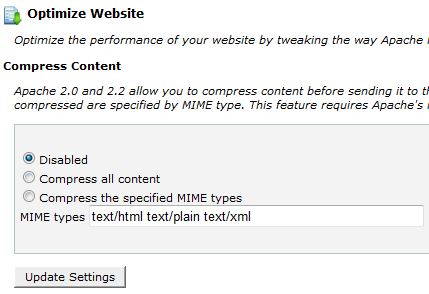
i used option number 3
3- Speed Booster show this messege in system status
v4.2 – Disabled – incompatible plugin detected: disqus-comment-system/disqus.php
i disable this plugin but still not active beacuse widget facebook and almost widget cause issue to speed booster
!!!!
finally i add plugin super cache and enable all option important in plugin but not effect also !!
-
This reply was modified 10 years by
omar ahmed.
simchris There are also some really good articles out there on speeding up your website using Nginx + Varnish for “optimizing WordPress for speed” … don’t have links handy. I looked at that in depth Jan. 2014, ended up sticking with Apache for our little corner of the universe. 🙂
simchris Well.. it makes the site compatible with the AMP protocol. If you read-up on what that is, it’s self explanatory.
It creates a super optimized version of page for mobile which loads at pagepermalink/amp/
I was curious of anybody had tried it yet with TagDiv themes, or just *any* WP website at all?
forgot to include link to plugin in repo:
https://wordpress.org/plugins/amp/
I guess the main thing it does is strip out javascript ?
Not a lot of info out there yet — like in our case running mod_pagespeed would it be necessary?
 doucare1971
 Day an a half and I am not sure when you are going to check on this. I sent my WordPress access to my website. I even left the speed booster plugin activate but says disabled waiting for you to check it out. I don’t even know if you can access the site or not. Assuming you can.
 grillingmachine
 Hey guys,
please have a look at the following huge different loading results:
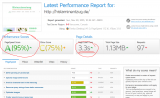
would i have any disadvantages (bad google ranking,…) because of the bad googlepage speed?
i have tried so many speed plugins, but the pagespeed on gmetrix AND google stays everytime at the same. What could be the reason for that?
website link: http://www.histaminentzug.de
-
This reply was modified 10 years by
grillingmachine.
-
This reply was modified 10 years by
 kompic
 Hello, I had this ‘thing’ forever, from start, when I changed the color in first place. The color that load first is black which lasts for less then half a second, and then it shows the right one.
The main reason for this are plugins similar to Speedbooster. When you send stuff to footer because you want your website to start rendering faster, then the css that shows other color then black in top menu bar is loaded after the default color.
So if you do not want this to happen then just deactivate or modify plugins similar to speedbooster.
For example you can even send the main css style from the theme to the footer. In this case your website will look broken for 200-300 ms.
After you make all this that I wrote, make sure to clear cache if you use caching plugin, or CDN.
Cheers
grillingmachine Now i could activate the speedbooster plugin with your guide,
but the pagespeed is still only at 58.
please have a look at my website, histaminentzug.de, something has to be wrong with it.
Before i updated it to v.6.5.1 , the speed was at 78…
thank you!
 damir
damir Where can I find speed booster plugin? all the other things you mentioned are already added to the website and I’m still facing painfully slow response
Thanks
damirHello,
I’m facing slow response time even though all the best practices possible are used to speed up the website (caching, minification, good and stable hosting, cloudfront CDN…).
On this hosting I host several other websites with other themes and all work fine. For a test purpose I tried running the website on other hosting and behaves the same.
Can you please advise?
 Andrei L.
 Hi @teodormiu
Thank you for your kind words!
1. Try this guide and regenerate the thumbnails for all your images: https://forum.tagdiv.com/how-to-fix-strange-thumbnails/ clear all caches and test again. If the image is large enough it should be displayed fine in thumbs.
2. If a post doesn’t have a featured image set the theme load a placeholder image when this option from theme panel is enabled: http://screencast.com/t/qXc9ADVOzKOf To set a custom image you need to add an image in /images/no-thumb directory: http://screencast.com/t/VBrS8hN53 then replace in get_image() function the name of the image like here: http://screencast.com/t/CYZRDHlJs
3. In order to identify the ideal/average size you need to figure out which is the largest container that will display that particular image and upload an image bigger than that container. Then there is the post template to consider. If you use post templates with big image backgrounds (style 6, 7 or 8), then your uploaded image has to be bigger (especially on style 8). You need to asses your website’s layout (posts and block elements) and come up with an average image size that will work on smaller containers but also keep good quality on bigger ones.
You can read more about thumbs and featured images here: https://forum.tagdiv.com/theme-thumbs/ – https://forum.tagdiv.com/featured-image/ – https://forum.tagdiv.com/thumbnails-vs-featured-image-size/
The theme uses thumbs to reduce the page size and speed up page loading time. From each image uploaded are generated thumbs for each thumb size used by the theme. Basically when a post it’s displayed on the page in a block, the featured image displayed is not the one which you uploaded in media file, it’s a thumb cropped from the original image at precise dimension. To change the picture orientation most likely you will need a different cropping system. We use a WordPress function – add_image_size() – you can read about it here – https://codex.wordpress.org/Function_Reference/add_image_size – and here – http://www.davidtan.org/wordpress-hard-crop-vs-soft-crop-difference-comparison-example/
Hope this help.
Thanks!
 rahuldungawat
Hello,
last i check my website performance so my website speed is very week.
google according my website speed Mobile : 36 and Pc :40
Please help how to increase my site speed.
Blog:www.rajasthanabout.com
Thanks
Bogdan B. Hello,
Please try to disable all your plugins except visual composer and check your titles again.
It should have nothing to do with speed booster (i assume that is what you were referring to not WP_Booster)
If the problem is still there please provide a link to your website so we can take a look
Thank you!
 MudassarSaeed
Hi, earlier i posted this https://forum.tagdiv.com/topic/newsmag-home-page-need-help/ because i needed some help to build my home page, now i have built it but the problem is that the “navbar”(Six Dots which you click and then category appears, hope it’s called navbar, if not then you know what i mean) for mobile is just below the logo and it can’t be tapped without tapping the logo which redirects to the homepage and it also looks very awkward , so how can i correct it so those 6 dots which you click and the menus appear in cellphones are separate from the logo, meaning there’s ample space between them. Here you can check the tapping error which i am talking about.
check this screen shot http://postimg.org/image/rp9yoqodj/ or the link below.
2. Another thing i noticed that after i had built my homepage and selecting it from settings > readings, i am no longer able to change the header style in newsmag. i mean it does change it but the website remains the same and no difference appears..
Thanks!
Bogdan B. Hi,
If the problem is still there, it can be caused by the page speed. CSS loads in cascades by default so if the load speed is realy slow you will see every step of the cascading styles. You can try to improve the pagespeed by following this topic: https://forum.tagdiv.com/how-to-make-the-site-faster/
You can also check to see if a plugin does not slow down your website, or you can check your server configuration.
The best way to eliminate this effect is still to use the style.css and create a back-up of it so it will not be lost in an update.
I hope this helps.
Thank you!
Bogdan B. Hello josan,
As a quick solution to your problem is to comment out this section in the speedbooster file: http://screencast.com/t/RZLIOPUNdqh to override the plugin compatibility. Now it should work with any plugin.
As for the minify, we do not recommend any minification because it will cause lots of problems. We have not found a plugin to minify css and javascript without errors although some users claim this one does the trick https://wordpress.org/plugins/merge-minify-refresh/. We have not tested it tough so we cannot say for sure if it will cause errors or not.
In order to make your website faster you can follow this tutorial: https://forum.tagdiv.com/how-to-make-the-site-faster/
I hope this helps!
Thank you!
 Josan
JosanHello, I purchased Newspaper theme yesterday.
Everything is fine but Speed Booster is not working. It say Disable due to Incompatible Plugins. Incompatible Plugins include: Akimset, MailChimp for WordPress Lite, Read More, Copy Link, TinyMCE Advanced, Ultimate Nofollow, UpdraftPlus – Backup/Restore)
I can’t keep Disable all these Plugins, SO is there anyway to use SPeed Booster with these plugins?
My Website is Hosted on iPage.
I am using WP Super Cache as recommanded by You. As Speed Booster is not working so i have installed Better WOrdpress Minify. I am also using CLoudflare (I have deactivated Minify option in Cloudflare dashboard)
Is It ok to use WP Super cache + Better WordPress Minify + CLoudflare?
Or i can use only WP Super Cache + CLoudflare, as cloudflare also offer Minify JS and CSS option?
I also request you to add feature offered by plugin Read More, Copy Link and Ultimate NOFollow in future updates.
Any other advice to speed up my website?
Gagan Josan
http://www.mysteryofindia.com
Thanks
doucare1971 I think there should be a sticky thread on the cloudflare rocket loader for this theme to turn it off because it effects most of what the theme does. Just a thought for those who keep having some kind of JS issues and with lazy load feature. It really messes up peoples websites that have JS ads on the site too. I am not going to try to manually change certain scripts for to have rocket loader enabled. That seems to drastic to have rocket loader enabled. It does help like 7% on speed on Y-Slow with rocket loader but they still have it in beta.
Not saying this thread but a new thread about images and lazy loading and JS scripts not working and rocket loader is the cause of it.
-
This reply was modified 10 years by
doucare1971.
