

 Edward
 To make your website faster, you can control which thumbnail is generated. To do this go to Theme Panel > Block Settings > Thumbs on Modules/Blocks and disable the unused ones to save space on your server:
Edward This is Header Style 11 – Top menus + bottom full menu:
Edward What you mean: “images don’t completely fill up a frame”?
https://forum.tagdiv.com/topic/what-is-the-best-imaze-size-for-post/
https://forum.tagdiv.com/topic/optimal-picture-size-2/
Edward Clear cache of browsers (Ctrl + F5).
Edward For example: Theme panel – Categories –

Edward The Yoast SEO plugin adds all the necessary tags when it comes to sharing, the theme itself does not have any sharing options. Install the mentioned plugin and enable og meta.
Edward Try this method:
1. Revert all changes in files back.
2. Login in your site.
3. Write test comment.
4. Check counter of your comments again.
Another words: You have to post comments while being logged in as an author for the theme to detect the author’s comments.
Edward В общей массе международных социальных сетей Одноклассники не настолько популярны. Поэтому, не думаю, что разработчики будут добавлять эту кнопку.
Вы можете добавить её самостоятельно, пользуясь сервисом Яндекса:
https://forum.tagdiv.com/topic/how-to-add-a-vk-sharing-button-on-your-posts/
Edward Edward As for the share button we are aware of the translation issue. It will be fixed as soon as possible. You could translate it here
– https://www.screencast.com/t/jpNM9CwY65
https://forum.tagdiv.com/topic/social-icons-desktop-8-6/#post-209822
Edward You can hide dropdown arrows via custom css in Theme Panel > Custom Css: http://screencast.com/t/3dvI3xwesew
.td-header-menu-wrap .td-icon-menu-down {

display: none;

}

.sf-menu {

margin-left: 0px;

}
https://forum.tagdiv.com/topic/mobile-menu-appearing-on-home-page/#post-48448
Edward Там ошибка (шутка) в переводе. Тут читайте: https://forum.tagdiv.com/topic/3-issues-or-more/
Edward Try to replace this code:
.td-category-header .td-page-title{

text-transform:none;

}
All breadcrumbs will show as is.
You should rename the breadcrumbs in small letters (lowercase).
 Edward Edward
 This plugin EventOn (https://codecanyon.net/item/eventon-wordpress-event-calendar-plugin/1211017) works without problems with the Newspaper theme.
Live Demo: http://demo.myeventon.com/
Edward Each post needs to have a featured image set, in order for the thumbnails to be created
– https://forum.tagdiv.com/theme-thumbs/
The theme will crop the images and create thumbnails
– https://forum.tagdiv.com/featured-image/
If an image is not set, the theme will display a default no-thumb placeholder on the modules. As for the size of the featured image, there is no recommendation. The demo you install contains mostly images of 1068 × 713 px, as mentioned. However, for superior thumbnail quality you could use bigger image sizes. For example, in the live demo this featured image size is used for a post
– https://demo.tagdiv.com/newspaper/wp-content/uploads/2016/01/01-girl.jpg
– https://demo.tagdiv.com/newspaper/
The mega menu uses a thumbnail as well, the thumbnail size cannot be changed
– https://www.screencast.com/t/7OLNwwdDyR8U
There are multiple post templates that you can choose from
– https://forum.tagdiv.com/post-templates-2/
See them live in the demo (Features menu).
Edward Read this carefully (https://forum.tagdiv.com/topic/a-wish-for-future-theme-versions-generate-thumbnails-for-featured-images-only/#post-162094):
What you can do, and what is commonly done in WordPress news portals, is upload images via FTP into an /images/ folder, and then put the explicit URL for the image in the HTML of the article, and don’t use the media manager except for the featured image.
Note that WP makes images from anything added to the media manager, per the default sizes shown on the settings > media page for *all* themes, defaulting to those most commonly used by the default blog themes included with WP.
So, *all* themes follow this behavior by adding additional add image classes to fit theme layouts, and for this theme they can be disabled based on the theme panel.
The only solution that works across all themes, is to simply use the FTP method for common images, and then use the media manager only for the ‘featured’ image for a story.
Edward Hi!
Before you start working with the Theme, read this complete documentation:
https://forum.tagdiv.com/newspaper-theme-documentation/
Many your questions will not arise.
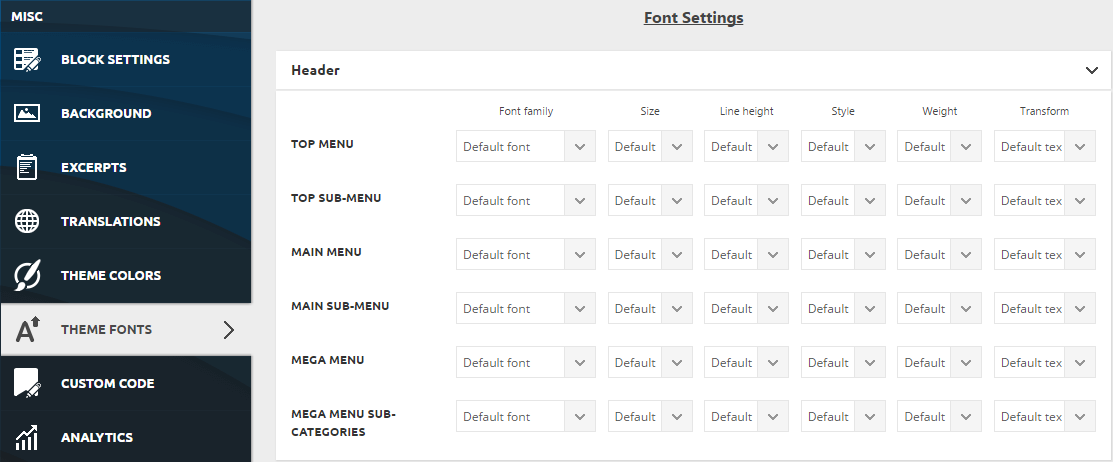
To change the font settings here:
Edward The only time when the website will be boxed, is when a background image or color is set. I believe there is a white background color on the website. Please check in the theme panel and remove it if that is the case
– https://www.screencast.com/t/g2aLdz2e
Edward Edward Theme panel – Block Settings – Meta info on Modules/Blocks
Edward Also:
When you decide to post content on your website, the theme automatically generates thumbnails from the featured image to display the content on your pages in an attractive way. This process creates 17 different thumbnail sizes. To make you website faster, you can control which thumbnail is generated. To do this go to Theme Panel > Block Settings > Thumbs on modules & blocks and disable the unused ones to save space on your server.
https://forum.tagdiv.com/newsmag-theme-thumbs/
-
This reply was modified 8 years by
Edward.
Edward Please try to save your theme panel settings again, clear all the caches and check the results. The problem should disappear.
Edward Technical support strongly recommends:
Our recommended way for updating your theme is via FTP way because this is the surest method.
Also keep in mind:
FTP always best way to update; and you must always DELETE the original theme folder, then upload new one; *NOT* over-write as you end up with old/new files mixed together — this is not how WordPress is designed to work. Same with plugins. All plugins when updated via the WP admin panel *delete* old folder then upload *new* one; not merge or over-write/mix them.
Notice that you can automatically update your theme using the Envato Market plugin, according to our documentation here -> https://forum.tagdiv.com/how-to-update-the-theme-2/ but we do not recommend to do this. Our recommended way for theme installing is via FTP way because this is the surest method in this regard and in that way you will avoid eventual problems which might appear.

