Calin
Calin Hi,
For me is working -> https://i.imgur.com/2Zm3C4g.pngbut I must have an account to can have the post.
Thank you!
Calin Hi,
Unfortunately, the GDPR Cookie Consent Banner plugin has not been tested with our theme and therefore, we cannot say for sure if it will work or not as expected with the theme, sorry! Also, we cannot provide support for untested plugins.
This is our list with tested plugins with our theme -> https://www.screencast.com/t/cmPkh9jba4sZ
Thank you for your understanding!
Calin Hi,
There are two type of mega menu, with sub-categories and without sub-categories -> https://forum.tagdiv.com/mega-menu/ also using a cloud header from tagDiv Cloud library, you can edit it using tagDiv Composer -> https://i.imgur.com/hfJk5HR.png also the image can be remove using this options -> https://i.imgur.com/6FU38Ue.png
Thank you!
Calin Hi,
I’m assuming that this problem appear on posts that have set infinite loading, you’ll need to edit the single post template with tagDiv Composer and disable the infinite loading.
-> https://tagdiv.com/infinite-loading-for-single-posts/ from post -> https://i.imgur.com/yIf6fA3.jpg -> https://i.imgur.com/KeclHLS.jpg -> https://i.imgur.com/4jHIHFY.png
If there is still a problem, please provide a link to your website!
Thank you!
Calin Hi,
Maybe you can use the options from “Rank Math SEO” to display what you want in that tooltip.
Have a nice weekend!
Calin Hi,
These are only notice, will not affect the the theme functionality.
Thank you!
Calin Unfortunately this is the only we we can investigate if there is a problem.
Thank you for your understanding!
Calin Hi,
I do not quite understand, you want to use the video playlist without YouTube api key as you can use the video embed, if yes, then the answer is no, these are different options and are working different.
Thank you!
Calin Hi,
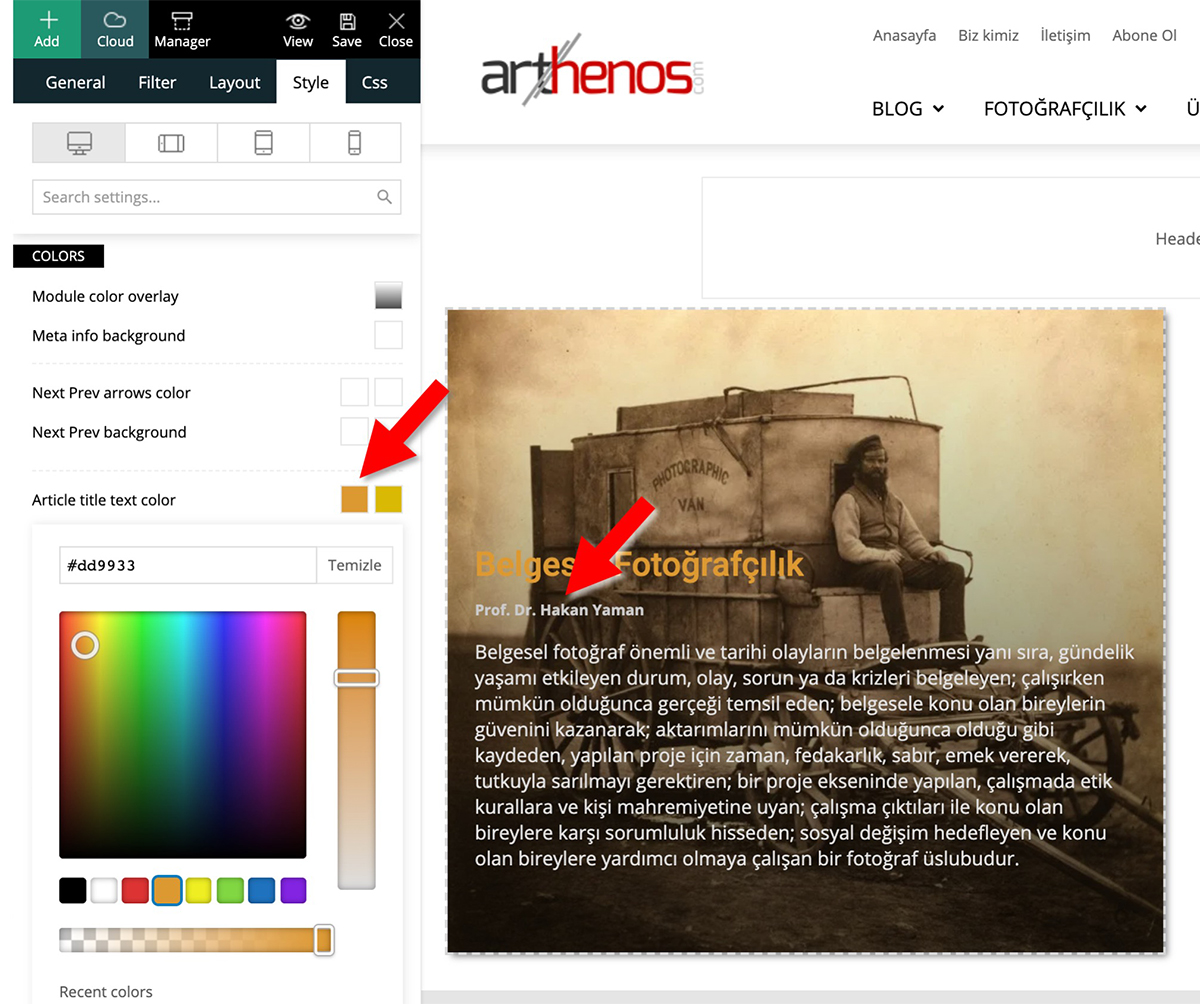
In your example you are editing the article title text color -> https://www.arthenos.com/wp-content/uploads/2020/06/Author_Text_Color.jpg and this is apply -> for author -> https://i.imgur.com/RoyZa9N.png
Thank you!
Calin Hi,
Please make sure that all the settings are like in our requirements, please follow the guide carefully
– https://forum.tagdiv.com/requirements-for-newspaper/
and please increase all requirements that are lower, and follow all steps.
Also please make sure that you do not have a plugin conflict, please deactivate ALL plugins except tagDiv Composer, also if you are using child theme or cache plugin, deactivate them, clear all cache and try again.
Let me know the results!
Thank you!
Calin Hi,
Unforgettably there is no option for this, but you can do it using a custom css -> https://i.imgur.com/EkbRCHs.png
.tdb-mega-menu .sub-menu > li {

    margin-top: 30px!important;

}
The code need to be set in theme panel> custom code> custom css.
Thank you!
Calin Hi,
Please try this custom css -> https://i.imgur.com/JThcFWg.png -> https://i.imgur.com/NemFaCn.png
.page-nav .page {

display: none;

}

.page-nav i.td-icon-menu-left:before {

content: "Prev";

}

.page-nav i.td-icon-menu-right:before {

content: "Next";

}
This code need to be set in theme panel> mobile theme> custom code> css.
Hope this will help you!
Thank you!
Calin Hi,
The problem is that you need to set the full url like this:
https://www.cedf.com/inquiry if is set like this http://www.cedf.com/inquiry you’ll get an incomplete url and you’ll get a 404.
Theme panel ads is for standard templates and in these you can set the link like this -> https://i.imgur.com/RqgPX61.png is your decision if you want to use the theme panel ads or not.
Thank you!
Calin Hi,
These can be find inside the single post template, for this you’ll need to edit it with tagDiv Composer -> https://i.imgur.com/5dfpUCN.png -> https://i.imgur.com/MRdBxUX.png
Thank you!
Calin Hi,
Unfortunately this can not be done automatically, but if user click on location on Weather then it will get his location -> https://i.imgur.com/wFRfob7.png here is an example -> https://demo.tagdiv.com/newspaper/weather-widget/
Thank you!
Calin Hi,
Indeed there are some problems with edge and ie, these browses do not recognize some css elements.
Thank you for your understanding!
Calin Hi,
When the mobile version or amp is displaying on desktop is a cache problem, we recommend to use WP Super Cache plugin, this is a free plugin and tested with our theme, also we have a guide for the settings you should do -> https://forum.tagdiv.com/cache-plugin-install-and-configure/ also if you are using other cache plugins please deactivate them and make a test.
Also using the mobile theme plugin, you’ll gain a better speed then responsive version of theme, but in order to achieve that speed you’ll need to create a new content for pages because in the most of cases those were made with builders ( tagDiv Composer, WPBakery ) and you need to use only the mobile editor ( you need to set the content for pages in mobile editor and this content will be display on mobile theme)
-> https://i.imgur.com/9d0UWLT.png
Also you can show the responsive version on mobile theme -> https://i.imgur.com/m0bVB5T.png you can check more details about mobile theme in our documentation -> https://forum.tagdiv.com/the-mobile-theme/ or if you want to have the responsive version only, you can use the amp option from mobile theme -> https://i.imgur.com/oofST3D.png (to use the mobile theme template on amp) or you can disable the plugin.
Thank you!
Calin Hi,
So if I understanding correctly you want to set different ads per category, to can achieve this without extra plugins, you’ll need to use cloud templates from tagDiv Cloud library, these can be edited using tagDiv Composer.
What you should do? you need to get a single post template for each category that you want to have a different ads, edit these cloud templates, set the ads and adjustments and set theme in theme panel per category -> https://i.imgur.com/k94Sh5x.png
Hope this will help you!
Thank you!
Calin Hi,
TagDiv Composer can be use on pages and cloud templates from tagDiv Cloud Library.
Please provide some more details and screenshots.
Thank you!
Calin Hi,
I’ve add this as a suggestion on our list.
Have a nice weekend!
Calin Hi,
You’ll need to add the inner row in that column -> https://i.imgur.com/TTaLqPP.png also to solve the problem with to posts from the same category, you can use a row position like this -> https://i.imgur.com/xIjk0Ri.png (a row set in half and in one of them set two inner row set in half).
Thank you!
Calin Hi valsim,
Please update to Newspaper v10.3.4 -> https://tagdiv.com/update-newspaper-theme/ and check the results to see if there is still a problem. Also make sure that you are using php v7.2 or v7.3 also please use last version of WordPress.
Thank you!
Calin Hi,
I believe that is why the transition was placed in the first place, to make the possible flashing not so noticeable. Not all browsers produce the same results, there are differences regarding how the website is loaded between Chrome, Firefox and IE for example. You could try some tricks from these topics
– https://www.nccgroup.trust/uk/about-us/newsroom-and-events/blogs/2016/may/why-background-images-are-slow-to-display-and-how-to-make-them-appear-faster/
– http://smallbusiness.chron.com/making-background-images-load-faster-31826.html
Thanks
Calin Hi there,
Thank you for getting in touch with us.
The easiest solution is to install the WordPress SEO plugin by Yoast: https://wordpress.org/plugins/wordpress-seo/
Once installed click on SEO → Titles and Meta where you can change title for various pages.
Thank you for your time in this.
Best regards
Calin Hi,
Unfortunately there is only a general option that will apply for all posts -> https://i.imgur.com/00c9J7H.png
The only way that you can hide several individual posts is to use a custom css -> https://forum.tagdiv.com/create-custom-code-using-the-browsers-inspector/ here is an example of code that is using the post id https://i.imgur.com/qHoP7Ve.png -> https://i.imgur.com/fAze6Sv.png
Thank you!