
 Lucian
 Hi,
How do you add the adsense ad code and this shortcode into your sidebar? Please let us know and write us via email, at contact@tagdiv.com and also provide wp and ftp access so we can check your site’s configuration and these suggested implementations concerning this.
So, make sure you apply the latest solution Bogdan gave you and let us know so we can check and we will get back with an answer on this as soon as possible. Please also provide all necessary info so we can investigate this and also include a link to this conversation.
Lucian C.
Lucian Hi,
Please send us your admin details via email so we can have closer look at this and also make sure you empty all caches and purge cdn files if using an cdn host then test again without any plugins active, besides theme’s plugins.
Address us at contact@tagdiv.com via email and also include a link tot this tread. We will get back back to your with an answer as soon as possible.
Thanks!
Lucian I have update my previous post because I have forgotten to answer to your other two questions. Theme’s socials are available on theme’s smart list 7 templates so I’m not sure what you mean: http://screencast.com/t/qRp5y2UuFUvt Please provide an image is possible and a link to a post on which you experience this issue.
Thanks!
Lucian Hi,
Check your site using google’s PageSpeed Insights: https://developers.google.com/speed/pagespeed/insights/ and check online or use our instructions as solutions based on their notifications.
Also make sure you go trough our server/host requires and recommendations: https://forum.tagdiv.com/requirements-for-newspaper/
Our page speed guide and covered the most important aspects that google notifies you of and based on which it classifies and grades your site’ regarding speed. The theme has been developed to be fast but it may still need configurations on this matters so test your site using google’s page speed insights testing tool and make sure you follow the guide instructions and methods then test your site again.
We can’t offer speed customization services at the moment so if you still need guidance on this or you’re not aware of the steps you need to take in this regard please consider hiring a developer or a freelancer to do this for you.
The fb comments plugin should appear by default on your post pages. Where do you want to add it? Please let us know and provide more details on this!
The smart list 7 lightbox image can’t be disabled just for the smart list 7 images only if you disable it from theme’s panel > post settings globally: http://screencast.com/t/pIg0TBAqCSsE
Please provide more details about the configuration you want for the fb and disqus comments.
Hope this helps!
Thanks for the message!
-
This reply was modified 10 years by Lucian.
Lucian Hi,
Theme’s activation code is stored in your site’s database so if it hasn’t been altered you wouldn’t need to activate it again.
Please address us via email concerning this, write us at contact@tagdiv.com include a link to this conversation and wp admin access and we will look into this.
Thanks!
Lucian I’ve replied to your other post on this: https://forum.tagdiv.com/topic/formats-dropdown-box-missing/#post-87059
Please do not open multiple treads on the same topic, we will reach and answer you as soon as possible during our working hours:
Support Hours (GMT+2)
Monday – Friday:
8:00 AM – 17:00 PM
Thanks for the message!
Lucian C.
Lucian Hi @John please apologize the delay but we did not work in the past 4 days due to new year’s period. We had this banner to notify you of this:
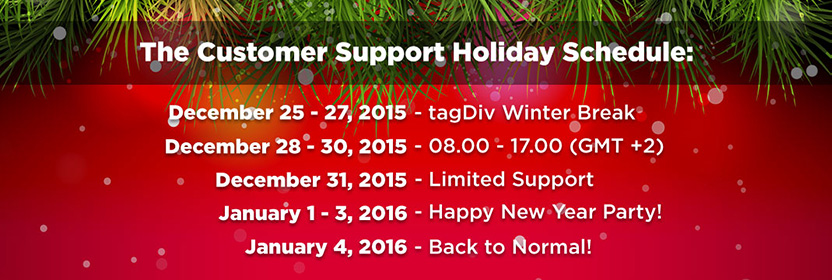
Make sure you use this button: http://screencast.com/t/BKF9M0SCN to toggle the formats toolbar like @Sjayne stated. Let us know if you can’t manage it and provide wp access via email at contact@tagdiv.com including a link to this conversation.
Lucian C.
Lucian I’ve agreed with your newsmag theme purchase! You should receive the refund soon!
Thanks!
Lucian Hi,
I have just replied you via email! Sorry for the inconvenience! We haven’t worked during the last 4 days due to new year’s period!
Thanks for the message!
Lucian I’ve just replied you via email!
Thanks for the message!
Lucian I’ve just replied you via email!
Thanks!
Lucian C.
Lucian Hi,
Try to enable the date on the articles – from Theme Panel -> Post Settings – http://screencast.com/t/Q6sNbyb3UoQ then the updated parameter should appear and after a while the webmaster errors should also disappear. You can check it using the live data testing tool: http://screencast.com/t/ATHGoopSTpA – https://developers.google.com/structured-data/testing-tool/ here is an example: http://screencast.com/t/9I6AYn7Vb
Once that updated attribute appears your issues should be fixed.
If you don’t want the date to appear you can hide it and the author using custom css: – http://screencast.com/t/j7NsXGsW
.td-module-meta-info .td-post-date  {

display: none;

}
Hope this helps!
Thanks!
Lucian C.
-
This reply was modified 10 years by Lucian.
Lucian Thanks!
I’ll add your suggestion on our list and consider it when we decide to improve or change theme’s adv system.
Lucian C.
Lucian Hi,
The theme automatically re-sizes your adsense banners if a custom size is not set from theme’s panel: http://screencast.com/t/wradJleK – https://forum.tagdiv.com/header-ad/ and if left as default it sets sizes specific to the device on which it’s loaded. If this is not what you need you can configure this and set the ad sizes for each spot from theme’s panel or if you wish the theme not to handle/interfere with your adsense ad codes you can turn to an adv manager plugin to render your ad codes and use theme’s ad spots just for placements, in that case you can use plugin’s shortcodes to place your ads on theme’s specific ad spots.
Hope this helps!
Let me know if you need additional info on any of these aspects!
Thanks!
Lucian Hi,
Please send us an email at contact@tagdiv.com and also provide wp admin so we can check your site’s configuration and we will get back with an answer on this as soon as possible. Please also provide all necessary info so we can investigate this and also include a link to this conversation.
Thanks!
Lucian Hi @securerr,
That could happen because the thumb type you use there is a bit wider than thumb’s container so it gets compressed from a 238px width to a 200px in order to fit the related module’s container and design. This solution was used in order to avoid cropping an additional image size from the related posts module so we used an already existent thumbs which has the dimensions near to the ones needed.
You can try to fix this by setting the related module to use a predefined wp image thumb and set it to the exact width the thumb needs then set to the related module from here: http://screencast.com/t/d3SK8oaIN ( in my screen I’ve set the related module to use the ‘thumbnail’ wp image size ).
Hope this helps!
Thanks for the message!
Lucian Hi ihora,
Sorry for the late replay!
The td_011 field stores theme’s options, not sure to which hardcoded url you refer too however you shouldn’t have any issues concerning this as the theme has ssl support implemented so it should work. I have also tested this on my side and found no issues.
Please send us an email at contact@tagdiv.com adn also provide wp admin and ftp access so we can check your site’s configuration and we will get back with a more accurate answer on this as soon as possible. Please also provide all necessary info so we can investigate this and also include a link to this conversation.
Thanks!
Lucian Thanks you for also updating this here, for your feedback and for the message!
Lucian C.
Lucian Hi molly55,
I have just replied you via email on this! Please reply us so we can find a solution for this and also please apologize us for the inconvenience it wasn’t our intention or my colleague’s to offend you in any manner.
Thanks!
Lucian C.
Lucian Hi,
I have replied you on themeforest’s dashboard on this. I have pasted my replies and our conversation below, hope you don’t mind.
I would use the block 16 as module , it is possible ? And if so, how can I do ?
tagDiv
Hi,
Unfortunately not without customization, as blocks’s template uses additional customizations to display 3/5 posts on 2/3 columns so setting/using that as module woudl display one post on each column resulting in a similar layout like this: http://demo.tagdiv.com/newsmag/block-3/
I’ll add this on our request list and consider it for future theme updates.
Thanks for the message!
Lucian C. tagDiv
I would like to customize , you could point me in which I would have to edit files.
tagDiv
Hi,
Sure, you can find the block’s 16 template file to see theme’s implementation for it here: http://screencast.com/t/0GNsavDbKxi then, for category’s modules layout in the loop.php file: http://screencast.com/t/X4kdqTz2Xoc
You would have to create a case in the loop file for your case. Please also note that we cannot provide customization services at the moment so if you can’t manage this on your own we advise you to get in touch with a freelancer or someone that could help you and also make sure you backup these files before customizing them.
Hope this helps!
Thanks for the message! Lucian C. tagDiv
Thanks!
Lucian Yes Chris, that’s the idea~!
At this point all theme issues with 4.4 wp update have been fixed in both themes latest updates so there is no need for that 🙂
Thank you! Happy Holidays to you too!
Lucian C.
Lucian Hi Wissam, I have just replied you via email!
Thanks!
Lucian Hi @vladica79
I have just replied you via email on this!
Thanks!
Lucian Hi Chris! I have added this topic with your tutorial and all your useful advises here to our “Best Of Forums” section.
Thanks!
Lucian C.
Lucian Hi @paulberrow,
First of all we apologize it took so long for us to test this and you’ve waited to give you a solution for your situation, unfortunately due to the latest investigation we have made concerning the 4.7.4 secure version of VC and theme’s version 4 we have decided not to provide a fix for this, our decision is based on technical reasons which will make this a difficult task and because our purpose is to focus and continue our latest themes versions research, improvement and development and because we are a small team with limited resources we can’t attend this.
We’re sorry for the inconvenience and hope you can and you will understand our decision!
To fix this an also avoid any similar issues and so that you can also benefit of the newspaper theme’s new features, its new design and off course fix this issue I would advise you to reconsider updating your theme to the most recent version of the theme and adjust your customization to the version 6 of the theme or redesign it. We will continue to improve the theme and its functionality as well its appearance so this would come in your benefit.
Thanks!
