No search results were found in Documentation!
 Sebshot69
 Contextual Menus Not Working in TagDiv Composer – Persistent React Error #200
Issue Description
The contextual menus (e.g., row settings, column settings) in the TagDiv Composer builder are not opening or responding on all browsers (Chrome, Brave, Firefox). The browser console shows the following React error:
text
Uncaught Error: Minified React error #200; visit https://reactjs.org/docs/error-decoder.html?invariant=200 for the full message or use the non-minified dev environment for full errors and additional helpful warnings.
at react-dom.min.js?ver=18.3.1.1:10:128046
at classic-editor.js?ver=d439270160c30dd62b3a:525:5674
at window.yoast.initEditorIntegration (classic-editor.js?ver=d439270160c30dd62b3a:525:6011)
Steps Already Taken
Disabled all plugins except TagDiv Composer, Cloud Library, and essential TagDiv plugins – issue persists.
Increased PHP memory limit to 256M in wp-config.php.
Added the recommended .htaccess directives for TagDiv builder functionality at the end of the .htaccess file (including SubstituteMaxLineLength 10M and Header always append X-Frame-Options SAMEORIGIN).
Reset theme options via Theme Panel > Support > Reset Theme.
Tested with default WordPress theme (Twenty Twenty-Three) – TagDiv builder not available for testing there.
Verified no 403/404 errors on admin-ajax.php requests in the network console.
Noted Google Maps warnings related to deprecated markers but confirmed API key is valid.
Tested the issue on multiple browsers (Chrome, Brave, Firefox) with the same result.
Technical Environment
Theme: Newspaper 12
Active TagDiv Plugins: Composer, Cloud Library, etc.
Hosting: Infomaniak
PHP Version: 8.1+
Apache modules confirmed active: mod_headers, mod_rewrite
mod_substitute is enabled (confirmed with hosting support)
No server-side errors related to permissions or timeouts found.
Request for Support
Please help identify the root cause of the React error in classic-editor.js, which seems related to Yoast SEO integration.
Confirm compatibility of TagDiv Composer with React 18+ and the latest WordPress versions.
Advise on any necessary server configurations or known conflicts that could cause this issue.
Provide guidance on ensuring proper DOM targeting and iframe handling within the builder to restore contextual menu functionality.
Attachments
PHP and server error logs (available via Infomaniak Manager).
Full browser console logs including Console and Network tabs.
Exported theme settings from Theme Panel.
Additional Note:
The .htaccess directives recommended by TagDiv for the builder’s proper operation have been added at the end of the .htaccess file and are present on the server.
Thank you very much for your assistance. Looking forward to your guidance to resolve this issue.
Best regards
 Anamaria
 Hi,
Please check the console when you hit the save button and see if there is an error. With right-click -> inspect -> console -> select the error in the tab network -> preview, you can see the cause and check the suggestion from here https://forum.tagdiv.com/topic/newspaper-theme-panel-settings-are-not-being-saved/ -> https://community.godaddy.com/s/question/0D58W00007ggvUDSAY/403-forbidden-error-not-sure-why
Thank you!
 gmodonesi
 After many tests and backups I found the cause.
When I add this specific image (https://www.vincimi.it/wp-content/uploads/2025/03/concorso-pandora-2025-4.webp) to an article (as featured image) the site brokes (homepage 403 error).
If I add a different image it works correctly!
 Bettina
 Hello!
The 403 Forbidden error means that your server is working, but you no longer have permission to view all or some of your site for some reason. The two most likely causes of this error are issues with your site’s file permissions or. htaccess file
Thank you!
gmodonesiI have a 403 error for the homepage only, other pages work correctly.
I did not make any change, no plugin change, no server change.
403 https://www.vincimi.it/
Other correct example https://www.vincimi.it/instant-win/concorso-vinci-la-musica-con-hm
Any idea how to fix?
If I change the theme the error stops. It must something with Newspaper Theme.
Anamaria Hi,
Please check the console when you hit the save button and see if there is an error. With right-click -> inspect -> console -> select the error in the tab network -> preview, you can see the cause and check the suggestion from here https://forum.tagdiv.com/topic/newspaper-theme-panel-settings-are-not-being-saved/ -> https://community.godaddy.com/s/question/0D58W00007ggvUDSAY/403-forbidden-error-not-sure-why
Thank you!
Bettina Hello Marcus!
Please check the steps from here: https://forum.tagdiv.com/topic/unable-to-edit-text-with-title/ and also another possible issue as here: https://forum.tagdiv.com/topic/403-error-on-tagdiv-composer-when-trying-to-use-wp-editor-wpedito-php/
If you can’t handle it, then I can try to help you. Please contact us via email at contact@tagdiv.com and provide the following:
– admin url and credentials
– cPanel url and credentials
– a link to this topic in order to identify you
Thank you!
Anamaria Hi,
Please check the console when you hit the save button and see if there is an error. With right-click -> inspect -> console -> select the error in the tab network -> preview, you can see the cause and check the suggestion from here https://forum.tagdiv.com/topic/newspaper-theme-panel-settings-are-not-being-saved/ -> https://community.godaddy.com/s/question/0D58W00007ggvUDSAY/403-forbidden-error-not-sure-why
Thank you!
Bettina Hello!
You should check the errors from the console (CTRL + right-click -> Inspect -> Console) while is loading, so you can see which errors are you encounter there.
Please check the steps from here: https://forum.tagdiv.com/topic/unable-to-edit-text-with-title/ and also other possible issue as here: https://forum.tagdiv.com/topic/403-error-on-tagdiv-composer-when-trying-to-use-wp-editor-wpedito-php/
Please check your .htaccess file: https://www.screencast.com/t/MJ78SDZr4Gl -> https://forum.tagdiv.com/general-options-may-interfere-newspaper-theme/
Let me know the results!
Thank you!
 accursi
 Dear Simion,
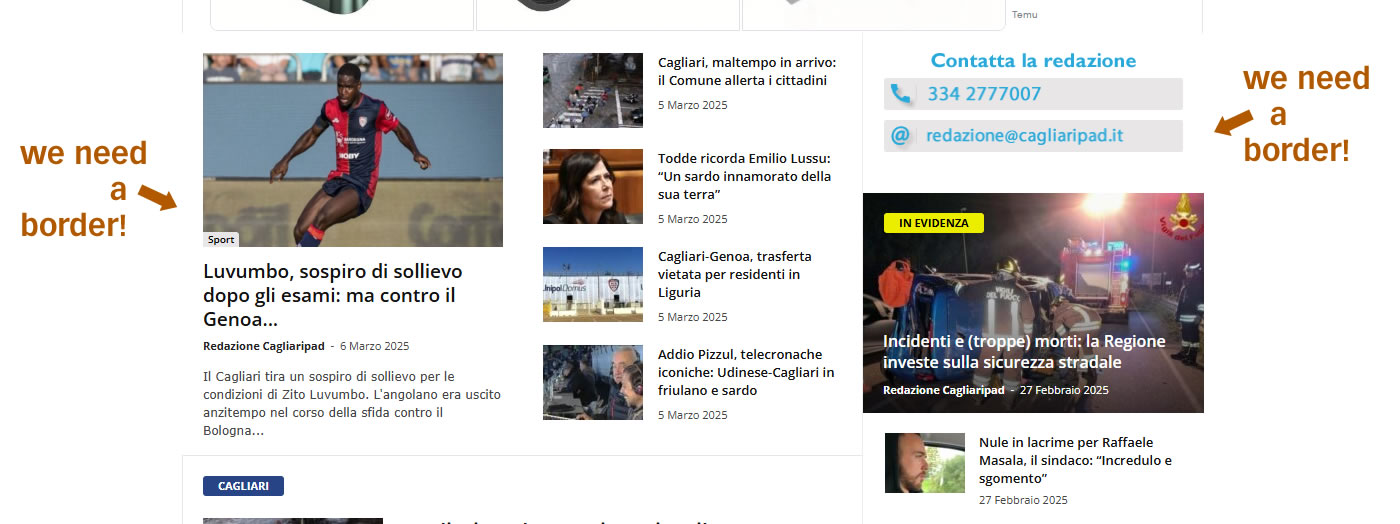
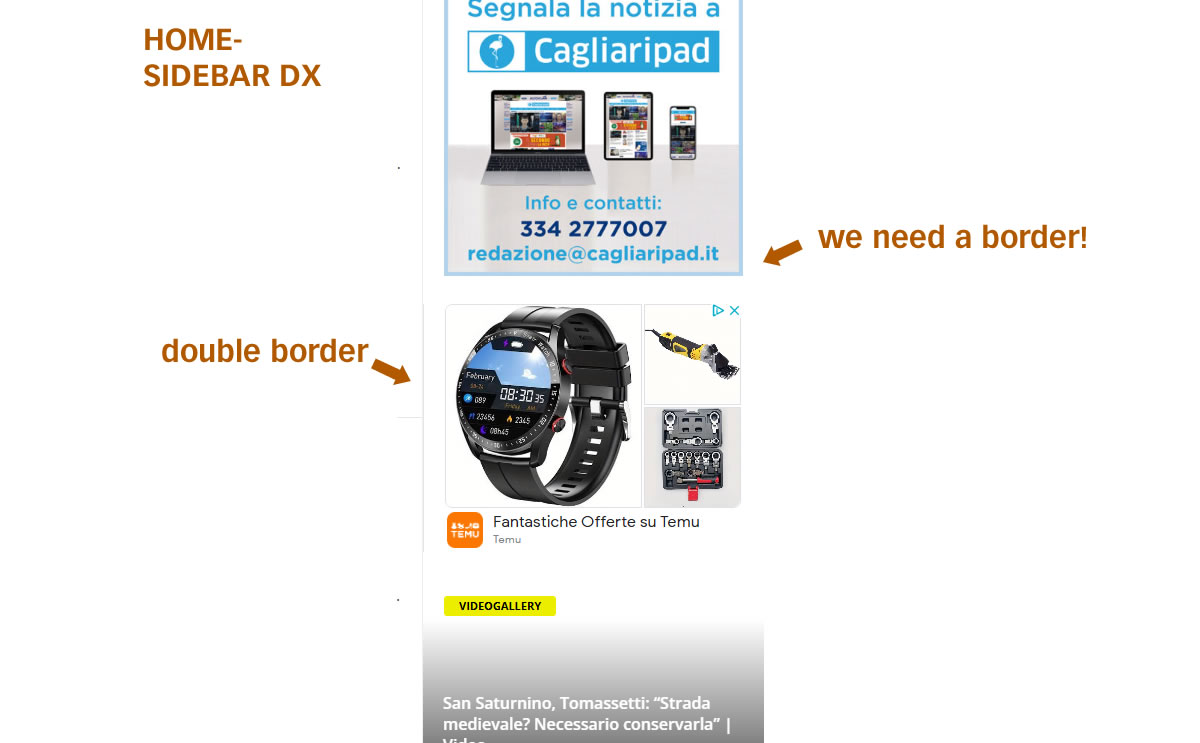
I can talk to you now about the edges task.
In the meantime, thank you for helping us in all cases. You’re very good.
as I wrote, we cannot manage or change the edges.
We’ll want the entire homepage with the light gray border of the theme.
I’ll send you examples of where we fail to change them.
1 https://assets.cagliaripad.it/wp-content/uploads/2025/03/06114038/screen001.jpg
2 https://assets.cagliaripad.it/wp-content/uploads/2025/03/06114042/screen002.jpg
Thanks and good work
Bettina Hello!
Is the site visibility setting from WooCommerce live?
It’s possible to be from the firewall or security module that blocks the admin-ajax.php request, which usually displays a 403 or 404 error.
If you don’t use a security plugin, please ask your host about this; maybe you have a security module that blocks this.
If you use a plugin like Wordfence, please set it to learning mode.
Also, if you are using Cloudflare, please make sure that it is set as in our guide: https://forum.tagdiv.com/cloudflare-cdn/; you need to disable the Rocket Loader.
Examine some other potential interfering factors: https://forum.tagdiv.com/general-options-may-interfere-newspaper-theme/
Thank you!
 medvid
Hello. I purchased the newspaper plugin. I install and all runs fine. Now, for example I install the demo NEWSWEEK and all is loaded and without error but if I click the NEWSWEEK header orange letters it gives me:
Server Error
403
Forbidden
You do not have permission to access this document.
That’s what you can do
With just click nothing else. To make enable again the wordpress that crash hard. I need to remove caches and login again but the error is there. There is som3thing wrong as the last time before this minimal example I just changed in general settings of wordpress the permalinks and that caused the error and impossible to click again on anything due the same error 403. Now is the same using just that NEWSWEEK Demo and with just clicking the orange NEWSEEK letters crash. How can i override this?
Anamaria Hi,
You should check the errors from the console (CTRL + right-click -> Inspect -> Console -> Network -> select the error and after select the preview) while it is loading so you can see which errors you encounter there. Maybe there is 403 generated by Wordfence, SiteGround, etc.
Please check the steps from here: https://forum.tagdiv.com/topic/unable-to-edit-text-with-title/ and also another possible issue as here: https://forum.tagdiv.com/topic/403-error-on-tagdiv-composer-when-trying-to-use-wp-editor-wpedito-php/
Please check your .htaccess file: https://www.screencast.com/t/MJ78SDZr4Gl -> https://forum.tagdiv.com/general-options-may-interfere-newspaper-theme/
Let me know the results!
Thank you!
 engage-media
WHen I try and edit text to columns contnet the WP Editor doesn’t load.
I get a 403 error that ths plugin failed to load.
I have tried resetting permissions on our hosting. Is there anything else I can try
Anamaria Hello,
You can check those topics https://wordpress.stackexchange.com/questions/403907/ignoring-a-links-from-the-excerpt -> https://stackoverflow.com/questions/55463264/removing-url-from-displaying-in-get-the-content
Thank you!
Anamaria Hi,
You should check the errors from the console (CTRL + right-click -> Inspect -> Console) while it is loading so you can see which errors you encounter there.
Please check the steps from here: https://forum.tagdiv.com/topic/unable-to-edit-text-with-title/ and also another possible issue as here: https://forum.tagdiv.com/topic/403-error-on-tagdiv-composer-when-trying-to-use-wp-editor-wpedito-php/
Please check your .htaccess file: https://www.screencast.com/t/MJ78SDZr4Gl -> https://forum.tagdiv.com/general-options-may-interfere-newspaper-theme/
Let me know the results!
Thank you!
Anamaria Hi,
Please check the console when you hit the save button and see if there is an error. With right-click -> inspect -> console -> select the error in the tab network -> preview, you can see the cause and check the suggestion from here https://forum.tagdiv.com/topic/newspaper-theme-panel-settings-are-not-being-saved/ -> https://community.godaddy.com/s/question/0D58W00007ggvUDSAY/403-forbidden-error-not-sure-why
Check all these requirements for the theme: https://forum.tagdiv.com/requirements-for-newspaper/
Also, have you checked for a plugin conflict?
Thank you!
Anamaria Hi,
Please check the console when you hit the save button and see if there is an error. With right-click -> inspect -> console -> select the error in the tab network -> preview, you can see the cause and check the suggestion from here https://forum.tagdiv.com/topic/newspaper-theme-panel-settings-are-not-being-saved/ -> https://community.godaddy.com/s/question/0D58W00007ggvUDSAY/403-forbidden-error-not-sure-why
Check all these requirements for the theme: https://forum.tagdiv.com/requirements-for-newspaper/
Also, have you checked for a plugin conflict?
Thank you!
 SvijetS
 sorry Anamaria but this isn’t have anything with the new tab on client browser, this is server problem
{“data”:{“error”:”Imgur is temporarily over capacity. Please try again later.”},”success”:false,”status”:403}
Please read previus query
thx
SvijetS I don’t see all pictures there is 403 error
 JBW23
JBW23I’m having two issues with the theme that i’m hoping someone could shed some light on.
1) I’m loading a page in the menu which works great when it’s on a “page”, but when I’m on a CPT/Taxonomy “page” the styling goes out of the window – unable to understand why, or what’s happening here?
2) When I load two or more pages in the menu, I get the error “Errors at columns: 1(models) : 3(dom). The model does not match the content Current state has involved an issue.”
In both of the pages i’m loading in the menu, I have menus, and Flex Loop and Flex Block builders – i’ve been playing around between both block and loop to see if there’s issues there, but they show for both.
Here’s a loom showing how the issues are presenting themselves for both:
https://www.loom.com/share/0d59a06ec97e4b249540377541b96cce?sid=0b9a821b-d935-4176-8491-671de23b141e
Any ideas what’s happening, or what i’ve done wrong here?
Any help is greatly appreciated.
Thanks
Anamaria Hi,
Please check the console when you hit the save button and see if there is an error. With right-click -> inspect -> console -> select the error in the tab network -> preview, you can see the cause and check the suggestion from here https://forum.tagdiv.com/topic/newspaper-theme-panel-settings-are-not-being-saved/ -> https://community.godaddy.com/s/question/0D58W00007ggvUDSAY/403-forbidden-error-not-sure-why
Thank you!
 mundoplus
 Yes, I set it up. It had been working until now. Do you think the 403 error message is because of that?
If so, I will try to regenerate the Youtube Api Key
Anamaria Hi,
Please check the console when you hit the save button and see if there is an error. With right-click -> inspect -> console -> select the error in the tab network -> preview, you can see the cause and check the suggestion from here https://forum.tagdiv.com/topic/newspaper-theme-panel-settings-are-not-being-saved/ -> https://community.godaddy.com/s/question/0D58W00007ggvUDSAY/403-forbidden-error-not-sure-why
Thank you!
Anamaria Hello,
What server do you use? Also, please set the permalinks to plain and check after. You can check also, this guide https://www.hostinger.com/tutorials/what-is-403-forbidden-error-and-how-to-fix-it?utm_campaign=Generic-Tutorials-DSA|NT:Se|LO:Other-EU&utm_medium=ppc&gad_source=1&gclid=CjwKCAiA-ty8BhA_EiwAkyoa31YPjs7O0aFCHrMIZX6CHANmvCZV8uc-TG_2OMCt89t-UmN3k4YATxoCkYIQAvD_BwE
Thank you!