- NewsmagUsing the theme translations together with WPML
- NewsmagHow to update a plugin
- NewsmagCustom Post Type Support
- NewsmagAbove footer ads
- NewsmagWeather Widget
- NewsmagHow to update the theme
- NewsmagIntroduction
- NewsmagLogo & Favicon
- NewsmagFooter templates
- NewsmagUsing other ads
- NewsmagCustom ad spots
- NewsmagArticle ads
- NewsmagSidebar ads
- NewsmagHeader ads
- NewsmagLoading image effects
- NewsmagCategory top post styles
- NewsmagSmart Lists
- NewsmagGeneral settings
- NewsmagTheme thumbs
- NewsmagtagDiv slider gallery
 Dimitron
Hi,
I have a few examples where I can’t seem to change the text’s font style and size. Mostly with titles. I’m checking with “whatfont” extension to make sure, and there’s very surprising settings that have never been set by me in the backend. Also cleared cache in shop and did control + F5.
I basically have 2 fonts that I want to use: PT Sans (in titles) and Georgia (in body). I checked the font setting repeatedly in backend to no avail.
Issues:
– Blog Article titles (posts are working well tho)
– In composer (on homepage specifically): homepage blog post, image blocks TITLE incorrect
– In backend text editor (when writing posts) I see old settings, not the font I see in the frontend
– Footer social media text (open sans?)
– in category pages (ex. https://www.dimitrovadam.hu/elet-tudas/): the category body text, article titles (with thumbnail, and in the list below the thumnbails too)
Apart from this the only issue I have is that in 1) Mozilla 2) Chrome incognito mode the logo disappears from the menu, and only the top menu appears. Sometimes it appears.
 simchris
 Theme has nothing to do with RSS feeds.
There is long standing documentation on the web to add a ‘function’ either via theme or plugin, to inject the featured image into the attachment based on featured image.
Also – note that if you have no featured image “inside” the post meta, there will be no image in the RSS feed.
You can easily view your RSS feed code in Chrome to “see” what is actually there. Feedburner does show images as long as the image is in the post meta and not “outside” the body — for example, some templates where the main image is in a background div, or outside the post meta — obviously is not in the post meta for the RSS feed.
It’s well known, but perhaps new to most, that you can simply create your own RSS feed by making a new post template and then publish that feed to syndicate (we do that here).
So, you might make customfeed.php as a page template, make empty page with that name, select the template; then you end up with mysite.xxx/customfeed/ as the feed.
By making a custom RSS feed, you can include the ‘large’ thumbnail for the featured image within the top of the post meta in the FEED template, so that there is always the image in the feed.
Some info
http://www.wpbeginner.com/wp-tutorials/how-to-create-custom-rss-feeds-in-wordpress/
I don’t work here — just some feedback. Theme doesn’t control the default WP RSS feeds — was the upshot; the RSS is part of WordPress, and simply pulls post meta and nothing else.
 rjdtramirez
I’m trying to edit the page Manage with Live Preview:

Here is the link it is accessing but blank:
website/wp-admin/customize.php?autofocus%5Bpanel%5D=widgets&return=%2Fwp-admin%2Fwidgets.php
also, how to fix my social sharing? it is broken in any of my articles:

 GBHarlequin
There always seems to be something.
1. When I try to interact with the theme panel (reduce opacity, change font, etc.) it throws the following error in the console:
VM499:1 POST http://www.tokenverse.com/wp-admin/admin-ajax.php?td_theme_name=Newspaper&v=8.6 net::ERR_CONNECTION_RESET
(anonymous) @ VM499:1
send @ load-scripts.php?c=1&load[]=jquery-core,jquery-migrate,utils,jquery-ui-widget,moxiejs,plupload,jquery-ui-core,jquery-ui-mouse&ver=4.9.2:4
ajax @ load-scripts.php?c=1&load[]=jquery-core,jquery-migrate,utils,jquery-ui-widget,moxiejs,plupload,jquery-ui-core,jquery-ui-mouse&ver=4.9.2:4
(anonymous) @ td_wp_admin.min.js?ver=8.6:45
dispatch @ load-scripts.php?c=1&load[]=jquery-core,jquery-migrate,utils,jquery-ui-widget,moxiejs,plupload,jquery-ui-core,jquery-ui-mouse&ver=4.9.2:3
r.handle @ load-scripts.php?c=1&load[]=jquery-core,jquery-migrate,utils,jquery-ui-widget,moxiejs,plupload,jquery-ui-core,jquery-ui-mouse&ver=4.9.2:3
I’ve tried modifying the WP Hearbeat and deleting some plugins, although I am wary of deleting ALL of my plugins to see if any of those are the culprit; I may just do that to narrow it down.
2. Occasionally, my site refuses to save new drafts, preview drafts, or publish material. Currently, it throws this error:
Navigated to chrome-error://chromewebdata/
The second error has been an intermittent thing. The first one started after updating the theme from 8.1 to 8.6, although I had not made changes in the theme panel for a long time. Could be a connection.
Any advice would be much appreciated.
 vujo91
Problem: It will be better to let Google to see FULL page- not paged.
Example: http://blabla.com/article-example/ – 150 words
http://blabla.com/article-example/1/ – 120 words
http://blabla.com/article-example/2/ – 200 words
http://blabla.com/article-example/3/ – 150 words
Every Page have small number of words, it will be better for Google Index that you have one page with 620 words. I know I can do it on same page, but I want it paged… every page – more ads I show ! So…
Is is possible to make a page: http://blabla.com/article-example/?full and it will be Canonical URL and Google will index that page, not split pages.
I hope you understand me… sorry for my bad English
 Mercuriel
Hi there,
When viewing my website from my Android Motorola Phone that uses the Google Chrome app, the colourful background image jumps when scrolling down from the top of the page. Once it jumps (a white box appears at the bottom of the screen then it resizes the photo) it then works as it should and stays fixed & static as you scroll down.
Is there any way to stop it from jumping at all?
Chris
 gsasho
Hello,
Soon I bought a newspaper 🙂
I started picking up things. Without wanting at one of the blocks In TD Composer, I tried to write a shortcode name in Cyrillic alphabet.
Since then, it does not allow me to save any shortcodes in TD Composer. I cleared all sorts of caches in browsers and on the server, but not working. Chrome Inspect Element tool say:
Uncaught DOMException: Failed to execute 'btoa' on 'Window': The string to be encoded contains characters outside of the Latin1 range.

    at callbackYes (https://www.300qdove.com/wp-content/plugins/td-composer/assets/js/js_files_for_wrapper.min.js?ver=__td_aurora_deploy_version__:294:118)

    at HTMLButtonElement.<anonymous> (https://www.300qdove.com/wp-content/themes/Newspaper/js/td_wp_admin.min.js?ver=8.6:138:55)

    at HTMLButtonElement.dispatch (https://www.300qdove.com/wp-admin/load-scripts.php?c=1&load%5B%5D=jquery-core,jquery-migrate,jquery-ui-core,jquery-ui-widget,jquery-ui-mouse,jquery-ui-draggable,utils,moxiejs,plupload&ver=4.9.2:3:12444)

    at HTMLButtonElement.r.handle (https://www.300qdove.com/wp-admin/load-scripts.php?c=1&load%5B%5D=jquery-core,jquery-migrate,jquery-ui-core,jquery-ui-widget,jquery-ui-mouse,jquery-ui-draggable,utils,moxiejs,plupload&ver=4.9.2:3:9173)
Print Screen:
http://prntscr.com/i64b90
Can you help me?!
 pabelp
 Sebastian Escobar
Hi
I have active the option for to show author’s name in posts (Newspaper > Theme panel > Posts settings > SHOW AUTHOR NAME) but the names don’t show. The same in the category view. For example in demo the author “John Chao” is visible in most of posts (https://demo.tagdiv.com/newspaper_medicine/). My site is http://chilecientifico.com/la-agencia-cientifica-de-chile/
What can I do?
Thanks!
 sneakerstech
Hi,
We’ve recently been receiving a javascript error on our Google Search Console after each post is created.
For example:
So every time I create a new post, I get a javascript (404) error within my google search console.
For example:
1. Latest Post = /adidas-x-dragon-ball-z-prophere-inspired-by-character-cell/
2. Google Error (404) = /adidas-x-dragon-ball-z-prophere-inspired-by-character-cell/javascript%3Avoid(0
* At the end of the link, we get “/javascript%3Avoid(0
Would this be theme related?
If not, any idea where it could be coming from?
We would appreciate any help we can get.
Thank you.
 detroitgazette
Hello how do I make the video post page look like yours/this?
Also is there forum support with this template, would you recommend installing buddypress?
 Simion C.
 Hi,
I have tested the text background, it looks like this for me
– https://www.screencast.com/t/i5cjr75oKT
– https://www.screencast.com/t/UExdk74AM4S
That issue would happen if you for example increase the font size but not the line height
– https://www.screencast.com/t/GvIMKdUDEs8q
– https://www.screencast.com/t/s3MwtXppiw
The highlight also seems to have more height in your example, please provide a link to your website where this is present so I can inspect it.
Thanks
 Prajwal Desai
 1) AMP – I got the answer, it’s coming in future update.
2) Message / alert box – I haven’t got the answer. Are you suggesting me to use custom code for this as well ?. If you can add dropcaps, buttons then why not message box ?. I can modify the css file and add code but with every update the code goes off. Since i want to display colored message box, i have to define multiple codes for each color in css. Can’t you even consider this as a request ?.
3) 4)- I Got the answer. Can you tell me how do we change background color of quote box ?.
5) haven’t got the answer. How do we ensure google adsense ads are displayed in firefox and chrome when they are blocked.
6) Post update date – I have referred the post and it does not display updated date in google search. It just adds “last updated label” to all posts. Though you have updated the post or not, it just shows last updated on all posts which is incorrect. Ideally it should show last updated date only if post has been updated recently. So please give me a proper solution for this.
-
This reply was modified 8 years by
Prajwal Desai.
-
This reply was modified 8 years by
-
This reply was modified 8 years by
Simion C. Hi,
The images are displaying fine at the moment from what I can see, on the whole website
– https://www.screencast.com/t/OA2JjvvyxQGs
Only the latest version is available for download. In order to update the theme please follow this guide
– https://forum.tagdiv.com/how-to-update-the-theme-2/
The most recommended method would be by FTP, and as always make a backup first. Update the theme plugins as well (deactivate and remove, then reinstall from latest theme package).
Note that in version 8 of the theme, the tagDiv composer was introduced. This composer will be activated by default when the theme is updated or installed. In order to use it all the pages have to be recreated with it. Or you can continue using Visual composer for the moment, and make the transition when you want, if you want. More about it here
– https://forum.tagdiv.com/tagdiv-composer-tutorial/
– https://forum.tagdiv.com/visual-composer-tagdiv-composer-transition/
Also a multi-purpose plugin was introduced, this adds many more elements and options to the tagDiv composer only
– https://www.youtube.com/watch?v=C0ARTSimnUY&t=287s
Visual composer (now WPBakery Page Builder) is still provided in the theme package and updates are included along with the theme
– https://forum.tagdiv.com/how-to-update-visual-composer-plugin/
Let us know if you should encounter issues after the update. It is a general recommendation to always keep WordPress and the theme updated.
Thanks
 Edward
 > AMP theme and ads
https://tagdiv.com/amp-newspaper-theme/
2 Developers:
Message / Alert boxes, Style quotes, Inline Related Posts (!!!) and etc. – live preview like for example here:
http://demo.betterstudio.com/publisher/shortcodes/advanced-blockquotes-pack/
http://demo.betterstudio.com/publisher/shortcodes/custom-lists/
http://community.betterstudio.com/publisher-doc/inline-related-posts/
http://community.betterstudio.com/publisher-cat/posts-pages/
 Catalin
 Hello Pradeep Augustine,
You should use such a bit of CSS code if you want to hide the featured images for such a post from a certain category. Please use the Inspector browser, take the specific category of your featured image. Below I gave you a simple example how you should be done.
@media (max-width:768px){

.category-lifestyle .td-post-featured-image{

display:none;

}

}
The result can be found here -> https://www.screencast.com/t/T0Oj6Yqk
Thanks for your understanding!
Prajwal DesaiHi,
I have got some feature requests, could you please look to add them in upcoming updates.
1) AMP theme and ads – Currently AMP plugin by automatic doesn’t display ads, could you come up with a new AMP plugin and allow us to display ads(more like a mobile theme plugin which you have).
2) Message box/ alert box + custom list shortcode – I know we can display a neat message box using custom css code. But if you could add it under shortcodes dropdown options (where buttons, dropbox and other shortcodes) are present, it would be great. Something like this –
https://snag.gy/8bdvku.jpg
https://snag.gy/PJnDwj.jpg
3) Ability to style quotes – Is there a way to set background for quotes ?. Something like this –
https://snag.gy/va4PHe.jpg
4) Ads on/off switch – Can you create a option to turn off ads for whole site at once ?. Currently one has delete the ads from all the locations > save to see how better website works with / without ads.
5) Adblocker detection – Can you add a feature where the website reports that adblocker is detected and one has to disable to view the site.
6) Post update date – Can you add an option to show post last updated date ?. I am very sure the current workaround of replacing the code doesn’t work well.
 citynews
 Hi Bogdan,
thank you for your response.
Where should I than deactivate the tagdiv composer after the updates? And where did I find the plugins? And is it possible to buy the full license of the VC (for further updates) at evato for example?
Simion C. The bold tag corresponds to the font bold value. You could modify it for all of them at once with a code. For example all the b tags in a post content
– https://www.screencast.com/t/f97r0nWh1Xkb
.td-post-content b {

font-weight: 400;

}
This code can be entered in Theme panel->Custom CSS.
Or for all the instances the b or strong tags are used
b, strong {

font-weight: 400;

}
Thanks
 Bogdan B.
 Hello,
Yes indeed amp implementation in our theme is on they way, but for the moment i can;t say for sure if it will work together with the mobile theme or not. It is still in development and a final decision was not taken in this regard.
I’m not sure what featured images you are referring to for categories though. A category does not have a featured image in our theme. Please provide an example of the immage you are referring to so I can provide the proper code.
Thank you!
Simion C. Hi,
Indeed that is a pretty old version of the theme. Much has changed in the theme since then. Also there might be issues with the latest version of WordPress.
This is an update guide that you can follow
– https://forum.tagdiv.com/how-to-update-the-theme-2/
The most recommended method would be by FTP, and as always make a backup first. Update the theme plugins as well (deactivate and remove, then reinstall from latest theme package).
Note that in version 8 of the theme, the tagDiv composer was introduced. This composer will be activated by default when the theme is updated or installed. In order to use it all the pages have to be recreated with it. Or you can continue using Visual composer for the moment, and make the transition when you want, if you want. More about it here
– https://forum.tagdiv.com/tagdiv-composer-tutorial/
– https://forum.tagdiv.com/visual-composer-tagdiv-composer-transition/
Also a multi-purpose plugin was introduced, this adds many more elements and options to the tagDiv composer only
– https://www.youtube.com/watch?v=C0ARTSimnUY&t=287s
Visual composer (now WPBakery Page Builder) is still provided in the theme package and updates are included along with the theme
– https://forum.tagdiv.com/how-to-update-visual-composer-plugin/
Let us know if you should encounter issues after the update.
Thanks
 videomaker
 My parameters are correct; This url is looping without end: /wp-admin/post.php?post_id=#####&td_action=tdc
I am currently using 8.6. I have all composer, multi-, social (from tag div) installed
videomaker My parameters are correct; This url is looping without end: /wp-admin/post.php?post_id=#####&td_action=tdc
I am currently using 8.6. I have all composer, multi-, social (from tag div) installed
 rafael-l
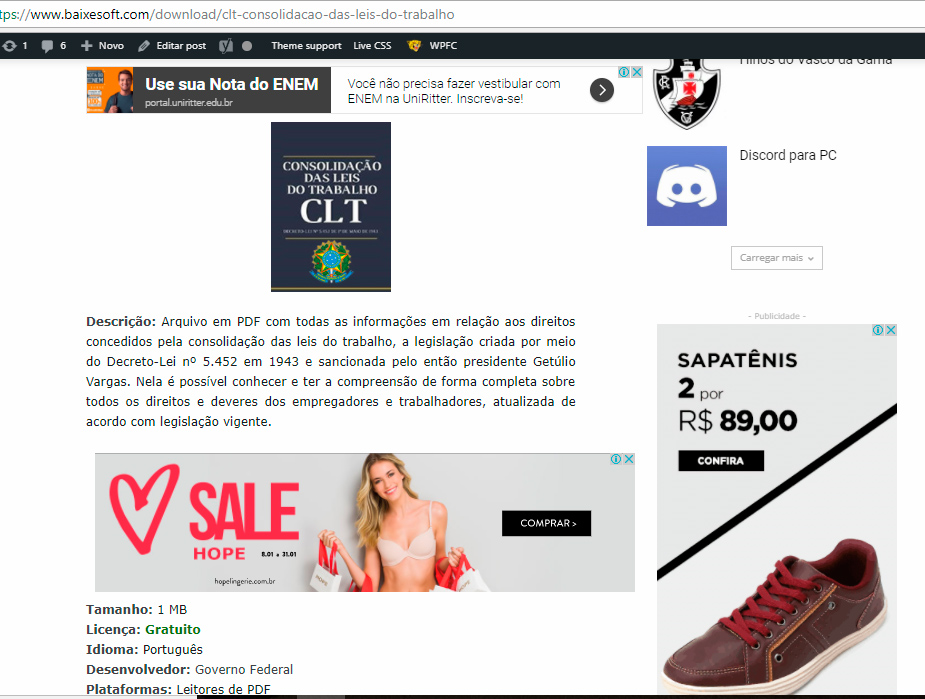
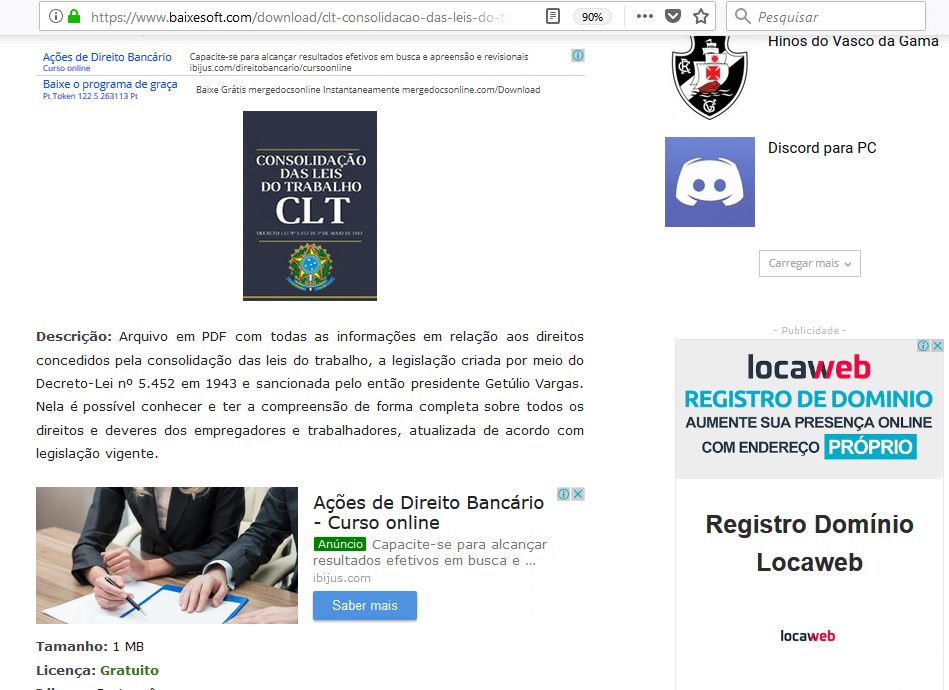
 Hi there again, i will post this here because is related, so the thing is i just applied the theme on the actual site and i have one last, but VERY SEVERE problem with the ads that happen only on Google Chrome, sometimes in Microsoft Edge, but never on Firefox.
I’m using 1 responsive and 1 native adsense blocks with the plugin quick adsense (i don’t use the native theme tool because the ads become very small than they supposed to be with the automatic function, so for me it dont work good, far from it actually).
The thing is i used this code on theme panel >> custom code >> Advanced CSS >> Desktop
.td-post-content {
padding-left:6%;
padding-right:6%;
}
And the ads on chrome become outfited with the content like this: https://www.baixesoft.com/wp-content/uploads/2018/01/Ad-bug-on-chrome-1.jpg
But on firefox it fit’s just nice: https://www.baixesoft.com/wp-content/uploads/2018/01/Ads-on-firefox.jpg
One example link: https://www.baixesoft.com/download/clt-consolidacao-das-leis-do-trabalho
Unfortunately 60 to 70% of my users use chrome, so this is very severe for me, i tried everything, all the others plugins, but nothing, i really don’t know what do do here anymore (tried to fiz this all day), so i’m asking for any ideas, any help, anything at all.
The solution will be to use the native option for blocks in the theme, i already tried but that automatic box for desktops junk this responsive ads real BAD, making them tiny (respectfully saying and meaning no offense)
If needed i can pay for some special service to fix this, because is a VERY SEVERE ISSUE…
-
This reply was modified 8 years by
rafael-l.
GBHarlequin Actually, any new settings applied to the theme panel fail to load. This is what the console comes up with:
(index):7 WebSocket connection to ‘wss://public-api.wordpress.com/pinghub/wpcom/me/newest-note-data’ failed: Error during WebSocket handshake: Unexpected response code: 403
O @ (index):7
/wp-admin/admin-ajax.php?td_theme_name=Newspaper&v=8.6 Failed to load resource: net::ERR_CONNECTION_RESET
3(index):7 WebSocket connection to ‘wss://public-api.wordpress.com/pinghub/wpcom/me/newest-note-data’ failed: Error during WebSocket handshake: Unexpected response code: 403
O @ (index):7
j @ (index):7
x @ (index):7
n @ (index):7
(anonymous) @ (index):7
dispatch @ ??/wp-includes/js/jquery/jquery.js,/wp-content/js/postmessage.js?m=1377267974j:3
r.handle @ ??/wp-includes/js/jquery/jquery.js,/wp-content/js/postmessage.js?m=1377267974j:3
-
This reply was modified 8 years by
GBHarlequin.