- ApiPractical example – How to add a new Block and Module
- Apitd_api_top_bar_template::delete
- Apitd_api_top_bar_template::update_key
- Apitd_api_top_bar_template::update
- Apitd_api_top_bar_template::add
- Apitd_api_single_template::delete
- Apitd_api_single_template::update_key
- Apitd_api_single_template::update
- Apitd_api_single_template::add
- Apitd_api_footer_template::delete
- Apitd_api_footer_template::update_key
- Apitd_api_footer_template::update
- Apitd_api_footer_template::add
- Apitd_api_smart_list::delete
- Apitd_api_smart_list::update_key
- Apitd_api_smart_list::update
- Apitd_api_smart_list::add
- Apitd_api_thumb::delete
- Apitd_api_thumb::update_key
- Apitd_api_thumb::update
 Web Macaw
Hello
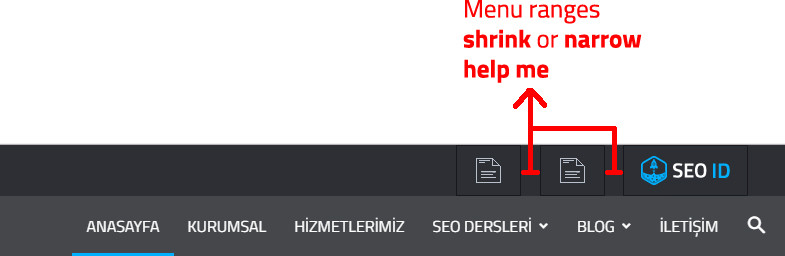
I am very happy to use the theme. But I have a few wishes and wishes, I think you will help me
I added pictures to the top menus, but among them there are gaps. I want to delete these gaps.
Examples: https://i.hizliresim.com/yz7Y2j.jpg
Please Help me
SEO
Web MacawHello
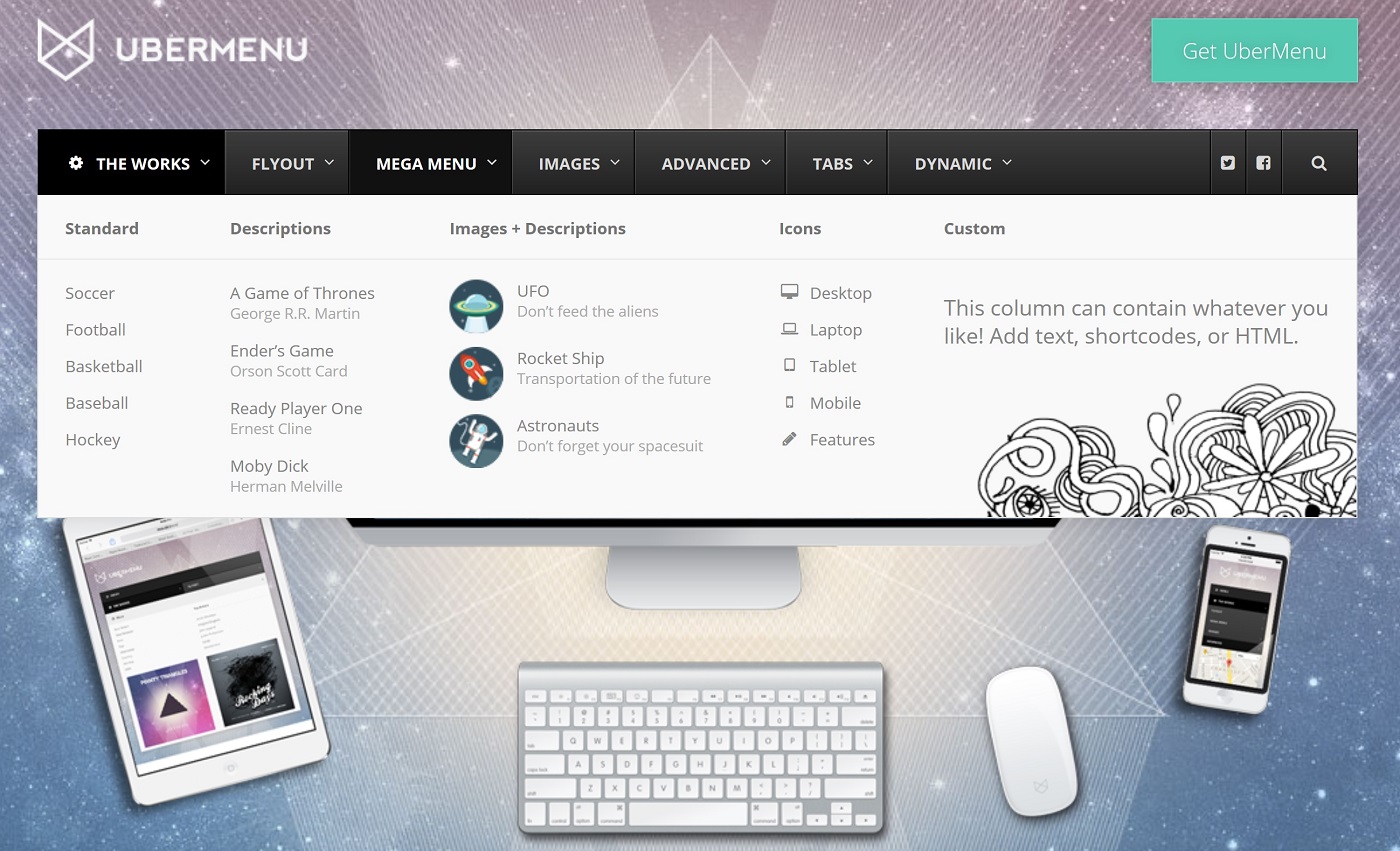
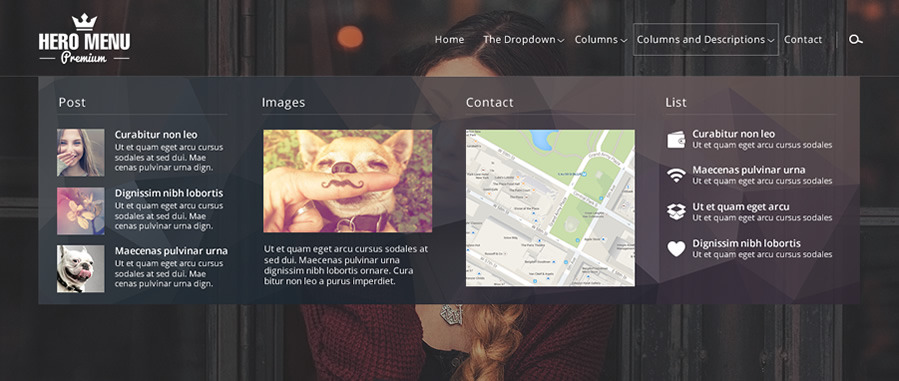
the only problem is menu, I want a menu like drop down sample;
additional plugin possible to find In my opinion
https://winningwp.com/wp-content/uploads/2017/01/UberMenu-Mega-Menu.jpg
https://s3.envato.com/files/122331541/01_MegaMenu.jpg vs vs
the menu title should be 7
 globalpro
 Additional Info: We have a Maintenence Page up because we’re running a campaign that required the removal of one of the GIFs. We have removed and deleted it along with several changes to the page. However, after updating, previewing, it looks fine. In short order, we go back to the homepage and it has reverted back to the deleted materials. We can’t sort this out. Need to get back online quickly. Please help https://lrsuntimes.com
 Mariano Jonte
 veludoleao
I would like to know how to set up the default background color from modules to be the same as my website standard.
I know that I am able to change it from module configuration. But some elements comes with a blue background color from default (e.g. arrow to go up, youtube module, related articles etc.).
Example of youtube module: https://squashistas.com.br/guia-de-equipamentos/
Thanks
 22p
22pHi and merry christmas!
I need update my theme from 8.2 to 8.5.1 and i ask an advice to avoid big problem.
I have a:
–> master theme (this is 8.2 and i need to update to 8.5.1)
–> child theme (this have many custom code)
Can i do these 2 step:
1) update the plugin with new release (example: Visual Composer).
2) Overwrite the theme folder with the 8.5.1 release.
Really thanks.
Mariano JonteHello, I wanted to know how you can remove or add a social network to share or not in a note. (See attached image).
http://lasopapa.com/wp-content/uploads/2017/12/Captura-de-pantalla-2017-12-26-a-las-14.39.38-1024×511.png
I need to remove Google+ for example.
 33ParkMedia
 This was provided by our host…
JQMIGRATE: Migrate is installed, version 1.4.1
post.php?post_id=35&td_action=tdc:406 Uncaught SyntaxError: Invalid or unexpected token
post.php?post_id=35&td_action=tdc:406 Uncaught TypeError: “+” is not a function
at post.php?post_id=35&td_action=tdc:406
(anonymous) @ post.php?post_id=35&td_action=tdc:406
js_files_for_wrapper.min.js?ver=__td_aurora_deploy_version__:263 Uncaught TypeError: Cannot read property ‘postMetaVcJsStatus’ of undefined
at Object.init (js_files_for_wrapper.min.js?ver=__td_aurora_deploy_version__:263)
at Object.init (js_files_for_wrapper.min.js?ver=__td_aurora_deploy_version__:268)
at js_files_for_wrapper.min.js?ver=__td_aurora_deploy_version__:269
at js_files_for_wrapper.min.js?ver=__td_aurora_deploy_version__:269
init @ js_files_for_wrapper.min.js?ver=__td_aurora_deploy_version__:263
init @ js_files_for_wrapper.min.js?ver=__td_aurora_deploy_version__:268
(anonymous) @ js_files_for_wrapper.min.js?ver=__td_aurora_deploy_version__:269
(anonymous) @ js_files_for_wrapper.min.js?ver=__td_aurora_deploy_version__:269
post.php?post_id=35&td_action=tdc:2239 Uncaught TypeError: Cannot read property ‘length’ of undefined
at HTMLDocument.<anonymous> (post.php?post_id=35&td_action=tdc:2239)
at i (load-scripts.php?c=0&load[]=jquery-core,jquery-migrate,jquery-ui-core,utils,plupload,jquery-ui-widget,jquery-ui-mouse,jquery-ui-draggable,jquery-ui-slider,j&load[]=query-touch-punch,iris,wp-color-picker&ver=4.8.4:2)
at Object.fireWith [as resolveWith] (load-scripts.php?c=0&load[]=jquery-core,jquery-migrate,jquery-ui-core,utils,plupload,jquery-ui-widget,jquery-ui-mouse,jquery-ui-draggable,jquery-ui-slider,j&load[]=query-touch-punch,iris,wp-color-picker&ver=4.8.4:2)
at Function.ready (load-scripts.php?c=0&load[]=jquery-core,jquery-migrate,jquery-ui-core,utils,plupload,jquery-ui-widget,jquery-ui-mouse,jquery-ui-draggable,jquery-ui-slider,j&load[]=query-touch-punch,iris,wp-color-picker&ver=4.8.4:2)
at HTMLDocument.K (load-scripts.php?c=0&load[]=jquery-core,jquery-migrate,jquery-ui-core,utils,plupload,jquery-ui-widget,jquery-ui-mouse,jquery-ui-draggable,jquery-ui-slider,j&load[]=query-touch-punch,iris,wp-color-picker&ver=4.8.4:2)
(anonymous) @ post.php?post_id=35&td_action=tdc:2239
i @ load-scripts.php?c=0&load[]=jquery-core,jquery-migrate,jquery-ui-core,utils,plupload,jquery-ui-widget,jquery-ui-mouse,jquery-ui-draggable,jquery-ui-slider,j&load[]=query-touch-punch,iris,wp-color-picker&ver=4.8.4:2
fireWith @ load-scripts.php?c=0&load[]=jquery-core,jquery-migrate,jquery-ui-core,utils,plupload,jquery-ui-widget,jquery-ui-mouse,jquery-ui-draggable,jquery-ui-slider,j&load[]=query-touch-punch,iris,wp-color-picker&ver=4.8.4:2
ready @ load-scripts.php?c=0&load[]=jquery-core,jquery-migrate,jquery-ui-core,utils,plupload,jquery-ui-widget,jquery-ui-mouse,jquery-ui-draggable,jquery-ui-slider,j&load[]=query-touch-punch,iris,wp-color-picker&ver=4.8.4:2
K @ load-scripts.php?c=0&load[]=jquery-core,jquery-migrate,jquery-ui-core,utils,plupload,jquery-ui-widget,jquery-ui-mouse,jquery-ui-draggable,jquery-ui-slider,j&load[]=query-touch-punch,iris,wp-color-picker&ver=4.8.4:2
js_files_for_live_css.min.js?ver=__td_aurora_deploy_version__:11 Uncaught TypeError: Cannot read property ‘contents’ of undefined
at Object.init (js_files_for_live_css.min.js?ver=__td_aurora_deploy_version__:11)
at post.php?post_id=35&td_action=tdc:2262
at dispatch (load-scripts.php?c=0&load[]=jquery-core,jquery-migrate,jquery-ui-core,utils,plupload,jquery-ui-widget,jquery-ui-mouse,jquery-ui-draggable,jquery-ui-slider,j&load[]=query-touch-punch,iris,wp-color-picker&ver=4.8.4:3)
at r.handle (load-scripts.php?c=0&load[]=jquery-core,jquery-migrate,jquery-ui-core,utils,plupload,jquery-ui-widget,jquery-ui-mouse,jquery-ui-draggable,jquery-ui-slider,j&load[]=query-touch-punch,iris,wp-color-picker&ver=4.8.4:3)
init @ js_files_for_live_css.min.js?ver=__td_aurora_deploy_version__:11
(anonymous) @ post.php?post_id=35&td_action=tdc:2262
dispatch @ load-scripts.php?c=0&load[]=jquery-core,jquery-migrate,jquery-ui-core,utils,plupload,jquery-ui-widget,jquery-ui-mouse,jquery-ui-draggable,jquery-ui-slider,j&load[]=query-touch-punch,iris,wp-color-picker&ver=4.8.4:3
r.handle @ load-scripts.php?c=0&load[]=jquery-core,jquery-migrate,jquery-ui-core,utils,plupload,jquery-ui-widget,jquery-ui-mouse,jquery-ui-draggable,jquery-ui-slider,j&load[]=query-touch-punch,iris,wp-color-picker&ver=4.8.4:3
 slavamatador
 How do this? i install AMP but deactivate tagdiv mobile theme http://prntscr.com/hsbvid
Where i need to reserve permalinks
pagespeed insights shows -69 it ti slow
http://prntscr.com/hsbvaw
may be instal age speed booster from tag div?
 Edward
 Each post needs to have a featured image set, in order for the thumbnails to be created
– https://forum.tagdiv.com/theme-thumbs/
The theme will crop the images and create thumbnails
– https://forum.tagdiv.com/featured-image/
If an image is not set, the theme will display a default no-thumb placeholder on the modules. As for the size of the featured image, there is no recommendation. The demo you install contains mostly images of 1068 × 713 px, as mentioned. However, for superior thumbnail quality you could use bigger image sizes. For example, in the live demo this featured image size is used for a post
– https://demo.tagdiv.com/newspaper/wp-content/uploads/2016/01/01-girl.jpg
– https://demo.tagdiv.com/newspaper/
The mega menu uses a thumbnail as well, the thumbnail size cannot be changed
– https://www.screencast.com/t/7OLNwwdDyR8U
There are multiple post templates that you can choose from
– https://forum.tagdiv.com/post-templates-2/
See them live in the demo (Features menu).
 simchris
 Tweets embed just fine in your two page examples above. The content might be prohibited from your locale, isp filtering, or ad blocker app.
simchris The Automattic Amp plugin works great with theme. You need to resave permalinks after activation. Then the /amp/ endpoint works.
slavamatadorAMP for WP – Accelerated Mobile Pages for WordPress – not work! how to fix?
 karlgoddard
Hi
This is probably a very noob question… but is there a step by step guide that would show me how to create a page template / post type that would allow me to add 4 ACF fields so that the custom fields are displayed below the main body content but above the Previous / Next articles section and post meta ?
I’ve looked at the sample ‘book’ example of CPT and was lost completely. Any pointers would be great, thanks!
 KokoShanel
Hello. How do I put the counter code in the subject? So that you do not climb in the code? For example, the counter from Google.
 rupdog
Hi recently, when I embed twitter in posts it just shows as text. When I am creating these posts the tweet shows correctly in the visual editor, but they show as text in preview and when published. See couple examples of not working here:
https://www.rockonindia.com/salmans-tiger-zinda-hai-box-office-collection-day-1-set-explosive-opening/
https://www.rockonindia.com/prince-harry-meghan-markle-released-official-engagement-photos/
Instagram works great.
However I had done some twitter embed sometime back an they show correctly at:
https://www.rockonindia.com/scoop-life-famous-bollywood-celebs/
Please help me fix this issue.
Thanks
Rupi
 chrizzim
Is there a way to change the predefined post/page templates. For example: I would like to use a seperate post template for each category. So it would be nice if I can make my own predefined templates.
Thanks a lot!
 WilRC
WilRCHi,
I want to use hex codes directly to be sure that same colors are exactly the same.
Colors can be adjusted in two way:
* Change Colors Using Hex Codes
* Change Colors Using RGBA
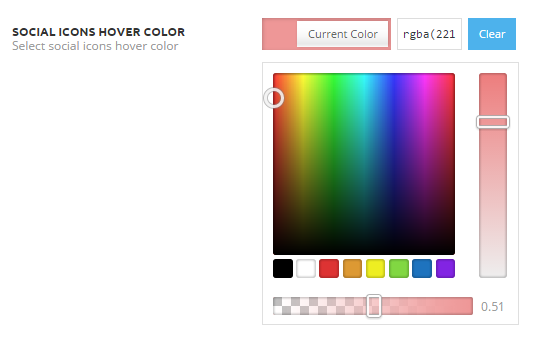
On my site I can’t use the hex code directly, the hex code box in missing! How to solve this?

 unit45host
 update:
The given example it actully appear only if I logged in as admin… – and only in Google Chrome – desktop browser.
If I log out as admin, or any other role member logged in its not shwon the bg image.
And not in another browsers desktop or mobile devices.
Something wrong..
Thx, Zoltan
screenshot: https://goo.gl/LZBxKR
website link: https://1000wordsmagazine.com/category/elet
 AnasTfx
Hi There
When I change post pagination buttons’s style by a plugin ,I got this problem in the link bellow ,I need the pagination to be at the bottom of the post up sharing buttons’s line,And by the way the plugin works good in other wordpress themes there is also an example,
The problem :

Working example :

 Kostas
 You could
a. Rename these files e.g. as “newspaper_theme_example_placeholder_*.jpg” Some of us design sites for customers who are mad with security. I didn’t know that these files were added via your plugin and didn’t know how to explain it. My customers assumed that I was using my admin account to login and post on their behalf.
b. Remove the content and use an “X” on a neutral grey background so that the placeholder will LOOK like a placeholder that everybody is familiar with.
-
This reply was modified 8 years by
Kostas. Reason: clarify
 latihlogika
Need help. My WPBakery Page Builder cannot work properly.
example: Screenshot > http://latihlogika.com/screenshot/screenshot1.jpg <- here i cannot click save, only close.
Also, i cannot click delete block > http://latihlogika.com/screenshot/screenshot2.jpg
simchris Perhaps share the exact example of the original menu setting, and then the new setting you are trying to do which is breaking your menus?
 Mladen Gradev
Hello,
I think it’s great that you want to create your own page builder, especially if it is lighter and faster than Visual Composer. Here I want to share my opinion about tagDiv Composer and give you some feedback, if it is OK.
I think that you have a lot of work to do until you reach the level of Visual composer. I my opinion your backend editor is not so user friendly and here are few examples:
01. Native theme elements are visualized great, but others, like “Widget Sidebar”, are poorly visible. You can make the height of this element bigger, because now it is something like 20 px and it is difficult to grab & edit.
02. Rows, Columns and other main elements are hard to understand and edit. In VC is a lot better – bigger and clear editor elements and controls.
03. Text block element is not working for me, when I hit “edit content” text editor pops up with loading circle element, which never load. There is a hidden error in an iframe:
“Warning: require_once(/home/***/public_html/files/plugins/td-composer/includes/wpeditor.phpwp-load.php): failed to open stream: No such file or directory in /home/***/public_html/files/plugins/td-composer/includes/wpeditor.php on line 13”
“Fatal error: require_once(): Failed opening required ‘/home/***/public_html/files/plugins/td-composer/includes/wpeditor.phpwp-load.php’ (include_path=’.:/usr/local/php7.0/lib/php’) in /home/***/public_html/files/plugins/td-composer/includes/wpeditor.php on line 13”
04. Text written in Cyrillic is visualized as symbols and take a lot of space in WP content editor. Example of such text: JTNDaDIlM0UlRDAlOTQlRDAlQkUlRDAlQjElRDAlQjAlRDAlQjIlRDElOEYlRDAlQkQlRDAlQjUlMjAlRDAlQkQlRDAlQjAlMjAlRDAlQjglRDAlQkQlRDElODQlRDAlQkUlRDElODAlRDAlQkMlRDAlQjAlRDElODYlRDAlQjglRDElOEYlMjAlRDAlQjIlMjAlRDAlQTYlRDAlQjAlRDElODAlRDAlQjUlRDAlQjIlRDAlQkUuJUQwJTk4JUQwJUJEJUQxJTg0JUQwJUJFJTNDJTJGaDIlM0UlMEElM0NwJTNFJUQwJTlFJUQxJTgyJTIwJUQxJTgyJUQxJTgzJUQwJUJBJTIwJUQwJUJDJUQwJUJFJUQwJUI2JUQwJUI1JUQxJTgyJUQwJUI1JTIwJUQwJUI0JUQwJUIwJTIwJUQwJUI0JUQwJUJFJUQwJUIxJUQwJUIwJUQwJUIyJUQwJUI4JUQxJTgyJUQwJUI1JTIwJUQwJUI4JUQwJUJEJUQxJTg0JUQwJUJFJUQxJTgwJUQwJUJDJUQwJUIwJUQxJTg2JUQwJUI4JUQxJThGJTIwJUQwJUJBJUQxJThBJUQwJUJDJTIwJUQxJTgxJUQwJUIwJUQwJUI5JUQxJTgyJUQwJUIwJTIwJUQwJUE2JUQwJUIwJUQxJTgwJUQwJUI1JUQwJUIyJUQwJUJFLiVEMCU5OCVEMCVCRCVEMSU4NCVEMCVCRS4lMjAlRDAlOUElRDAlQkUlRDAlQjMlRDAlQjAlRDElODIlRDAlQkUlMjAlRDAlQkQlRDAlQjAlRDElODIlRDAlQjglRDElODElRDAlQkQlRDAlQjUlRDElODIlRDAlQjUlMjAlRDAlQkQlRDElOEYlRDAlQkElRDAlQkUlRDAlQjklMjAlRDAlQkUlRDElODIlMjAlRDAlQjElRDElODMlRDElODIlRDAlQkUlRDAlQkQlRDAlQjglRDElODIlRDAlQjUlMjAlRDAlQkYlRDAlQkUtJUQwJUI0JUQwJUJFJUQwJUJCJUQxJTgzJTJDJTIwJUQxJTg5JUQwJUI1JTIwJUQwJUIxJUQxJThBJUQwJUI0JUQwJUI1JUQxJTgyJUQwJUI1JTIwJUQwJUJGJUQxJTgwJUQwJUI1JUQwJUJGJUQxJTgwJUQwJUIwJUQxJTgyJUQwJUI1JUQwJUJEJTJGJUQwJUIwJTIwJUQwJUJBJUQxJThBJUQwJUJDJTIwJUQxJTg0JUQwJUJFJUQxJTgwJUQwJUJDJUQwJUIwJTIwJUQwJUI3JUQwJUIwJTIwJUQwJUJGJUQwJUJFJUQwJUJGJUQxJThBJUQwJUJCJUQwJUIyJUQwJUIwJUQwJUJEJUQwJUI1JTIwJUQwJUJEJUQwJUIwJTIwJUQwJUI4JUQwJUJEJUQxJTg0JUQwJUJFJUQxJTgwJUQwJUJDJUQwJUIwJUQxJTg2JUQwJUI4JUQxJThGLiUyMCVEMCU5RiVEMCVCRSVEMCVCRiVEMSU4QSVEMCVCQiVEMCVCRCVEMCVCNSVEMSU4MiVEMCVCNSUyMCVEMCVCRiVEMCVCRSVEMCVCQiVEMCVCNSVEMSU4MiVEMCVCMCVEMSU4MiVEMCVCMCUyMCVEMCVCOCUyMCVEMCVCOCVEMCVCNyVEMCVCRiVEMSU4MCVEMCVCMCVEMSU4MiVEMCVCNSVEMSU4MiVEMCVCNSUyMCVEMSU4NCVEMCVCRSVEMSU4MCVEMCVCQyVEMCVCMCVEMSU4MiVEMCVCMCUyQyUyMCVEMCVCRCVEMCVCOCVEMCVCNSUyMCVEMSU4OSVEMCVCNSUyMCVEMCVCRiVEMCVCRSVEMCVCQiVEMSU4MyVEMSU4NyVEMCVCOCVEMCVCQyUyMCVEMCVCMiVEMCVCMCVEMSU4OCVEMCVCNSVEMSU4MiVEMCVCRSUyMCVEMCVCNyVEMCVCMCVEMCVCRiVEMCVCOCVEMSU4MiVEMCVCMiVEMCVCMCVEMCVCRCVEMCVCNSUyMCVEMCVCOCUyMCVEMSU4OSVEMCVCNSUyMCVEMSU4MCVEMCVCNSVEMCVCMCVEMCVCMyVEMCVCOCVEMSU4MCVEMCVCMCVEMCVCQyVEMCVCNSUyMCVEMCVCMiUyMCVEMSU4MyVEMCVCRiVEMCVCRSVEMCVCQyVEMCVCNSVEMCVCRCVEMCVCMCVEMSU4MiVEMCVCOCVEMSU4RiUyMCVEMSU4MSVEMSU4MCVEMCVCRSVEMCVCQS4lM0MlMkZwJTNF
05. Why you don’t have 1/2 + 1/2 columns in build-in elements? It is confusing.
Other than that everything is working great with latest theme and plugins updates 🙂
p.s. I can not understand why this topic is not viewing correctly?!
Edward Also:
When you decide to post content on your website, the theme automatically generates thumbnails from the featured image to display the content on your pages in an attractive way. This process creates 17 different thumbnail sizes. To make you website faster, you can control which thumbnail is generated. To do this go to Theme Panel > Block Settings > Thumbs on modules & blocks and disable the unused ones to save space on your server.
https://forum.tagdiv.com/newsmag-theme-thumbs/
-
This reply was modified 8 years by
Edward.