
- NewsmagUsing the theme translations together with WPML
- NewsmagHow to update a plugin
- NewsmagCustom Post Type Support
- NewsmagAbove footer ads
- NewsmagWeather Widget
- NewsmagHow to update the theme
- NewsmagIntroduction
- NewsmagLogo & Favicon
- NewsmagFooter templates
- NewsmagUsing other ads
- NewsmagCustom ad spots
- NewsmagArticle ads
- NewsmagSidebar ads
- NewsmagHeader ads
- NewsmagLoading image effects
- NewsmagCategory top post styles
- NewsmagSmart Lists
- NewsmagGeneral settings
- NewsmagTheme thumbs
- NewsmagtagDiv slider gallery
 Simion C.
 Hi,
That depends on where you want it to display. The modules for example will not display custom taxonomies, only default categories.
In the post page you can choose to display from the available taxonomies, in the CPT&Taxonomy section in the theme panel
– https://forum.tagdiv.com/custom-post-type-support/
Those are the only options and settings for custom post types available at the moment. There could be more support added in future updates, but I could not say for sure when this will happen.
Thanks
 Amit
AmitHello team tagDiv,
Google AdSense doing a great job by providing various ad units to boost earning. But unfortunately, Newspaper’s ad panel does not support most of them.
For Google AdSense, theme adds its own conditions to the code like this:
<script async src="//pagead2.googlesyndication.com/pagead/js/adsbygoogle.js"></script><div class="td-g-rec td-g-rec-id-content_top  ">
<script>
var td_screen_width = window.innerWidth;

                    if ( td_screen_width >= 1140 ) {
                        /* large monitors */
                        document.write('<ins class="adsbygoogle" style="display:inline-block;width:728px;height:90px" data-ad-client="ca-pub-XXXXXXXXXX" data-ad-slot="XXXXXXXXXX"></ins>');
                        (adsbygoogle = window.adsbygoogle || []).push({});
                    }

	                    if ( td_screen_width >= 1019  && td_screen_width < 1140 ) {
	                        /* landscape tablets */
                        document.write('<ins class="adsbygoogle" style="display:inline-block;width:468px;height:60px" data-ad-client="ca-pub-XXXXXXXXXX" data-ad-slot="9450419862"></ins>');
	                        (adsbygoogle = window.adsbygoogle || []).push({});
	                    }

                    if ( td_screen_width >= 768  && td_screen_width < 1019 ) {
                        /* portrait tablets */
                        document.write('<ins class="adsbygoogle" style="display:inline-block;width:468px;height:60px" data-ad-client="ca-pub-XXXXXXXXXX" data-ad-slot="9450419862"></ins>');
                        (adsbygoogle = window.adsbygoogle || []).push({});
                    }

                    if ( td_screen_width < 768 ) {
                        /* Phones */
                        document.write('<ins class="adsbygoogle" style="display:inline-block;width:320px;height:100px" data-ad-client="ca-pub-XXXXXXXXXX" data-ad-slot="9450419862"></ins>');
                        (adsbygoogle = window.adsbygoogle || []).push({});
                    }
                </script>
				</div>
and that’s the reason, matched contents ad, In-feed ads, in-article ads do not work correctly.

Some of them work correctly on a mobile theme (using td-mobile plugin).
This is how ad looks after using theme panel for ads:

Ads by adding direct code or using 3rd party plugin, for example, Simplest Adsense Ads Manager – By Crunchify

I tried adding matched ads and working fine but activating td-speed-booster plugin breaks the ads.
If possible add condition to disable those conditions. Talking about the responsiveness, almost all the ad units are responsive by default so they will work correctly on the all screen size.
Thank you!
Simion C. Hi,
At the moment there is no option in the theme to change the post width. The tagDiv composer can only be used on pages, not posts.
This is an example of a post with sidebar
– https://demo.tagdiv.com/newspaper/td-post-microsoft-subsumes-open-tech-unit-back-inside-mothership/
Here is a post with no sidebar, the post content has the full theme width
– https://demo.tagdiv.com/newspaper/td-post-five-things-you-may-have-missed-over-the-weekend-from-the-world-of-business/
Changing the post content width could only be done with custom code, and it is not recommended. The elements used depend on the theme’s fixed width, changing it could damage the layout.
Thanks
Simion C. Hi,
What is present by default in the ad sections is probably the demo content. Like this demo ad for example
– https://www.screencast.com/t/mPeNlHms
You can remove that and simply paste the Adsense code in the needed locations
– https://forum.tagdiv.com/ads-adsense-overview/
Yo can find more information about using Adsense ads in the theme here
– https://forum.tagdiv.com/ads-adsense-overview/
Please note that there could be some delay according to Google before the ads will be displayed on the website
– https://support.google.com/adsense/answer/76228?hl=en
Thanks
 Catalin
 Hello bformhals,
I have inspected your website and I saw that you are using the Google Adsense code for your Header Ad, as an example. Check the option from there to be disabled like this -> https://www.screencast.com/t/w8mVFqs7 Notice that your Google AdSense should have to be responsive by default and if not, please const the AdSense department, tell the problem because they should be able to provide a more accurate response. Notice that the theme simply take the code and display it on the front end and the theme does not influence the ad functionality.
Thanks for your understanding!
 MikeMcElwee
Hi
I’m busy trying to change all my pages to the Tag Div Composer. However when I try to create a 2/3 + 1/3 column setup I get stacked columns instead
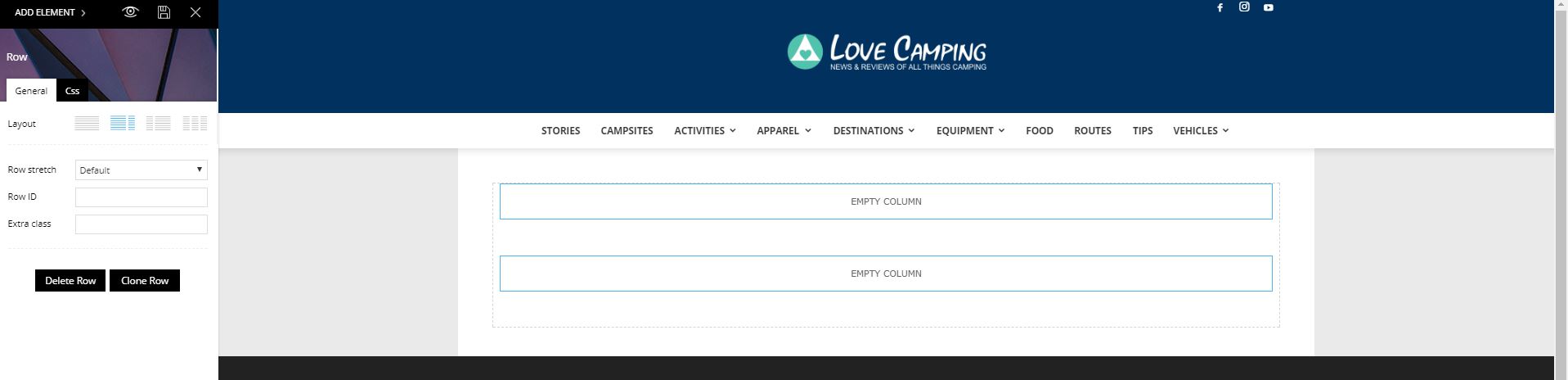
Please advise how to fix this. Obviously I want to update the site use you latest system but being able to create a sidebar is pretty fundamental.
 rtissler
I have a problem with the styles of all headlines in the containers of the homepage and category pages, NOT on a single post, here they are correct.
So you know what mouse-over color I mean, here the example of a headline on the homepage:
http://www.gesundheit-medikamente.com/wp-content/uploads/2017/07/Unbenannt.jpg
Where can i change this color?
 simchris
 Well, it may not match the php.ini file, but should match the example file I provided.
However, if you *know* the system settings are correct on server, then it’s really immaterial to anything as the theme is reading that from your system, so the system is reporting the wrong info — but if it’s correct on the backend, that is all that matters if the resources are “actually” available.
Also, per the theme docs, if you know the WP Orion plugin doesn’t conflict, you can simply add it t o the TD Booster plugin whitelist.
I don’t work here, just some feedback as I’ve been managing my own Linux servers since Jan. 1996.
The phpinfo.php file when you run it will show the ‘actual’ PHP settings for your single domain/site. If not, then your system is mis-configured.
Simion C. Hi,
You can use a bigger image size, in height. In this example I used a image with a height of 146px with the same header style 3, with this result
– https://www.screencast.com/t/UlpKH1yu7
I believe that is what you are trying to do.
Thanks
 sonic-media
Hello, I have a question regarding “uniqu articles”.
On my homepage I have activated “uniqu articles”.
Among my articles I have a standard page navigation.
On page 2 I find an article, which I have already seen on the homepage.
Why is that?
Catalin Hello ChecMark,
I have inspected your website and I saw that you are using a lot of untested plugins which might interact with the theme core files and cause a lot of unknown issues. Try to disable all of them and leave just to active only the required plugins and then, try to create your homepage according to the following useful video tutorial here -> https://www.youtube.com/watch?v=N2wGizMz4X0&t=82s
Now, I saw on your homepage some shortcodes which do not come from our theme, sorry! Please roll back to the default theme functionality, clear all the caches and check the results.
Thanks for your understanding!
Simion C. Hi,
I believe that using such big images in the post content, would not be necessary. The post content width is 696px, so it would be best if you would use images around this size.
Bigger images are not necessary, since they will only be displayed in the post content.
If you would like to use images with bigger sizes or it is necessary, you can try modifying the WordPress thumbnail size
– https://www.screencast.com/t/uUqt3tzPh4
Try modifying the medium size for example to a size you want, and then upload a new image in the library, and select the medium size when inserting it in the post content.
Thanks
Simion C. Hi,
Thank you for your appreciation. If the mentioned categories are sub-categories and have the same parent category, they should be displayed accordingly.
For example here the “Fashion” category has 4 sub-categories
– https://www.screencast.com/t/nqrlotsit
These category tags will be displayed on the Fashion category page
– https://www.screencast.com/t/bqaejGWPLkg
I believe that in your case the “Restaurants” category is not displayed because this is a parent category as well, besides being a sub-category of the main “FOOD & DRINK” . You could maybe try a different category structure with one level of sub-categories only, not sub-sub-categories.
Thanks
Catalin Hello lymwebdes,
What kind of table do you are using and what is the size of it? I have tested your website on iPad for example in Landscape and Portrait and here you can see the results -> https://www.screencast.com/t/dOVG5h52x -> https://www.screencast.com/t/NoVq31q3ffmg
Thanks for your understanding!
Catalin Hello gcamara,
Please notice that the speed of your website depends on how well your site is optimized. Notice that is not a simple task and if you do not have any experience in this regard you will do not bring good results for the theme. Also, notice that we have a speed optimization tutorial but this is addressed only to advanced users. So, if you follow the steps which are presented in this tutorial here -> https://forum.tagdiv.com/how-to-make-the-site-faster/ you can increase the page speed loading and if you are not aware of the steps in this regard, please consider hiring a freelancer/developer to help you because the speed optimization services are not covered by our support policy, as you can read here -> https://forum.tagdiv.com/support-policy-2/ Check our documentation here -> https://forum.tagdiv.com/requirements-for-newspaper/ regarding on dedicated server to fit to our requirements. For an example, you should check our demo preview because this website is optimized.
Thanks for your understanding!
 sil2
sil2Hi
I want to manage my advertising blocks based on language
For example – I want to have header ads available only for main language but no for all languages.
How can I do it?
 reidostorrents
 Hi,
I added this code to my functions.php:
add_filter(‘retrieve_password_message’, ‘password_reset_message’, 10, 3);
function password_reset_message($message, $reset_key, $userlogin)
{
$message .= ‘(‘ . network_site_url(‘wp-login.php?action=rp&key=’ . $reset_key . ‘&login=’. rawurlencode($userlogin), ‘login’) . ‘)’;
return $message;
}
The link to reset the password is sent to the email, however it is coming invalid, it does not come with the userid at the end of the link, eg:
To reset your password, visit the following address (https://mywebsite.com/wp-login.php?action=rp&key=b8kfCQVGpDX5kDI1SxsO&login=)
How do I make it come like this?
To reset your password, visit the following address (https://mywebsite.com/wp-login.php?action=rp&key=b8kfCQVGpDX5kDI1SxsO&login=userid)
Thanks!!
 TechDragon12
Newspaper V 6.5.1
Wordpress V 4.7.4
Visual Composer V 5.2
We are having an issue with Visual Composer elements. The blocks, which were previously available when you choose an element in VC are now not showing. The actual code is there if you look at the text in the page (example: [td_block_big_grid_6 td_grid_style=”td-grid-style-4″ category_id=”26″ offset=”1″])
…but the blocks themselves are not appearing in the element list. Previously, you could choose a block to display on the page and select various categories / filters but none of that is available now.
If I create a test page and put one of the templates on it (like a homepage template) on it, the blocks will still appear on the front end, but the column design is not correct.
This site was created by a previous developer who did not create a child theme so we can’t upgrade it at this time. We place to rebuild it at some point, but for now getting it fully functional is the highest priority.
simchris Doesn’t hurt the site at all. We’ve been using it since it was in BETA end of 2015 with zero problems. The /amp/ endpoint won’t use anything from the theme, however the /amp/ endpoint will generally only pull in the content actually in the body of the text, not stuff outside the post such as a slider or featured image, etc. — and anything inserted must be https.
Likely good to look at the forum for the plugin.
If you are using Yoast SEO, be sure to also get the ‘glue for amp’ plugin for Yoast.
 fernando.segre@tomorrowads.com
If you type “www.your-url.com/#” which is the mobile web url, into your desktop browser, then the mobile version of the site will show up. Problem is, if you type “www.your-url.com/” without the number symbol it won’t show the desktop version of the site unless you delete Cache.
Please see my domain as a sample.
1) Go to https://crunchy.life/
2) Then go to https://crunchy.life/#
3) And finally try to see if on desktop you’ll see the desktop version instead mobile (again go to https//crunchy.life/)
How can we solve this and have the desktop version show, regardless if a user mistypes /#.
Thanks,
 AudraCarpenter
 Hmmm… this link I do have a sidebar and its still vertical? Am I missing something?
Catalin Hello Newstrack,
Please notice that the speed of your website depends on how well your site is optimized. Notice that is not a simple task and if you do not have any experience in this regard you will do not bring good results for the theme. Also, notice that we have a speed optimization tutorial but this is addressed only to advanced users. So, if you follow the steps which are presented in this tutorial here -> https://forum.tagdiv.com/how-to-make-the-site-faster/ you can increase the page speed loading and if you are not aware of the steps in this regard, please consider hiring a freelancer/developer to help you because the speed optimization services are not covered by our support policy, as you can read here -> https://forum.tagdiv.com/support-policy-2/ Check our documentation here -> https://forum.tagdiv.com/requirements-for-newspaper/ regarding on dedicated server to fit to our requirements. For an example, you should check our demo preview because this website is optimized.
Thanks for your understanding!
Catalin Hi,
Please notice that the speed of your website depends on how well your site is optimized. Notice that is not a simple task and if you do not have any experience in this regard you will do not bring good results for the theme. Also, notice that we have a speed optimization tutorial but this is addressed only to advanced users. So, if you follow the steps which are presented in this tutorial here -> https://forum.tagdiv.com/how-to-make-the-site-faster/ you can increase the page speed loading and if you are not aware of the steps in this regard, please consider hiring a freelancer/developer to help you because the speed optimization services are not covered by our support policy, as you can read here -> https://forum.tagdiv.com/support-policy-2/ Check our documentation here -> https://forum.tagdiv.com/requirements-for-newspaper/ regarding on dedicated server to fit to our requirements. For an example, you should check our demo preview because this website is optimized.
Thanks for your understanding!
 pstgibson
Dear support,
I want to install AMP By Automattic.
What will be the result on my website with out the mobile version, upon activating this plugin which need no extra configuration?
Thanks
Catalin Hello aliahmad,
Please notice that our theme will display on the blocks only the category tag which is setup by Primary Category and not all of these if that post has more than one category.
Also, if you want to move the tags section from post template, notice that you should edit the theme core file and move the specific div in your desired place. For example, if you are using the post template style 1, you should edit the loop-single-1.php and move the following div where you want to display this element, like this -> https://www.screencast.com/t/gvLd469joL If you are not aware of the steps which are needed to take in this regard, please consider hiring a freelancer/developer to help you because we cannot provide custom services at the moment, sorry!
Thanks for the message!

