- NewsmagUsing the theme translations together with WPML
- NewsmagHow to update a plugin
- NewsmagCustom Post Type Support
- NewsmagAbove footer ads
- NewsmagWeather Widget
- NewsmagHow to update the theme
- NewsmagIntroduction
- NewsmagLogo & Favicon
- NewsmagFooter templates
- NewsmagUsing other ads
- NewsmagCustom ad spots
- NewsmagArticle ads
- NewsmagSidebar ads
- NewsmagHeader ads
- NewsmagLoading image effects
- NewsmagCategory top post styles
- NewsmagSmart Lists
- NewsmagGeneral settings
- NewsmagTheme thumbs
- NewsmagtagDiv slider gallery
 Simion C.
 Hi,
Be sure to use a big enough image size in order to display the proper thumb – https://www.screencast.com/t/zEz08tpP – Example – https://www.screencast.com/t/UbdvqCnC
Thanks
 damian
Your theme is supporting AMP Technology? Or will be supporting it in future? Or maybe u can recommend any plugin which can do it?
 wuschele
Hi,
Yesterday I`ve bought the “Newspaper”-theme. I tried to upload it within the WP-appearance-menu as normal but after maybe 30 seconds I always receive the following message:
Are you sure you want to do this?
Please try again.
Ì tried it with both Options – juInstallable wordpress file only and all files & documentation (unzip and isolatimng the newspaper.zip file).
Please help!
Kind regards
Michael
 Bogdan B.
 Here is the big grid on mobile: https://www.screencast.com/t/ld3ByVy5U8
here is post template 9: https://www.screencast.com/t/9165gpl9
here is post template 10: https://www.screencast.com/t/C61ElDyFcD
and here is post template 11: https://www.screencast.com/t/yxJiggaW
I cannot see any black halo you mention. Please provide an example of this as I cannot see any issue.
As for the mobile issue, If you are using wp super cache please note there is a problem in the plugin causing a bit of an issue. Please check this topic: https://forum.tagdiv.com/topic/mobile-theme-problems-3/
Thank you!
 Catalin
 Hello justfreshkicks,
Please keep in mind that this task is related to WordPress. You should check the WordPress Roles & Capabilities from the Codex, like this -> https://codex.wordpress.org/Roles_and_Capabilities After reading this guide, you should be able to set your Roles and Capabilities for your users.
Thanks for the message!
 Berbi
BerbiHi there,
My pages are all set on the template “Pagebuilder + page tittle”, wich displays a sidebar. But strangely, this style doesn’t not apply on all page.
For example :
– this page displays according to the template : http://stock-newswire.com/calcul-rendement-locatif/
– this page displays according to the template : http://stock-newswire.com/5-conseils-investir-loi-pinel/
– this page displays according to the template : http://stock-newswire.com/test-style/ (I created it 2 min ago as a test page)
– this page does not display according to the template : http://stock-newswire.com/taux-immobiliers/
– this page does not display according to the template : http://stock-newswire.com/le-guide/.
However, these page are all set on the template “Pagebuilder + page tittle”. They should all display according to the template.
I have tried to unset the template and to reset it back, but still the sidebar would not show up in certain pages. Could you point me the road to follow to solve this ?
Thanks in advanced.
 piortek
 Yes they work on other themes without any problems. There is no need to use any plugin to handle them. If I send a newsletter with the link to my site I simply add some additional info into the url like in example below
http://gurbacka.pl/3-glowne-bledy-zywieniowe-przez-ktore-trudniej-schudnac/?utm_campaign=kg_lista1&utm_content=3-glowne-bledy-zywieniowe&utm_medium=email&utm_source=getresponse&utm_term=3-glowne-bledy-zywieniowe
There is nothing needed on wordpress site to make it work. Newspaper should be loaded as usual but for some reason adding utm tags to the url breaks the theme.
Catalin Hello Lewis,
If you want to increase the width of specific widget you should use the specific class for this widget. Below I gave you a simple example for this.
The code is ->
.td-ss-main-sidebar .td_block_9{

width:400px;

}
The result is here -> https://www.screencast.com/t/2d61PzEgAr
You should adjust your code as you wish.
Thanks for the message!
Bogdan B. Hello,
Sorry but customization services are not part of the theme support. We can help with questions and issues that are theme related, but not with customization su ch as the above example. The wordpress functions are described in the wordpress codex. If you cannot understand them, we suggest hiring a freelancer to help out.
Thank you for your understanding.
Bogdan B. Hello,
I just tested this on my end but I cannot see the issue. You must have an image optimization tool such as the photon setting of jetpcak. Here is an example of how the single image shows on our end:
https://www.screencast.com/t/NNqVXFuShGM – https://www.screencast.com/t/cyNRS1Ky6mOW
Please try to disable all plugins except visual composer, celar cache and reset cdn files. Then test the iamges again. Also redo any image optimization you might have in place.
Thank you!
 Bobby_Ocean
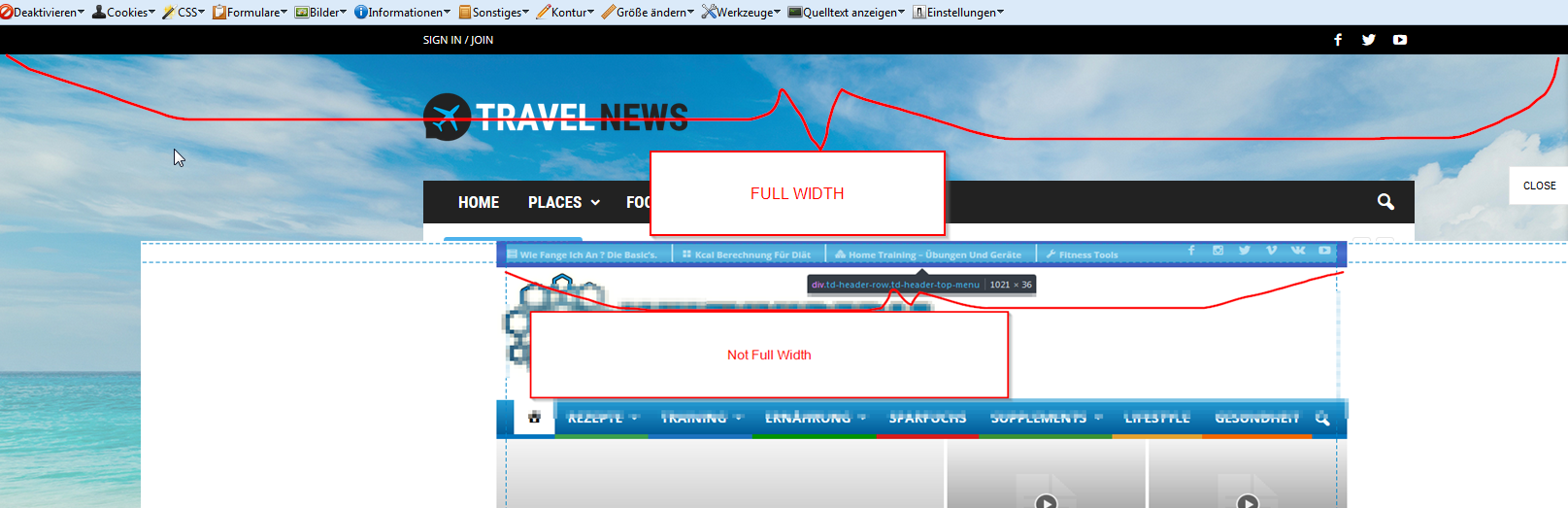
 Hello i dont mean the structure, heres a pic to understanding
 laurena86
 Hi Catalin
I have tried this exactly as you did and it just won’t work on the actual site. I have cleared cache and tested on mobile and it is still appearing as overlappingf off the page? Might I be able to send you logins somewhere secure so you could take a look to see if any other code is conflicting?
The More Stories box – this is what I mean: https://www.dropbox.com/s/avngx2v0hc8xmp0/MoreStoriesBox.png?dl=0
This box pops pout from the right hand side when I scroll down on the earliest news story (Iceland Can Change You) – however, the box doesn’t work/appear on the other two blog posts (e.g this one: http://thedarklordspeaks.com/rogue-one-film-looking/), and I can’t figure out why?
The other issue I have is try as I might, I cannot get people’s gravatars in comments on the blog posts to show up (including the author’s). I have the set gravatar correctly on the gravatar site, I have set it to show gravatars in wordpress settings, and I have even installed the WP User Avatar plugin and tried that way, and nothing seems to work! See here for example of commenyts under the blog piece: http://thedarklordspeaks.com/rogue-one-film-looking/
Any help would be greatly appreciated!
Many thanks,
Lauren
 mayaguez
 P.S. Simion:
1. How do I add more “Ad Boxes” (sidebar advertisement) to/in Categories? Example add several more “Ad Boxes” to the sidebar to/in this category> http://hispaniclatinonewsandevents.network/category/more/entertainment/
2. Also I do not see this Setting> https://www.screencast.com/t/3cdjcksUC
Where is it?
-
This reply was modified 9 years by
mayaguez.
 fabinhoalmeida
Hello friends. We’re having a problem with publishing vertical videos. In this example case (https://www.screencast.com/t/yrbQkjKRxQM) we upload the video by the WordPress post editor, and in the wordpress editor it appears normally embedded. However, in the public posting, the video overlaps/overlays all that is below, be it text or blocks of the theme, hiding part of the layout and hindering the visualization of the video itself.
We usually embed videos and vertical images directly from the instagram and the same does not occur. The incorporation is published normally.
What could be happening?
 owidani
http://dev.oneworldidentity.com/
Everything is displaying as fullwidth and the sidebar doesn’t seem to be working.
For example the social should appear to the right of the “don’t miss”section.
 Xiluvanogcosta
I have two things that I don´t know how to change/add it.
1. For example on this Demo: How can I add the green lines that appear on the header: http://demo.tagdiv.com/newspaper_magazine/
2. On my menu there is a white space between the menu and the revolution slider. How can I delete that space: This is the website: http://epilepsyandwellness.com/
Thanks in advance
 Finland
 ”We know about this issue and this it is in course of investigation and we will try to fix it as soon as possible. You should try to check the solution which has received above until we will fix it.”
its not newspaper problem same as newsmag. do you guys work for newsmag too or this post just for newspaper ? i’m sure its a theme problem. i have 19 different theme site and i got this mail my newsmag site.

 PedroMiguelMoreira
Hello,
When I put a video on a post and the user writtes the associated tag of the video in the Search function, it appears that video – see the example: http://videosupporters.com/quilmes-chants-lyrics/.
However, at the end of the video it appears a lot of suugested videos of Youtube, which means that there is the risk that the user selects one of those videos and leave my site. So, I´d like to know how to avoid this, I mean, what I want is that at the end of the video the image simply stop and don´t appear suggestions of other videos.
Thank you.
Best regards.
 Jessie
 Thanks Catalin, it is in the main content area that I am asking about… Every few seconds on the example page new posts display in the big blocks.
P.S. NSFW
 planetvic
 I am not trying to redirect pages, but pictures internally.
When I add a picture within WordPress as far as I know I cannot define the web url image address.
Wordpress itself names the image file.
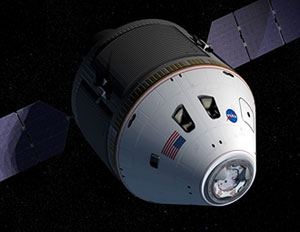
For example I added the Orion Spacecraft photo and it gave this address.
http://www.aerospaceguide.net/wp-content/uploads/2016/07/orion.jpg
I would like to show this internal web address as below.
http://www.aerospaceguide.net/spaceexploration/orion.jpg
Is that possible?
Vic
 Marcellino
 Hello, I don’t understand in which file (could you give me the name) paste the following code (and where exactly)
title, ENT_COMPAT, ‘UTF-8’)), ENT_COMPAT, ‘UTF-8’) . ‘&source=’ . urlencode(get_bloginfo(‘name’)) . ‘” onclick=”window.open(this.href, \’mywin\’,\’left=50,top=50,width=600,height=350,toolbar=0\’); return false;”><i class=”fa fa-linkedin”></i>
Thanks
Bogdan B. Hi,
I ran a few tests on my end but the br tag displays the same on all browsers. I cannot see any difference between them. Pleas provide an example.
Thank you!
Catalin Hello Lewis,
If you want to increase the widgets from sidebar you should use a bit of CSS code to do that. Below I gave you a simple example. Also, please notice that we do not recommend the increasing the width of this because you can damage the theme layout.
.td-ss-main-sidebar{

width:600px!important;

}
The result is here -> https://www.screencast.com/t/59tEcXmSo
Thanks for your understanding!
 boos11
I have:
– td-mobile-plugin
– Visual Composer 5 (VC5)
– Post with shortcode’s VC5
I use 1 shortcose VC5 with posts (not article):
[vc_row][vc_column][td_block_13 post_ids=”IDPOST” sort=”featured” limit=”1″ tdc_css=””][/vc_column][/vc_row]
shortcode not workink in mobile plugin
Is there any possibility of throwing shortcode visual composer to the article so as to display it properly on mobile plugin?
for example, plugin WP Polls have 2 ways of placing the link:
[poll id=”ID”] or <?php get_poll(ID); ?>
 Hometown
 Hi Bogdan. I’ll try to ask in other words. In general, does your theme support shortcodes for main page? If not you have to write about it in your theme’s promo. It’s very important for any webmasters.
Examples:
https://wordpress.org/plugins/search.php?q=shortcodes
We bought it, installed, spent large numbers of hours to tune it and now we see that the theme is for simple blogs only.