
- NewsmagUsing the theme translations together with WPML
- NewsmagHow to update a plugin
- NewsmagCustom Post Type Support
- NewsmagAbove footer ads
- NewsmagWeather Widget
- NewsmagHow to update the theme
- NewsmagIntroduction
- NewsmagLogo & Favicon
- NewsmagFooter templates
- NewsmagUsing other ads
- NewsmagCustom ad spots
- NewsmagArticle ads
- NewsmagSidebar ads
- NewsmagHeader ads
- NewsmagLoading image effects
- NewsmagCategory top post styles
- NewsmagSmart Lists
- NewsmagGeneral settings
- NewsmagTheme thumbs
- NewsmagtagDiv slider gallery
 efaq
efaqHello,
I have installed the theme on my domain http://www.travelisfun.de
But I am wondering, how the start-page is built? Here my questions:
1. How can i change the big picture ?
2. What are the templates? For example: pagebuilder + latest articles + pagination
—> http://abload.de/img/unbenanntycjfp.png
3. Why is it not possible to enable the Frontend Editor
4. What is the so called “Block 5” ?
Just activate the Travel demo and you will see what I mean 🙂
Thanks for reply!
 letenkyzababku
H, I have problem with visual composer on mobile. If I create any element in visual composer, so it is ok on desktop, but on mobile it is cuted from left. So you cant read the first letters : here is my example: http://www.letenkyzababku.sk/porovnanie-autobusov-letisko-vieden/
check it on mobile.
have you any recommendation where can be problem?
Thanks
 andantesash
Hi,
I need a fix for a problem I am having with the theme. I am using Wp Club Manager plugin and it doesnt work properly on the match patch.
Here is an example of how the pages should look with the sidebar
http://www.broxburnathletic.co.uk/committee/
Here is an example of how the matches page displays, how do I fix this?
http://www.broxburnathletic.co.uk/match/1172/
Thanks
 Leisurevn
Hi,
I have problem with my website: http://leisurevn.com/ . It’s very slow to load my website. What is my problem? I wanna improve it.
I used this hosting service: https://uk.godaddy.com/hosting/web-hosting-config-new.aspx?src=ac&isc=gdbbt3404&plan=cpanel_tier2_036mo
Help me please,
Thank u.
 zmcleod
I have a Table of Contents plugin that is messing up the smart list by shortening all the titles prematurely. For example I’ll get: “1) Monke..” instead of “1) Monkey kicks own baby off a cliff “. I think the T.O.C. plugin is placing code after the Title and it thinks the title is longer for some reason and then shortens it.
So I was wondering if there was an easy way to take off the word restriction on the title? If it’s not too difficult, would you mind pointing me in the right direction?
Also, do you guys offer $/hr coding services? Recommend anyone?
Thanks,
Zack
 iip
iip To continue this thread… I was looking at the code and it seems that if a post is not viewed on the current day, its number will persist from the previous week. Shouldn’t there be a function that resets all current day values in the database to 0 at the beginning of each day? The only time a number is reset is when the specific article is viewed and the last day for the article does not match the current day.
For example, if an article has 1000 views on Thursday of the previous week, but this week, the article receives zero views on Thursday, that 1000 will not be overwritten in the array because the article was not viewed.
I have several articles with bloated 7 day arrays which may or may not be viewed on any given day. Subsequently, on days they are not viewed, their previous values will persist.
Of course, this could be self-correcting because if they are promoted to the 7 day popular list, they should receive views if it is working as intended. However, the logic still seems flawed.

 JDF
JDFHello,
The text is temporarily “blowed” during page load. I guess while formatting text.
Please see the example :
1. http://hpics.li/68aab68
2. http://hpics.li/0581448
This lasts only a second, but is there a way to correct this ?
Thank you.
 Mach619
 That worked perfectly thank you Bogdan <333
Im stuck on one more problem and im hoping you could help me, i been trying to fix this for awhile.
I’ve installed a ” Time ago ” plugin to display when a post was published, for example 5 seconds ago, 5 mins ago etc. Its working for all my categories except the ” HOME ” and ” News ” those 2 are displaying the publishing date of the actual page not post. So it displays ” 2 months ago ” for the entire page and overwriting the time ago plugin. How do i fix this?
http://www.badragencynews.com/ i mean its working fine on category menu items ive created, but the actual pages i left intact which are ” Home ” and ” News ” are blocking the plugin. Also if theres a solution without the plugin i can do that aswell aslong as date on post changes to ” time ago ” stamp. Thanks in advance
 ned4spd8874
 Some of those I’ve already had deactivated and went ahead and disabled the rest. Fingers crossed!
Just looked at my stats this morning and I’m over my allotted Account Executions for a 24 hour period. Meaning that my site might be going down again soon. My hosting isn’t waiting long anymore to bring it down when I go over.
Here are screenshots of the stats:
http://screencast.com/t/WnwofpRLTt
http://screencast.com/t/kK6vHiEGw0
One other thing that I can’t understand; using yesterday as an example, 78% of my visitors came from mobile. So why is the Newspaper theme even using resources for mobile visitors? I’m using WPTouch and it’s as optimized as it can get.
http://screencast.com/t/r3swIxrJgG4I
What am I missing here, am I simply just “screwed”?
 Cristi990
Salut, am sters ceva de la homepage si vreau sa adaug cum este la “example” , sa adaug si sa apara la sidebar
I’ve installed a ” Time ago ” plugin to display when a post was published, for example 5 seconds ago, 5 mins ago etc. Its working for all my categories except the ” HOME ” and ” News ” those 2 are displaying the publishing date of the actual page not post. So it displays ” 1 month ago ” for the entire page and overwriting the time ago plugin. How do i fix this?
 posonty
Please pray help me solve this that tells me pagespeed. Thanks in advance.
https://developers.google.com/speed/pagespeed/insights/?url=http%3A%2F%2Fpicrun.es%2F&tab=mobile
Screenshot
https://snap.ashampoo.com/ePyntf1f
 poporil
In my post custom type displayed as here https://forum.tagdiv.com/wp-content/uploads/2015/07/2015-08-11_1609.png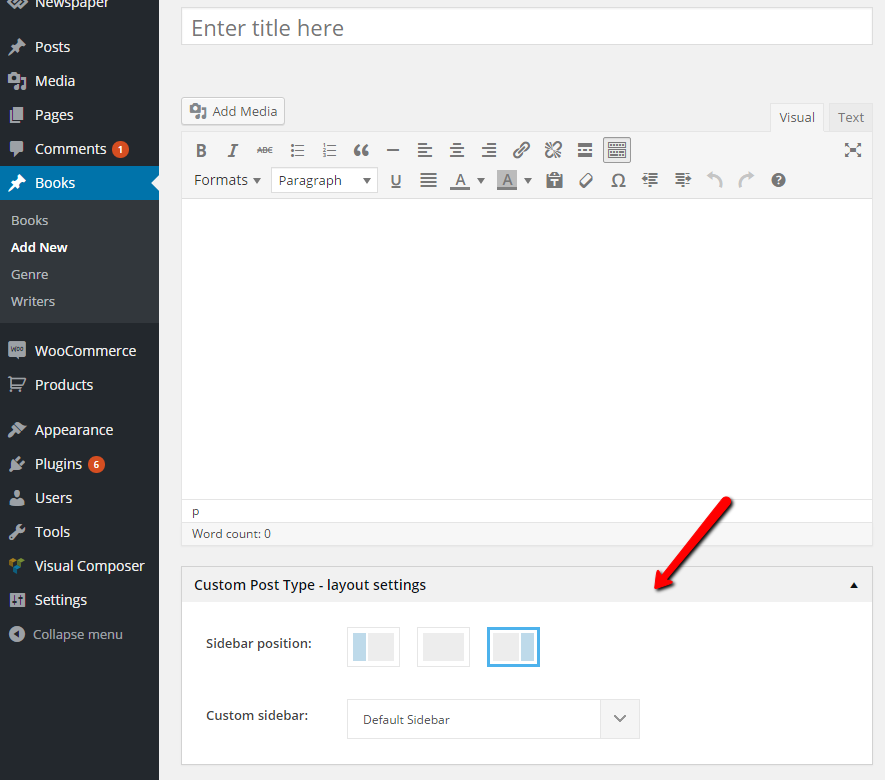
I want to I can and I have the choice “Post Setting” example
https://forum.tagdiv.com/wp-content/uploads/2015/05/2015-06-15_17-48-37.png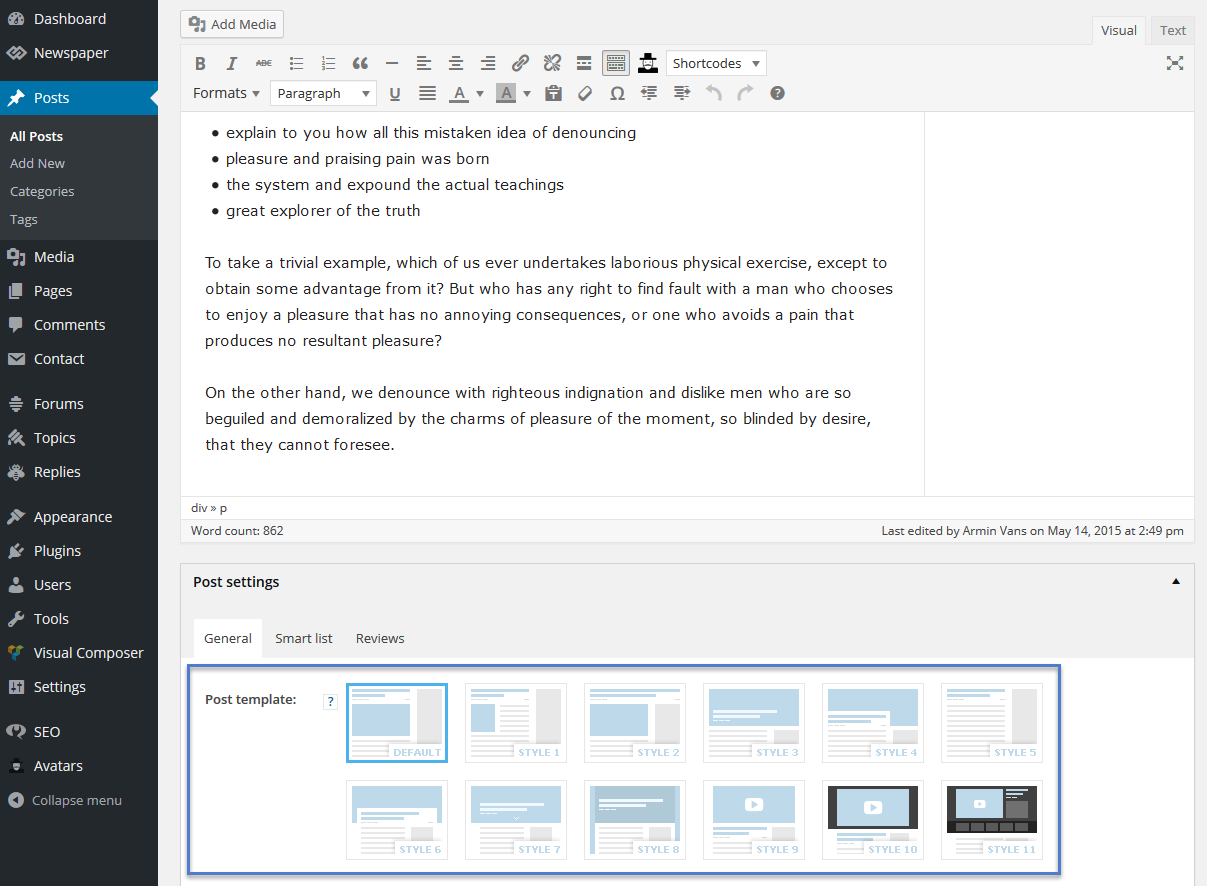
 amsam1979
Hi,
I can’t find any options to customize the content on the sidebar of category pages. For example, I want to change the color of the background the title “Must Read” on the category page (Eg: http://demo.tagdiv.com/newspaper/category/tagdiv-technology/tagdiv-gadgets/) or add new widgets to the category page.
I tired the theme panel, page editor, category editor but can’t find any place to make these changes.
I checked the instructions on http://import.tagdiv.com/newspaper/doc/#categ but I don’t see any of those options mentioned in that article, beyond “Description” part.
Really appreciate your help in this.
 dtalerman
Hi,
I just installed your theme.
There is a problem on the home page, with Yoast Snippet editor:
1. I can not change the title tag
2. There is a strange URL in the snippet : instead of http://www.travailler-en-angleterre.com, th url is http://www.travailler-en-angleterre.com/example-post
The problem is only for the homepage (www.travailler-en-angleterre.com).
I use VC ans Yoast with lots of other theme, without any problem.
Did you have any existing problem like this? Any hints?
Many thanks in advance
David
 simchris
 From that example, looks like the FB comments plugin is too wide breaking your layout ?
 Ata
AtaHi I have a question. I have been checking my sites statistics. I have seen that there was a lot of visit to
mydomain.com/ wp-admin/admin-ajax.php?td_theme_name=Newspaper&v=6.6.5
when I tried myself the page shows zero ( 0) .
Can anybody offer any help in preventing an attack?
Mach619I’ve installed a ” Time ago ” plugin to display when a post was published, for example 5 seconds ago, 5 mins ago etc. Its working for all my categories except the ” HOME ” and ” News ” those 2 are displaying the publishing date of the actual page not post. So it displays ” 1 month ago ” for the entire page and overwriting the time ago plugin. How do i fix this?
 rodrigocarlos
Hello,
The Mega Menu layout is one. Even if I create the WP standard menus and select for each Category the Mega category, specific Menu will show Mega Menu always with the same layout, but prioritizing the first vision for the category you select, however, will show all categories in this Mega Menu.
For example, if you create the categories.
Technology
Health and Fitness
Fashion and beauty
Investments
… and Technology category at the Mega Menu, I select the related category (technology) and do the same to the other. So, when you hover in categories, for example, technology, will show the Mega Menu giving priority for the posts of technology. However, the left will display all the existing categories.
So, I was wondering if it is possible in each category, I select in the Mega Menu, the specific category and so, when you hover in the category, be shown only the posts without the other existing categories on the left.
If there are subcategories, so when you hover over the categories, will show subcategories and hovering in a subcategory, will show the Mega Menu window with only the posts of this subcategory. The only difference in this case of subcategories is that on the left could show the other subcategories of that category.
If you do not have how to do that, so stay as suggestion for you to do, because the theme is to create an Online newspaper, usually ends up having several categories of different subjects, as well as my site that talks about technology, Health/Fitness, Languages, investments …
Another suggestion would also each category can have a Custom Header Menu, IE, being able to have a custom color, a custom logo, and also for each category to show in the header a menu with only the subcategories in this category.
See how I did on my site http://proddigital.com.br/where for each category I customized the color and logo. And the menu header I put the categories, and when I go to a category, for example, http://proddigital.com.br/saude/, you will see that the header menu keeps showing the different categories, so in place of these categories, to show subcategories.
Thank you.
 olivervossmann
Hi – great theme! Please excuse my bad english (in advance) …
We need to display 30 categories (cities) of which the user has to select 1 to go further on.
This is necessary for 3 main topics (holiday, business e.g.).
We tried to solve this by using the “page menu” function, added only the city names in 3 cols (10 rows per col) and linked them to 1 one the 30 category pages per topic of this cities. We tried this first for 1 topic (holiday e.g.).
If the site is loaded the first time – everything looks fine. 3 cols – 10 rows per col. Perfect.
If you select a city category then and place your mouse again above the page menu item (hover) – the 3 rows are gone and the 30 links are listed one below the other. Is this a bug?
Does anyone maybe have an idea how to solve the problem with a different solution than the menu page?
Thanks a lot for your answers 🙂
 studiotopo
Hi,
how can I do to insert into the sub footer (Footer Copyright Text) a text with a link to a target=”_blank”?
Example text is: POWERED BY STUDIOTOPO (the link should be on the world STUDIOTOPO).
Thanks
 Bogdan B.
 Hi,
1) In order to get rid of the margin, you can use a bit of css:
.home .td-a-rec-id-custom_ad_1 > div, .home .td-a-rec-id-custom_ad_2 > div, .home .td-a-rec-id-custom_ad_3 > div, .home  .td-a-rec-id-custom_ad_4 > div, .home .td-a-rec-id-custom_ad_5 > div{
margin-bottom:0!important
}
2) In order to limit the width of the ad on the category pages and remove the spacing and title/breadcrumb you can use this code:
.category .g-single{
width: 1068px!important;
}
.category .td-a-rec-id-custom_ad_1 > div{
margin-bottom:0!important;
}
.category .td-crumb-container{
display:none!important;
}
.category .td-category-pulldown-filter{
display:none!important;
}
.category .td-category-header .td-page-title{
display:none;
}
.category .td-category-header{
padding-bottom:0!important;
}
3) In order to get the post ad above the content and the sidebar, you will need to edit the theme files and use a do_shortcode function inside the post template you want the ad to be displayed in. For example you can use a theme custom ad 1 spot and add this shortode in each of the loop files coresponding to the post styles you use:
<?php echo do_shortcode('[td_block_ad_box spot_id="custom_ad_1"]'); ?>
Ad this code to the very top of the loop file like so:
http://screencast.com/t/76hTfIICn6kS
Make sure you have an ad placed in custom ad 1 .
I hope this helps.
Thank you for your message!
 Catalin
 Hello hedfox,
I have tried with a playlist to give you an example because the first time I thought that you are referring to the image that will be displayed from the cover of the video playlist and then I understand what you want truly.
Thank you for the message!
Catalin Hello jenosize,
1)If you want to change your category top posts style, you can do it from Theme panel->Categories like this ->
http://screencast.com/t/1drxqTkBg2la
2)Unfortunately, our theme does not have such an option to filter the post for the category. If you want to display more levels and if you are not aware the steps in this regard, please consider hiring a freelancer/developer to do this for you because we cannot provide custom services at the moment!
3)If you want to remove the meta info (Author name, date) and Category name from Category page, you have to target the certain category page by ID category and after module used by the category. Below I gave you an example for one category (that use module 11).
The code is ->
.category-6 .td_module_11 .td-module-meta-info, .category-6 .td-page-title {

display:none;

}
The result -> http://screencast.com/t/817DissQUnK
Hope this helps!
If is not what you mean, please provide more details about your desired changes so I will be able to provide a more accurate response.
Thank you for the message!
 pureglamtv
 Hi Bogdan,
thank you – when I look on your example at screencast.com it is the right way and the thing I was looking for – but adding the code to my Custom CSS it won’t work…
You can take a look at http://www.pureglam.tv and nothing happened. I will need the code working for…
BigGrid7, Slide, Block11, BigGrid2, BigGrid5, Block15, Block19, BigGrid6, BigGridSlide
Thank you so much…

