- NewsmagUsing the theme translations together with WPML
- NewsmagHow to update a plugin
- NewsmagCustom Post Type Support
- NewsmagAbove footer ads
- NewsmagWeather Widget
- NewsmagHow to update the theme
- NewsmagIntroduction
- NewsmagLogo & Favicon
- NewsmagFooter templates
- NewsmagUsing other ads
- NewsmagCustom ad spots
- NewsmagArticle ads
- NewsmagSidebar ads
- NewsmagHeader ads
- NewsmagLoading image effects
- NewsmagCategory top post styles
- NewsmagSmart Lists
- NewsmagGeneral settings
- NewsmagTheme thumbs
- NewsmagtagDiv slider gallery
 ComicsBeat
 1) The wrapper is a background ad so it is supposed to goto another site when I click. However I suspect you are right and its a plugin conflict. I’ll try that method.
2) I have, O believe your second option selected. I created a mobile theme for my current template but it is not rendering properly. Should I disable the Mobile Theme and Amp plugins?
 Bettina
 Hello Narendra!
You use a mobile page with that name, so of course the URL will display another name (of the template).
Unfortunately, AMP is not working with the cloud templates because the AMP’s layout is not fully customized.
The AMP version works best with default templates and not cloud templates. That’s why we integrated it with the Mobile theme plugin.
The feedback from our clients about AMP was negative and it is not used anymore, that’s why we didn’t add more customization options.
Please see: https://forum.tagdiv.com/the-mobile-theme/, https://forum.tagdiv.com/mobile-theme-introduction/ and https://forum.tagdiv.com/tagdiv-amp-plugin-tutorial/ for more information.
Thank you!
 Hello Daas
Hello team,
We are using the App Finder Pro Plugin. However, we do not see any option to change the customer post URL (slug).
Example: It shows this way — “newspaper_app_find_pro” Can we not change it to a more SEO-friendly URL?
 nagi
nagi Dear Sir,
In our live website old theme only there, newspaper theme is not implemented in live site.
We are working Newspaer theme on our localhost, everything goes well then we will implement it on live site.
For your reference we are sending screenshots for the same
Here are the links, working on our localhost, sending screenshot of each URL
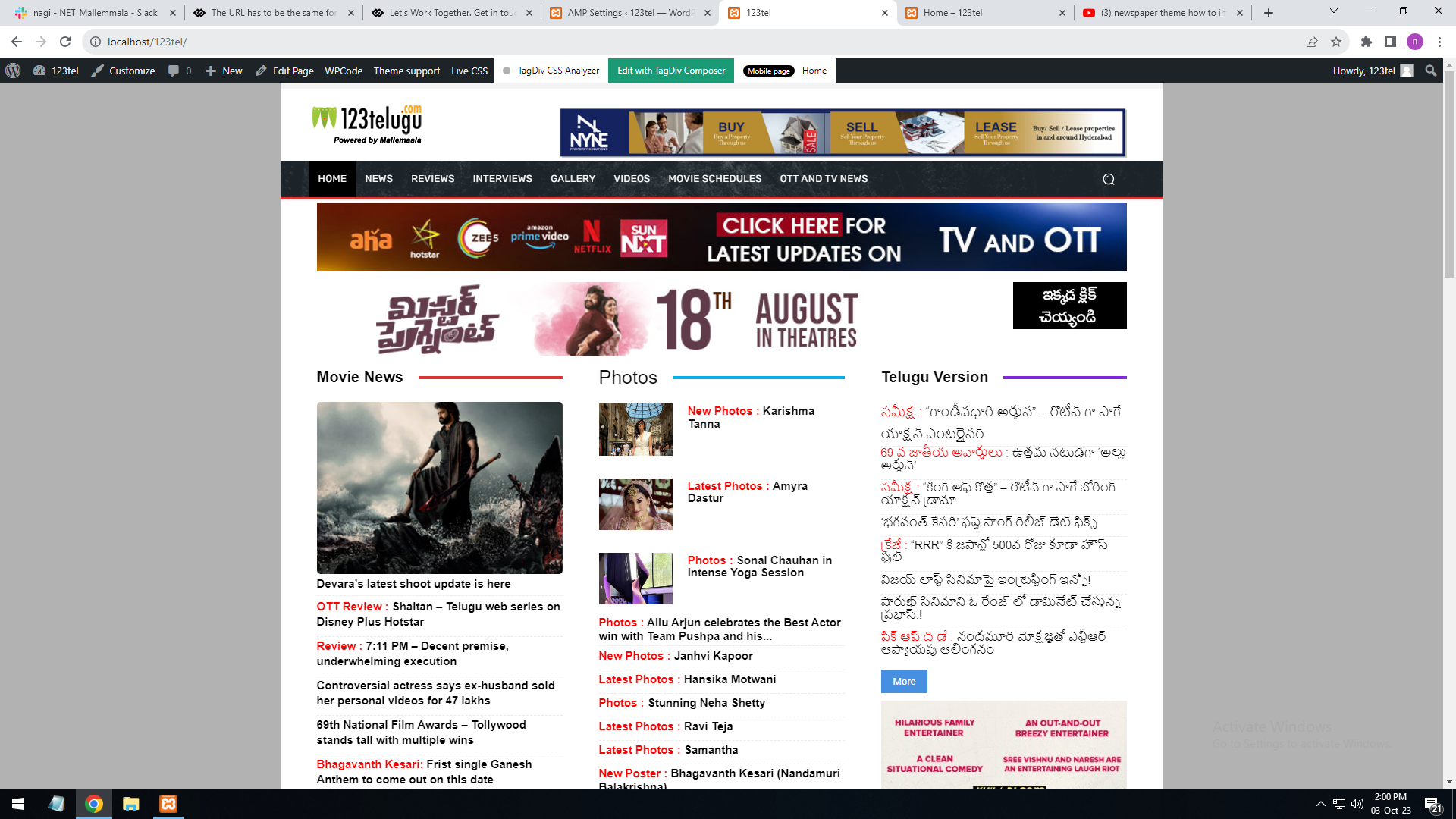
Website desktop url
———-
http://localhost/123tel/
Screenshot URL : https://gallery.123telugu.com/images/theme_test/Desktop.png
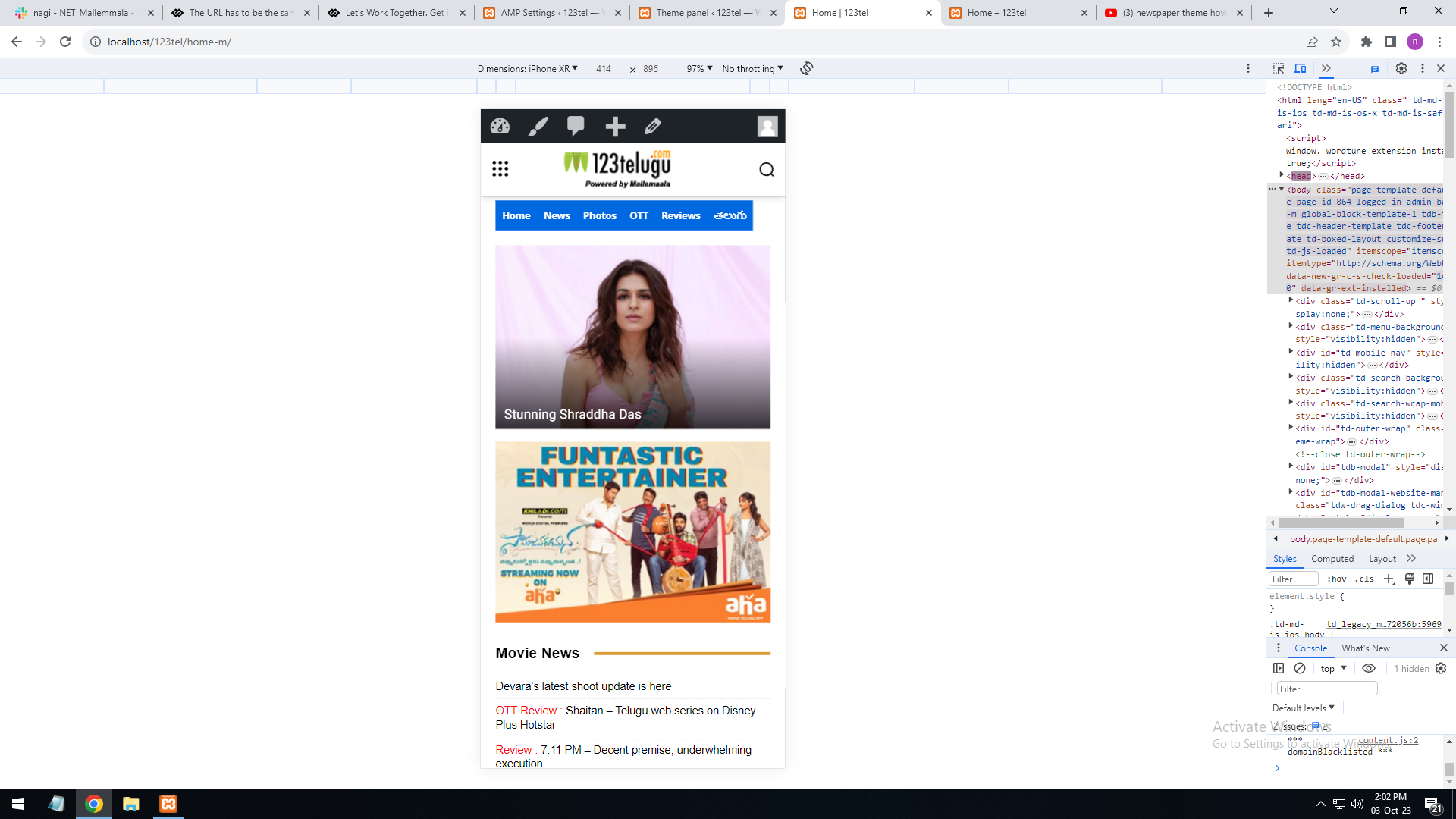
Mobile URL
———-
http://localhost/123tel/home-m/
Screenshot URL : https://gallery.123telugu.com/images/theme_test/Mobile.png
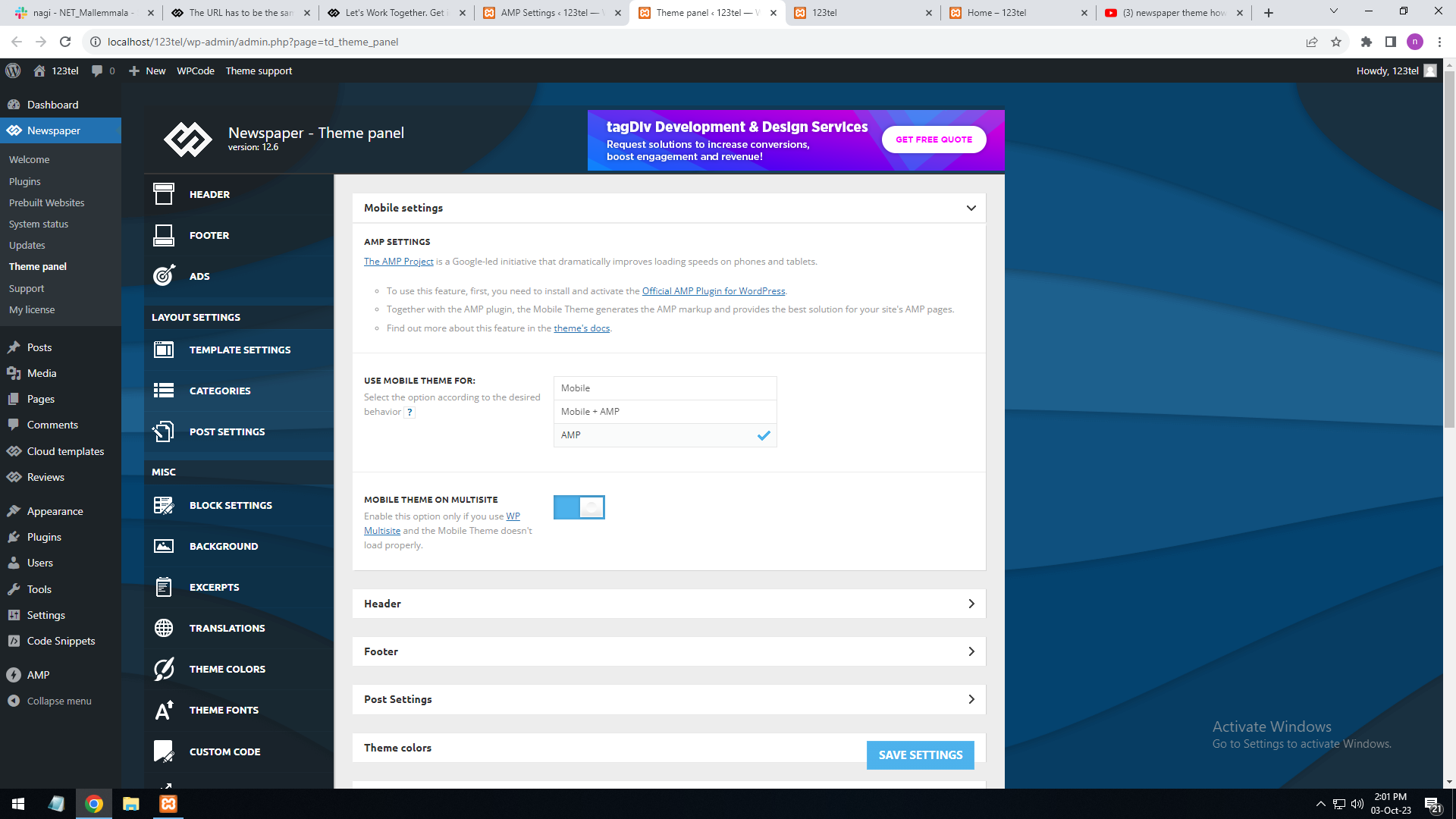
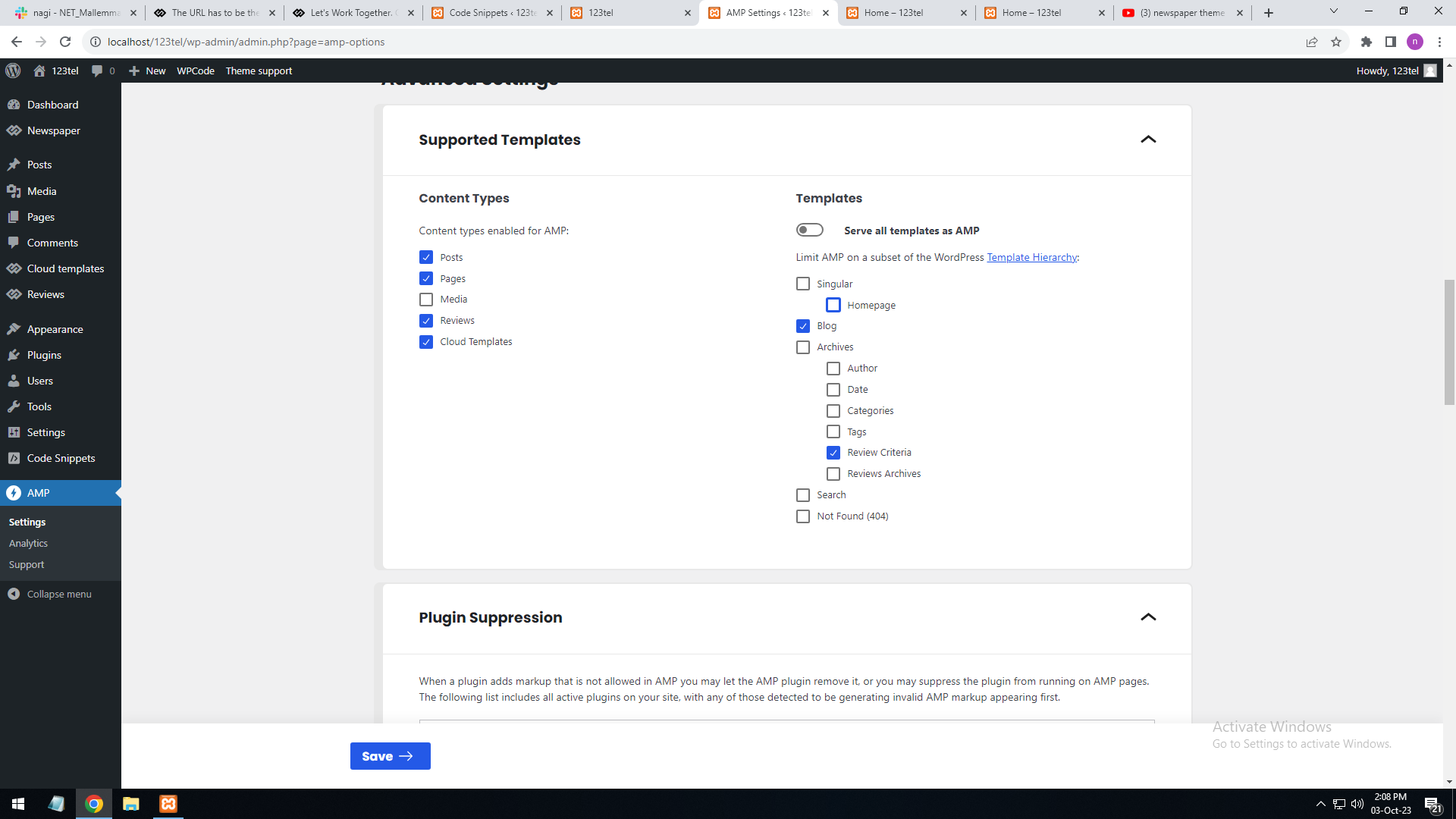
Amp page
———–
http://localhost/123tel/amp=1
Screenshot URL : https://gallery.123telugu.com/images/theme_test/Amp_setting.png
https://gallery.123telugu.com/images/theme_test/Amp_setting2.png
Also suggest a documentation to design AMP pages
Bettina Hello!
1. There should be a plugin conflict because even the scroll is not working. And if you click everywhere on your site, it will redirect you to another site. Make a test and deactivate ALL plugins except tagDiv ones, also if you are using a cache plugin, deactivate it, clear all cache and try again.
2. If you want to see the mobile page for your desktop version, then you should uninstall the Mobile theme & AMP plugin.
We have 3 options for mobile versions that you can use:
1) Responsive version: A responsive version of your website looks similar to the desktop version. TagDiv Composer is used to edit the page.Click on the mobile viewport: https://www.screencast.com/t/XDQJedlggSB. There, you can see your mobile version and edit or adjust the elements to look better.
2) Mobile pages: https://tagdiv.com/newspaper-10-3-7-update-brings-customizable-and-fast-mobile-pages
3) Mobile theme plugin: The Mobile Theme is a performance-optimized theme included in the main Newspaper theme that only loads on mobile devices. It comes with its own templates and designs for pages, posts, categories, etc., so your current templates from the desktop theme will get converted to the mobile theme layout. Please see https://forum.tagdiv.com/the-mobile-theme/ and https://forum.tagdiv.com/mobile-theme-introduction/ for more information.
A full explanation is here: https://www.youtube.com/watch?v=SpGkOnJeNZY
If you need to use the mobile version 1 or 2, then you need to uninstall the Mobile Theme plugin and AMP.
Thank you!
Bettina Hello Tim!
Check out this guide to see an example: https://forum.tagdiv.com/add-cryptocurrency-price-ticker-widget/
Unfortunately, we do not have the inline option for the element text with title or column text.
Also, it depends on whether the plugin supports this.
A workaround could be to add the text with title element in a column next to the previous elements. For example, split a row into two https://prnt.sc/tYZS3I3RcZpz and drag & drop the element in the empty column.
I hope that helps you!
Thank you!
 Anamaria
 Hello,
You can save the elements in the composer and use them in other templates/pages https://www.screencast.com/t/kVxpDT9SV -> https://i.imgur.com/6NKpHua.png the saved elements are at the end of the list. Please note that there are special elements that will not work for another template, for example, single post content.
Thank you!
Bettina Hello @archerix!
There are two workarounds there.
1. You can use these classes: https://prnt.sc/-OW-bTwOXj6t and place the div you want in the tagdiv Composer ad field: https://prnt.sc/8QtefdYQInIL
For more information, please check out this guide: https://forum.tagdiv.com/using-other-ads/.
For example, use the first div for desktop and do not use the other ones, and they will be hidden in the other viewports.
2. In the tagdiv composer: https://prnt.sc/mJr0qnjlCjaW If you check the CSS tab, you’ll find an option to hide the element. (This will hide all the ads from that element.) You can click on the mobile viewport: https://www.screencast.com/t/XDQJedlggSB and hide the entire element on mobile.
You can hide it from all users by going to the CSS tab of every element and selecting Display: Hidden. You can also hide the entire row.
If you can’t find an element after you have hidden it on every viewport, check this thread for the solution: https://forum.tagdiv.com/topic/cssdisplay-show-or-hidden/
Thank you!
 Alex
Alex Hi @ncalex
Well, in addition to Search Form block, seems like Header Live Search block also have issues.
1. This new demo you just released uses Header Live Search. The issue is: Form elements do not have associated labels.
2. The second issue with Header Live Search is: Elements with visible text labels do not have matching accessible names. This happens when the additional text is placed in “Text” field under General > Search Icon section. Put, for example, Job Search, and the pagespeed will return error. From what I understand because aria label is set for “Search” by default, and doesn’t change to “Job Search”.
So basically, seems like none of the TD search blocks work properly.
Thanks.

 RobyDadd
 Hi Anamaria,
Thanks for your quick reply.
I do not have any footer template either but it is displaying correctly.
If I had a cloud header template before it was the one connected to my website theme (Entertainment).
By the way, even if I select a cloud header template (for example, I downloaded Header Template 60 – Black Pro just to try) it does not display correctly (it is white instead of black), and even if the theme panel seems to accept my edits (background, font, etc.) they are not applied to my website header.
What can I do?
Best,
Roberta
 Otaku
Otaku Thank You and i have also two more queries
1. Is there any type of plugin or feature in newspaper theme which can automatically share my articles directly to my social media accounts.
2. How can I optimize these theme to increase the website speed for both mobile and desktop. my current score is below 60 in both devices even after amp installation
Bettina Hello @newshindi24!
You can only modify the footer with TagDiv Composer if you go to a page where it is assigned and edit that page with TagDiv Composer, and then you will have access to the footer also. For example, edit your homepage with TagDiv Composer, scroll till footer, click on footer zone and you can edit it.
Thank you!
Anamaria Hi,
I checked, and it seems you have the mobile theme plugin installed. You should create the content with the Mobile Editor https://forum.tagdiv.com/the-mobile-theme/
The mobile theme comes with its own templates for page, post, category, etc so your current templates from the desktop theme will get converted to the mobile theme layout, the page content is made without builders in mobile editor => https://www.screencast.com/t/xbgZG8kH also, the options that are provided to edit the mobile theme version are limited (this keeps the things simple)).
So, if you want to use the cloud templates, then you need to disable the mobile theme and AMP plugins, and then use the responsive version.
You can disable the mobile theme plugin on the pages from the Gutenberg editor using the following option => https://www.screencast.com/t/axXRJsWby
Also, please check this topic where I explained each mobile version -> https://forum.tagdiv.com/topic/mobile-version-not-working-properly-2/ -> https://forum.tagdiv.com/topic/amp-pages-not-working-well-with-this-theme/ and choose what mobile version you want.
Thank you!
Anamaria Hi,
The cloud templates are custom post types, and these can be an index or not, therefore you can use Yoast SEO to control the SEO for cloud templates, for example https://i.imgur.com/6BRLmIs.png after that you need to reindex your website on Google (or you can reindex only that link).
Thank you!
 Calin
Calin Hi,
Usually when the mobile version appears on desktop is related to cache plugin. Most of the time it is used the mobile theme plugin (is no longer the responsive theme version) and for this it is need to use from the cache plugin the option for cache mobile vision to can deliver the correct version (as example if you are using WP Super Cache you need to use this option – https://i.imgur.com/6055D3I.png).
Thank you!
 Archerix
Without using a separate mobile theme, is it possible with a cloud template achieve the same ad control that we have with de default “post templates” of “Standard Pack”.
With the Magazine Pro I want to have this control shown in the screenshot. How to achieve this?
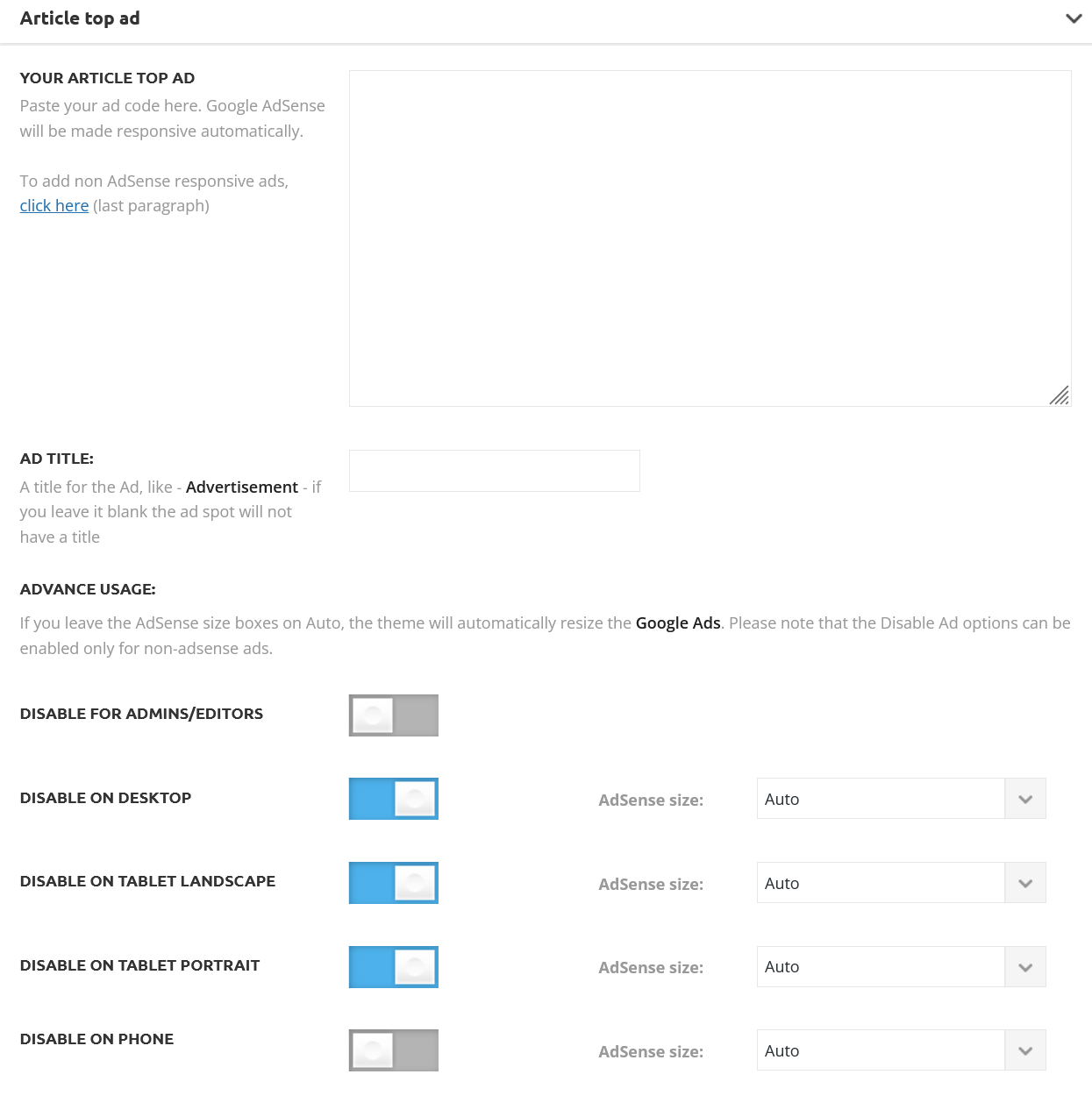
 Marnest
I’m checking if something changed in the configuration of the YouTube videos module, since I’m trying to add the link part of a new video and I can’t do it.
For example:
Full link: https://youtu.be/UkSkNpypgy4?si=S6jP3be928lYE78T
I’m supposed to add this part: UkSkNpypgy4?si=S6jP3be928lYE78T
or is there something I added wrong?
My website is: http://www.aldeaglobal.ar
I will appreciate an answer
Thank you very much and greetings
Nestor
 Hindistack
Hello,
Is it possible to implement a filter for the ‘flex block/flex loop’ using an ACF (Advanced Custom Fields) select field? For example, if I select ‘Book’ from the select field, could I configure it to display only posts related to books within the ‘flex block/flex loop’?
Thanks in Advance
 manualedimari1
 Thanks Bettina, I know how to change the color of the links and I have tried to do this many times already but it doesn’t change it, I can no longer change this color and I had and have already installed the standard plugin pack! I haven’t installed any other plugins since the last update and so I’m sure it’s the last update that created this problem. Can anyone tell me if I can change this color in some other way? For example, acting on MySQL tables, only I would like the precise name of the field to be modified. Thank you!
 Sergey
 I want to mention that I have added base64 to the XML configuration file as per below code. But it did not help. The same error appears with reference to the same tag and attribute (vc_raw_html: content:).
<tag>vc_raw_html</tag>

<attributes>

<attribute encoding="base64">content</attribute>

</attributes>
I read about how to correct it here:
https://wpml.org/documentation/translating-your-contents/page-builders/how-to-fix-encoding-of-fields/?utm_source=plugin&utm_medium=gui&utm_campaign=wpmltm
 theheritagelab
 Hi Megan @nolandolce ! Happy to help you. Take a look at the template I created — I’ve outlined the process with screenshots for you in this document.
All the best! Let me know how it works out & have a good weekend 🙂
-
This reply was modified 3 years by
theheritagelab.
 Doan Thanh Nhut
Example: https://ibb.co/8r6cRLP
 usc-shift
Hi, need to create sticky sidebar in post that have breakpoints like here sidebar multiply sticky ads
 bebese
 I got the same error. it was resolved after i removed amp and the td mobile theme. it’s 100% a theme issue.
 MattiaVe
 hi Bettina, I solved, just tell for others:
in cloud theme, if you change “global font” in “Manager”,
don’t change nothing in blocks, in blocks you need “default font”.
If you have (example) Roboto in Manager and you put Robot in block’s title =
do not change nothing…
thank you
—————————-
clarification: everything is ok everywhere but not in “single post Content”, that remains Sans-Serif, it cannot be transformed into Roboto
-
This reply was modified 3 years by
MattiaVe.