
- ApiPractical example – How to add a new Block and Module
- Apitd_api_top_bar_template::delete
- Apitd_api_top_bar_template::update_key
- Apitd_api_top_bar_template::update
- Apitd_api_top_bar_template::add
- Apitd_api_single_template::delete
- Apitd_api_single_template::update_key
- Apitd_api_single_template::update
- Apitd_api_single_template::add
- Apitd_api_footer_template::delete
- Apitd_api_footer_template::update_key
- Apitd_api_footer_template::update
- Apitd_api_footer_template::add
- Apitd_api_smart_list::delete
- Apitd_api_smart_list::update_key
- Apitd_api_smart_list::update
- Apitd_api_smart_list::add
- Apitd_api_thumb::delete
- Apitd_api_thumb::update_key
- Apitd_api_thumb::update
 RVPSRichard
Dev Site is rvtravellife.live-website.com
Example Page: https://rvtravellife.live-website.com/category/rv-lifestyle-and-rv-living
For SEO, I want to display the category description for each category at the bottom of the category page, just above the footer (non-working example and location is on the page now.)
Also, because these descriptions are 600-700 words long, I want to have them appear in a collapsible Read More/Less format.
I’m using the Pre-built Magazine Pro Template.
Does anyone have a solution?
Does anyone
 franchisegoal
 Hello There,
Everything was working until I check pagination on my website, to be specific on this page:
https://franchisegoal.com/franchise-opportunities/
The same thing is working on desktop but not on mobile devices.
For your info,
1. I use Mobile theme but disable it for the particular page.
2. CSS Combine – Off in Cache Plugin
3. Load CSS Asynchronously – OFF
Please Suggest as it is impacting our visitors experience(Several users has reached out to me for this issue on our website).
Query -2 :
How can category and tag searches be enabled in the search window? For example, if there is a category called “food and beverages,” we expect it to be displayed when someone searches for that category, including the associated posts. Currently, only the posts are appearing in the search results, but not the corresponding category and tags.
Thanks
Gaurav
 Youngman
Is there a “table of contents” feature in the mobile plugin theme and in the AMP function? It would be quite helpful for long or medium articles with multiple subheadings. So far, I haven’t found it.
 DDN-Magazine
Hello
I’d be grateful for some assistance please.
The site lost all it’s sidebar widgets after a theme uodate to the latest version, so I’m in the process of trying to restore them.
I’m using a plugin called WPJobBoard that uses a custom post type named ‘Job’, I can’t get single job listings to show a sidebar despite all the settings looking correct. There are no sidebar settings in the plugin.
The sidebar was showing ok on single job posts before the update.
I’ve included some URL’s and screen captures below.
Any help would be gratefully received thank you.
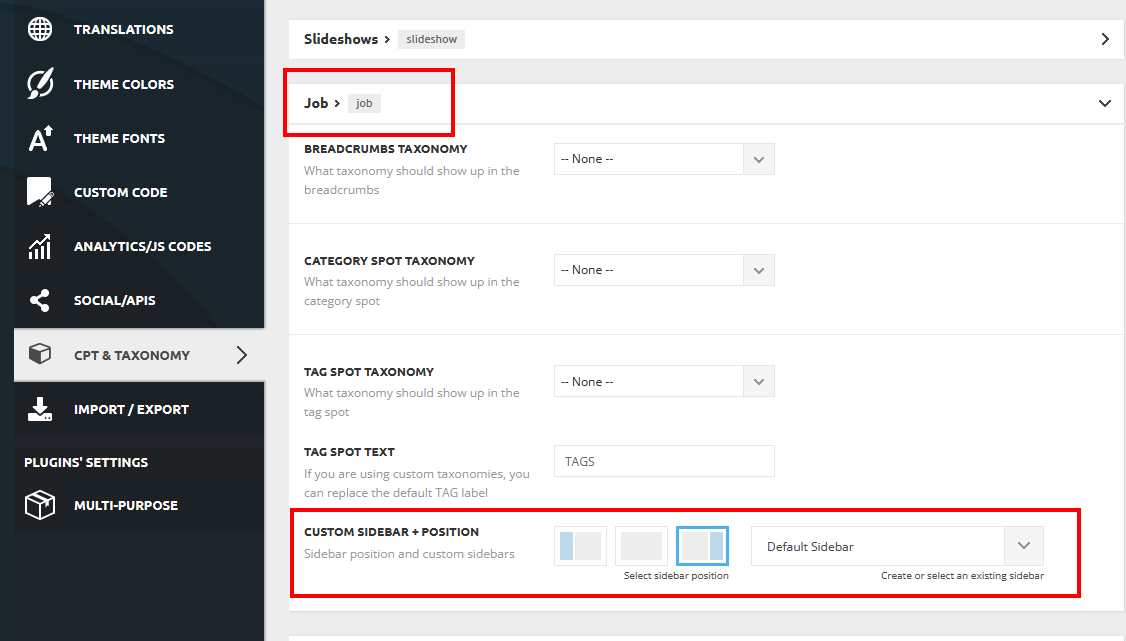
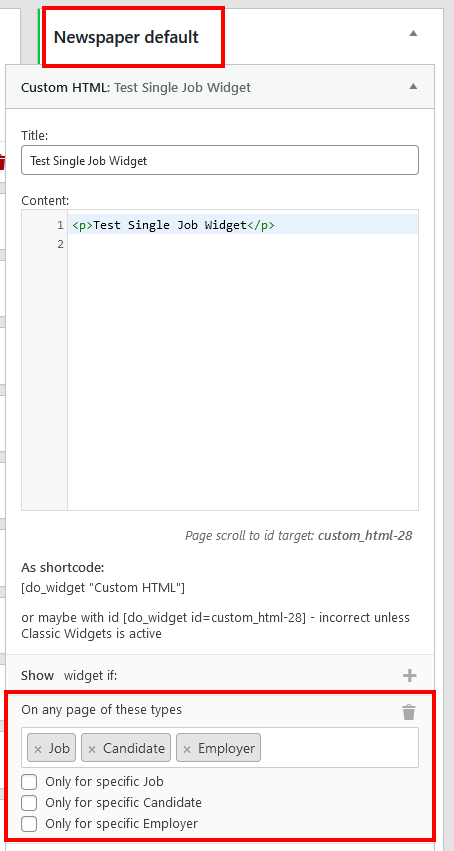
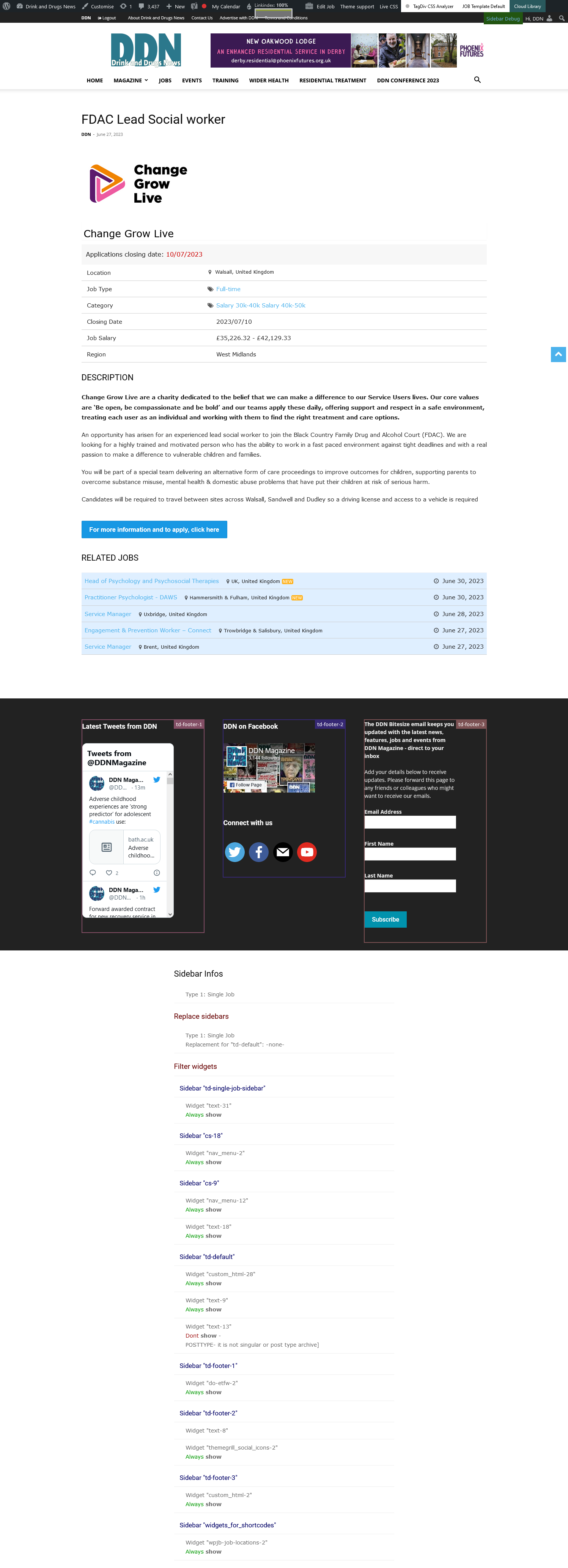
 sloope
 Hi,
I don’t think a screenshot is needed because this is an issue I experience often in the Tag div composer:
For example I use a “Text with title” or “Single image”. When I don’t want to show this element in the landscape/portrait/phone viewport, I select CSS – Display: hidden. So this element is hidden for example in the phone version.
But: The element will be loaded as it just is hidden.
Now I want to design a very wide header image for my first page – but a different one for phone users. If I just select “display: hidden”, the very big header image with a couple of MB will be loaded in the phone version – which is not useful. It should not be loaded in the very first place.
I hope now it’s clear 🙂
 Anamaria
 Hi,
Please set the wp-memory and the requirements like our guide -> https://forum.tagdiv.com/requirements-for-newspaper/ also, make sure that you are using SSL and you have a good bandwidth; the one from our server is 1GB/s, and the one that I use at home is 500MB/s, if you have low bandwidth, then you can access parts of the cloud, this can be done from the frontend, for example, if you are on a post -> https://i.imgur.com/4G74M7F.jpg or from tagDiv Composer -> https://i.imgur.com/2F6MhfI.png or from backend -> https://www.screencast.com/t/wekHmc7kJ8J
Also, you can check the console if you receive a message error.
Thank you!
Anamaria Hello,
You can add that button only if you use a sign-in form from Mailchimp or set a link on the button like this https://mailchimp.com/help/include-a-signup-form-link-in-a-campaign/
Thank you!
 Calin
Calin Hi MattiaVe, this situation depends on more settings, for example if you are using a cloud header (then set the settings using tagDiv Composer), if you are using the mobile theme plugin, if the sticky option for mobile menu is enabled (if the option is off, the mobile header will load faster and there will be less CLS). Can you please provide a link to the website to investigate the mobile header and see the current settings? Doing this I will be able to see what can be done to improve the results!
Thank you!
Calin Hi,
I think that you are referring that the mobile on amp is taking one second until is loading, this is because on amp is a different header used and it takes some time until is loading. I see that navigating on amp the problem no longer persist, this usually apers when you access the website and until the amp header is completed loaded.
Thank you!
 adwenchure
Haven’t used Newspaper for a few iterations & am lost on basic post creation. Want to upload an image inline… when I upload, image is fullsize, but I want it smaller & for the text to wrap it. Am sure this is simple, but I can’t figure it out. Could someone please explain or point me to a video that explains how to work with images in posts in Newspaper 12?
I’m fairly new to working with websites, so simple explanations are best for me
 MattiaVe
I apologize for inserting myself, but I’m on the subject:
friend Calin, can you give me some advice please? I’ve done all the recommended optimizations, but I’d like to improve the mobile loading time a bit.
I think apparently the header is a bit heavier (I use the one in the attached image) could you give me a suggestion to ‘lighten’ it a bit please? Changing some item to another for example, or changing some other thing… important – maybe, I think – is finding ways to reduce server calls and header time would improve me, maybe…
you have the answer.. you know everything 🙂
 christianmuda
Hi,
I got this alert from really simple SLL that I use:
Access violation vulnerability in Newspaper – News & WooCommerce WordPress Theme 12.3
https://really-simple-ssl.com/vulnerability/6e44ba61-79db-456e-a4cf-e6a37129839a/
Can this The TagDiv Cloud Library plugin be inactivated or does this effect the live site?
Best regards Christian
 observatorulprahovean
 Hi, Bettina.
Thank you very much for your answer. We are using the second scenario/version. We have separate mobile versions for the layouts we are using and, since you introduced this feature, we used it with no problem.
Regarding the third situation, we are using the mobile theme plugin just for AMP pages.
Meanwhile, we had an issue regarding a cdn SSL certificate expiring and, after we managed to renew it, the problem with the layout rendering fixed by itself.
I am thinking that it was something related to this CDN/subdomain SSL certificate.
Thanks!
Ciprian
 pkvolattu
 Hi, I have the same question. But I’m not using any single post template.
URL for example:- https://infoinspired.com/google-docs/spreadsheet/function-hlookup-in-google-sheets/
Changes Required:
Thanks
-
This reply was modified 3 years by
pkvolattu.
 vet
vetmy logo in the mobile amp header is moving !!!
in the home page it is in the centre but in the posts it doesn’t appear and when I click on the menu icon ( three lines ) it redirect me to the homepage.
 p0ltergeist
 Hello Bettina,
I know where are the settings for mobile theme since I use your themes for years.
I am just wondering why mobile theme activates itself only when I click to any category. It is not activating if I click to post, page or anything else. Is there a possibility to turn off mobile theme, just to leave responsive website? Maybe to deactivate AMP plugin?
Thanks!
 Bettina
 Hello @bromaru!
The homepage template can not be assigned on a single template or about page because there are specific element on every template. But, you can:
-> save an element in the tagdiv Composer (click right on the element -> save) and use it in another page,
-> create custom blocks (module template) which can be added on every page using the shortcode called flex block builder,
-> copy-paste an element when you have both pages opened with the TagDiv Composer,
-> copy-paste the code when you edit the page for example with Gutenberg and paste it in a new page,
-> build as many template as you want and assign the one you like on the page. A manager of those templates can be seen in Dashboard -> Cloud Templates.
Thank you!
 Miller-J
 I want to display a unique header image on each category page. If I add a header image to a category page and set the teamplate to global, it assigns the same header image to all category pages.
Is there an element that can pull the corresponding unique category image from Woocommerce? I can’t find such an option.
Thanks
 signorini
 Sure, for example, I want to hide the date of the posts in this category (both in category and post view): https://nonewsmagazine.com/category/milano-food-drink/categorie-ristoranti/aperitivo/
-
This reply was modified 3 years by
signorini.
 hieumn24
I want to change the interface for each category on my website, but when I adjust it with the Edit button or change it in the theme panel > Categories > select Cate and change the interface. However, when I change the interface of that category, the interfaces of the following categories also change. Is there any way to change the interface of only one cate that I want?
For example:
I used cloud template name: VietnamTravel for my cate: https://www.mihitravel.com/destination/discover-asia/vietnam/
Another code with name: Category Cloud Template – Travel PRO
https://www.mihitravel.com/planning/
I haved set in themepanel but it’s not work
Calin Hi martijnoso,
If you want to contact us privately, please contact us at the email address contact@tagdiv.com (usually this method is for problems that can not be resolved on the forum).
As for the option in the theme for the favicon, the option in our theme only applies to the elements in the theme, for example, if a page is made with our builder or a cloud template is used, but if a maintenance plugin is used, this is no longer part of our theme, as a shoulder the favicon element will not be displayed, as a result, my colleague’s advice was to set this favicon element to the default option in WordPress, so the element will be displayed all the time.
Thank you for your understanding!
Calin Hi,
1. The site loads very hard due to the elements that are set on the home page, for example, there is a slider, and it takes some time for the images and style to load.
For the menu, make sure that the drop-in more option is not enabled on it – https://i.imgur.com/25xlNSp.jpg – https://i.imgur.com/wcuokUw.png
2. Unfortunately, I cannot tell you when compatibility with other builders will be sought, as the theme comes with its own builder, and it is very difficult to achieve compatibility with others. Usually, the free versions from other builders work, but not the premium versions.
Thank you!
 dita999
I’m using your Header Template 53 – Gourmet PRO including the image it comes with. It works fine for desktop but disappears on iPad (portrait & landscape), leaving a grey block. I checked the Header Cloud Template and see an image was uploaded/specified in CSS > Background Image in the Desktop Viewport. That field is blank for the other 3 viewports, but the Phone Viewport doesn’t use an image anyway. Is the image the header template came with supposed to be responsive? If not, do I need to upload an image to the Portrait and Landscape Viewports to fix this issue? And where would I find it? I’m not finding the file in my Media.
 Explorion
 Hello so I am using the Responsive version only
& you can see the attached Screenshots the animated text is working in all the screen versions of editor & also on the desktop version of live site but it is not visible on the mobile version of live site.
Please help.
 martijnoso
 With literally every other theme I have ever used the favicon is set in the theme options. Just like you also have a section in the theme option to set the favicon. I only mention that it need to work on my maintenance mode page because you said there is also a setting on the homepage to set another favicon. I’m just giving you information. The favicon setting should work via the theme option section you guys provide and it doesn’t. How to fix this is all I want to know?
What I mean with my question about the ticket being public. I am wondering if there is an option to submit tickets privately, not for everyone to see like this ticket is for example?
Thanks



