- NewsmagUsing the theme translations together with WPML
- NewsmagHow to update a plugin
- NewsmagCustom Post Type Support
- NewsmagAbove footer ads
- NewsmagWeather Widget
- NewsmagHow to update the theme
- NewsmagIntroduction
- NewsmagLogo & Favicon
- NewsmagFooter templates
- NewsmagUsing other ads
- NewsmagCustom ad spots
- NewsmagArticle ads
- NewsmagSidebar ads
- NewsmagHeader ads
- NewsmagLoading image effects
- NewsmagCategory top post styles
- NewsmagSmart Lists
- NewsmagGeneral settings
- NewsmagTheme thumbs
- NewsmagtagDiv slider gallery
 shahjada
hello,
I have been using newspaper theme for a while now. But the issue I am facing is that I cannot customize the mobile theme rather I have designed a mobile page from the tag div panel manually. now the issue is the pages are loading very slowly, whereas the combination of AMP and mobile theme is super fast which I cannot utilise.
screenshots: https://imgur.com/a/e61bEOn
actually I want my design to home page in the mobile theme, as I cannot customize the existing options very much.
can anyone please point me where to look at?
Thanks!
 rumosdabolsa
 Hi Calin, I was trying to edit the Table of Contents configuration, but I’m having some problems. For example, I tried to change the language for [Hide] and [Show], but the content didn’t change and some code started to appear below the TOC. Do I need to update something? I was using the Rank Math TOC, but I uninstalled this plugin and the problem continues.
I am using the template “Newspaper Publication”
 projectya
 In AMP I have this error: A conflicting version of PHP-CSS-Parser appears to be installed by another plugin or theme (located in plugins/woocommerce). Because of this, CSS processing will be limited, and tree shaking will not be available.
 Calin
Calin Hi,
This needs to be done on the css set with teh code :after, for example:
.remove.remove_from_cart_button:after {

    content: "پاک کردن ";

    font-size: 12px;

    font-family: fantasy;

    padding-right: 6px;

}
Thank you!
 cloverjim
 Hi,
1. I want the spacing of the elements to be equal on both sides.
For example, here the distance of the text from the top is less than the distance of the text from the bottom of the box.
2.And please guide me on how to make the post boxes the same as the product boxes.
Thank You!
Calin Hi,
If the layout and error persist, please disable the mobile theme and use only the amp plugin and set the template mode to reader.
Thank you!
 sibyxaviery2k
 Can I have both versions. Means mobile + amp
I have already configured all things you mentioned. Except selecting amp version for mobile. Can I have two versions for mobile.
Calin Hi,
Please do like this, install amp plugin and tagDiv Mobile theme plugin and go to Newspaper > theme panel > Mobile theme and set the mobile settings only for amp – https://i.imgur.com/es0kaR6.png after that, go to amp plugin and let it only for posts – https://i.imgur.com/Qfp2Ypn.png last thing, make sure that the amp option for redirecting mobile users to amp is disable – https://i.imgur.com/bJzB3JD.png
Calin Hi,
Can you please provide an example?
Thank you!
sibyxaviery2k Google Search Console Error
AMP issues detected in https://trendsnafrica.com/
To the owner of https://trendsnafrica.com/:
Search Console has identified that your site is affected by 1 AMP issue(s). The following issues were found on your site.
Top critical issues*
CSS syntax error in tag ‘style amp-custom’.
*Critical issues prevent your page or feature from appearing in Search results.
We recommend that you fix these issues when possible to enable the best experience and coverage in Google Search.
 3 Narratives News
 Thanks in advance for your help, I setup a staging site and sent an email, with this thread pasted to it.
Calin If you want a css to set the stars as in the example https://i.imgur.com/oeUPRdD.png
.cls-wpb .star-rating{

    position: absolute!important;

    left: 10%;

    bottom: 7%;

}

.cls-wpb .price{

    border-bottom: 2px solid #e7f0f1;

}

.cls-wpb .td-module-meta-info{

    border-radius: 0 0 10px 10px;

    min-height: 210px;

}
sibyxaviery2kI have allowed amp pages only for post . but it seems broken how to style it. please help I am new to amp
https://prnt.sc/JigT39gFKkEQ
https://trendsnafrica.com/tanzanian-airlines-set-to-resume-european-flights-following-eu-regulatory-clearance/?amp=1
 Mediv
MedivHello,
Is there a step by step tutorial available? the youtube videos are 8 years old, the documentation here: https://forum.tagdiv.com/tagdiv-composer-tutorial/
are too short and not very informative (for example where do i find this “short code” to activate the video tooltips) there isn’t much info and i have no idea where to start and what to do.
Thank you.
 theheritagelab
Hello team, is there a way to add the button to a post ? I don’t mean a single-post-template…but a post? for example, I have a popup with the unique id: td_m_f565 — can I display it on a particular post?
Thank you in advance!
Calin Hi,
Here are some fast settings, and I think that after you make them, you’ll know how to improve the layout. Set the Woo Product block, go to the layout tab and set it as in my screenshots – https://i.imgur.com/rKrAkkW.png https://i.imgur.com/KVGyRlo.png (you can adjust the paddings, seo tabs and the rest of the options after your needs). After that, from the Style tag, you can set the fonts and colors you want to use – https://i.imgur.com/OfbRrXB.png, then in the General tab, set a class for example, cls-wpb – https://i.imgur.com/Cf8zW0r.png then in css add this code – https://i.imgur.com/KHdGiQa.png to set the reviews in the bottom right. Then the last review is on mobile, set only one module per row – https://i.imgur.com/6J78MgO.png
I hope this will help you!
 rafaelpetermann
I am using the Newspaper theme and noticed that the featured image of each post is displayed as a background-image inside a <div> with the class tdb-featured-image-bg, instead of being rendered as an tag.
This approach makes it impossible to use the alt attribute, which is essential for:
– SEO, since Google does not properly index images used as backgrounds;
– Accessibility, as screen readers cannot interpret the image.
I would like to confirm with you:
1) Is this behavior the default of the theme, or is there any setting to display the featured image as an tag with the alt attribute?
2) If there is no setting, what would be the recommended way to implement this without losing compatibility in future updates (for example, using a child theme)?
Thank you in advance for your support.
 duck1970
Hello, I have the following problem and need your help. I’ll tell you:
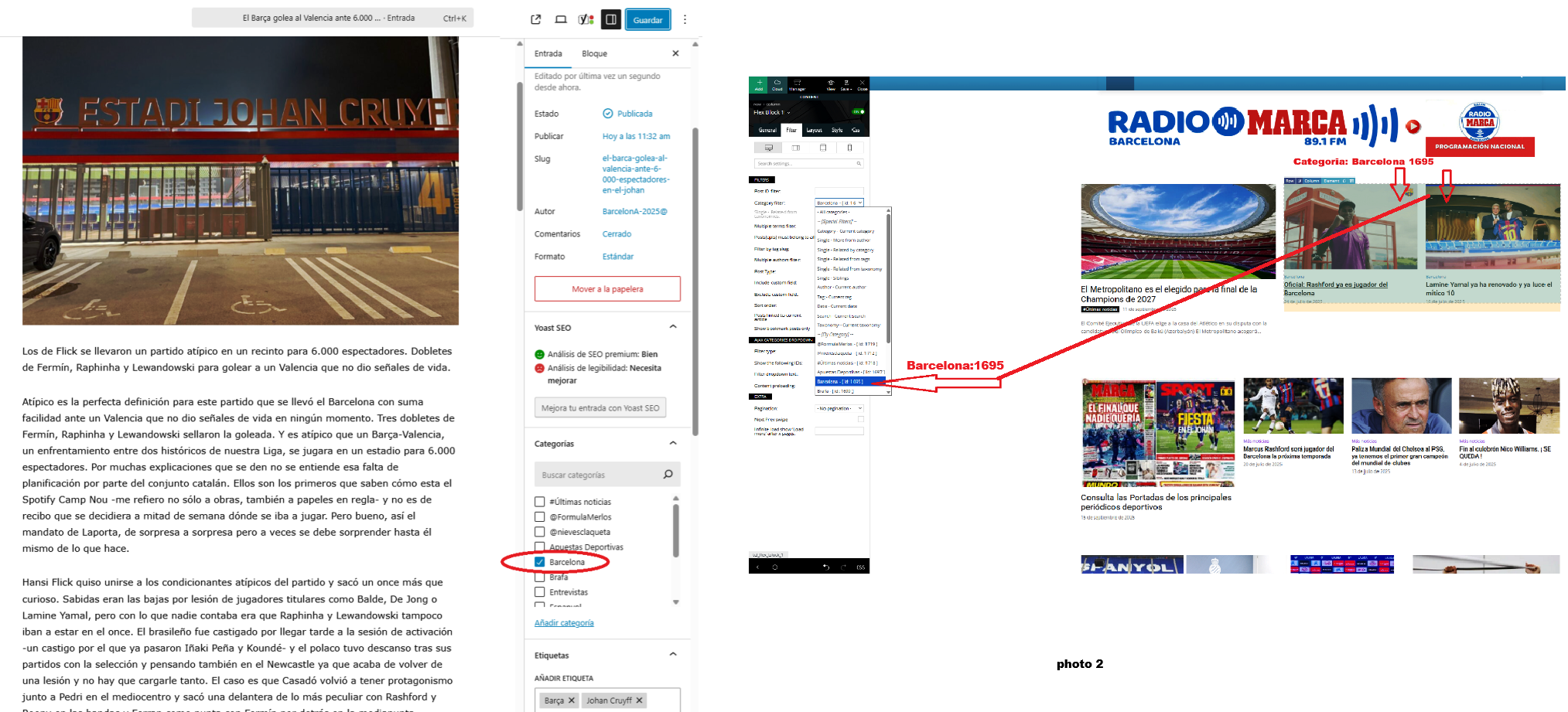
I created some new posts and published them with their respective categories, but I don’t know why they aren’t showing up on my home page. For example, today I created a new news story with the category “Barcelona 1695.” This news story should be displayed in the first block of my home page, as shown in the attached photo 2. But it isn’t.
Can you tell me why some categories aren’t showing up?
Thank you for your help.
Link web: https://www.radiomarcabarcelona.com
Link Photo: https://www.radiosalut.com/videos/categories.png
Calin Hello,
The last link is useless because it is referring to the article that you are, for example – https://demo.tagdiv.com/newspaper_pro/wordpress-news-magazine-charts-the-most-chic-and-fashionable-women-of-new-york-city/
Thank you!
Calin Hi,
Please try to set the wp-memory limit according to the guide https://forum.tagdiv.com/requirements-for-newspaper/ then it will display the number set.
Also, can you provide some examples of errors you get in the error log?
Thank you!
Calin Hi,
If you are using the option from row to “Stretch row off”, this will stretch off the background of that row, but the row will still have the selected width, for example – https://i.imgur.com/xlhsyMI.jpeg
Related to assigning and unassigning, I think you are referring to assigning/unassigning the key from domains. This is possible only on 2 domains. After that, a time will be displayed when you can use the option to unassign it from a domain.
Thank you!
Calin Hi jpegjoe,
The situation you have with the ads should not be related to the error you detailed, but just in case, please try the following. Make a full backup of the site and go to Newspaper > Updates and look at the theme versions, there you should see a version RC12.7.2, install that version and the error you gave as an example will disappear. That version is the new update of the theme that we hope to make official this week.
Thank you!
Calin Hello,
Can you please provide an example for this situation and a link where I can investigate the situation? In this way, I will be able to understand the situation and see what can be done to remove duplicate posts inside each post.
Thank you!
 StefanGebala
Recently I’ve found an error on my page, as breadcrumps generated by Newspaper theme are missing last link “@id”: “” – here should be link to my page.
Example site:
https://www.wyborkierowcow.pl/diesel-3-0-r6-m57-bmw-opinie-awarie-usterki-spalanie-i-rozrzad/
Breadcrump code:
{
“@context”: “https://schema.org”,
“@type”: “BreadcrumbList”,
“itemListElement”: [{
“@type”: “ListItem”,
“position”: 1,
“item”: {
“@type”: “WebSite”,
“@id”: “https://www.wyborkierowcow.pl/”,
“name”: “Strona główna”
}
},{
“@type”: “ListItem”,
“position”: 2,
“item”: {
“@type”: “WebPage”,
“@id”: “https://www.wyborkierowcow.pl/category/uzywane/”,
“name”: “Używane”
}
},{
“@type”: “ListItem”,
“position”: 3,
“item”: {
“@type”: “WebPage”,
“@id”: “”,
“name”: “Diesel 3.0 R6 M57 (BMW): opinie, awarie, usterki, spalanie i rozrząd”
}
} ]
}
Can you pls help me with fixing it?
 Alex
Alex Hi Calin,
The CLS you measured is for the homepage http://www.moviemag.it, while the CLS score at the top (0.3) refers to the site’s articles. For example:
https://www.moviemag.it/sleeping-dogs-russell-crowe-come-non-lo-avete-mai-visto/
https://www.moviemag.it/identita-violate-trama-recensione-cast/
https://www.moviemag.it/homo-argentum-il-nuovo-film-di-mariano-cohn-e-gaston-duprat/
If you try running the test on these example URLs, you’ll see that the CLS is higher than 0.3, and I don’t understand why.
Anyway, can we continue the discussion via your service email address to check the site? I’ll provide you with the administrative credentials and the cPanel login if you agree.
Thanks