- NewspaperWP Rocket and Newspaper Theme: Optimization Guide
- TutorialsFrom WPBakery to tagDiv Composer
- TutorialsOffset Feature
- TutorialsWhat is Ajax preloading?
 youfly
 Fair enough but the request is made on each and every article load. Try it yourself: https://youfly.com/tileorasi/open-panagiotis-stathis-kai-evlabia-revi-mazi-ti-nea-sezon/ and watch the calls made without touching any button. /wp-admin/admin-ajax.php?td_theme_name=Newspaper&v=11 is being called every time. And what is it’s use by the way? To indicate the theme and it’s version? On every article load? Make a record of it somewhere (database, txt, xml) and fetch it from there.
Could this be happening cause of the “Ajax view count feature” that we have enabled?
Thanks.
youfly Hi there. We are facing the same exact issue with high /wp-admin/admin-ajax.php?td_theme_name=Newspaper&v=11 requests. From our cache log, out of 80.000 requests, 43.000 are made to this exact address as POST. Hence the problem: they cannot be cached, resulting in high CPU usage. The site is youfly.com and we are a relatively medium to large news website with a lot of daily traffic.
99% of our traffic is “landing” on specific articles pages, so all the features you’ve mentioned above to OnlineTushar, except the search bar, don’t apply to our case. And even search is rarely used. We get /wp-admin/admin-ajax.php?td_theme_name=Newspaper&v=11 requests on each and every article load.
There has to be something we could do to bring this number down.
Please advise.
 hadharm
 Please the menu doesn’t show well on tablet devices. What changes can I make to make the menu sit on the menu. I have play around and couldn’t get it. See sample on hiideemedia.com/blog using a tablet. Thanks
 dennisjpitocco
Using the Image Box element to create the 3 rows of images shown on this Page. Can’t seem to find a way to move the Custom Titles (names) for each image down a bit, so as not to overlap the center of each image?
 Anamaria
 Hello,
You can use AMP, but we offer support for the mobile version only with mobile theme + AMP plugin and set for AMP -> https://forum.tagdiv.com/tagdiv-amp-plugin-tutorial/ => https://i.imgur.com/1kMs1ds.png and set the AMP for posts => https://i.imgur.com/GLEeeoZ.png, but you can’t customize the layout for AMP with tagDiv Composer.
Also, please check this topic where I explained each mobile version -> https://forum.tagdiv.com/topic/mobile-version-not-working-properly-2/ and choose what mobile version you want.
Also, you can check our documentation here:
-> https://forum.tagdiv.com/tagdiv-amp-plugin-tutorial/ please set the AMP like in our guide.
-> https://forum.tagdiv.com/the-mobile-theme/
This is a video about Responsive Newspaper Theme, AMP & Mobile Theme, Mobile Pages & Templates -> https://www.youtube.com/watch?v=SpGkOnJeNZY
Thank you!
 comms
commsNot sure what went wrong, however before the 11.5* update these were showing up OK. We are having issues with both category and single post templates.
We are using dedicated mobile templates before this, now, it seems whenever I use tagdiv composer to edit a page (desktop mode) I see two more options for mobile views
Example below: (censored some content)
I am editing a Category template (desktop view) – everything looks OK.
However, I see two new options in the panel for tablet/mobile views (which were not in the previous version)
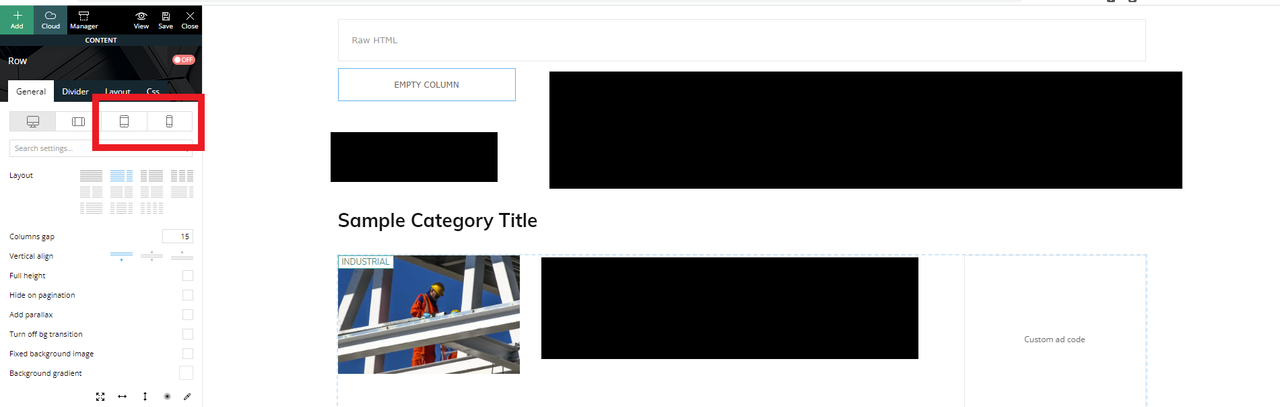
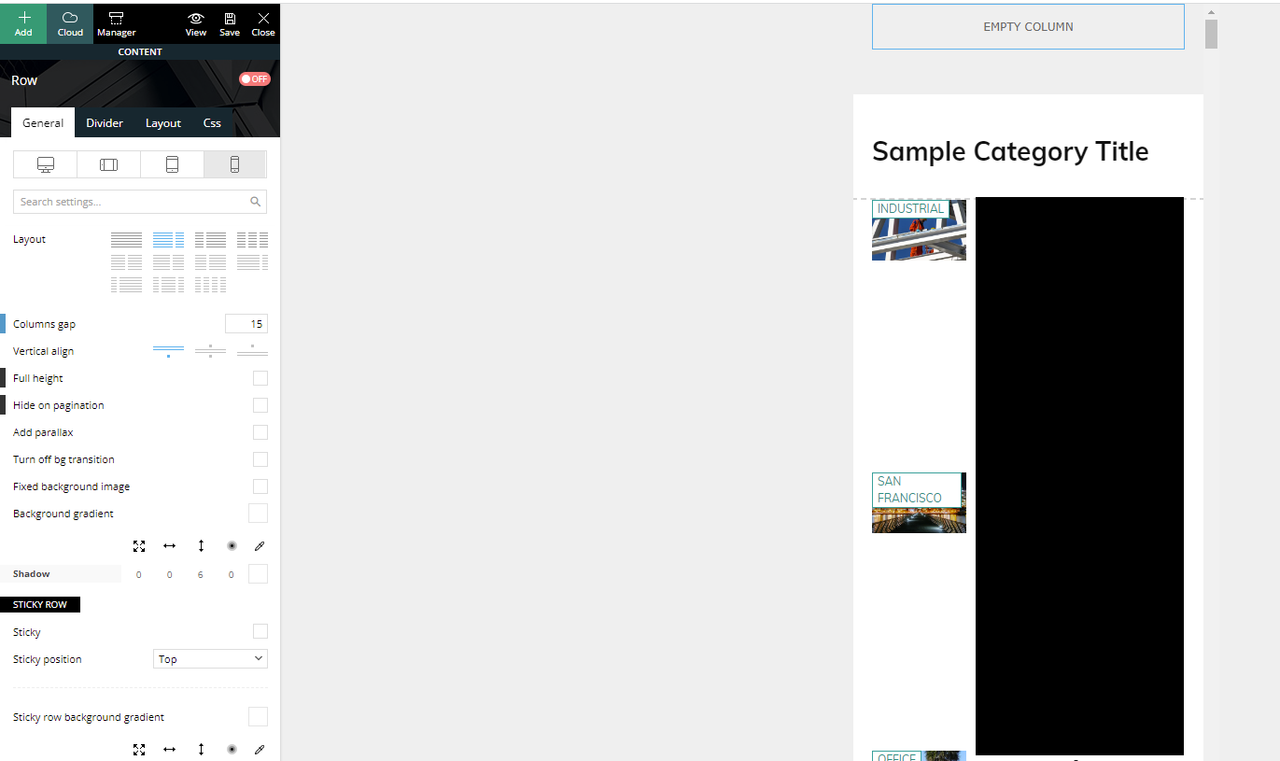
If I click the mobile view, this is what I see and what is actually being displayed if you browse the website in mobile mode.
We have another mobile only template that was created and was working (being displayed) before the update.
If I click on the “Edit the mobile template” from the desktop view takes us to the right mobile template that should have been displayed.
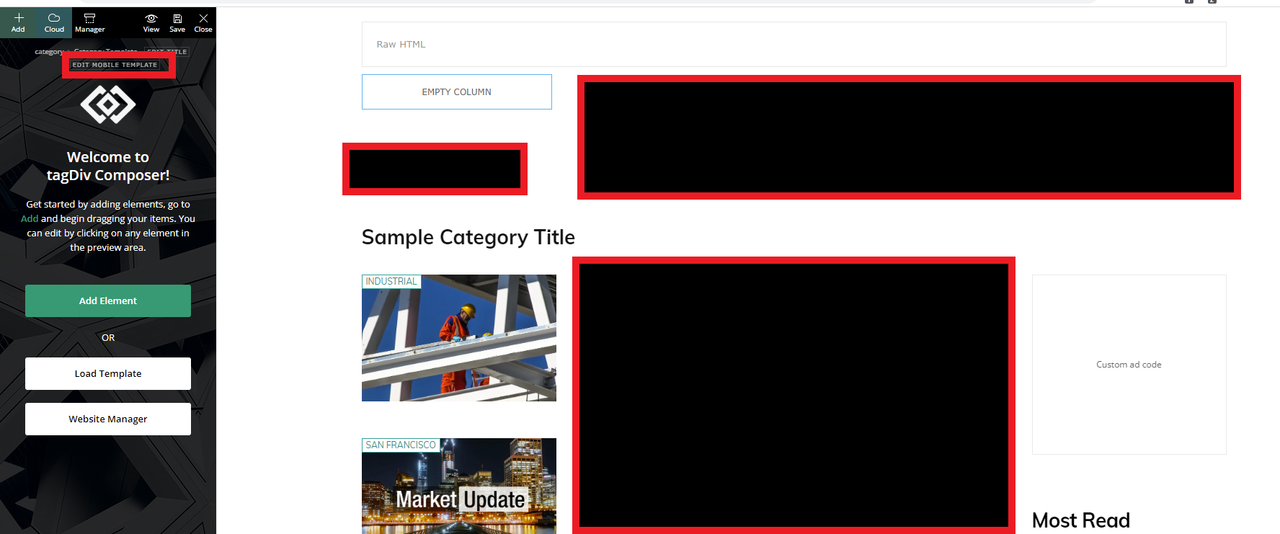
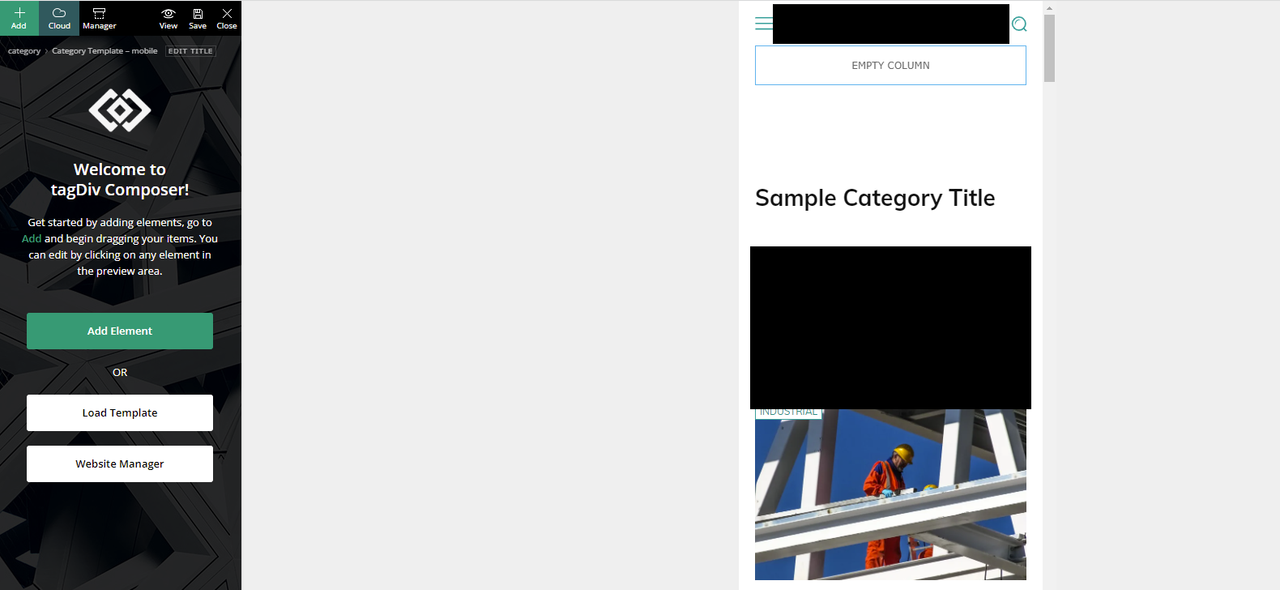
How can we fix this?
Thank you
Anamaria Hello,
In that section are displayed the websites where the same activation key is used. For example, if you have a key on a live site and a staging website it should look like this -> https://i.imgur.com/530FmYW.png -> https://tagdiv.com/update-version-11-4-3-newspaper-theme-is-rtl-ready/
Thank you!
Anamaria Hello,
Please check if the code needs to be set between head tags, this can be set in our theme in Theme Panel -> Analytics/Js Codes. Example: https://prnt.sc/1tju9qf -> https://prnt.sc/10jk7fq, the code needs to be set only once per page -> https://www.wpbeginner.com/beginners-guide/how-to-add-google-adsense-to-your-wordpress-site/
Thank you!
 Bettina
 Hello!
AMP is faster and works better only with the Mobile Theme plugin. From my point of view, if you don’t use the Mobile Theme plugin, then there is no reason or benefit to AMP. Please read all about AMP here: https://forum.tagdiv.com/tagdiv-amp-plugin-tutorial/
It comes with its own templates/design for page, post, category, etc so your current templates from the desktop theme will get converted to the mobile theme layout. Documentation here:
– https://forum.tagdiv.com/the-mobile-theme/
– https://forum.tagdiv.com/mobile-theme-introduction/
Make sure the redirect mobile visitors to amp option is disabled and try again.
Thank you!
 Satyajit3097
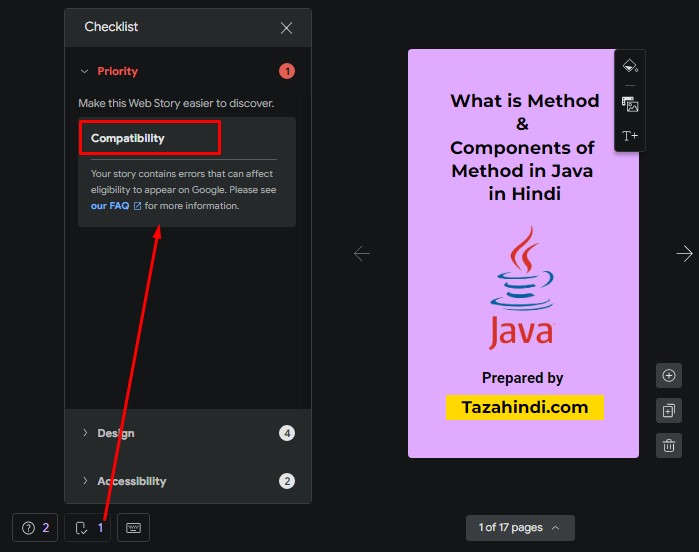
 Since two days, all my Web Stories showing Compatibility errors and indicate that this error can affect eligibility to appear on Google Search.
Google Search Console of my website showing following 10 errors:
1. The parent tag of tag ‘html’ must be ‘!doctype’.
2. Tag ‘amp-story’ is not allowed to have any sibling tags (‘body’ should only have 1 child).
3. A tag on this page requires an AMP component ‘script’ tag, which is missing.
4. A mandatory AMP HTML tag is missing from this document.
5. Tag found outside the document head which is only allowed as a direct child of the document head.
6. Only amp-boilerplate and amp-custom ‘style’ tags are allowed, and only in the document head.
7. Custom JavaScript is not allowed.
8. Disallowed attribute or attribute value present in HTML tag.
9.Tag or text which is only allowed inside the body section found outside of the body section.
10. Malformed URL found for attribute ‘href’ in tag ‘a’.
Summary:
1) AMP compatibility issue- 10 errors mentioned above
2) AMP Plugin Settings showing following compatibility issues
https://tazahindi.com/wp-content/uploads/2022/06/AMP-Scan-report.jpg
3) Google Web Stories Plugin compatibility issue:
https://tazahindi.com/wp-content/uploads/2022/06/Web-Stories-Compatibility-issue.jpg
4) Breadcrumbs issue-Either “name” or “item.name” should be specified
I am using wordpress and Newspaper premium theme to run my website. Because of above problem my view are reduced. Please help to solve above issues.
I have tried number of thing but unfortunately don’t work anyone for me. Please sort out my problem as early as possible, just because of that my page view is continuously decreasing.
Please help to solve above problems.
Thanks in Advance.
From Satyajit.
 arungoyal
Hello,
I am using the Crypto Gaming Pro template from cloud templates and have done layout (color & spacing) changes. AMP is not working correctly. I am using the transitional mode and /amp/ as URL suffix.
Getting plugin compatibility issues in the backend: https://prnt.sc/_5IFhC6i6-9C
You can have a look here:
https://g2g.news/mpl-tweaks-pay-structure-after-layoffs-report/amp/
https://g2g.news/gaming/amp/
 oonify
Hi!
I have my template translated to Portuguese (Brazilian), but some text is still in English. I also found out that some words that are in Portuguese (Brazilian) need some correction to Portuguese (Portugal), there are some little diferences.
Example:
https://freeimage.host/i/h4YLYP
https://freeimage.host/i/h4aTaS
I did some correction to some words but somehow won’t appear on the site.
I also need to translate the automated emails (email verification) that are send to news users when they sign-up!
Can you help me?
Many Thanks!
Jorge Gonçalves
Anamaria Hello,
You can also use automatic updates, but only have tagDiv plugins enabled/activated, (for example if you have the WordFence plugin, you need to use the WordFence assistant plugin to make sure it does not block the update process), also please make sure you have permissions set correctly so as not to interfere with the update process -> https://www.malcare.com/blog/wordpress-file-permissions/
Also, please do a full backup of all files.
Thank you!
Bettina Hello!
Please provide more information about this issue or what you tried and it is not working.
A solution for sending a screenshot or video is this:
Download, capture, send: https://www.techsmith.com/jing-tool.html
After making the screenshot, you will have a link, paste it here.
Read all about AMP from the theme here: https://forum.tagdiv.com/tagdiv-amp-plugin-tutorial/
Thank you!
Bettina Hello!
@metacoach Check if you have some errors in the console on that CPT page. Also, try to check if there is not a plugin conflict with other plugins that you use.
@techwafer AMP has its own style/design/template, so it could overwrite the CPT template. Read all about it here: https://forum.tagdiv.com/tagdiv-amp-plugin-tutorial/
Thank you!
 techwafer
 Hi Team I wanted to try out this new custom post type feature just want to know are these templates or a custom one that I will create through tagdiv composer will be AMP compatible?
Thanks
 nhowarth
 Hi Sergio & Stu
Unfortunately WP Rocket doesn’t touch background images. It only serves webP images for images with attributes ‘href’, ‘src’, ‘srcset’ and ‘content’. And you can add further attibutes using their ‘Add WebP Target Attribute’ plugin.
I have raised this problem with WP Rocket and it’s on their todo list.
Cheers,
-
This reply was modified 4 years by
nhowarth.
 sahoobiotech3
In my website http://www.bongojobnews.com, I am facing the problem of Duplicate field FAQPage, objection given by google search console.
192 pages are effected. actually , one page containing faq schema is also indexed with the another page faq schema. So, google is considering that two faq schema is in a single page .
example of effected url
I have zero knowledge of coding. please help me to solve.
I can give you the temporary access of website admin panel if you need it to solve the issue.
Thank you
 IndiNewsLive
hey whenever i open to edit pages with tagdiv editor it crashes and these message appears:
This site can’t be reachedThe webpage at https://www.indinews.live/wp-admin/post.php?post_id=537&td_action=tdc&tdbTemplateType=page&prev_url=%2F%2Fwww.indinews.live%2Fwp-admin%2Fedit.php%3Fpost_type%3Dpage might be temporarily down or it may have moved permanently to a new web address.
ERR_HTTP2_PROTOCOL_ERROR
 Zanardi87
Hi to all,
I have newspaper 9. When I go to install some themes and with contents and I click on “Edit with Tag div composer”, it doens’t load the preview I have a white sheet on the right and the menu on the left but I can’t do anything. I have this problem for example with the theme Lifestyle blog and wine aroma, for example. I don’t have this problem if I install the theme “Default demo”.
 zarpe77
 I deactivated AMP but the problem still exsists
zarpe77 After looking into it further it seems that the posts are showing in mobile mode. Could this be because of AMP plugin? Does newspaper theme need a AMP Plugin?
 shasankagogoi
 for example : https://kashlem.com/bthah-u-cm-ban-pyllait-kloi-ia-ka-song-jingiarap-sha-ki-lanot-shlei-um-bad-twa-khyndew/ the tweet is not getting embedded.
Satyajit3097Hi, I am Satyajit, since few days, view in Discover drastically decrease but can not find why this happen.
Yesterday night suddenly I got message from Google Search Engine about AMP 10 errors and end of today I got another 17 errors, total 27 errors in dashboard of my google search console. But could not manage to solve these problem. My website is Tazahindi.com
1. The parent tag of tag ‘html’ must be ‘!doctype’.
2. Tag ‘amp-story’ is not allowed to have any sibling tags (‘body’ should only have 1 child).
3. A tag on this page requires an AMP component ‘script’ tag, which is missing.
4. A mandatory AMP HTML tag is missing from this document.
5. Tag found outside the document head which is only allowed as a direct child of the document head.
6. Only amp-boilerplate and amp-custom ‘style’ tags are allowed, and only in the document head.
7. Custom JavaScript is not allowed.
8. Disallowed attribute or attribute value present in HTML tag.
9. Tag or text which is only allowed inside the body section found outside of the body section.
10. Malformed URL found for attribute ‘href’ in tag ‘a’.
I am running my website, with the help of wordpress and premium newspaper theme. It will be helpful for me, if anyone suggest or help me to solve these errors.
 Balint
 Hello,
I tried already, but It wont change. Every word has a Capital letter in the title. And I need to be just the first letter from the tile, not all words.
If I put Capitalize It remains the same: https://demo.tagdiv.com/newspaper_parenting_pro/2021/06/28/adopting-a-son-of-a-different-race-opened-my-eyes-to-the-foster-care-system/
In the link example I want that just the Adopting word to start with a Capital letter, the other I want to be small letters.
Thanks.